
As Amazon Associates, we earn from qualifying purchases. This means we may receive a small commission at no extra cost to you if you click through and make a purchase.
Modern high-performance graphics cards have grown dramatically in weight and volume, creating significant strain on motherboard expansion slots and often requiring unsightly kickstands or acrylic towers to remain level. The Lian Li GB-002 takes a completely different approach to this physical problem by anchoring directly to your motherboard tray rather than resting on the power supply shroud or bottom intake fans. As a stealth internal support mechanism, it offers a clean, near-invisible solution for builders who want to safeguard their PCIe slots without cluttering the main interior chamber of their PC.
This discreet bracket is ideally suited for system builders who prioritize a minimalist presentation and have standard ATX or Micro-ATX motherboards inside standard desktop enclosures. However, builders who already have fully assembled systems with restricted standoff access, or those utilizing unconventional motherboard form factors and vertical GPU risers, will likely find traditional pillar supports far more convenient to implement.




Lian Li GB-002 at a Glance

| Attribute | Detail |
|---|---|
| Product Name | Lian Li GB-002 |
| Brand | Lian Li (LIANLI) |
| Product Category | Graphic Card Anti-SAG Bracket |
| Compatible Devices | Desktop PCs |
| Interface Compatibility | PCI Express |
| Mounting Style | Motherboard Standoff Anchor |
| Number of Items | 1 |
| UPC | 840353040892 |
Stealth Motherboard Mounting and Engineering Design
The primary appeal of the lian li gb-002 anti-sag bracket lies in its mechanical integration. Rather than placing a vertical pillar between the graphics card cooler and the chassis floor, the design relies on a specialized lian li gb-002 motherboard mount. By securing directly into the threaded motherboard standoffs behind the card, the bracket creates a rigid cantilever support point that interfaces with the edge of the graphics card PCB and cooler frame. When installed properly, the hardware remains largely hidden from view through tempered glass side panels, maintaining the pristine visual lines of your build.
Traditional pillar braces often introduce functional compromises inside modern chassis. In cases focused on optimized airflow, such as the lian li lancool 217, builders frequently populate the bottom chamber with intake fans to feed cool air directly to the GPU heatsink. A floor-standing bracket can obstruct fan blades, impede laminar airflow, or rest awkwardly on top of fan grilles. The suspended architecture of the lian li gpu support bracket completely eliminates these clearance headaches by keeping the lower compartment entirely open for uninhibited air delivery and tidy cabling.
The structural framework relies on stamped metal components designed to resist bending under continuous vertical shear loads. Because the bracket mounts flush to the chassis tray standoffs, mechanical force is transferred away from the delicate PCIe solder joints and into the rigid steel frame of the computer case itself. This eliminates the rotational torque that causes long-term card droop while remaining virtually imperceptible from normal viewing angles.
Mechanical Stability and Long-Term GPU Protection
As cooling heatsinks have expanded to span three and four expansion slots, the physical mass hanging off a single PCIe slot has escalated substantially. Over months and years, gravity causes unreinforced cards to tilt downward at the outer corner. This deformation not only looks untidy but can also lead to cracked trace lines, micro-fractures in solder balls beneath memory modules, and bent PCIe retention clips. The primary objective of this lian li gb-002 review is examining whether a stealth bracket can match the load-bearing capacity of an upright brace.
In practice, the anti-sag bracket achieves stability through adjustable support fingers that can be positioned against solid sections of the card. Because graphics card backplates, fan shrouds, and circuit boards vary across manufacturers, the bracket allows vertical and horizontal adjustment along its mounting plate. This adaptability ensures that the lifting pressure is applied strictly against structural metal or reinforced plastic rather than vulnerable electrical components or fan blades.
Once locked into position, the bracket counteracts the gravitational moment created by heavy copper vapor chambers and dense fin stacks. The support remains constant regardless of vibration from high-speed cooling fans or chassis movement. For desktop users who transport their systems to events or frequently work inside their cases, having an anchored anti-sag mechanism means the support will not slide or tip over accidentally like a free-standing magnetic pillar might.
Motherboard Installation and Hardware Compatibility
Evaluating lian li gb-002 compatibility requires careful inspection of your internal chassis clearance and motherboard layout. The bracket mounts directly to the ATX screw positions that line the right side of the PCIe slots on standard desktop motherboards. It requires replacing standard motherboard screws with dual-threaded standoff extensions that allow the bracket to sit securely above the motherboard surface. Consequently, the lian li gb-002 installation is substantially easier when performed during an initial system assembly rather than as an afterthought in a tightly packed, fully built rig.
Potential clearance hurdles can arise depending on your motherboard’s component arrangement. Motherboards with right-angle USB headers, bulky front-panel connectors, or vertically mounted SATA ports directly along the standoff line can occasionally interfere with the bracket’s flat metal backbone. Similarly, large integrated M.2 heatsinks located near the primary PCIe slot require careful measurement to guarantee that the bracket sits flush without pressing against cosmetic covers or thermal pads.
Chassis dimensions also play a role in how seamlessly the bracket fits into a system. While standard mid-towers and showcase enclosures accommodate the bracket comfortably, ultra-compact enclosures like the lian li mini v2 require builders to pay close attention to component proximity. Before ordering, verify that your motherboard adheres strictly to standard ATX or Micro-ATX standoff spacing, as proprietary boards with irregular mounting holes cannot host the bracket.
Value, Practicality, and Everyday Operation
When asking whether is lian li gb-002 worth it, builders must weigh physical convenience against visual payoff. A standalone kickstand takes three seconds to drop onto the bottom of a case, whereas this bracket requires removing the graphics card, installing standoff extenders, and precisely aligning support tabs before reinstalling the card. However, for enthusiasts who spend considerable time perfecting internal aesthetics, the complete absence of visible support columns is a compelling design reward.
In terms of lian li gb-002 specs, the bracket provides an understated, zero-maintenance structural foundation. It contains no RGB lighting, requires no supplementary software control, and draws no power from your system. By functioning purely as a mechanical brace, it avoids the reliability quirks, driver overhead, and cable clutter common to illuminated accessories, fulfilling its role silently in the background.
Another practical benefit is long-term stability during routine maintenance. Free-standing support pillars can easily be knocked over or shifted when dusting filters, swapping memory modules, or working inside the enclosure. Because this bracket is physically bolted to the chassis standoff threads, it stays locked in place whenever you open the side panel, preserving consistent alignment throughout the lifespan of your gaming computer.
Lian Li GB-002 Pros and Cons
Pros
- Stealth motherboard mounting design
- Leaves bottom airflow unimpeded
- Eliminates unsightly visible pillar stands
- Rigid metal load transfer
- Permanent bolting prevents accidental slippage
Cons
- Requires graphics card removal to install
- Incompatible with non-standard motherboard hole layouts
- May crowd right-angle SATA or USB headers
Check Lian Li GB-002 on Amazon
Who Should Buy the Lian Li GB-002
Buy It If
- You want a clean, minimalist interior without visible pillars, kickstands, or bulky acrylic arms.
- Your case features bottom-mounted intake fans that would be blocked or crowded by a floor-standing bracket.
- You are assembling a new system from scratch and can easily install the standoffs before mounting your graphics card.
- You want a bracket that remains securely anchored in place during chassis movement and cleaning.
Skip It If
- You have a fully assembled, cramped computer and do not want to remove your graphics card to install standoff hardware.
- Your motherboard uses non-standard mounting holes, extreme custom heatsinks, or crowded right-angle headers along the standoff line.
- You are using a vertical graphics card mount or an external PCIe riser bracket.
Lian Li GB-002 Alternatives Worth a Look
If your case geometry or installation preferences make a motherboard-mounted bracket impractical, several reliable alternatives utilize floor-standing and magnetic designs instead.
Graphics Card GPU Brace Support
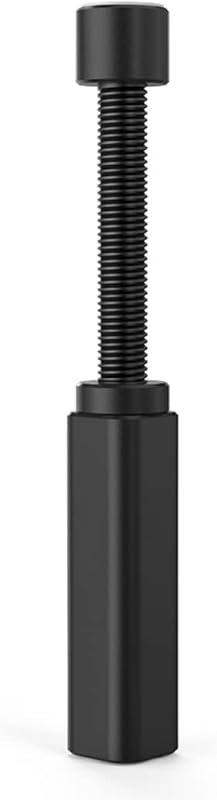
The Graphics Card GPU Brace Support is a standalone adjustable pillar designed to span heights from 74mm to 120mm. It rests directly on your power supply shroud or bottom chassis panel, using a twist-to-adjust telescoping mechanism to dial in exact support heights. Builders who want an effortless installation that requires no screw removal or motherboard modification will find this format significantly quicker to deploy.
California JOS GPU Support Bracket

The California JOS GPU Support Bracket offers a height-adjustable stand in a sleek black finish designed for larger graphics cards. It operates independently of motherboard standoff points, making it an ideal choice for systems with unusual motherboard layouts or tightly clustered SATA connectors that cannot clear an internal backplate bracket.
GPU Support Bracket
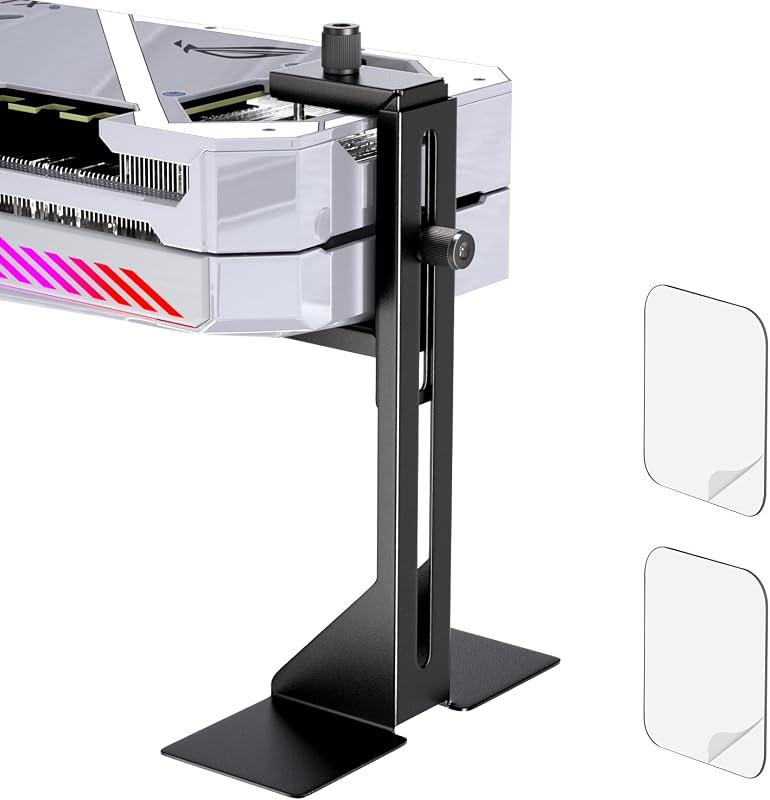
The GPU Support Bracket features an adjustable range from 35mm to 120mm and includes bottom adhesive to ensure the stand remains planted on the bottom of the case. It is specifically suited for supporting thick modern cards up to 75mm in depth, providing an adaptable fallback for chassis that cannot accommodate motherboard-anchored hardware.
Final Verdict
The Lian Li GB-002 succeeds by delivering exactly what clean-build enthusiasts want: dependable, rigid reinforcement against graphics card sag without adding visual clutter. By leveraging existing motherboard standoff locations, it transfers heavy downward loads directly into the chassis frame, keeping delicate PCIe interfaces safe while leaving the bottom chamber open for intake airflow and clean aesthetics.
While the installation process requires more patience and disassembly than dropping in a basic pillar stand, the result is vastly superior in presentation and durability. If your motherboard adheres to standard layout conventions and you are willing to spend an extra few minutes during your build, this bracket represents one of the most elegant, unobtrusive GPU support solutions available for modern gaming desktop rigs.
FAQ
How does the Lian Li GB-002 attach inside the computer case?
The bracket attaches directly to the motherboard standoffs on the right side of standard ATX and Micro-ATX boards. It utilizes replacement standoff extenders that allow the metal support arm to anchor securely over the motherboard tray without contacting surface circuitry.
Does the bracket work with vertically mounted graphics cards?
No, the bracket is engineered strictly for standard horizontal graphics card orientations where the card is inserted directly into the motherboard PCIe slot. Vertical GPU mounts position the card away from the motherboard face, making standoff-based bracing incompatible.
Can I install the bracket without removing my graphics card?
In almost all configurations, you will need to remove the graphics card to access the motherboard standoff screws and align the bracket properly. Attempting installation while the graphics card is seated is extremely difficult and risks scratching motherboard traces.
Will the bracket interfere with motherboard SATA ports or front panel cables?
It can potentially crowd right-angle SATA ports or tall USB 3.0 headers if they sit directly along the standoff line. Checking the clearance around your motherboard mounting holes prior to installation is recommended to ensure cables can still route cleanly.
Does the bracket support graphics cards from brands other than Lian Li?
Yes, the bracket is universally compatible with desktop graphics cards from any manufacturer, provided the card is installed horizontally and has a solid edge or backplate area for the adjustable support finger to rest against.


