As Amazon Associates, we earn from qualifying purchases. This means we may receive a small commission at no extra cost to you if you click through and make a purchase.
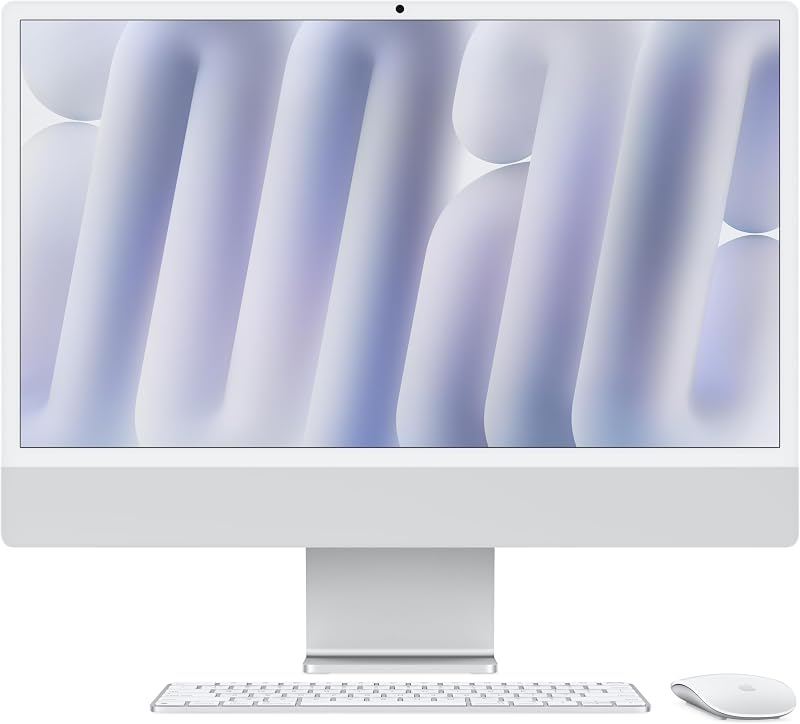
The Apple iMac M4 represents the latest evolution of Apple’s signature all-in-one desktop, bringing next-generation M4 silicon into an iconic, ultra-slim profile. Equipped with a 10-core CPU, a 10-core GPU, and an expansive 24GB unified memory allocation, this computer delivers serious processing power while keeping desk clutter virtually nonexistent. Built specifically to handle modern operating system demands and Apple Intelligence features, it acts as a cohesive command center for everyday productivity, family tasks, and creative design work.
This desktop is an exceptional match for telecommuters, students, and home office users who value high-resolution visual clarity, responsive performance, and a streamlined single-cable setup. Those invested in the Apple ecosystem will find that features like iPhone Mirroring and universal clipboards make everyday interactions seamless. However, dedicated PC gamers, users demanding modular internal expansion, and creative professionals requiring massive ultrawide or 32-inch built-in panels will likely want to explore modular tower setups instead of this compact 24-inch platform.


Apple iMac M4 at a Glance
| Attribute | Detail |
|---|---|
| Processor | Apple M4 chip (10-core CPU, 10-core GPU) |
| Unified Memory | 24GB unified memory (configurable with 16GB or 24GB) |
| Internal Storage | 512GB SSD (listing notes 256GB or 512GB options) |
| Display | 24-inch 4.5K Retina display, 500 nits, 1 billion colors |
| Camera | 12MP Center Stage camera with Desk View and 1080p HD video |
| Audio System | Six-speaker system with Spatial Audio and 3 studio-quality mics |
| Connectivity | Up to 4 Thunderbolt 4 ports, Wi-Fi 6E, Bluetooth 5.3.6 |
| External Display Support | Up to two external 6K displays |
| Dimensions and Weight | 21.54 x 5.79 x 18.15 inches; 9.77 pounds |
| Operating System | macOS built for Apple Intelligence |
M4 Processing Power and Unified Memory Capacity
At the heart of this machine sits Apple’s M4 processor, configured with 10 processor cores and 10 graphics cores. In this configuration, the architecture relies on Apple’s unified memory approach, sharing a high-bandwidth memory pool directly between compute and graphics workloads. The imac m4 performance stands out noticeably during everyday multitasking, photo retouching, spreadsheet calculation, and multi-tab web browsing. Applications like Microsoft 365 and Adobe Creative Cloud are designed to run smoothly on this silicon, handling complex layers and heavy documents without system sluggishness.
Memory capacity plays a vital role in long-term desktop longevity. Opting for the imac m4 24gb memory configuration gives users substantial headroom over baseline machines. In standard computing environments, browsers loaded with dozen of research tabs, background communication apps, and photo editing suites can quickly chew through basic memory pools. Having 24GB ensures the system avoids frequent memory swapping to the solid-state drive, preserving responsiveness during heavy multitasking sessions. Buyers exploring a 2025 imac desktop will find that this upgraded memory tier keeps local workloads fluid even when rendering multimedia or crunching larger datasets.
Graphics tasks also benefit directly from the integrated 10-core GPU. While all-in-one machines are rarely aimed at high-end competitive esports, the GPU handles design tasks, video exports, presentation creation, and casual gaming with ease. By pairing the unified architecture with hardware-accelerated media engines, the system processes high-resolution video streams smoothly while keeping energy consumption low, ensuring the slim chassis stays quiet during sustained productivity sessions.
The 24-Inch 4.5K Retina Display Experience
The screen remains the defining visual element of the desktop, centering around a 24-inch 4.5K panel that produces sharp text and rich visuals. The apple imac m4 retina display delivers 500 nits of brightness and supports up to 1 billion colors, creating an optimal canvas for photo editing, digital illustration, and general media streaming. The high pixel density renders typography cleanly, reducing eye strain during lengthy reading or coding sessions in home workspaces.
Measuring 21.54 by 5.79 by 18.15 inches and weighing just 9.77 pounds, the all-in-one footprint takes up minimal real estate on shallow desks or floating workstations. The remarkably thin enclosure integrates the computing components entirely behind the glass and aluminum frame, eliminating the bulky tower that traditional desktop setups require. While some long-time Mac users still look back fondly at larger platforms like the older imac 27 inch 2020, the modern 24-inch display packs an exceptionally high pixel density into a much more compact physical frame.
Visual presentation is further augmented by anti-reflective treatments on the glass panel. The 500-nit luminance ensures comfortable visibility in bright rooms with large windows or overhead lighting. Whether reviewing client documents, organizing personal photo libraries, or watching streaming television shows during downtime, the display presents vibrant color saturation and crisp edge fidelity across every corner of the screen.
Camera, Microphones, and Video Conferencing
Communication hardware has become a primary consideration for remote professionals, and this desktop includes substantial upgrades for virtual collaboration. The imac m4 center stage camera utilizes a 12-megapixel sensor paired with an advanced image signal processor that leverages computational video. It captures 1080p HD video recording with accurate skin tones and minimal noise in variable lighting conditions. Center Stage automatically adjusts the frame to keep users centered as they move around their office space, creating a natural meeting experience.
The camera system also supports Desk View, a clever functional tool for educators, presenters, and creative professionals. Desk View mimics an overhead camera, showing a top-down view of your physical desk surface while simultaneously displaying your face on screen. This makes demonstrating physical sketches, unboxing small components, or reviewing physical documents during team meetings straightforward without needing an auxiliary webcam or external tripod rig.
Audio hardware matches the visual fidelity with a three-mic array and a six-speaker sound system. The studio-quality microphones feature directional beamforming to prioritize your voice while filtering out background typing or household ambient noise. For playback, the six-speaker array delivers rich stereo separation and supports Spatial Audio, producing clean mids and noticeable bass depth that surpasses standard built-in monitor speakers, eliminating the immediate need for desktop audio monitors.
Apple Intelligence and Ecosystem Synergy
Software integration continues to be one of the strongest arguments for choosing Apple hardware for personal and business tasks. This model features deep hardware acceleration for imac m4 apple intelligence, providing writing tools, message summaries, and on-device privacy protections designed to prevent personal data from leaving the machine without authorization. These tools help streamline daily writing, proofreading, and schedule organization directly inside native productivity applications.
For individuals already using portable Apple devices, the desktop creates a cohesive workflow environment. The system includes iPhone Mirroring, allowing you to view and interact with your mobile device screen directly from macOS. You can drag and drop assets between devices, reply to mobile notifications using your physical keyboard, and access phone-only utilities without picking up your handset. Continuity tools like Universal Clipboard allow text or images copied on an iPhone to be pasted instantly on the desktop, keeping digital workspaces fluid.
Deploying the apple imac m4 for home office productivity also streamlines standard communication. FaceTime calls and incoming carrier text messages sync natively across devices, letting you manage calls and SMS conversations while working inside spreadsheets or collaborative documents. Shoppers seeking an organized workstation can examine how this generation compares to earlier releases like the apple imac desktop computer 2024, noting how the combination of M4 efficiency and seamless ecosystem tools elevates daily multitasking.
Connectivity, Ports, and Peripheral Support
Physical and wireless connections on the back of the desktop ensure modern versatility. The hardware configuration features up to four Thunderbolt 4 ports, delivering fast data transfer rates for external solid-state drives, card readers, and pro-audio interfaces. Crucially, this M4 model expands display capabilities by supporting up to two external 6K displays alongside the built-in 4.5K screen, allowing power users to construct an expansive three-screen command center for complex financial or editing workflows.
Wireless connectivity is equally modern, incorporating Wi-Fi 6E for high-speed network access and Bluetooth 5.3.6 for stable peripheral synchronization. Three lithium-ion batteries are included to support the bundled wireless input accessories. By routing power through a single woven cable that attaches magnetically, the machine maintains a remarkably tidy desk presence, eliminating cable bundles behind the screen.
Apple iMac M4 Pros and Cons
Pros
- Powerful 10-core CPU and 10-core GPU M4 silicon
- Generous 24GB unified memory configuration
- Brilliant 24-inch 4.5K Retina display with 500 nits
- 12MP Center Stage camera with Desk View support
- Connects up to two external 6K displays
- Up to four high-speed Thunderbolt 4 ports
Cons
- Memory and storage cannot be upgraded after purchase
- Fixed 24-inch screen size with no larger panel option
- Integrated graphics limit high-end competitive PC gaming
Who Should Buy the Apple iMac M4
Buy It If
- You want a clutter-free, all-in-one workstation that combines a sharp 4.5K display and high-end speakers in a single plug-and-play unit.
- You rely heavily on an iPhone or iPad and want ecosystem perks like iPhone Mirroring, Universal Clipboard, and cross-device messaging.
- You need the headroom of 24GB unified memory to maintain fluid performance across dozens of open tabs, office documents, and creative applications.
- Your daily workflow involves regular video meetings that benefit from the 12MP Center Stage camera and Desk View overhead framing.
Skip It If
- You require modular internal components that can be upgraded with standard aftermarket memory sticks or internal hard drives down the road.
- You need a massive 27-inch or 34-inch single built-in screen rather than adding external monitors to a 24-inch panel.
- You prioritize dedicated PC gaming hardware with high-end discrete graphics cards from Nvidia or AMD.
Apple iMac M4 Alternatives Worth a Look
While the Apple all-in-one offers a tightly unified hardware and software package, several Windows-based alternatives provide different port layouts, varied storage configurations, and distinct operating system ecosystems for home and office users.
512GB External and 128GB SSD

The 512GB External and 128GB SSD all-in-one computer is an HP OmniStudio 24-inch system powered by an Intel Quad-Core processor, 16GB of DDR5 RAM, and a combined 640GB of storage space split between internal and external solid-state drives. Running Windows 11 and featuring Wi-Fi 6 alongside an included keyboard and mouse, this option suits everyday family environments where users prefer a standard Windows interface and a dual-storage setup for home archiving.
HP 21.5″ FHD All-in-One Desktop

Shoppers needing a smaller physical footprint can consider the HP 21.5″ FHD All-in-One Desktop. This compact system is powered by an Intel N100 Quad-Core processor, 8GB of RAM, and 384GB of storage, bundled with an 8-in-1 docking hub and a keyboard and mouse. It serves as a practical, space-conscious Windows workstation for dorm rooms, reception counters, or basic web navigation where a premium high-resolution Retina display is unnecessary.
Lenovo 24″ FHD All-in-One Desktop

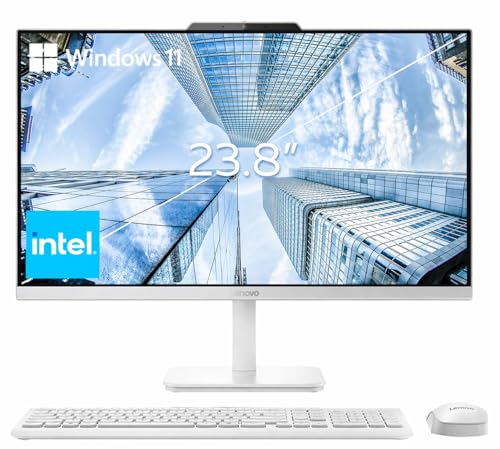
The Lenovo 24″ FHD All-in-One Desktop provides an enterprise-oriented solution featuring an Intel processor, 16GB of RAM, a 256GB PCIe SSD, and Windows 11 Pro. Outfitted with HDMI connectivity, Wi-Fi 6, Bluetooth 5.2, and wireless input accessories, this business-ready all-in-one appeals to corporate home offices and small businesses that depend on Windows-specific networking tools and administrative management utilities.
Final Verdict
When asking is apple imac m4 worth it, the answer depends largely on how much value you place on display quality, physical design, and unified performance. As outlined in this apple imac m4 desktop review, the combination of a 10-core M4 chip, 24GB of unified memory, and a brilliant 4.5K Retina display creates a fast, highly capable workspace. The machine handles demanding daily productivity and creative software with silent efficiency, while the upgraded 12MP Center Stage camera makes virtual meetings look professional straight out of the box.
While the lack of post-purchase internal hardware upgradability remains a trade-off inherent to modern unified architectures, the generous 24GB memory configuration provides considerable protection against future software bloat. For home offices, executive desks, and creative workstations that thrive in the macOS ecosystem, this sleek desktop delivers an exceptional balance of processing speed, visual fidelity, and clean organization.
FAQ
Does the Apple iMac M4 support dual external monitors?
Yes, the M4-powered desktop with four Thunderbolt 4 ports supports connecting up to two external displays with up to 6K resolution, allowing you to expand your visual workspace far beyond the built-in 24-inch screen.
What is the benefit of the 12MP Center Stage camera?
The 12MP Center Stage camera uses computational video to keep you centered in the frame as you move around during calls. It also supports Desk View, which presents an overhead view of your workspace to share physical items or sketches with call participants.
Can the unified memory or storage be upgraded after purchase?
No, the unified memory and solid-state storage are integrated directly into Apple’s system architecture, meaning you cannot open the chassis to install aftermarket RAM sticks or internal drives later on.
How does Apple Intelligence work on the iMac M4?
Apple Intelligence is built directly into the operating system and accelerated by the M4 processor, providing tools for writing, proofreading, summarizing text, and organizing tasks while keeping personal data private through on-device processing.
What are the primary Apple iMac M4 specs for this configuration?
The specific model detailed here features an Apple M4 processor with a 10-core CPU and 10-core GPU, 24GB of unified memory, a 512GB solid-state drive, a 24-inch 4.5K Retina display with 500 nits of brightness, and four Thunderbolt 4 connectivity ports.