
As Amazon Associates, we earn from qualifying purchases. This means we may receive a small commission at no extra cost to you if you click through and make a purchase.
The Gigabyte X570 Aorus Elite Wi-Fi is an ATX motherboard built around AMD’s X570 chipset, designed to provide a stable, high-throughput foundation for Socket AM4 desktop builds. It aims squarely at mainstream PC builders and gamers who want the benefits of generation-four PCI Express bandwidth without paying for extreme overclocking features they will never touch. In short, this board serves as a dependable, no-frills workhorse that delivers core next-generation connectivity, robust circuit reliability, and integrated wireless functionality straight out of the box.
This board is an excellent match for system builders pairing second-generation or third-generation AMD Ryzen processors with high-speed solid-state storage and modern graphics cards. If you need clean power delivery, multiple high-bandwidth storage slots, and integrated Wi-Fi for an everyday gaming station, it hits all the essential functional checkmarks. Conversely, shoppers looking for newer hardware platforms with DDR5 support, multi-gigabit networking ports, or advanced Wi-Fi 6E standards will want to pass on this model and look toward newer chipset generations.
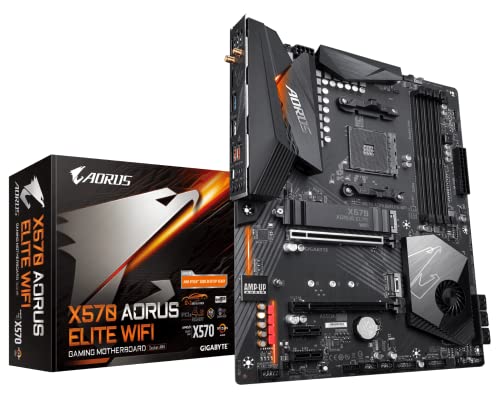


Gigabyte X570 Aorus Elite Wi-Fi at a Glance

| Feature | Specification |
|---|---|
| Processor Socket | Socket AM4 |
| Chipset | AMD X570 |
| Processor Support | AMD 2nd and 3rd Generation Ryzen Processors |
| Memory Support | Dual-channel DDR4, 4 DIMMs, up to 4400 MHz |
| Power Delivery | 12+2 Phases Digital VRM Solution with DrMOS |
| Storage Interfaces | Dual NVMe PCIe 4.0/3.0 x4 M.2, 6 x SATA 3 (6Gb/s) |
| Wireless Connectivity | Intel Dual Band 802.11ac Wi-Fi, Bluetooth 4.2 |
| Wired Networking | Intel Gigabit LAN with cFosSpeed |
| Display Interface | 1 x HDMI 2.0 |
| BIOS Flashing | Q-Flash Plus (update without CPU, RAM, or GPU) |
VRM Architecture and Power Delivery
Power delivery is one of the most critical aspects of any desktop system board, and this model handles current regulation through a true 12+2 phase digital VRM design using integrated DrMOS power stages. By utilizing DrMOS components rather than separate high- and low-side MOSFETs, the board improves power efficiency and reduces the heat generated across the voltage regulator circuit during heavy multi-threaded computing tasks. This robust power setup ensures that multi-core processors receive steady, ripple-free current even during intense rendering passes or extended gaming marathons.
Managing heat across the power circuitry is handled by an enlarged heatsink array that provides extensive surface area to dissipate thermal buildup effectively. In testing and evaluating real-world thermal parameters, solid aorus x570 vrm performance relies heavily on how well these metal heatsinks interact with ambient chassis airflow. While it lacks the massive, heatpipe-linked metal armor found on ultra-enthusiast flagships like the gigabyte z790 aorus xtreme, the cooling solution here is more than adequate for running high-core-count Ryzen chips at stock settings and within standard thermal limits.
For builders who want a clean, stable computing experience, this digital power layout eliminates the voltage instability that can cause system crashes under heavy processing demands. The motherboard pairs this power delivery with heavy-duty solid pin power connectors, which provide larger contact areas for electricity transfer, preventing cable overheating under sustained processor workloads.
PCIe 4.0 Bandwidth and Storage Architecture
The AMD X570 chipset is famous for bringing full generation-four PCI Express bandwidth to both processor lanes and chipset-routed lanes, and this board implements that capability across its primary expansion and storage slots. High-bandwidth aorus x570 pcie 4.0 connectivity means that modern solid-state drives can transfer data at double the theoretical bandwidth of earlier PCIe 3.0 designs, significantly improving asset streaming in modern gaming titles and speeding up large file transfers.
Storage flexibility is anchored by dual NVMe PCIe 4.0/3.0 x4 M.2 connectors, giving builders room to install two ultra-fast NVMe solid-state drives directly on the board. To help keep drive temperatures in check, the primary M.2 slot comes equipped with an integrated M.2 Thermal Guard heatsink, which pulls heat away from the drive controller to minimize thermal throttling during large file writes. Supplemental bulk storage is well supported too, courtesy of six standard SATA 3 ports capable of handling traditional 2.5-inch SSDs or large mechanical hard drives.
When comparing different tiers within this generation, many builders find themselves weighing the aorus x570 ultra vs elite to see which board matches their storage plans. While the higher-tier Ultra includes three M.2 slots with heatsinks on every slot, the Elite sticks to two M.2 connections and provides a heatsink on only one. Evaluating the aorus x570 ultra specs reveals extra high-speed slots and beefier passive cooling, but for typical gaming setups utilizing one fast operating system drive and secondary SATA drives, the Elite provides all the bandwidth essential for a standard rig.
Cooling Controls and Builder-Friendly Features
Building and maintaining a modern desktop requires granular control over internal temperatures and acoustics, which this board delivers via the Smart Fan 5 suite. The board integrates multiple onboard temperature sensors across critical heat zones and provides hybrid fan headers that support both pulse-width modulation (PWM) and direct voltage control modes. The included FAN STOP feature allows builders to configure fan curves so that chassis and cooler fans shut down completely when component temperatures fall below defined thresholds, delivering silent operation at idle.
Physical assembly is streamlined thanks to the integrated I/O shield armor, a welcome design choice that eliminates the hassle of snapping a thin, stamped-metal I/O shield into the back of your PC case. The integrated shield also provides grounded physical protection around the rear connection ports, preventing accidental short circuits during motherboard installation. In addition, RGB Fusion 2.0 support brings multi-zone lighting along the audio trace path and provides dedicated headers for addressable LED and RGB strips for those who want personalized chassis lighting.
One of the most practical DIY features on the board is the Q-Flash Plus utility, which allows users to update the BIOS without needing to install a processor, system memory, or graphics card. If you purchase a processor that requires a newer BIOS release to boot, you can simply load the updated firmware onto a USB thumb drive, plug it into the designated rear port, and press the Q-Flash button. This convenience takes the anxiety out of processor compatibility and makes long-term system maintenance hassle-free.
Networking, Audio, and Peripheral Connectivity
Physical and wireless networking on this motherboard covers all typical home gaming and office requirements through dedicated Intel controllers. The wired connection utilizes an Intel Gigabit LAN controller backed by cFosSpeed internet acceleration software, which prioritizes network traffic to keep latency low during online multiplayer gaming sessions. On the wireless side, the board integrates an Intel Dual Band 802.11ac Wi-Fi module alongside Bluetooth 4.2, offering reliable cable-free connection to local home networks and peripheral devices.
Onboard audio is treated with dedicated hardware isolation, featuring high-quality audio capacitors paired with an Audio Noise Guard. An LED trace path physically separates the sensitive analog audio circuitry from the rest of the board’s digital noise, preserving clarity for headphones and desktop speakers. Rear peripheral connections include a dedicated optical S/PDIF digital audio output alongside standard analog jacks, offering clean digital audio routing to external receivers and dedicated DAC setups.
Internal connectivity covers modern front-panel case requirements, highlighted by a front-panel USB 3.1 Gen2 Type-C header. This allows users with modern PC cases to connect high-speed external drives and mobile devices directly through the case’s front panel. For video output when running Ryzen processors featuring integrated Radeon Vega graphics, the board provides an HDMI 2.0 port capable of delivering high-resolution digital video without needing an add-in graphics card.
Gigabyte X570 Aorus Elite Wi-Fi Pros and Cons
Pros
- 12+2 phase DrMOS digital power design
- Dual high-speed PCIe 4.0 M.2 slots
- Q-Flash Plus CPU-less BIOS update
- Integrated rear I/O shield armor
- Built-in Intel dual-band Wi-Fi and Bluetooth
Cons
- Only one M.2 thermal heatsink included
- Older 802.11ac Wi-Fi instead of Wi-Fi 6
- Bluetooth limited to version 4.2
Check Gigabyte X570 Aorus Elite Wi-Fi on Amazon
Who Should Buy the Gigabyte X570 Aorus Elite Wi-Fi
Buy It If
- You want a reliable, no-nonsense aorus x570 am4 motherboard to build around a Ryzen 2000 or 3000 processor.
- You need dual high-speed NVMe PCIe 4.0 storage slots for gaming and fast file management.
- You appreciate DIY assembly conveniences like an integrated I/O shield and CPU-free BIOS flashing with Q-Flash Plus.
- You need integrated Wi-Fi and Bluetooth connectivity right out of the box without occupying a separate PCIe expansion slot.
Skip It If
- You plan to use multiple high-end NVMe drives that all require pre-installed motherboard heatsinks.
- You require bleeding-edge wireless standards like Wi-Fi 6, Wi-Fi 6E, or modern Bluetooth 5.x connectivity.
- You are building a next-generation platform using DDR5 memory and newer socket designs like the b850 aorus elite.
Gigabyte X570 Aorus Elite Wi-Fi Alternatives Worth a Look
Depending on your budget, networking needs, and whether you are staying with the AM4 platform or moving to a newer architecture, several alternative motherboards offer compelling feature sets.
Asus ROG Strix B550-F Gaming

The Asus ROG Strix B550-F Gaming is an AM4 motherboard built on the B550 chipset that offers newer connectivity options than standard X570 baseline boards. It includes upgraded Wi-Fi 6E, 2.5Gb Ethernet, and an HDMI 2.1 display output, making it an excellent alternative for builders who want faster wired and wireless networking while remaining on DDR4 memory and 3rd Gen Ryzen processors.
paired with Asrock Z890 PRO

The paired with Asrock Z890 PRO bundle moves builders off the older AM4 ecosystem entirely and into Intel’s latest platform. Featuring PCIe 5.0 expansion, high-speed 20Gbps Type-C connectivity, and Wi-Fi 6E, this option suits users who want to transition to a completely new multi-core processor architecture rather than maintaining an existing DDR4-based build.
MSI MAG B850 Tomahawk MAX

For builders committed to the AMD processor ecosystem but looking toward the newer AM5 socket, the MSI MAG B850 Tomahawk MAX is a top contender. This board supports Ryzen 7000, 8000, and 9000 series processors, bringing cutting-edge upgrades including DDR5 memory support, Wi-Fi 7, 5Gb LAN, and PCIe 5.0 graphics and storage lanes for long-term future-proofing.
Final Verdict
This comprehensive gigabyte x570 aorus elite wifi review highlights a board that focuses on fundamental engineering rather than excessive aesthetic ornamentation. By pairing a capable 12+2 phase DrMOS digital power delivery system with dual PCIe 4.0 M.2 slots, Intel networking, and practical assembly protections, it provides everything necessary for a dependable AM4 build. It balances thermal management and functional connectivity cleanly, ensuring that your processor and storage drives run without unexpected throttling.
While newer standards have introduced faster Wi-Fi protocols and higher multi-gigabit wired speeds, the core gigabyte x570 aorus elite specs remain thoroughly capable for standard gaming and general productivity. If you are shopping the second- and third-generation Ryzen ecosystem and want a stable platform with reliable VRMs and clean layout aesthetics, this motherboard stands out as a sensible, battle-tested choice.
FAQ
Can the Gigabyte X570 Aorus Elite Wi-Fi update its BIOS without a processor installed?
Yes, the motherboard features Gigabyte’s Q-Flash Plus technology, which enables you to update the BIOS using only a power supply connection and a USB thumb drive. You do not need to install a processor, graphics card, or system memory to flash the board to a newer firmware version.
Does this motherboard support PCIe 4.0 storage on both M.2 slots?
Yes, the board provides dual NVMe PCIe 4.0/3.0 x4 M.2 connectors. When paired with a compatible third-generation AMD Ryzen processor, both slots can operate at full PCIe 4.0 x4 bandwidth, although only the top slot includes a metal M.2 Thermal Guard heatsink from the factory.
What Wi-Fi generation does the onboard wireless adapter provide?
The motherboard comes equipped with an Intel Dual Band 802.11ac Wi-Fi module supporting 2.4 GHz and 5 GHz frequency bands, along with integrated Bluetooth 4.2. It does not natively support newer Wi-Fi 6 or Wi-Fi 6E wireless standards.
How does the Aorus Elite differ from higher-tier boards like the Aorus Ultra?
When asking is aorus x570 ultra worth it over the Elite, the primary differences lie in expansion slots, storage cooling, and networking. The Ultra model typically includes a third M.2 slot, heatsinks across every drive position, and upgraded Wi-Fi, whereas the Elite provides two M.2 slots, one heatsink, and standard 802.11ac wireless to maintain a simpler, more direct build profile.
Is the board suitable for high-speed DDR4 memory kits?
Yes, the motherboard features four dual-channel unbuffered DDR4 DIMM slots that support memory clock speeds up to 4400 MHz when overclocked. This memory headroom ensures you can pair high-frequency RAM with your Ryzen CPU to optimize gaming and multi-tasking performance.


