As Amazon Associates, we earn from qualifying purchases. This means we may receive a small commission at no extra cost to you if you click through and make a purchase.
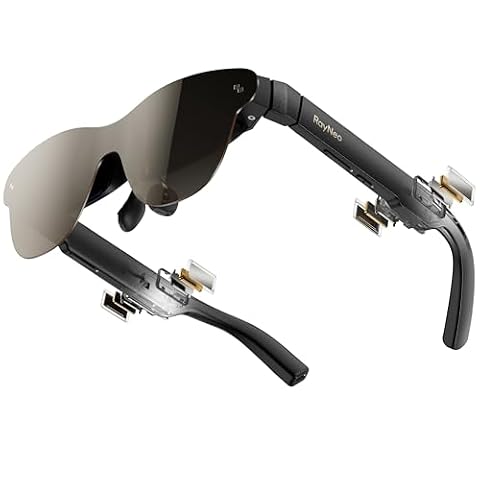
The VITURE Pro 2 represents an ambitious refinement in wearable display tech, shrinking a massive personal theater into a wearable pair of glasses weighing only 63 grams. Rather than isolating you like a traditional bulky virtual reality headset, these viture pro glasses cast a virtual 146-inch 1080p screen directly in your line of sight using Sony Micro-OLED panels running at up to 120Hz. If you want a plug-and-play wearable screen that delivers edge-to-edge optical clarity, bright colors, and native diopter dials for eyesight adjustment without complicated hardware setups, this display delivers on its core promises with minimal friction.
This headset is tailored specifically for traveling professionals, handheld gamers, and mobile media consumers who need a private external display that slips easily into a jacket pocket. It connects straight to modern USB-C video sources like laptops, tablets, and compatible smartphones without requiring proprietary base stations. However, users seeking fully standalone spatial computing with internal battery packs, or shoppers hoping for wide augmented-reality field geometry beyond 50 degrees, will want to examine full-sized headsets instead of lightweight display glasses.


VITURE Pro 2 at a Glance

| Feature | Specification |
|---|---|
| Display Hardware | Sony Micro-OLED |
| Perceived Screen Size | 146-inch virtual display |
| Native Resolution | 1920 × 1080 per eye |
| Refresh Rate | 120Hz maximum |
| Peak Brightness | 1600 nits |
| Field of View | 50 degrees |
| Myopia Adjustment | Independent twin dials (0 to -5.00D) |
| Weight | 63 grams |
| Connectivity | USB-C DisplayPort Alt Mode |
| Physical Dimensions | 6.68 x 5.91 x 1.97 inches |
Visual Clarity and Display Quality
The centerpiece of the VITURE Pro 2 is its upgraded optical engine. While earlier generations of wearable displays often suffered from fuzzy text near the perimeter of the frame, the UltraClarity 3.0 birdbath optical system resolves details uniformly across the canvas. Both horizontal and vertical lines stay straight, allowing small subtitles, fine system fonts, and productivity spreadsheets to remain completely legible from the center all the way out to the far edges. For buyers who read text for hours, this even sharpness resolves one of the longest-standing complaints in the wearable monitor category.
Underneath the optical stack sits a high-performance viture pro micro oled display sourced from Sony, capable of hitting a peak brightness of 1600 nits. Color calibration is handled directly on the Micro-OLED panels themselves rather than pushed through an auxiliary intermediary chip, which preserves pure black levels and prevents color banding in dark movie scenes or dimly lit video game environments. The 50-degree field of view produces a perceived 146-inch projection that feels balanced: expansive enough to create an immersive theater feel while keeping all essential on-screen interfaces inside your natural line of sight without forcing rapid eye darting.
Beyond traditional media consumption, the hardware supports real-time 2D-to-3D conversion driven by AI algorithms. When playing supported flat media, streaming shows, or standard game visuals, the onboard software adds stereoscopic visual separation to give flat imagery dimensional depth. While 3D performance naturally depends on scene composition and visual contrast, having real-time depth mapping directly on the device expands your viewing options without hunting for dedicated stereoscopic video files.
Fit, Weight, and Myopia Adjustment
Physical comfort makes or breaks wearable tech, and the hardware updates seen in the viture pro 2 vs viture pro demonstrate a distinct focus on daily wearability. Weighing just 63 grams, the VITURE Pro 2 is 20 percent lighter than the original VITURE Pro model, while also featuring a 16 percent thinner main frame and a 39 percent thinner temple hinge. The upgraded temple materials distribute clamping pressure evenly along the sides of the head, avoiding the pinch points that commonly cause fatigue during long flights or extended viewing sessions.
A standout engineering feature is the built-in viture pro myopia adjustment mechanism located directly on top of the frame. Twin independent rotary dials allow nearsighted users to adjust optical focus between 0 and -5.00D for each eye individually. This means that if your vision prescription falls within this diopter range, you do not need to wear contacts or pay for custom magnetic prescription lens inserts. You simply put the glasses on, rotate each dial until the image snaps into focus, and get right to work or play. The display system is also SGS A+ Eye Care Certified, helping minimize visual strain during prolonged screen time.
To ensure a stable resting fit on different face shapes, the package includes three swappable nose pads alongside a protective travel case, a dedicated lens shade for bright outdoor environments, and a durable USB-C connection cable. If you want to learn more about how this frame geometry compares to other entries in the product line, our detailed viture pro 2 xr glasses overview outlines the physical evolution in greater depth.
Gaming and Media Performance
Using the viture pro glasses for gaming reveals the genuine utility of low-latency Micro-OLED technology. With an operational refresh rate of 120Hz at 1080p, motion handling is snappy, fluid, and free of the visual smearing often seen on portable LCD panels. Fast-paced first-person shooters, racing games, and high-action platformers feel immediately responsive, transforming handheld play into an expansive big-screen experience while keeping input delay minimal.
For handheld PC enthusiasts, pairing the viture pro glasses steam deck setup is essentially instantaneous. Because the glasses draw both video signal and power over a standard USB-C cable supporting DisplayPort Alternate Mode, you simply plug them directly into the Steam Deck, ROG Ally, or compatible gaming laptop. The handheld console automatically mirrors or extends its display to the glasses, letting you play comfortably while leaning back rather than craning your neck over a tiny six-inch handheld screen on a plane or train. The frame-mounted button controls make it easy to adjust brightness or toggle 3D modes on the fly without interrupting gameplay.
When evaluated alongside rivals like the xreal one pro ar glasses, the VITURE hardware stands out for its high peak brightness and optical sharpness. Note that while USB-C devices like modern laptops, iPads, and recent smartphones connect directly, the listing indicates that certain consoles (such as Nintendo Switch) require external accessories like the Mobile Dock to negotiate power delivery and video conversion.
Software Ecosystem and Daily Productivity
Hardware capabilities are tied together through the viture spacewalker app, which is available as a free download across iPhone, Android, macOS, and Windows. When running on a supported computer or mobile device, SpaceWalker turns the glasses from a basic mirroring display into a spatial workspace. Users can pin multiple virtual monitors side-by-side in digital space, lock displays in fixed positions while moving their head, and access integrated productivity widgets without cluttering their physical desk.
The mobile application also unlocks dedicated 3D and VR video playback modes, along with one-click 3D toggles and spatial video playback for compatible smartphones, including iPhone 15, 16, and 17 series devices. This allows users who record spatial memories on their phones to watch them back on a high-density, color-accurate screen. For remote workers, the ability to open several full-sized documents or browser windows side-by-side while working from a cramped coffee shop table or airplane tray is a genuine productivity boost.
The wider accessory ecosystem further expands device functionality. VITURE offers optional add-ons like a dedicated Neckband for standalone Android TV streaming, a Mobile Dock for multi-player console gaming, and specialized adapters for older hardware. For shoppers comparing display characteristics across different form factors, checking out the virtue luma pro xr glasses comparison can provide additional context on how optics and software features interact across modern wearable displays.
VITURE Pro 2 Pros and Cons
Pros
- Sharp Sony Micro-OLED 1080p display
- Smooth 120Hz refresh rate
- Independent built-in dials up to -5.00D
- Lightweight 63-gram frame design
- High 1600 nits peak brightness
- Free SpaceWalker multi-screen application
Cons
- Diopter adjustment limited to myopia
- Requires tethered USB-C connection
- Certain consoles need extra dock accessories
Who Should Buy the VITURE Pro 2
Deciding if the VITURE Pro 2 matches your daily workflow comes down to your primary use cases, your existing gear ecosystem, and whether you value portability over spatial immersion.
Buy It If
- You travel regularly and want a private 146-inch virtual display for flights, train rides, and hotel rooms that easily fits inside a carry-on.
- You game on handheld systems like the Steam Deck or modern laptops and demand a smooth 120Hz refresh rate with vibrant Sony Micro-OLED color reproduction.
- You have mild to moderate nearsightedness up to -5.00D and want built-in focus dials that let you skip corrective contacts and prescription clip-ons.
- You frequently work on private spreadsheets, coding environments, or documents in public spaces and need screen privacy.
Skip It If
- You want a completely wireless, untethered headset with internal batteries and built-in standalone processing.
- Your vision requires astigmatism correction or exceeds -5.00D of myopia, which falls outside the range of the integrated diopter adjustment dials.
- You require room-scale six-degrees-of-freedom tracking and physical motion controllers for interactive virtual reality gaming.
VITURE Pro 2 Alternatives Worth a Look
If your primary interest leans more toward audio streaming, photography, or hands-free artificial intelligence rather than a dedicated 1080p wearable video monitor, several alternative smart glasses focus on entirely different feature sets.
Photo Capture,Real-Time Translation,Object Recognition,Open-Ear Music

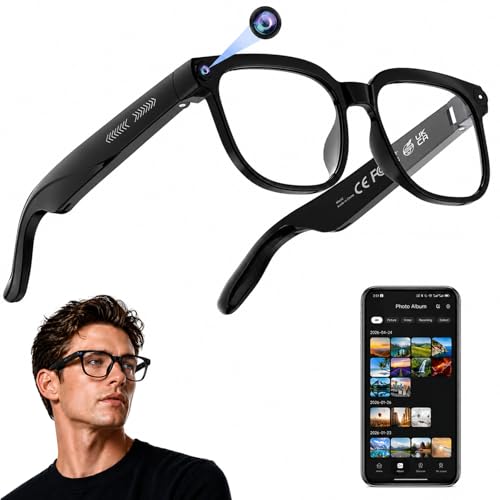
The Photo Capture,Real-Time Translation,Object Recognition,Open-Ear Music glasses are designed around content capture and AI utility rather than displaying high-resolution computer monitors. Equipped with an onboard camera capable of 4K HD video recording, open-ear audio speakers, Bluetooth calling, and real-time translation features, this alternative serves users who want hands-free video capture and voice-based AI assistance throughout their day.
Choose this alternative if you need a lightweight pair of camera-equipped sunglasses for recording outdoor activities or managing voice calls, rather than a tethered virtual screen for gaming and movie watching.
AI Assistant

The AI Assistant smart glasses emphasize voice interactions, photochromic lens versatility, and eye protection. Featuring integrated ChatGPT-enabled voice assistance, real-time language translation, open-ear Bluetooth music playback, and UV/blue light filtering, these glasses focus on daily conversational help and hands-free communications without projecting visual displays in front of your eyes.
Pick this option if your priority is daily eyewear with audio connectivity, vision protection, and conversational AI tools rather than an external monitor replacement for your mobile devices.
Object Recognition

The Object Recognition glasses combine open-ear audio speakers, Bluetooth calling, and transparent lenses with camera-based computer vision. Featuring 4K video recording, live language translation, and visual object identification powered by an integrated AI assistant, these glasses are aimed at users who want smart contextual analysis of their physical surroundings.
Opt for these glasses if you want an ambient smart-assistant headset that records video and analyzes physical objects, rather than a wearable Micro-OLED cinema screen designed for media streaming and gaming.
Final Verdict
When evaluating whether the viture pro glasses specs translate to practical daily value, the VITURE Pro 2 succeeds by focusing relentlessly on display fundamentals. Instead of chasing cumbersome spatial computing tricks that add weight and drain battery life, it delivers what travelers and gamers actually want: an ultra-crisp, color-accurate Sony Micro-OLED monitor that rests comfortably on your nose at just 63 grams. The addition of the UltraClarity 3.0 optics eliminates the peripheral blur that troubled earlier display glasses, ensuring text remains sharp whether you are working in code editors or reading in-game menus.
So, is viture pro worth it for your setup? If you regularly game on a handheld PC, travel on airplanes, or need private multi-window monitor setups from a coffee shop laptop, the combination of 120Hz performance, built-in myopia adjustment dials, and robust cross-platform SpaceWalker software makes this one of the most cohesive wearable monitors currently available. As long as you understand that it functions as a high-end tethered external display rather than a standalone VR world, the VITURE Pro 2 stands out as a dependable, highly portable upgrade to your everyday screen setup.
FAQ
What devices can connect directly to the VITURE Pro 2?
The glasses connect natively via USB-C to any device supporting DisplayPort Alternate Mode video output. This includes modern Android smartphones, iPhone 15, 16, and 17 series handsets, MacBooks, Windows laptops, and handheld gaming consoles like the Steam Deck. Devices without native USB-C video output, or consoles like the Nintendo Switch, require compatible accessory docks to supply power and convert video signals.
How does the built-in myopia adjustment work?
The top of the frame features two independent mechanical dials, one for each eye. Nearsighted users can adjust the diopter focus from 0 down to -5.00D simply by rotating the dials until the screen image looks crisp and clear. This built-in adjustment eliminates the need for contact lenses or custom magnetic prescription inserts for users within that eyesight range.
Do these glasses have an internal battery that requires charging?
No, the VITURE Pro 2 does not contain an internal battery. Instead, it draws a minimal amount of operating power directly from the connected host device through the included USB-C cable. This architectural choice keeps the glasses extremely lightweight at just 63 grams and avoids battery degradation over time.
Can I use the glasses for multi-monitor work on a laptop?
Yes. When you install the free SpaceWalker application on macOS or Windows, you can unlock virtual multi-screen workspaces. This software feature lets you pin multiple virtual monitors side-by-side in your visual field, allowing for expanded productivity layouts without carrying physical secondary monitors.
Are the glasses comfortable to wear with bright ambient light?
The Sony Micro-OLED panels feature a peak brightness of 1600 nits, which helps maintain high visual contrast in bright indoor environments. For direct outdoor sunlight or brightly lit transit cabins, the package includes a snap-on lens shade that blocks ambient light, allowing the virtual screen to stand out vividly.