As Amazon Associates, we earn from qualifying purchases. This means we may receive a small commission at no extra cost to you if you click through and make a purchase.
The Surface Pro 3 is a 12-inch 2-in-1 slate computer designed by Microsoft that bridges conventional laptop productivity with handheld tablet portability. Powered by a dual-core Intel Core i7 1.7 GHz processor, 8 GB of RAM, and 256 GB of flash storage, this 2015-era machine runs full Windows 10 to support classic office applications, web navigation, and media streaming. Our one-line verdict is that this device remains a dependable, focused computing tool for routine document creation, digital handwriting, and web browsing, provided your workload does not require intensive multi-core rendering.
This hybrid computer suits home organizers, budget-minded learners, and office workers seeking a secondary Windows machine with a dedicated active stylus for digital notes and PDF markups. However, high-end video editors, contemporary 3D animators, and PC gamers will find its legacy dual-core architecture insufficient for modern demands. Shoppers looking for higher computing throughput or modern design refreshes might consider looking at our surface pro 7 coverage to observe how Microsoft refined the platform over subsequent hardware iterations.
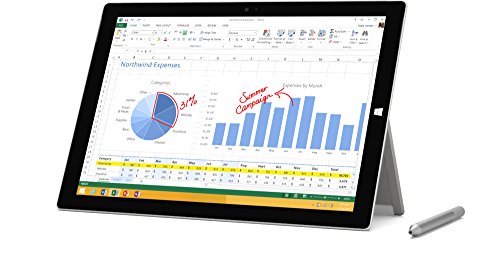


Surface Pro 3 at a Glance

| Hardware Attribute | Manufacturer Specification |
|---|---|
| Brand | Microsoft |
| Model Name | Surface Pro 3 |
| Model Number | 5D2-00017 |
| Model Year | 2015 |
| Processor | Intel Core i7 (1.7 GHz) |
| System Memory | 8 GB RAM |
| Internal Storage | 256 GB Flash Storage |
| Display Size | 12 inches |
| Operating System | Windows 10 |
| Device Weight | 1.76 pounds |
| Included Components | 36W Power Supply, Surface Pen |
Processing Power and Daily Multitasking
When assessing overall surface pro 3 performance, the core configuration relies on an Intel Core i7 processor operating at a base frequency of 1.7 GHz, supported by 8 GB of internal system RAM. For standard administrative workflows, this hardware delivers responsive interactions when operating word processing suites, managing spreadsheets, and toggling across multiple active browser windows. The 8 GB memory capacity allows you to keep an email client, several productivity documents, and background music running in unison without experiencing aggressive software freezes or instant memory saturation.
Conducting an objective surface pro 3 i7 review requires realistic expectations regarding its 2015 release vintage. While this processor effortlessly tackles standard desktop applications, web-based conferencing tools, and media streaming services, it is not engineered for heavy modern computational loads like complex 4K video exports, CAD modeling, or modern graphics-intensive gaming. Keeping your daily operational targets aligned with general productivity, text composition, and educational tasks ensures the dual-core processor operates within its intended thermal and operational comfort zone.
System speed is bolstered by the built-in 256 GB flash storage drive. Flash storage eliminates the mechanical read-head delays associated with legacy hard disk drives, translating into snappy system startup times, rapid document loading, and swift application initialization across Windows 10. The 256 GB storage tier provides generous local room for office files, essential software installations, and personal photo archives, though users managing extensive high-resolution media libraries may choose external drives or cloud services to supplement their storage over time.
Display Quality and Tablet Usability
The visual experience is centered on a 12-inch touchscreen display that establishes an effective balance between portable agility and usable screen real estate. The 12-inch screen dimension offers ample workspace to open two documents side by side, making reference comparisons and digital drafting comfortable without feeling cramped. As a touch-enabled panel, it accommodates intuitive pinch-to-zoom gestures, rapid menu navigation, and direct tap interactions, which simplifies digital reading and web exploration when operating away from a desk.
A central design feature is the integrated surface pro 3 kickstand built directly into the rear casing. Unlike external cases that add significant weight or offer only one or two fixed propping angles, this mechanical kickstand smoothly reclines through continuous positions. This design allows you to position the display upright for viewing movies, slant it gently for comfortable desk typing, or angle it low for comfortable drafting and drawing. The firm hinge tension holds your chosen angle securely, preventing the unit from shifting under regular touchscreen taps.
Evaluating the broader surface pro 3 tablet features shows that portability was a top priority in its industrial design. Weighing just 1.76 pounds, the slate remains easy to carry in one hand or slip inside a padded messenger bag for daily commutes. It is important to note that the product listing specifies the keyboard is sold separately. Consequently, while the tablet excels at touch navigation and pen input out of the box, converting it into a full clamshell typing station requires pairing it with an external or detachable keyboard accessory.
Operating System and Stylus Productivity
Running surface pro 3 windows 10 ensures broad compatibility with a vast library of personal and business computing software. Unlike restricted mobile tablet operating systems that confine users to simplified mobile applications, Windows 10 supports legacy desktop executables, custom office plugins, and complete file management systems. Those curious about how Microsoft has structured its broader ecosystem across multiple hardware revisions can browse our windows surface pro tablet overview for an in-depth operational comparison.
Handwritten workflows are enabled straight out of the package thanks to the included surface pro 3 pen stylus. This dedicated digital pen features precision tip tracking, letting you annotate PDF contracts, sign electronic documents, and sketch freehand diagrams with natural handwriting control. Integrated palm rejection technology enables you to rest your hand naturally against the 12-inch glass screen while writing, avoiding accidental inputs and creating an experience that closely resembles pen-on-paper composition.
These capabilities make the surface pro 3 for students an appealing option for academic lecture halls, study groups, and classroom research. Students can record lecture notes directly into digital notebooks, highlight textbook excerpts on the touchscreen, and organize class handouts without carrying heavy physical binders. If your academic or professional demands involve software packages requiring greater graphics power or higher system memory ceilings, checking our microsoft surface pro 8 analysis can help clarify whether modern updates are necessary for your curriculum.
Portability and Power Delivery
When evaluating surface pro 3 battery life, shoppers should understand that the manufacturer listing does not specify exact milliamp-hour ratings or estimated run times. In real-world portable computing, battery consumption on an Intel Core i7 processor varies based on screen brightness settings, connected accessories, and background software operations. Moderate brightness and sensible application management will help conserve stored energy during mobile sessions, but keeping power access nearby remains wise for extended workdays away from home.
To keep the device operational throughout long work sessions, Microsoft includes a 36W power supply inside the product packaging. This dedicated charger attaches securely to the tablet frame, delivering consistent electrical power to replenish the battery while supporting ongoing intensive operations. The power supply maintains a compact footprint, making it easy to store in a small accessory pouch alongside the stylus without cluttering your daily travel bag.
The total travel burden remains minimal due to the slim 1.76-pound tablet chassis. Working professionals and home users can transport the slate between kitchen counters, home offices, and meeting spaces without fatigue. The combination of lightweight hardware, a sturdy built-in kickstand, and a compact 36W power adapter forms a coherent mobile setup suited for personal use on the move.
Detailed Hardware Architecture and Longevity
A closer look at the surface pro 3 specs shows an established 3rd generation personal computer carrying model number 5D2-00017 and UPC 889842012163. Microsoft designed this hardware configuration for adult personal computing, matching an Intel Core i7 processor clocked at 1.7 GHz with 8 GB of RAM and 256 GB of flash storage. These technical specifications provide a robust performance baseline that easily handles typical home administration, digital correspondence, and multimedia streaming.
Because this device houses an active x86 computer processor rather than a passively cooled smartphone chip, the chassis contains internal ventilation to manage operational temperatures during sustained multitasking. When processing standard web pages and reading documents, the system remains quiet and manageable. When handling prolonged processor-intensive tasks, internal airflow manages the heat dissipation, meaning users should ensure the perimeter cooling vents remain unobstructed by soft bedding or blankets.
Determining whether the question is surface pro 3 worth it applies to you depends on your intended daily use case. If you need an affordable, dedicated Windows 10 tablet for handwriting notes, managing local spreadsheets, and watching media, the package provides solid value with its included pen and power supply. Conversely, if your future plans require full support for cutting-edge software suites or enterprise-tier virtualization tools, investing in a later-generation Windows device would be the more practical long-term path.
Surface Pro 3 Pros and Cons
Pros
- Intel Core i7 1.7 GHz processor
- Generous 256 GB flash storage
- Active Surface Pen included in box
- Lightweight 1.76-pound portable frame
- Spacious 12-inch multi-touch display
Cons
- Keyboard peripheral sold separately
- Listing does not specify battery hours
- Older 2015 model year release
Who Should Buy the Surface Pro 3
Buy It If
- You want a full Windows 10 desktop environment in a lightweight 1.76-pound tablet format.
- You regularly write notes, sketch diagrams, or sign digital forms using the included Surface Pen.
- Your daily workload centers on standard office productivity, web browsing, and media streaming.
- You value the convenience of an integrated, multi-angle kickstand for comfortable desk viewing.
Skip It If
- You expect a physical keyboard included in the initial purchase without buying an extra peripheral.
- You require a heavy-duty workstation for advanced 3D rendering, 4K video editing, or modern PC gaming.
- You demand verified all-day battery life figures explicitly stated by the manufacturer listing.
Surface Pro 3 Alternatives Worth a Look
If you are exploring the broader tablet marketplace to evaluate alternatives alongside this Windows machine, several models with different operational systems and specialized features are worth considering.
Amazon Fire HD 10 tablet
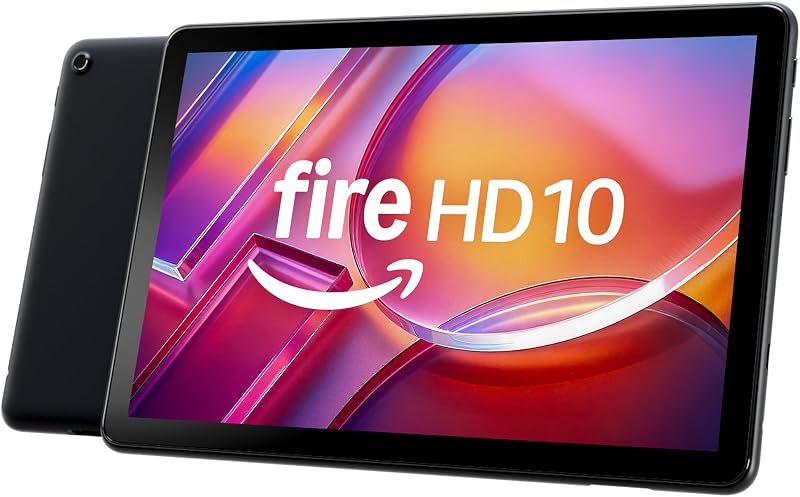
The Amazon Fire HD 10 tablet comes equipped with a 10.1-inch vibrant Full HD screen, an octa-core processor, 4 GB of RAM, and 32 GB of internal storage. It is built primarily for relaxation, digital reading, and media entertainment, making it a preferable choice for shoppers who want a streamlined, casual entertainment tablet rather than a complete desktop-class Windows environment.
24GB RAM 256GB ROM

The 24GB RAM 256GB ROM is a rugged Android tablet featuring an 11,000mAh battery, a 10.1-inch FHD display, waterproof and drop-proof protection, glove-friendly touch, a 93dB loud speaker, and a 16MP camera. Field technicians, outdoor workers, and travelers who need extreme physical durability and high battery capacity over traditional office productivity tools should consider this rugged alternative.
1280×800 IPS HD Touchscreen 6000mAh
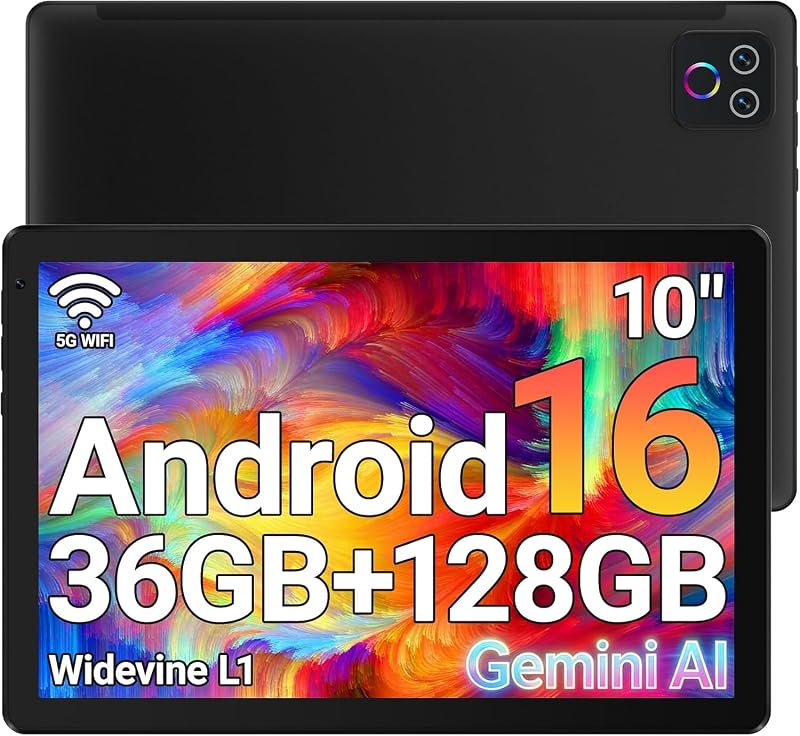
The 1280×800 IPS HD Touchscreen 6000mAh tablet delivers an Android 16 platform featuring an octa-core processor, 36GB (6+30) RAM, 128GB ROM with 1TB expansion support, Wi-Fi 6, and a 6000mAh battery. Users seeking an up-to-date mobile operating system with expandable storage options and modern wireless connectivity will appreciate what this device provides.
Final Verdict
The Surface Pro 3 remains a functional, well-constructed 2-in-1 slate that delivers genuine desktop computing capabilities in a highly portable 1.76-pound package. Its pairing of an Intel Core i7 1.7 GHz processor, 8 GB of RAM, and 256 GB of flash storage creates an effective baseline for day-to-day office paperwork, study sessions, web tasks, and video streaming under Windows 10.
While prospective owners must remember that the keyboard is sold separately and the 2015 hardware release is not built for high-demand modern gaming, the included Surface Pen and 36W power supply offer tangible out-of-the-box utility. For anyone seeking an agile, pen-ready Windows machine for personal administration and basic mobile productivity, it provides a capable and balanced experience.
FAQ
Does the Surface Pro 3 come with a keyboard included?
No, the listing specifies that the keyboard is sold separately. The retail packaging includes the Surface Pro 3 tablet, the 36W power supply, and the Surface Pen.
What operating system is installed on this Surface Pro 3?
This model comes installed with Windows 10, providing broad support for traditional desktop software, web browsers, and built-in tablet interface controls.
What processor and RAM does this model feature?
The tablet is powered by an Intel Core i7 processor operating at 1.7 GHz alongside 8 GB of system RAM and 256 GB of flash storage.
How heavy is the Surface Pro 3 tablet?
The tablet chassis weighs 1.76 pounds, allowing for comfortable handheld use and easy transportation inside standard backpacks or satchels.
Is the Surface Pen stylus included in the box?
Yes, the listing states that the Surface Pen is included, enabling direct digital handwriting, sketching, and document annotation on the 12-inch touchscreen.