As Amazon Associates, we earn from qualifying purchases. This means we may receive a small commission at no extra cost to you if you click through and make a purchase.
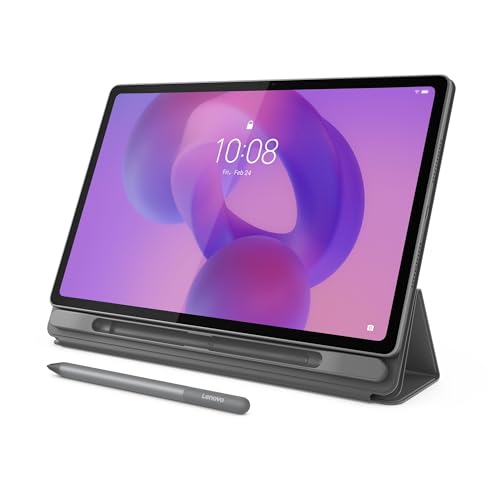
Finding a digital slate that balances screen real estate, everyday performance, and practical accessories without unnecessary bloat can be challenging. The Lenovo Idea Tab Plus arrives as a productivity and multimedia solution designed primarily for students, casual multitaskers, and streaming enthusiasts. Equipped with a generous 12.1-inch 2.5K IPS touchscreen, an octa-core MediaTek Dimensity 6400 processor, and a quad-speaker audio array, it delivers an expansive canvas for research and entertainment. Our comprehensive Lenovo Idea Tab Plus review reveals that by bundling the digital pen and folio case right in the box, Lenovo provides a ready-to-use workstation that minimizes the friction of buying separate add-ons.
This mid-range slate suits students drafting lecture notes, remote learners juggling study apps, and anyone seeking a portable entertainment hub for videos and reading. It provides a sharp visual upgrade over smaller budget devices while maintaining a featherlight profile that slides easily into a bookbag. However, users needing desktop-level workstation power, professional creative rendering, or high-frame-rate 3D gaming will find its processing boundaries clear. Those with heavier computational demands might prefer comparing this build to a full-fledged 2-in-1 like the lenovo ideapad flex 5i chromebook plus gen 7 or a high-end enterprise slate before making a final investment.



Lenovo Idea Tab Plus at a Glance

| Feature | Specification |
|---|---|
| Display | 12.1-inch 2.5K IPS Touchscreen, 90Hz Refresh Rate |
| Brightness & Color | Up to 800 nits, 96% DCI-P3 Color Gamut, TÜV Low Blue Light |
| Processor | MediaTek Dimensity 6400 |
| Graphics | Integrated Arm Mali-G57 MC2 |
| Memory | 8GB RAM |
| Internal Storage | 128GB (Expandable via MicroSD Card Tray) |
| Audio System | Quad Speakers with Dolby Atmos Tuning |
| Battery & Charging | Up to 13 Hours Streaming, 45W Fast Charging Support |
| Included Accessories | Lenovo Tab Pen, Folio Case, USB-C 2.0 Cable |
| Model & Weight | ZAG70917US (Luna Grey), Weighs Just Over a Pound |
Expansive 12.1-Inch 2.5K Display Quality
The visual centerpiece of this hardware is undeniably the Lenovo tablet plus display. Measuring 12.1 inches diagonally, the screen provides ample workspace for side-by-side app multitasking, PDF annotation, and widescreen video playback. The 2.5K resolution ensures that small text inside complex research documents and dense spreadsheets renders with crisp, legible contours. Backed by a 96% DCI-P3 color gamut, the panel presents vibrant tones and natural skin shades, making it a compelling option for streaming movies or reviewing high-resolution photo albums.
Outdoor usability and viewing comfort receive significant attention here. The panel reaches up to 800 nits in high brightness mode, allowing users to read near sunlit windows or outdoor study benches without battling aggressive glare. Additionally, the TÜV Rheinland Low Blue Light certification actively limits eye fatigue during extended late-night study sessions. The fluid 90Hz refresh rate further refines the experience, ensuring that browsing through research portals, skimming long social feeds, and swiping through app drawers feels markedly smoother than standard 60Hz panels.
For shoppers weighing screen size against portability, this Lenovo 12 inch tablet plus strikes an effective middle ground. It gives you significantly more screen real estate than compact entry-level slates like the tablet lenovo m11 128gb 8gb ram, yet it avoids the cumbersome bulk of oversized flagship tablets. Whether you are dividing the panel between a video lecture and a note-taking canvas or relaxing with a movie, the spacious dimensions provide an immersive, uncluttered workspace.
Lenovo Idea Tab Plus Performance and Hardware Specs
Under the hood, the Lenovo Idea Tab Plus specs center on the MediaTek Dimensity 6400 processor paired with an integrated Arm Mali-G57 MC2 GPU. Accompanied by 8GB of system memory, this silicon configuration handles routine daily computing effortlessly. Launching research apps, switching between browser tabs, streaming high-definition video feeds, and editing digital documents happen without noticeable hesitation. The 8GB RAM capacity ensures that background applications remain cached properly, preventing annoying app reloads during intensive multi-window study workflows.
While the Lenovo Idea Tab Plus performance excels at everyday student productivity and media consumption, hardware expectations should remain grounded. The integrated Mali-G57 MC2 graphics processor handles casual games and UI animations smoothly, but it is not built for running graphics-heavy 3D gaming titles at maximum settings. Users looking for an intense gaming rig or a heavy creative production machine may find thermal throttling or lower frame rates during sustained rendering tasks. For academic workflows and digital reading, however, the processing package provides reliable, consistent output.
Storage management is straightforward and adaptable. The device includes 128GB of built-in flash storage, providing sufficient space for textbooks, lecture recordings, offline streaming playlists, and an extensive suite of software tools. If your library of recorded video lectures or high-resolution media outgrows the internal drive, the integrated MicroSD card tray lets you expand capacity effortlessly. This expansion eliminates the anxiety of running out of local room during a busy academic semester.
Included Lenovo Tab Pen and Software Ecosystem
One of the strongest arguments in favor of this package is the Lenovo Idea Tab Plus pen and case bundle. Rather than treating the stylus as a costly optional upgrade, Lenovo packages the Lenovo Tab Pen and a tailored folio case right in the retail box. The stylus interacts seamlessly with the 90Hz touch surface, delivering responsive handwriting input and precise sketching capabilities. The bundled folio case protects the screen during travel and props the tablet at convenient angles for hands-free lecture viewing or typing.
Software integration focuses heavily on academic success. The tablet comes equipped with dedicated tools designed for clear thinking: Lenovo Notepad, Squid, Nebo, and MyScript Calculator. These applications allow students to handwrite lecture notes, convert handwritten equations into computed math problems, and sketch diagrams with minimal latency. Lenovo tablet plus for students becomes an especially viable option because these apps cater directly to active classroom learning without requiring immediate third-party software purchases.
Everyday convenience is further elevated through Google-powered Circle to Search. When reviewing unfamiliar vocabulary, historical figures, or diagrams, you can simply use the Lenovo Tab Pen or your fingertip to circle any on-screen item. The system instantly returns search context and language translations without forcing you to toggle between apps. Complementing this is effortless file sharing, which enables quick drag-and-drop document transfers across devices without quality loss or clunky email attachments.
Lenovo Tablet Plus Battery Life and Charging Speeds
Portability depends heavily on endurance, and Lenovo tablet plus battery life delivers practical all-day independence. The device is rated for up to 13 hours of continuous YouTube streaming on a single charge. This longevity allows students to navigate an entire schedule of morning seminars, afternoon library sessions, and evening entertainment without tethering themselves to a wall outlet. Even during continuous mixed workloads involving active stylus input and bright display settings, the battery holds up commendably.
When it is time to recharge, the device supports 45W fast charging capabilities over USB-C. Although the package supplies a standard USB-C 2.0 charging cable, connecting the tablet to a compatible high-wattage wall adapter restores significant battery percentages in a short window. This fast top-up capability is invaluable when you have only a brief break between lectures or travel connections to restore power for the rest of the day.
Audio Quality and Physical Ergonomics
Multimedia consumption is elevated by the tablet’s quad-speaker array tuned with Dolby Atmos. Positioned along the chassis to deliver balanced stereo sound, these speakers produce crisp vocal separation and surprising acoustic depth. Dialogue in educational podcasts, video seminars, and feature films remains intelligible even at higher volumes. While tablets naturally lack the deep sub-bass found in dedicated external sound systems, this quad-speaker setup outperforms the thin, tinny drivers typical of budget hardware.
From an ergonomic perspective, the tablet is crafted with a svelte, modern aesthetic finished in Luna Grey. Weighing just over a single pound, it remains comfortable to hold for reading or digital sketching over reasonable intervals. Its slim profile slips between notebooks and fits into compact bags without adding cumbersome weight. The chassis feels rigid and well-assembled, giving everyday users the confidence that it can withstand the daily grind of transit and classroom desks.
Lenovo Idea Tab Plus Pros and Cons
Pros
- Sharp 12.1-inch 2.5K display with 90Hz refresh rate
- Lenovo Tab Pen and folio case included in box
- Quad speakers with immersive Dolby Atmos tuning
- Long-lasting battery with up to 13 hours streaming
- Fast 45W charging support for rapid top-ups
- Bright 800-nit panel with low blue light certification
Cons
- Mid-range processor not built for heavy 3D gaming
- Base 128GB storage requires MicroSD card for large libraries
- Does not include a physical keyboard accessory
Check Lenovo Idea Tab Plus on Amazon
Who Should Buy the Lenovo Idea Tab Plus
Buy It If
- You want a complete study station with an included digital stylus and protective folio case right out of the box.
- You prioritize a large, bright 12.1-inch 2.5K screen with 90Hz fluidity for reading textbooks and watching media.
- You need all-day battery life that reliably lasts through long lectures and up to 13 hours of video playback.
- You regularly multitask with split-screen study apps, PDF annotators, and smart search tools like Circle to Search.
Skip It If
- You expect high-tier 3D gaming performance or professional video rendering that exceeds the capabilities of the Dimensity 6400 processor.
- You need a complete desktop operating system replacement, where a premium slate like the windows surface pro tablet would fit better.
- You require an ultra-premium executive entertainment powerhouse with an OLED display, such as the flagship lenovo tab extreme.
Lenovo Idea Tab Plus Alternatives Worth a Look
If you are exploring different screen sizes, operating environments, or rugged chassis builds, several alternative tablets provide contrasting advantages depending on your daily priorities.
Amazon Fire HD 10 tablet
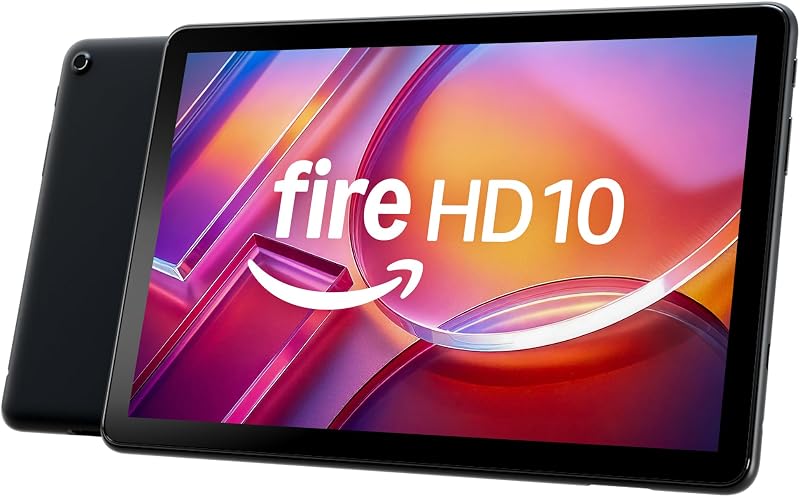
The Amazon Fire HD 10 tablet is designed specifically for relaxed, casual entertainment. It features a smaller 10.1-inch Full HD screen, an octa-core processor, 4 GB of RAM, and 32 GB of internal storage. While it lacks the larger 2.5K display resolution, bundled stylus, and 8GB RAM found on the Lenovo model, it represents an accessible pick for shoppers who only want a lightweight tablet for e-books, basic streaming apps, and smart home control.
RT9 Rugged Tablet
For demanding environments, the 24GB RAM 256GB ROM RT9 Rugged Tablet is built with waterproof, drop-proof, and glove-friendly armor. Featuring an 11,000mAh battery, a loud 93dB speaker, a 16MP camera, dual SIM connectivity, and a 10.1-inch FHD display, it targets outdoor workers and job sites. Shoppers working in rough conditions will prefer its heavy-duty exterior over the sleek, student-focused profile of the Idea Tab Plus.

URAO 10.1-Inch Android Tablet
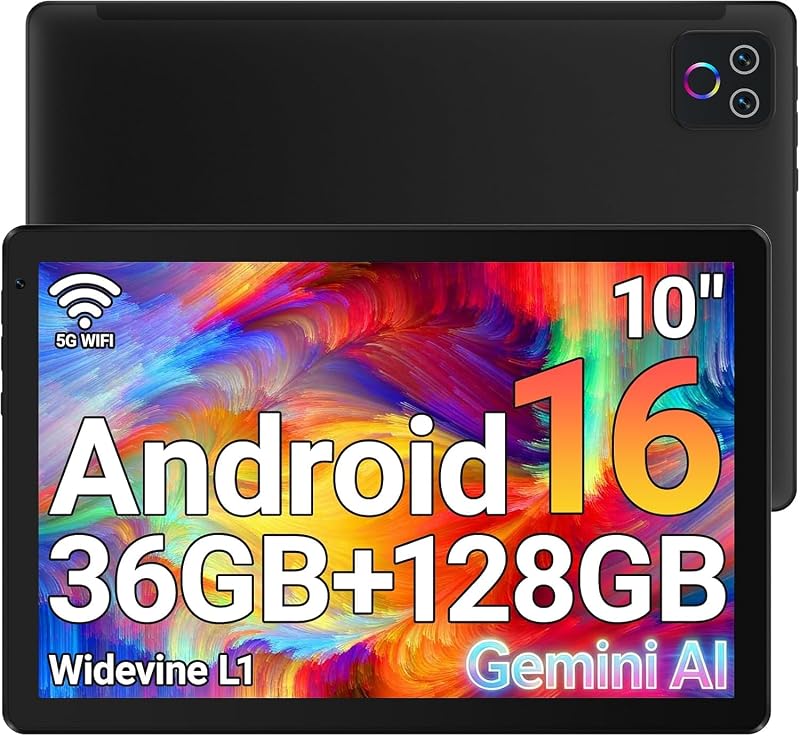
The 1280×800 IPS HD Touchscreen 6000mAh URAO Tablet offers an entry-level platform running Android 16 with Wi-Fi 6, Bluetooth 5.4, and a 6000mAh battery. With an octa-core chip, dual cameras, 128GB of storage, and 1TB expansion support, it delivers functional daily computing on a modest 1280×800 resolution screen. It fits general users who need basic connectivity and web browsing rather than a high-resolution stylus canvas.
Final Verdict
The Lenovo Idea Tab Plus establishes itself as a thoughtful, well-engineered package for shoppers who want maximum utility without navigating endless accessory catalogs. Its 12.1-inch 2.5K display is vibrant, sharp, and easy on the eyes, offering the brightness and color coverage necessary for both focused study and immersive video streaming. Backed by solid quad Dolby Atmos speakers and up to 13 hours of battery life, it covers every entertainment and academic baseline with confidence.
Ultimately, is Lenovo Idea Tab Plus worth it? For students, note-takers, and everyday multimedia viewers, the answer is a resounding yes. While power users and hardcore mobile gamers will encounter hardware limits with the MediaTek Dimensity 6400 processor, the inclusion of the responsive Lenovo Tab Pen and protective folio case provides undeniable everyday value. It stands out as a balanced, dependable tablet that handles real-world workloads straight out of the box.
FAQ
Does the Lenovo Idea Tab Plus come with a stylus and case included?
Yes, the retail package includes both the Lenovo Tab Pen and a protective folio case alongside the tablet, USB-C 2.0 charging cable, and MicroSD card tray.
Can I expand the storage on the Lenovo Idea Tab Plus?
Yes, while the tablet comes with 128GB of internal storage, it includes a dedicated MicroSD card tray that allows you to expand the available capacity for documents, videos, and offline media.
Is the screen bright enough to use outdoors?
The 12.1-inch 2.5K IPS display reaches up to 800 nits in high brightness mode, which provides solid visibility and reduced glare when studying near bright windows or outdoors.
Does this tablet support fast charging?
Yes, the hardware supports up to 45W fast charging over USB-C, allowing users to rapidly top up the battery when paired with a compatible fast-charging wall adapter.
What note-taking apps are featured on the device?
The tablet includes four dedicated learning tools: Lenovo Notepad, Squid, Nebo, and MyScript Calculator, which integrate smoothly with the Lenovo Tab Pen for handwriting, sketching, and mathematical calculations.


