As Amazon Associates, we earn from qualifying purchases. This means we may receive a small commission at no extra cost to you if you click through and make a purchase.
As an Amazon Associate we earn from qualifying purchases. Links on this page are affiliate links.
When comparing the mxz ryzen 7 7700 rtx vs intel core i7 13700f, both prebuilt desktop configurations share key hardware. Each desktop pairs an Nvidia GeForce RTX 4070 graphics card with a 1TB NVMe solid-state drive and Windows 11 Pro. The primary distinctions lie in the core platform. The AMD system runs an eight-core Ryzen 7 7700 with DDR5 memory, while the Intel build features a 16-core Core i7-13700F on DDR4 RAM.
Processor
AMD Ryzen 7 7700 (8 cores, 16 threads, 3.8 to 5.3GHz)
Intel Core i7 13700F (16 cores, 24 threads, 2.1 to 5.2GHz)
Memory Type
16GB DDR5
16GB DDR4
Motherboard
B650
B760
Power Supply
750W 80+
700W 80+
Choose the first if
- You want newer DDR5 system memory.
- You prefer higher maximum clock speeds reaching up to 5.3GHz.
- You want a higher-capacity 750W power supply.
Choose the second if
- You run multithreaded applications that use 16 cores and 24 threads.
- You specifically require an Intel platform with a B760 chipset.
Verdict
Choose the AMD configuration if you want DDR5 memory and higher clock speeds on an eight-core platform. Select the Intel model if your workflow benefits from 16 processing cores and 24 threads. Both systems deliver identical RTX 4070 graphics capabilities and 1TB of NVMe storage.
Key Spec Differences Breakdown
Processor cores and clock speeds
Edge: MXZ Intel Core i7 RTX 4070 Gaming PC
The MXZ Intel Core i7 RTX 4070 Gaming PC provides 16 cores and 24 threads, spanning clock speeds between 2.1GHz and 5.2GHz. In comparison, the MXZ Ryzen 7 7700 RTX 4070 Gaming PC features an 8-core, 16-thread AMD Ryzen 7 7700 processor. The Ryzen unit offers a higher base clock of 3.8GHz and reaches a maximum boost speed of 5.3GHz. While the Ryzen chip achieves slightly faster clock frequencies, the Intel configuration brings twice the core total and eight additional processing threads. That expanded thread capacity gives the Intel model a clear structural advantage for heavily threaded computing tasks.
System memory generation
Edge: MXZ Ryzen 7 7700 RTX 4070 Gaming PC
Both desktops provide 16GB of system memory, but they use different RAM generations. The MXZ Ryzen 7 7700 RTX 4070 Gaming PC is equipped with 16GB of DDR5 RAM paired with an AMD B650 platform. In contrast, the MXZ Intel Core i7 RTX 4070 Gaming PC utilizes 16GB of DDR4 RAM on an Intel B760 motherboard. DDR5 represents a newer memory standard over DDR4, delivering higher baseline bandwidth capabilities to the system. While both systems supply an identical 16GB capacity for active applications and games, the AMD system gains the technological edge with its newer DDR5 standard.
Power supply capacity
Edge: MXZ Ryzen 7 7700 RTX 4070 Gaming PC
Power delivery differs slightly between these two prebuilt gaming rigs. The MXZ Ryzen 7 7700 RTX 4070 Gaming PC features a 750W 80+ power supply unit. Meanwhile, the MXZ Intel Core i7 RTX 4070 Gaming PC contains a 700W 80+ power supply unit. Both units share an 80+ efficiency rating, ensuring certified power conversion standards. However, the Ryzen machine delivers an additional 50 watts of total capacity. This extra headroom provides greater overhead for system components under peak operational loads, giving the AMD desktop a modest but measurable hardware benefit in overall power distribution capacity.
Graphics card configuration
Edge: Tie
Dedicated visual processing hardware is identical across both computer builds. The MXZ Ryzen 7 7700 RTX 4070 Gaming PC and the MXZ Intel Core i7 RTX 4070 Gaming PC each feature an Nvidia GeForce RTX 4070 graphics card. Neither system lists different clock rates, cooler styles, or memory configurations for the GPU in the provided specifications. Because both computers rely on the exact same dedicated graphics model to render frames and handle 3D imagery, you can expect equivalent graphics hardware capability whether choosing the AMD-based or the Intel-based tower setup.
Internal storage drive
Edge: Tie
Internal drive specifications match directly between both builds. The MXZ Ryzen 7 7700 RTX 4070 Gaming PC includes a 1TB NVMe solid-state drive for storing files, software, and games. Similarly, the MXZ Intel Core i7 RTX 4070 Gaming PC includes a 1TB NVMe M.2 solid-state drive. Both options rely on NVMe architecture rather than mechanical hard disk drives, ensuring fast data retrieval rates across the board. Because each tower supplies the exact same 1TB solid-state capacity straight out of the box, neither unit holds an edge over the other in primary storage.
Choosing Your Next Gaming Desktop
Buyers prioritizing newer memory architecture
Our pick: MXZ Ryzen 7 7700 RTX 4070 Gaming PC
You get 16GB of DDR5 memory paired with a 750W 80+ power supply and the AMD B650 platform. The Ryzen 7 7700 processor also operates at a higher 3.8GHz base clock and reaches up to 5.3GHz boost clock. This setup gives you updated memory hardware and fifty additional watts of power capacity.
Users running heavy multi-threaded computing tasks
Our pick: MXZ Intel Core i7 RTX 4070 Gaming PC
You receive an Intel Core i7 13700F processor configured with 16 cores and 24 threads on an Intel B760 motherboard. That configuration doubles the core count over the eight-core alternative, delivering eight extra threads for processing. The system includes 16GB of DDR4 memory and a 700W 80+ power supply.
Gamers seeking maximum base clock speed
Our pick: MXZ Ryzen 7 7700 RTX 4070 Gaming PC
You obtain a base clock speed of 3.8GHz that scales up to 5.3GHz on the Ryzen 7 7700 CPU. The system also supplies 16GB of DDR5 memory and a 750W power supply alongside the Nvidia GeForce RTX 4070 graphics card and 1TB NVMe solid-state storage.

MXZ Ryzen 7 7700 RTX 4070 Gaming PC
Best for: DDR5 gaming on the AMD AM5 platform
- Graphics Card
- GeForce RTX 4070
- Processor
- Ryzen 7 7700
- RAM Capacity
- 16GB
- Storage Capacity
- 1T
- Memory Type
- DDR5
- Storage Type
- NVME Solid State Drive
This prebuilt desktop combines an AMD Ryzen 7 7700 processor with an Nvidia GeForce RTX 4070 graphics card and 16GB of DDR5 RAM. Built on a B650 motherboard with a 1TB NVMe solid-state drive, it brings current-generation memory standards to your desk. It suits gamers who want an AM5 platform with DDR5 memory bandwidth rather than older DDR4 setups.
- AMD Ryzen 7 7700 with 8 cores, 16 threads, and up to 5.3GHz boost
- DDR5 memory standard on a B650 chipset motherboard
- Nvidia GeForce RTX 4070 graphics card
- 750W 80-plus power supply
- 16GB RAM capacity leaves less headroom than 32GB configurations
- One-year limited parts and labor warranty
- You want current-generation DDR5 memory instead of older DDR4.
- You prefer the AMD AM5 socket platform with a B650 motherboard.
- You need more than 16GB of system memory out of the box.
- You prefer an Intel Core i7 processor for your gaming setup.
Verdict: MXZ Ryzen 7 7700 RTX 4070 Gaming PC suits players who prioritize an AM5 platform paired with DDR5 system memory and RTX 4070 graphics. It gives you 1TB of NVMe storage and Windows 11 Pro pre-installed.
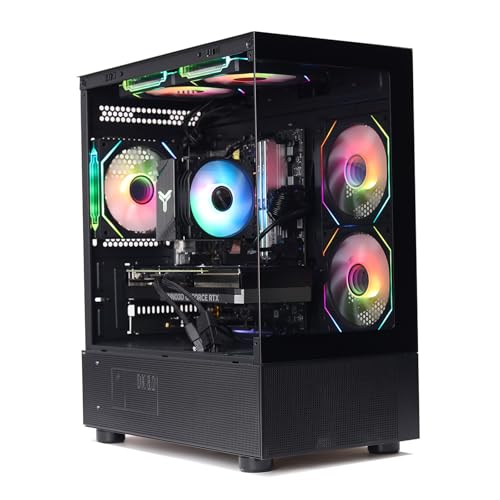
MXZ Intel Core i7 RTX 4070 Gaming PC
Best for: Multi-threaded production workloads and high-resolution gaming
- Graphics Card
- GeForce RTX 4070
- Processor
- Intel Core i7 13700F
- RAM Capacity
- 16GB
- Storage Capacity
- 1T
- Memory Type
- DDR4
- Storage Type
- M.2 SSD
This MXZ desktop pairs a 16-core Intel Core i7-13700F processor with a GeForce RTX 4070 graphics card for heavy computing and gaming. Inside, you get 16GB of DDR4 RAM, a 1TB NVMe solid-state drive, and a 700W 80+ power supply on a B760 motherboard. It suits you if you want high core counts for multitasking alongside modern 1440p graphics performance.
- Intel Core i7-13700F CPU with 16 cores and 24 threads
- GeForce RTX 4070 dedicated graphics card
- 1TB NVMe solid-state drive for storage
- Pre-installed Windows 11 Pro operating system
- Uses DDR4 memory instead of DDR5
- Includes a 1-year parts and labor warranty
- You need a 16-core processor for multi-threaded workloads.
- You want Windows 11 Pro pre-installed from the factory.
- You run graphics-heavy games requiring an RTX 4070 GPU.
- You want a modern system running on DDR5 memory.
- You need more than 16GB of included system RAM.
Verdict: MXZ Intel Core i7 13700F RTX 4070 Gaming PC provides 24 threads of processing power alongside discrete RTX graphics for demanding rendering and gaming. It fits users prioritizing Intel CPU core counts over DDR5 memory bandwidth.
Specifications side by side
| Spec | MXZ Ryzen 7 7700 RTX 4070 Gaming PC | MXZ Intel Core i7 RTX 4070 Gaming PC |
|---|---|---|
| Graphics Card | GeForce RTX 4070 | GeForce RTX 4070 |
| Processor | Ryzen 7 7700 | Intel Core i7 13700F |
| RAM Capacity | 16GB | 16GB |
| Storage Capacity | 1T | 1T |
| Memory Type | DDR5 | DDR4 |
| Storage Type | NVME Solid State Drive | M.2 SSD |
| Operating System | Windows 11 Pro | Windows 11 Pro |
| Memory | 16GB RAM | 16GB RAM |
| Model | RYZEN 7 | I7 13700F| RTX 4070 |
Frequently asked questions
Which graphics card comes installed in both MXZ gaming PCs?
Both systems include an Nvidia GeForce RTX 4070 discrete graphics card. This GPU handles high-resolution rendering and demanding 3D games on either desktop. Because both builds share this graphics chip, your graphics output, resolution support, and display options remain uniform regardless of whether you select the AMD or Intel processor build.
What is the memory difference between the Ryzen 7 and Intel Core i7 models?
The Ryzen build uses 16GB of DDR5 system memory, while the Intel build features 16GB of DDR4 memory. DDR5 offers higher data transfer speeds and increased memory bandwidth compared to DDR4. You get identical capacity at 16GB on both, but the AM5 AMD configuration operates on the newer memory standard.
Which operating system is included with these MXZ gaming desktops?
Both MXZ configurations come with Windows 11 Pro pre-installed. This edition provides standard gaming capabilities alongside enterprise-level features such as BitLocker drive encryption and remote desktop access. You do not need to install an operating system separately before setting up your games, drivers, or everyday productivity software on either machine.
Why choose the MXZ Intel Core i7 configuration over the Ryzen model?
The Intel Core i7 13700F model provides 24 threads of processing power for multi-threaded production workloads. If you frequently handle heavy rendering, video editing, or background multitasking, those extra execution threads offer sustained computational throughput. It fits tasks where total processing thread capacity matters more than accessing the latest generation of memory architecture.
What makes the MXZ Ryzen 7 7700 build better suited for AM5 gaming?
The Ryzen desktop runs on AMD AM5 architecture paired with DDR5 memory. This setup suits players who want current-generation platform features for their gaming library. You receive the efficiency of the Ryzen 7 7700 processor alongside the GeForce RTX 4070, making it tailored for high-speed memory workloads without using legacy DDR4 components.
How much total system RAM is installed in each desktop?
Each desktop comes equipped with 16GB of RAM straight out of the box. This capacity gives you sufficient headroom to run modern games, web browsers, and background utilities at the same time. The critical specification variance is purely the generation, offering DDR5 on the Ryzen 7 machine versus DDR4 on the Intel Core i7 rig.