
As Amazon Associates, we earn from qualifying purchases. This means we may receive a small commission at no extra cost to you if you click through and make a purchase.
Finding a portable computer capable of genuinely matching a full-sized desktop rig often feels like a series of compromises between screen real estate and hardware thermal limits. The MSI Crosshair 18 HX AI confronts this dilemma head-on by pairing a massive 18-inch panel with modern computational silicon engineered for intensive workloads. Serving as an imposing, desk-bound centerpiece, this machine delivers fluid gameplay and responsive multitasking that easily rivals dedicated desktop workstations, provided you are prepared for the heft that comes with its expansive frame.
This oversized laptop fits gamers and digital creators who prioritize uncompromised visual immersion, high-speed memory, and vast onboard solid-state storage over effortless portability. If you plan to park your machine on a sturdy desk for demanding gaming sessions or demanding video editing timelines, it provides all the screen room and connectivity you could reasonably want. On the other hand, commuters who need a lightweight companion for daily coffee shop runs or cramped classroom desks will likely find its bulk overwhelming and should instead explore more compact portable alternatives like the msi vector 16 hx ai.


MSI Crosshair 18 HX AI at a Glance

| Attribute | Detail |
|---|---|
| Display | 18-inch QHD+ (2560×1600) IPS, 240Hz refresh rate, 100% DCI-P3 color gamut |
| Processor | Intel Core Ultra 9 275HX (24 cores, 2.1 GHz base, up to 5.4 GHz boost) |
| Graphics Coprocessor | NVIDIA GeForce RTX 5070 with 8GB GDDR7 dedicated memory |
| System Memory | 32GB DDR5 5600MHz RAM (16GB x 2 configuration) |
| Storage Drive | 2TB NVMe Solid State Drive |
| Networking | Intel Wi-Fi 6E AX211, Bluetooth 5.3, RJ45 Ethernet port |
| Audio System | 2x Dynaudio 2W speakers plus 2x 2W woofers |
| Integrated Camera | 720p HD webcam equipped with physical privacy shutter |
| Battery and Adapter | 90Whr Li-Ion battery with 240W external power adapter |
| Dimensions and Weight | 15.90 x 11.02 x 1.17 inches; 6.83 pounds bare chassis weight |
Display and Visual Immersion
The centerpiece of this machine is unquestionably its expansive screen. Measuring a full 18 inches diagonally with a modern 16:10 aspect ratio and a native resolution of 2560×1600, the panel provides a vast working canvas that eliminates the cramped feel typical of standard gaming portables. The IPS panel ensures that colors stay consistent even when viewed from wide angles, while full coverage of the 100% DCI-P3 color space gives digital artists and video editors the rich color representation required for color grading. For anyone transitioning away from a multi-monitor desktop arrangement, the physical scale of this display offers immediate relief without requiring an external panel.
Motion clarity is another defining highlight of the experience. The msi crosshair 18 240hz display renders rapid camera pans and high-velocity action with exceptional smoothness, noticeably cutting down motion blur in twitch-heavy scenarios. Because visual tracking remains razor-sharp during sudden maneuvers, using the msi crosshair 18 for competitive gaming gives players a distinct perceptual edge in first-person shooters and driving titles where millisecond reactions dictate the outcome. The sheer surface area also improves peripheral awareness, letting you detect in-game opponents and user interface elements without squinting.
Beyond competitive matches, the generous screen area significantly enhances general productivity. Working across split-screen spreadsheets, code editors, and communication windows feels natural rather than constrained. Gamers who have previously relied on smaller screens, such as those evaluating options like the acer predator helios neo 16 ai rtx 5070 ti, will appreciate the massive visual upgrade that an 18-inch viewport provides. You get the benefits of a desktop display while maintaining the consolidated, single-cord convenience of an all-in-one chassis.
Processing and Graphics Performance
Underneath the black clamshell exterior, the internal hardware is balanced to tackle heavy computational loads. The msi crosshair 18 core ultra 9 275hx processor features an impressive 24 cores capable of turbo frequencies reaching up to 5.4 GHz from a base clock of 2.1 GHz. This multi-threaded architecture allows the system to effortlessly manage demanding background processes, local asset compiling, and streaming software without stealing processing bandwidth from your main game. Whether processing complex physics engines or rendering dense multi-layer video sequences, the silicon remains responsive and agile.
Graphical tasks are handled by the msi crosshair 18 hx rtx 5070 graphics card, which comes equipped with 8GB of modern GDDR7 video memory. This architecture introduces advanced ray tracing hardware alongside specialized artificial intelligence acceleration cores, enabling visually complex lighting effects and high-fidelity texture rendering at the screen native 2560×1600 resolution. When paired with 32GB of DDR5 5600MHz RAM in a dual-channel layout, memory bottlenecks are virtually nonexistent, ensuring smooth frame pacing even when high-resolution texture packs fill the frame buffer.
Storage performance matches the high computational ceiling thanks to a generous 2TB NVMe solid state drive. Modern game installations routinely exceed one hundred gigabytes, making this substantial capacity a practical necessity rather than an indulgence. Booting Windows 11 Home takes mere seconds, and game load screens pass with minimal delay. In this msi crosshair 18 gaming laptop review assessment, the hardware configuration provides reliable headroom that keeps you from worrying about managing drive space or memory limits whenever a major game update drops.
Audio, Keyboard, and Peripheral Usability
Physical interaction with a gaming machine can make or break the daily user experience, and the input layout here is tailored for precision. The machine features a SteelSeries 24-zone RGB backlit keyboard engineered with anti-ghosting keys, ensuring that simultaneous complex key inputs register accurately during chaotic gameplay. Keystrokes feel positive and tactile, making both prolonged typing and intense action sequences satisfying. Beneath the keys, an expansive multi-touch trackpad provides smooth gesture navigation when an external mouse is not plugged in, though most serious gamers will naturally tether a dedicated mouse.
Audio playback is notably robust for a clamshell form factor, courtesy of an integrated quad-speaker array tuned by Dynaudio. The system integrates two 2W main speakers alongside two 2W dedicated woofers, delivering a sound profile that possesses surprising depth and mid-range clarity. While bass-heavy explosions will never shake the room like a dedicated subwoofer, the onboard setup easily outperforms standard laptop speakers for background music, discord calls, and casual video playback. When private communication is required, the built-in 720p HD webcam features an integrated physical shutter to guarantee privacy when you step away from the desk.
Connectivity options are thoroughly laid out across the chassis edges to support a complete desktop battle station. You will find a versatile Thunderbolt 4 USB-C port, an HDMI 2.1 output for pushing visuals to high-refresh external television panels, and a dedicated RJ45 Ethernet port for low-latency wired networking. For wireless peripherals, Intel Wi-Fi 6E AX211 and Bluetooth 5.3 maintain stable connections to wireless headsets and controllers. The listing notes that a ZYN HDMI cable is included in the package, giving you immediate out-of-the-box readiness for multi-display environments.
Thermal Design and Everyday Usability
Operating a high-wattage 24-core CPU alongside a dedicated graphics processor requires substantial airflow management. Evaluating the msi crosshair 18 cooling performance reveals that the sizable physical dimensions of the chassis work in its favor, providing ample internal volume for heat pipes and dual-exhaust pathways. Under sustained gaming loads, the cooling system spins up deliberately to keep silicon temperatures well within operational thresholds, preventing sudden thermal throttling from ruining a critical competitive round.
Because the laptop draws substantial power, it relies on a robust 240W external adapter to keep the components properly energized during peak computational spikes. A sizable 90Whr lithium-ion battery is fitted inside the chassis, providing adequate backup runtime for basic web browsing or document review away from the wall outlet. However, demanding 3D games and heavy GPU compute tasks quickly consume battery reserves, meaning serious gaming sessions should always be conducted with the power brick plugged into an outlet.
Noise levels during routine tasks like browsing text documents or playing casual media remain quiet, allowing the machine to blend into quiet home office settings. When you launch a demanding modern title at native resolution, fan noise becomes clearly audible, though it maintains a steady, whooshing pitch rather than an irritating whine. Those seeking ultra-quiet, slimline machines like the zephyrus g16 5070ti will notice the difference in physical acoustics, as this large chassis prioritizes continuous thermal dissipation over near-silent operation.
Form Factor and Portability Realities
The physical presence of this machine is impossible to ignore. Measuring 15.90 inches long, 11.02 inches wide, and 1.17 inches thick, the notebook commands significant space on any tabletop. The bare machine weighs 6.83 pounds, while the total package shipping weight reaches 13.1 pounds when factoring in the heavy-duty power brick, cabling, and external packaging. This is very much a desk-anchored clamshell rather than a lightweight notebook designed for shoulder-bag commuting.
Carrying a chassis of this size requires a dedicated, extra-large backpack built specifically to accommodate 18-inch tech gear. Moving it from room to room around your house or packing it into a car trunk for a weekend LAN party is entirely feasible, but daily transit on public buses or crowded subways will quickly cause shoulder fatigue. Buyers should approach this machine as a transportable desktop rather than a typical laptop.
For individuals with limited desk space who want to eliminate the rat nest of cables and bulky tower cases of traditional desktops, this footprint is actually an asset. It consolidates a high-end display, an ergonomic keyboard, quad speakers, and a massive 2TB drive into an all-in-one unit that folds flat when not in use. Shoppers who value mobility above all else should look at compact options like the asus gaming v16, but if maximum visual workspace is your top metric, the bulk is well justified.
MSI Crosshair 18 HX AI Pros and Cons
Pros
- Expansive 18-inch 240Hz QHD+ display
- Intel Core Ultra 9 275HX 24-core processor
- Generous 32GB DDR5 RAM and 2TB SSD
- NVIDIA GeForce RTX 5070 with GDDR7
- Dynaudio quad speakers with dual woofers
Cons
- Heavy 6.83-pound bare chassis weight
- Webcam resolution limited to 720p
- Substantial physical footprint on smaller desks
Check MSI Crosshair 18 HX AI on Amazon
Who Should Buy the MSI Crosshair 18 HX AI
Deciding if this massive gaming portable belongs on your desk comes down to how you plan to use its specialized hardware. Evaluating whether the msi crosshair 18 hx ai specs match your specific workflow prevents buyer regret.
Buy It If
- You want a complete desktop replacement that eliminates the need for a separate external gaming monitor.
- You play fast-paced esports titles where the smooth 240Hz refresh rate and large visual area improve reaction times.
- You handle heavy video editing or multi-track audio creation that benefits from 32GB of DDR5 RAM and 2TB of fast NVMe storage.
- You need extensive legacy and modern connectivity ports, including RJ45 Ethernet, HDMI 2.1, and Thunderbolt 4.
Skip It If
- You require a lightweight machine for frequent travel, daily classroom lectures, or tight airplane tray tables.
- You rely heavily on battery power away from wall outlets for extended high-performance gaming sessions.
- You prioritize a high-resolution 1080p or 4K webcam for professional corporate broadcasting, as this unit tops out at 720p.
MSI Crosshair 18 HX AI Alternatives Worth a Look
If the massive 18-inch frame or specific hardware layout of this machine does not align perfectly with your space or use habits, several alternative options offer distinct trade-offs worth considering.
ASUS ROG Strix G16

The ASUS ROG Strix G16 provides a more balanced middle ground for gamers who want robust performance in a slightly more manageable package. It pairs an Intel Core i7 14650HX processor with an NVIDIA GeForce RTX 5060 GPU and a 16-inch FHD+ 16:10 display running at 165Hz with a 3ms response time. With 16GB of DDR5 memory, a 1TB Gen 4 SSD, and cutting-edge Wi-Fi 7 connectivity, this machine suits buyers who want modern networking and a smaller footprint that slips into standard backpacks much easier than an 18-inch behemoth.
Acer Nitro V 16S AI
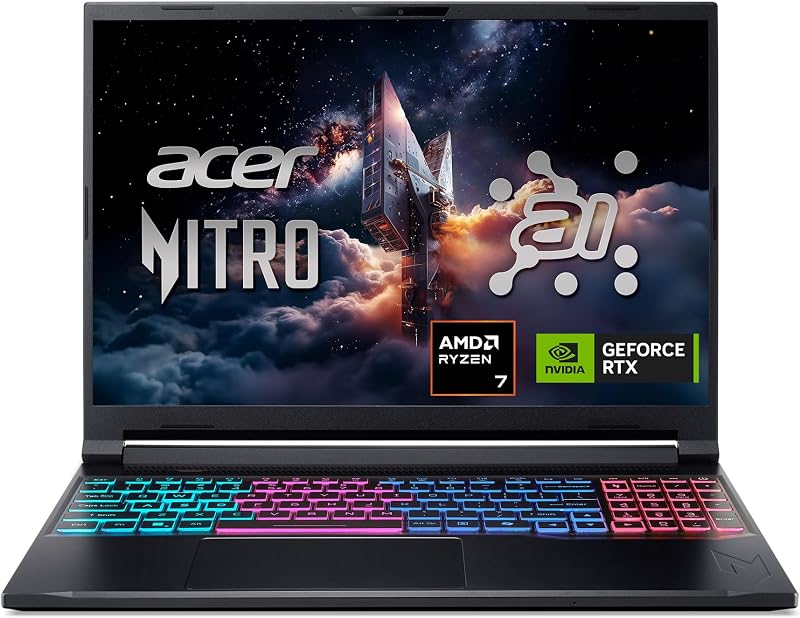
For shoppers who favor AMD hardware architectures, the Acer Nitro V 16S AI offers an intriguing alternative. It is built around an AMD Ryzen 7 260 Processor and an NVIDIA GeForce RTX 5060 laptop GPU, outputting to a 16-inch WUXGA IPS display running at 180Hz. It matches the Crosshair by packing a generous 32GB of DDR5 memory alongside a 1TB Gen 4 SSD and Wi-Fi 6 wireless networking, making it an excellent selection for users who want substantial multitasking memory in a sleeker 16-inch chassis.
KAIGERR Gaming Laptop

The KAIGERR Gaming Laptop caters to a completely different user profile, serving those who need essential computing power rather than a high-end desktop-replacement gaming rig. Powered by an AMD Ryzen 7430U processor boosting up to 4.3GHz, it includes 16GB of DDR4 memory, a 512GB SSD, a 1920P FHD display, Wi-Fi 6, USB 3.2, Type-C, and a webcam cover slide. It is best suited for entry-level tasks, casual gaming, or general productivity where high-refresh graphics and massive chassis cooling are not required.
Final Verdict
When asking is msi crosshair 18 worth it, the answer depends almost entirely on your physical setup and travel expectations. By bringing together an Intel Core Ultra 9 275HX processor, an RTX 5070 graphics chip with 8GB GDDR7, 32GB of DDR5 memory, and a massive 2TB solid state drive, the machine eliminates virtually every common performance bottleneck. The centerpiece 18-inch 240Hz QHD+ display delivers a level of visual grandeur that smaller laptops simply cannot replicate, making games feel expansive and immersive right out of the box.
The inevitable trade-off for this uncompromising visual real estate is substantial weight and physical volume. At 6.83 pounds for the chassis alone and carrying a 1.17-inch thickness, this is not a device designed for casual mobility. However, if your primary goal is to establish a high-powered, clean gaming station that saves room compared to a traditional desktop tower while retaining top-tier speed, the machine delivers a remarkably cohesive and capable package that home-based gamers will thoroughly enjoy.
FAQ
Does the MSI Crosshair 18 HX AI have enough screen space to replace an external monitor?
Yes, the 18-inch QHD+ 2560×1600 panel offers a visual surface area substantially larger than conventional 15-inch and 16-inch laptops. Its 16:10 aspect ratio and wide IPS viewing angles make split-screen multitasking and immersive gaming feel comfortable without requiring a secondary desktop screen.
Can the RAM and storage on the MSI Crosshair 18 HX AI be upgraded?
The system comes pre-configured with 32GB of DDR5 5600MHz RAM configured as two 16GB modules, along with a 2TB NVMe solid state drive. While the listing notes that the manufacturer packaging is inspected and tested during configuration upgrades, the listing does not specify maximum internal expansion limits beyond the included hardware.
What display refresh rate does the MSI Crosshair 18 HX AI support?
The laptop features a high-speed 240Hz refresh rate across its 2560×1600 resolution panel. This allows compatible games running at high frame rates to display fluid motion and minimal ghosting, which is particularly beneficial for fast-paced competitive esports.
Is the MSI Crosshair 18 HX AI convenient for everyday travel?
With a bare machine weight of 6.83 pounds, an overall packaged weight of 13.1 pounds, and dimensions of 15.90 by 11.02 inches, it is quite bulky for everyday commuting. It functions best as a transportable desktop replacement rather than a laptop for frequent mobile transit.
What connectivity options are available on the MSI Crosshair 18 HX AI?
The laptop provides comprehensive wired and wireless connectivity, including Intel Wi-Fi 6E AX211, Bluetooth 5.3, an RJ45 Ethernet jack, an HDMI 2.1 port, and a Thunderbolt 4 USB-C port, along with a bundled ZYN HDMI cable.


