As Amazon Associates, we earn from qualifying purchases. This means we may receive a small commission at no extra cost to you if you click through and make a purchase.
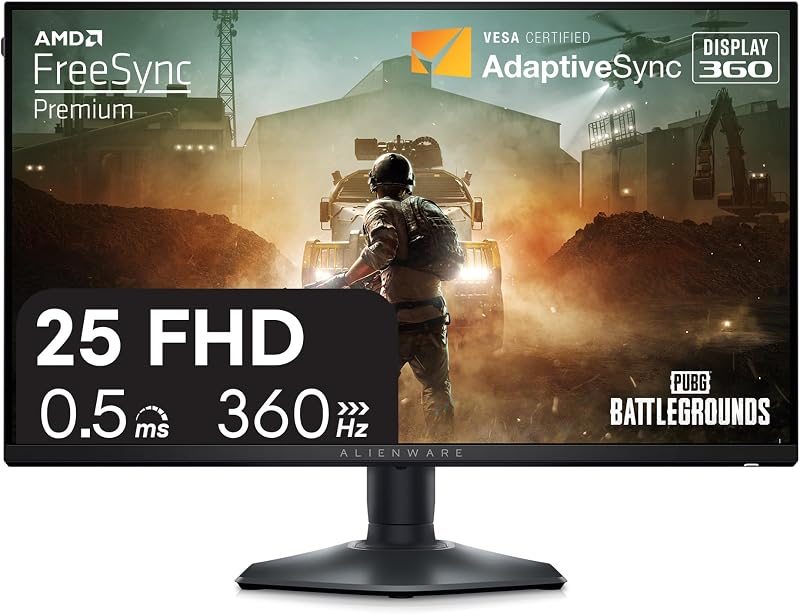
The Alienware AW2523HF is a dedicated 24.5-inch esports display built specifically to provide blisteringly fast frame transitions and minimal input lag for competitive first-person shooter titles. In this Alienware 25 gaming monitor review, the one-line verdict is clear: it is a purpose-built, speed-first competitive powerhouse that trades ultra-high resolution for raw motion clarity and exceptional esports ergonomics.
This monitor suits serious competitive players, ranked tournament grinders, and esports enthusiasts who prioritize maximum frame throughput and zero distracting motion blur above all else. Casual gamers who prefer narrative single-player titles, immersive open-world environments, or ultra-sharp 4K productivity should look elsewhere, as its Full HD resolution is engineered strictly for speed rather than expansive canvas real estate.



Alienware AW2523HF at a Glance
| Attribute | Detail |
|---|---|
| Screen Size | 24.5 inches |
| Display Technology | Fast IPS LED |
| Native Resolution | Full HD (1920 x 1080) |
| Maximum Refresh Rate | 360Hz (DisplayPort), 255Hz (HDMI) |
| Response Time | 0.5 ms minimum Gray-to-Gray (1 ms Gray-to-Gray) |
| Aspect Ratio | 16:9 |
| Brightness | 400 |
| Contrast Ratio | 1000:1 |
| Color Gamut | sRGB 99% |
| Adaptive Sync | AMD FreeSync Premium, VESA AdaptiveSync |
| Ergonomics | Height, tilt, swivel, pivot adjustability |
Refresh Rate and Motion Clarity for Fast Paced Action
The centerpiece of this monitor is its blistering refresh ceiling, engineered to deliver exceptional frame rates without ghosting or stuttering. When connected through DisplayPort, the Alienware AW2523HF 360Hz performance delivers an ultra-smooth visual pipeline that updates the on-screen image every 2.78 milliseconds. This rapid refresh cycle dramatically reduces visual tearing during lightning-fast mouse sweeps, making it far easier to track opposing players who dash, slide, or peek across sightlines in competitive tactical shooters. When driving this display with a high-output rig like an alienware area-51 gaming desktop, the monitor translates raw GPU rendering power into immediate visual feedback.
Pixel responsiveness is equally vital to competitive integrity, and the Alienware AW2523HF response time is rated at a minimum of 0.5ms Gray-to-Gray, with a standard 1ms Gray-to-Gray rating. In practice, this near-instantaneous pixel transition practically eliminates smearing behind high-contrast targets, ensuring that crosshairs remain sharp even during frantic firefights. The display also features certified AMD FreeSync Premium Technology along with VESA AdaptiveSync Display Certification, harmonizing refresh rates with incoming frame signals to eradicate visual micro-stutters and screen tearing during critical engagements.
For players dedicated to fast-action genres, the fluid motion tracking delivers a distinct sense of visual consistency that lower-refresh panels struggle to match. While moving up from 240Hz to 360Hz offers more refined micro-pacing than the massive jump from 60Hz to 144Hz, competitive gamers who rely on sub-millisecond reaction windows will appreciate the heightened tracking accuracy across the entire display surface.
Fast IPS Panel Characteristics and Image Reproduction
Historically, esports players had to accept washed-out colors and restrictive viewing angles from legacy twisted nematic panels to achieve elite refresh rates. The Alienware AW2523HF fast IPS display overcomes these historical limitations by combining high-speed liquid crystal transitions with wide 178-degree viewing angles. This ensures that colors remain consistent whether you sit upright, lean back between matches, or position the screen close to your face in an aggressive competitive posture.
In terms of color performance, the panel delivers 99% sRGB color coverage alongside support for HDR content playback. The display reaches a brightness level of 400, which provides ample luminance to overpower bright ambient room lighting and maintain clear visibility during daytime gaming sessions. The contrast ratio is rated at 1000:1, which represents standard performance for IPS architecture. While deep shadow details and pitch-black scenes may appear slightly gray compared to self-lit panels like the alienware 34 oled, the color reproduction remains vibrant and accurate for daily gaming and media consumption.
The 24.5-inch screen carries a native resolution of 1920 x 1080 with a pixel pitch of 90, matching the recognized tournament standard for esports competition. A smaller 1080p display allows your peripheral vision to encompass the entire battlefield without requiring excessive eye or head movement to monitor health bars, mini-maps, and ammunition counters. The screen also features a glossy finish listed in the specifications, contributing to vibrant color delivery across the panel face.
Esports Ergonomics and Desk Footprint
Physical desk arrangement plays a massive role in competitive play, and the Alienware AW2523HF desk footprint reflects deliberate design choices aimed at maximizing usable desk area. Built around Alienware’s revamped Legend 2.0 industrial design in the Dark side of the Moon finish, the monitor replaces wide, sprawling tripod legs with a compact hexagonal base. This streamlined base shape lets competitive players tilt their keyboards at aggressive angles and pull extra-large mousepads directly adjacent to the monitor stand without colliding with awkward support feet.
Ergonomic flexibility is comprehensive, offering full height, tilt, swivel, and pivot adjustments. Players can dial in their precise physical posture by raising or lowering the panel, tilting it forward or backward, swiveling horizontally, or rotating the screen into a vertical orientation for secondary multitasking. The physical footprint measures 21.9 inches deep, 9.6 inches wide, and 19.7 inches high at its listed extents, with an overall weight of 12.7 pounds providing sturdy stability during frantic mouse swipes. For players who prefer monitor arms, the chassis also supports standard VESA mounting.
In addition to its supportive base, the chassis incorporates a subtle but practical touch: an integrated retractable headset hanger located along the side. When your match concludes, the hanger slides out to hold your gaming headset securely off the desk, retracting flush into the casing when not needed to maintain a clean and uncluttered workspace.
Input Connectivity and Hardware Requirements
Connecting this monitor correctly is essential to unlocking its full capabilities, as input ports deliver varying levels of bandwidth. The Alienware AW2523HF specs state that full 360Hz operation is achieved exclusively through the DisplayPort connection. If you connect your computer via the HDMI ports, the maximum refresh rate is capped at 255Hz due to interface limits. Players aiming to extract the ultimate competitive advantage must ensure their graphics card features an open DisplayPort output.
The monitor also integrates onboard USB connectivity along with its HDMI and DisplayPort interfaces, turning the display into a convenient hub for connecting low-latency peripherals like esports mice and mechanical keyboards. This centralized port layout minimizes cable clutter traveling down to your desktop tower. To hit stable frame rates near the 360Hz ceiling, your gaming hardware must be powerful enough to sustain high frame output, making modern graphics cards and high-clock CPUs essential companions for unlocking the screen’s true potential.
Alienware AW2523HF Pros and Cons
Pros
- Ultra-smooth 360Hz refresh rate via DisplayPort
- Rapid 0.5ms minimum response time eliminates ghosting
- Fast IPS panel with 99% sRGB coverage
- Redesigned compact hexagonal base frees desk space
- Convenient integrated retractable headset hanger
- Full height tilt swivel and pivot adjustability
Cons
- HDMI refresh rate capped at 255Hz
- Resolution limited to 1080p Full HD
- Standard 1000:1 contrast ratio
Check Alienware AW2523HF on Amazon
Who Should Buy the Alienware AW2523HF
Understanding whether the Alienware AW2523HF for competitive gaming aligns with your personal setup comes down to your primary gaming genres and your tolerance for lower resolution in exchange for elite refresh rates.
Buy It If
- You play high-intensity esports titles where tracking fast-moving targets at 360Hz provides a tangible competitive advantage.
- You need an optimized desktop footprint featuring a hexagonal base that allows uninhibited mouse sweeping and angled keyboard placement.
- You want the color accuracy and wide 178-degree viewing angles of a Fast IPS panel without sacrificing sub-millisecond response times.
- You appreciate dedicated desktop convenience features such as an integrated retractable headset hanger and full four-way ergonomic adjustability.
Skip It If
- You prioritize ultra-sharp resolution for immersive single-player games, open-world exploration, or high-density creative tasks.
- You plan to game exclusively through HDMI connections where the refresh rate is restricted to 255Hz rather than the full 360Hz capability.
- You demand deep cinematic contrast and true pitch-black levels in dark rooms, where panels like the alienware aw2725df qd-oled offer superior black reproduction over standard 1000:1 IPS contrast.
Alienware AW2523HF Alternatives Worth a Look
If the speed-first 360Hz 1080p profile of the AW2523HF does not match your specific gaming priorities or desktop space requirements, several other monitors offer different feature balances worth considering.
Sceptre New 22-Inch Gaming Monitor

The Sceptre New 22-Inch Gaming Monitor is an entry-level 1080p display featuring a refresh rate up to 144Hz, HDMI and DisplayPort inputs, and built-in speakers in a Machine Black finish. Gamers working with strictly limited desktop space or those seeking an entry-level high-refresh screen with integrated audio for casual gaming should choose this model over the esports-focused Alienware.
1ms

The 1ms Acer 27in FHD 1920×1080 IPS 120Hz Gaming Monitor provides a larger 27-inch viewing canvas with AdaptiveSync, 99% sRGB color coverage, HDMI and legacy VGA inputs, a bluelight filter, and VESA mount support. Everyday home office users and casual gamers who want a larger screen for work documents and moderate 120Hz gaming will find this display a more practical choice than a specialized 360Hz tournament monitor.
Dell 24 Monitor

Players who want a capable 1080p IPS display for mainstream gaming and multi-device HDMI hookups without paying for ultra-high 360Hz refresh overhead should consider this balanced alternative.
Final Verdict
When asking whether is alienware aw2523hf worth it, the answer depends entirely on your gaming priorities. For competitive tournament players and ranked ladder climbers, the monitor delivers an exceptional combination of a fluid 360Hz refresh rate, rapid 0.5ms minimum response time, and AMD FreeSync Premium motion clarity. The Legend 2.0 design updates, specifically the compact hexagonal base and integrated headset hanger, demonstrate that Alienware engineered this display around the real physical habits of competitive players.
However, users looking for an all-around media display or cinematic centerpiece will find its 1080p resolution and standard 1000:1 contrast ratio underwhelming for narrative immersion. If your daily gaming revolves around tactical shooters, battle royales, and twitch-based competition where every fraction of a millisecond counts, the Alienware AW2523HF remains one of the sharpest, most responsive esports monitors available.
FAQ
Does the Alienware AW2523HF support 360Hz over HDMI?
No, the listing specifications state that the 360Hz refresh rate is achievable exclusively through the DisplayPort connection, while HDMI inputs are capped at a maximum of 255Hz.
What is the response time of the Alienware AW2523HF?
The display features a minimum Gray-to-Gray response time of 0.5 milliseconds, with a standard Gray-to-Gray response time rated at 1 millisecond on its Fast IPS panel.
How does the hexagonal base benefit competitive players?
The redesigned hexagonal base takes up less usable desk space than wide tripod monitor stands, allowing players to position their keyboards at sharp angles and glide their mouse across large mousepads without striking the monitor legs.
Does the Alienware AW2523HF support variable refresh rate technology?
Yes, the monitor includes AMD FreeSync Premium Technology and carries VESA AdaptiveSync Display Certification to eliminate screen tearing and minimize stuttering during fast-paced gameplay.
Can the Alienware AW2523HF be mounted on a monitor arm?
Yes, the listing confirms that the monitor is VESA mountable, allowing you to attach it to standard monitor arms or wall mounts if you prefer not to use the included ergonomic desk stand.