
As Amazon Associates, we earn from qualifying purchases. This means we may receive a small commission at no extra cost to you if you click through and make a purchase.
The Apple MacBook Pro 14 equipped with the Apple M2 Pro chip, 16GB of unified memory, and a 512GB solid-state drive represents the gateway into Apple’s high-end portable computing lineup. Designed to handle intensive creative suites and demanding computational tasks, this model balances professional processing headroom with a compact form factor. The straightforward verdict on this configuration is clear: it delivers exceptional workstation-caliber performance, industry-leading display quality, and remarkable efficiency, provided your workflow accommodates managing large asset libraries on external drives or cloud infrastructure rather than relying entirely on internal disk space.
This particular build suits independent creative professionals, software engineers, and digital content creators who prioritize raw processing throughput and color-accurate visual fidelity over massive onboard disk capacity. Users transitioning from older hardware, such as a legacy macbook pro with touch bar, will find the physical tactile keyboard, restored legacy connectivity, and sustained thermal performance to be an immediate ergonomic and practical upgrade. Conversely, video editors working with uncompressed 4K or 8K multicam footage and audio engineers carrying hundreds of gigabytes of sound libraries without auxiliary storage should consider whether this entry capacity will create a storage bottleneck.
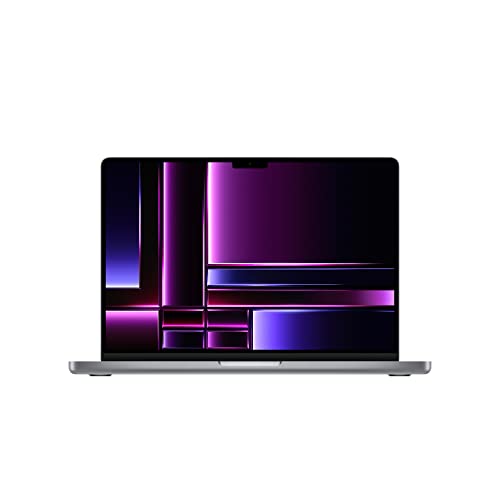



Apple MacBook Pro 14 at a Glance

| Attribute | Detail |
|---|---|
| Processor | Apple M2 Pro chip (10-core CPU with 6 performance cores and 4 efficiency cores) |
| Graphics | Apple 16-core integrated GPU |
| Unified Memory | 16GB |
| Storage Capacity | 512GB SSD |
| Display | 14.2-inch Liquid Retina XDR display with Extreme Dynamic Range |
| Screen Brightness | Over 1000 nits sustained for HDR content |
| Battery Life | Up to 18 hours |
| Physical Ports | 3x Thunderbolt 4, HDMI, SDXC card slot, MagSafe 3, 3.5mm headphone jack |
| Wireless Connectivity | Wi-Fi 6E (802.11ax) and Bluetooth 5.3 |
| Weight and Dimensions | 3.52 pounds; 12.31 x 8.71 x 0.61 inches |
Processing Power and Unified Memory Performance
At the heart of this machine sits the M2 Pro system-on-chip, engineered with a 10-core central processing unit and a 16-core graphics processing unit. In everyday studio work, this architecture handles complex multi-layered photo editing, software compilation, and digital illustration without breaking a sweat. Apple’s integration of the memory directly beside the compute cores ensures that the 16GB of unified memory operates with immense bandwidth, allowing both the CPU and GPU to access active assets simultaneously without copying data between separate pools. While earlier generations like the macbook pro m1 14 inch 16gb laid the groundwork for Apple silicon efficiency, the macbook pro 14 m2 pro architecture introduces higher graphics throughput and refined media engines that accelerate demanding codecs.
Application compatibility is thorough and stable across professional software suites. The machine natively accelerates tools like Adobe Creative Cloud, Xcode, Affinity Designer, and Microsoft 365, ensuring that tool responsiveness remains smooth even when multiple resource-heavy platforms run concurrently. For developers running containerized environments or digital artists rendering complex vector work, the 16GB memory footprint delivers reliable responsiveness, though running extreme virtual machine setups alongside complex rendering pipelines may eventually test the upper boundary of available RAM. For those tracking long-term flagship trends against extreme powerhouses like an apple macbook pro m5 max 128gb ram, this M2 Pro configuration strikes a far more accessible balance for day-to-day creative execution.
The 512GB Storage Reality for Creative Workflows
Evaluating the base storage tier requires an objective look at modern digital file sizes. The macbook pro 14 16gb 512gb configuration presents an entry-level capacity that provides adequate space for the operating system, a full deployment of professional applications, and active ongoing client projects. However, the macOS installation, system caches, application binaries, and temporary render scratch files will naturally occupy a noticeable portion of that 512GB drive right out of the box. Users who maintain disciplined file archiving habits will find the capacity functional, but those who store years of high-resolution RAW photo archives or large sample libraries directly on their primary drive will experience capacity pressure relatively quickly.
When considering the macbook pro 14 512gb storage speed, technical architecture plays an important role. The base solid-state drive in this configuration utilizes a high-speed interface that handles rapid application loading, instant system boot times, and smooth real-time timeline playback. However, because modern SSD configurations distribute data channels across memory chips, the base 512GB tier may display different raw benchmark transfer speeds compared to higher-capacity configurations that utilize more physical NAND chips in parallel. In practical scenarios involving daily creative workloads, asset retrieval remains exceptionally fast, ensuring that operating system operations and app responsiveness never feel sluggish.
For video producers evaluating the macbook pro 14 512gb for video editing, disk management strategy is paramount. The dedicated hardware media engine handles 4K ProRes and H.264 streams effortlessly, allowing real-time timeline scrubbing without dropped frames. Nevertheless, raw video captures consume disk space at a rapid rate. Editors cutting multi-camera projects or high-bitrate documentary footage on this machine will almost certainly want to pair the onboard SSD with external Thunderbolt solid-state drives or high-capacity network storage, using the internal drive primarily for the active operating system, software, and current timeline caches.
Liquid Retina XDR Display and Audio Engineering
The visual centerpiece of the chassis is the 14.2-inch Liquid Retina XDR display, which delivers Extreme Dynamic Range and sustained brightness exceeding 1000 nits for HDR mastering. Featuring an anti-glare coating and calibrated pro reference modes, the screen allows colorists, photographers, and video editors to grade visual assets with dependable accuracy directly on location. The contrast ratios ensure deep blacks and vivid highlight details, eliminating the immediate necessity of carrying a secondary grading monitor for remote shoots. Whether working under bright studio illumination or variable outdoor conditions, the visual output remains legible and uniform across the panel.
Complementing the display is a robust integrated multimedia setup built into the aluminum chassis. The machine houses a studio-quality three-microphone array that suppresses ambient background noise for clear vocal capture during production meetings or voiceover scratch tracks. Audio reproduction is managed by a high-fidelity six-speaker sound system featuring force-cancelling woofers and support for Spatial Audio. For communications, the 1080p FaceTime HD camera provides crisp video capture, processing exposure and white balance effectively to keep video calls professional without auxiliary webcams.
Connectivity, Port Selection, and Hardware Design
One of the strongest practical benefits of this platform is the macbook pro 14 ports ecosystem. Apple equips the chassis with a dedicated MagSafe 3 charging port, an HDMI output for external monitors, a full-sized SDXC card slot, and a 3.5mm headphone jack with advanced support for high-impedance headphones. In addition, three Thunderbolt 4 ports provide high-bandwidth connectivity for docking solutions, external SSD arrays, and high-resolution external displays. Photographers and videographers can offload footage directly from SD cards without needing an external dongle, significantly streamlining mobile workflows.
The physical construction reinforces its professional identity. Built from a durable all-aluminum unibody enclosure finished in Space Gray, the laptop weighs 3.52 pounds and measures 0.61 inches in thickness. The Magic Keyboard incorporates a full-height function key row, replacing digital touch interfaces with tactile mechanical scissor switches that offer consistent travel and comfort during extended typing sessions. Integrated into the top-right corner of the keyboard deck is a fast Touch ID sensor, allowing instantaneous biometric unlocking, system authentication, and secure administrative approvals.
Battery Endurance and Portable Mobility
Power efficiency remains a defining trait of Apple’s silicon architecture. The macbook pro 14 battery life is rated for up to 18 hours of continuous operation on a single charge of its integrated lithium-ion battery. More importantly, the system maintains consistent processing performance whether operating connected to wall power or running purely on battery reserves. Unlike traditional workstation laptops that throttle GPU and CPU clock speeds when disconnected from an AC outlet, this laptop renders, exports, and compiles code with identical speed on the go.
Wireless networking standards are current, featuring Wi-Fi 6E (802.11ax) for high-bandwidth local area connections and Bluetooth 5.3 for reliable peripheral pairing. For creators considering ultra-lightweight alternatives, a machine such as the apple – macbook air 13-inch laptop – apple m4 chip built for apple intelligence – 16gb memory – 512g prioritizes a fanless, slimmer design, but sacrifices the active dual-fan thermal cooling system, multi-display external outputs, and extra physical ports built into this 14-inch Pro enclosure.
Apple MacBook Pro 14 Pros and Cons
Pros
- Responsive 10-core CPU and 16-core GPU
- 2-inch Liquid Retina XDR display
- Over 1000 nits sustained HDR brightness
- Up to 18 hours of battery life
- Generous port selection with SDXC and HDMI
- Durable all-aluminum unibody enclosure
Cons
- 512GB internal capacity fills quickly with raw media
- Unified memory cannot be upgraded after purchase
Check Apple MacBook Pro 14 on Amazon
Who Should Buy the Apple MacBook Pro 14
Buy It If
- You need workstation-grade computational and graphical power in a rugged, portable aluminum chassis.
- Your visual work demands a color-accurate Liquid Retina XDR screen with over 1000 nits of HDR brightness.
- You frequently use physical media connections like direct SDXC card reading, HDMI, and multiple Thunderbolt accessories.
- You work away from desk power for long stretches and need sustained processing speed on battery reserves.
Skip It If
- You require terabytes of internal storage for massive offline media libraries and dislike carrying external portable drives.
- Your daily tasks consist entirely of casual web browsing, email correspondence, and lightweight document editing.
- You require a Windows-native operating environment for proprietary software or legacy x86 engineering tools.
Apple MacBook Pro 14 Alternatives Worth a Look
If your budget, operating system preferences, or performance requirements point away from a high-end macOS workstation, several entry-level Windows portable computers offer alternative configurations for daily productivity.
2026-2027 edition

The 2026-2027 edition is an HP 14-inch laptop featuring an Intel N150 processor, 4GB of DDR5 RAM, 128GB of local SSD storage, and 1TB of cloud storage running Windows 11 with Microsoft 365. This machine is built strictly for entry-level document work and online tasks, making it a budget-conscious selection for students who do not require professional creative software or high-end rendering power.
Supports 1TB TF Card Expansion

The Supports 1TB TF Card Expansion notebook is a gray 15.6-inch laptop powered by an Intel N4020 processor, 4GB of DDR4 memory, and 128GB of eMMC storage running Windows 11. It features a Full HD LCD display and supports storage expansion via a 1TB TF card, serving home-office users who prioritize a larger screen and expandable low-cost storage over high-speed hardware processing.
Copilot AI

The Copilot AI laptop is a natural silver HP 2026 essential model equipped with an Intel processor, 128GB of storage, an LED display, Windows 11, and bundled Microsoft Office 365 access with 1TB of cloud storage. Users needing a lightweight Windows notebook for essential cloud-centric office tasks and basic automated productivity tools may prefer this alternative over a dedicated creative workstation.
Final Verdict
Determining whether the macbook pro 14 512gb review verdict lands in your favor ultimately hinges on how you handle digital assets. From a raw engineering perspective, the M2 Pro chip, 16GB of unified memory, brilliant Liquid Retina XDR screen, and expansive port selection deliver a best-in-class mobile workstation experience. The keyboard is comfortable, the acoustic design is unmatched in this footprint, and the build quality guarantees exceptional long-term physical resilience.
So, is macbook pro 14 512gb worth it for your specific creative career? If your primary workloads center on software engineering, visual design, photography, or moderate video production where large project archives can comfortably live on high-speed external drives, this machine provides phenomenal performance without demanding extra expenditures for unneeded internal capacity. It remains an outstanding, reliable production workhorse that satisfies the vast majority of demanding creative tasks.
FAQ
Is 512GB enough storage on the MacBook Pro 14 for professional use?
A 512GB solid-state drive is sufficient for operating system files, core application suites, and several active working projects. However, creative professionals dealing with extensive raw 4K video footage or massive sample libraries will need to utilize external Thunderbolt storage or network drives to keep internal disk space free.
What are the primary macbook pro 14 512gb specs for this base configuration?
The configuration includes an Apple M2 Pro chip with a 10-core CPU and a 16-core GPU, 16GB of unified memory, a 512GB SSD, a 14.2-inch Liquid Retina XDR display, up to 18 hours of battery life, and comprehensive physical connectivity including HDMI, SDXC, and three Thunderbolt 4 ports.
Can I edit 4K video smoothly on this 14-inch MacBook Pro?
Yes, the M2 Pro chip incorporates dedicated hardware-accelerated media engines for ProRes, H.264, and HEVC codecs, allowing seamless playback and multi-stream 4K editing without dropped frames. Using external solid-state storage for raw footage is advised to prevent filling the internal 512GB drive.
Does this model include physical function keys or a digital display strip?
The Apple MacBook Pro 14 features a Magic Keyboard with a full-height row of physical tactile function keys alongside an integrated Touch ID sensor, completely omitting the digital touch bar interface seen on older hardware generations.
How does the battery perform when unplugged during intense tasks?
The laptop delivers up to 18 hours of battery endurance under standard usage conditions. Due to the high efficiency of the M2 Pro system-on-chip, the machine maintains full computational and graphical speed on battery power without throttling performance.


