As Amazon Associates, we earn from qualifying purchases. This means we may receive a small commission at no extra cost to you if you click through and make a purchase.
The Intel Core i7-14700KF represents a major performance step in modern desktop computing, combining twenty processing cores with high turbo clock speeds designed to power demanding modern workloads. As an unlocked desktop processor built without integrated graphics, it delivers heavy multi-threaded horsepower for gaming, streaming, and creative production at a level that bridges the gap between mainstream gaming rigs and high-end workstations. For PC builders looking to assemble a powerful desktop equipped with a dedicated graphics card, this processor offers an exceptional balance of single-thread responsiveness and raw multi-threaded throughput.
This chip is tailored for PC enthusiasts, competitive gamers, and creative professionals who already plan on installing a discrete graphics card and want dependable high-speed performance across heavy desktop applications. It gives users the flexibility to transition between memory standards while maximizing compute efficiency across high-end productivity programs and modern video games. On the other hand, builders putting together low-profile office setups, budget builds with minimal cooling, or systems that rely entirely on onboard display outputs will want to look elsewhere, as this chip requires a dedicated GPU and robust thermal planning to perform at its best.
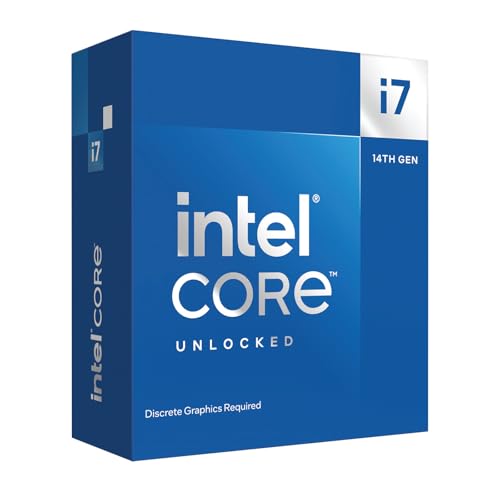
Intel Core i7-14700KF at a Glance

| Feature | Specification |
|---|---|
| Processor Model | Intel Core i7-14700KF (BX8071514700KF) |
| Total Core Count | 20 Cores (8 Performance-cores and 12 Efficient-cores) |
| Total Thread Count | 28 Threads |
| Maximum Turbo Frequency | Up to 5.6 GHz with Turbo Boost Max Technology 3.0 |
| Processor Base Power | 125 Watts |
| Secondary Cache | 33 MB |
| Socket Compatibility | LGA 1700 |
| Motherboard Chipset Support | Intel 600 Series (with BIOS update) and 700 Series |
| Memory Architecture Support | DDR4 and DDR5 |
| Integrated Graphics | None (Discrete graphics card required) |
Core Architecture and Multitasking Efficiency
A primary highlight when reviewing the intel i7 14700kf specs is the hybrid architectural configuration. The processor features twenty physical cores, arranged as eight high-powered Performance-cores (P-cores) and twelve background-focused Efficient-cores (E-cores). This core distribution creates a massive processing pool of 28 threads, enabling the chip to handle intensive foreground processes like complex physics simulations or real-time gameplay while delegating operating system services and streaming utilities to the secondary cores. When running on Windows 11, the underlying thread allocation works seamlessly to make sure demanding software remains fluid without micro-stutters caused by background tasks.
Compared to previous generations or mid-range alternatives like the intel core i5 12400f, the additional cluster of Efficient-cores noticeably enhances productivity and heavily multi-threaded workloads. Video transcoding, multi-track audio production, code compilation, and 3D asset rendering take full advantage of the twelve E-cores, letting them chew through long processing queues without bogging down everyday responsiveness. The combination of 8 P-cores and 12 E-cores gives users a workstation-caliber execution pipeline that prevents system lag during heavy multitasking sessions.
The architecture also benefits from a generous 33 MB secondary cache, which reduces latency by keeping critical data closer to the execution units. This cache buffer allows the processor to maintain consistent instruction pipelines, preventing starvation during prolonged workloads. Whether you are toggling between heavy productivity suites or managing multiple virtual environments, the core layout delivers stable and predictable computational muscle across every thread.
Gaming Responsiveness and Clock Speeds
When assessing real-world i7 14700kf gaming performance, single-core clock speeds play a decisive role alongside raw core count. This processor reaches up to 5.6 GHz using Intel Turbo Boost Max Technology 3.0, delivering the clock frequencies needed to sustain high frame rates in fast-paced competitive esports and sprawling open-world titles alike. Games that rely heavily on primary thread speed benefit directly from this aggressive boost clock, resulting in rapid frame delivery, low input latency, and consistent frame-time pacing during intense graphical sequences.
Running an intel core i7-14700kf benchmark suite reveals how well this high frequency translates into stable 1% low frame rates, especially in simulation-heavy games where physics calculations and complex non-player character logic can bog down lesser hardware. Modern titles that juggle background asset decompression and asset streaming simultaneously run smoothly here, as the supplementary E-cores shoulder background calculations while the primary P-cores focus completely on rendering the active gameplay scene. Gamers who compare this capability against specialized chips, such as those found in an amd ryzen 7 7800x3d bundle, will find that this processor offers an outstanding blend of sheer single-core speed coupled with massive raw thread capacity for mixed-use machines.
Furthermore, native support for PCIe 5.0 and PCIe 4.0 data lanes guarantees that your system is equipped to leverage current and upcoming generations of discrete graphics cards without bandwidth bottlenecks. High-bandwidth communication between the processor and the graphics card ensures rapid asset transfer from high-speed storage drives, cutting down scene transitions and preventing stuttering during demanding gaming sessions.
Motherboard Compatibility and Socket Lifespan
Understanding core i7 14700kf motherboard compatibility is critical for anyone planning an upgrade or a new PC build. The processor drops into the established i7 14700kf lga 1700 socket, offering comprehensive compatibility across both Intel 600-series and Intel 700-series motherboard platforms. For users who already own an Intel 600-series board, such as a Z690 or B660 model, this processor can be utilized following a simple motherboard BIOS update, extending the lifespan of an existing platform without requiring a costly motherboard replacement.
For builders assembling a system from the ground up, pairing the processor with an Intel 700-series motherboard, such as a Z790 board, offers out-of-the-box readiness along with enhanced platform connectivity. The processor comes unlocked, allowing builders with compatible motherboards to fine-tune operational parameters, adjust voltage curves, and explore performance headroom. The inclusion of PCIe 5.0 lanes on supported motherboards also provides future-proof pathway support for the fastest graphics cards and solid-state storage solutions.
Here are key motherboard factors to keep in mind before building:
- Intel 700-series motherboards support the processor natively without requiring a preliminary BIOS update.
- Intel 600-series motherboards require a BIOS update to recognize the 14th Gen processor properly.
- Motherboard power delivery systems should feature robust heatsinks and quality voltage regulator modules to sustain boost frequencies reliably.
- LGA 1700 socket mounting hardware is mandatory for whatever aftermarket cooler you select.
Memory Flexibility: DDR4 vs DDR5
One of the most practical advantages of this platform is the comprehensive i7 14700kf ddr4 vs ddr5 flexibility. Unlike newer hardware platforms that lock builders strictly into newer memory architectures, the integrated memory controller on this processor supports both established DDR4 memory and faster DDR5 modules. This dual-generation support empowers builders to tailor their memory choices around existing components or overall system goals.
Opting for a DDR4 configuration enables builders to carry over existing memory kits from older desktop machines, significantly reducing total upgrade friction while still accessing the raw multi-core speed of a 20-core processor. While DDR4 memory operates at lower peak bandwidth than DDR5, it provides reliable stability, lower access latencies, and dependable day-to-day performance for gaming and office workflows.
Conversely, choosing a DDR5 motherboard unleashes the full memory bandwidth potential of the platform. Higher data transfer speeds help reduce load times when opening massive video editing projects, streaming high-resolution textures in modern games, or executing extensive database queries. The extra bandwidth offered by DDR5 maximizes the efficiency of the 28 execution threads, preventing data queues from stalling during multi-app workloads.
Power Consumption, Thermals, and Cooler Demands
Managing i7 14700kf power consumption is a vital consideration when designing your desktop build. With a 125 watts Processor Base Power, this unlocked desktop chip demands a capable power supply and disciplined cooling configuration. When the processor engages its Turbo Boost Max Technology 3.0 to push all Performance-cores toward their upper frequency limits, power draw naturally climbs beyond the base baseline. Builders should ensure their chosen power supply provides ample overhead to support both the CPU under full load and a high-performance discrete graphics card.
Because of this power envelope, realistic i7 14700kf cooler requirements lean toward high-efficiency aftermarket thermal solutions. The processor does not come with a stock cooler in the box, meaning you must source your own cooling hardware. Reliable dual-tower air coolers, such as the phantom spirit 120 evo, or large all-in-one liquid cooling loops are strongly recommended to maintain low operating temperatures and prevent thermal throttling during sustained rendering runs or long gaming sessions.
Another major consideration is the i7 14700kf integrated graphics situation. The “KF” designation denotes an unlocked processor that completely lacks integrated processor graphics. Because there are no built-in video display outputs on the chip, the system will not transmit a video signal to a monitor on its own; a discrete graphics card is strictly required for display output and everyday operation.
Intel Core i7-14700KF Pros and Cons
Pros
- Twenty total cores deliver exceptional multi-threaded performance
- High clock speeds reaching up to 5.6 GHz
- Flexible support for both DDR4 and DDR5 memory
- Compatible with Intel 600 and 700 series motherboards
- Twenty-eight threads handle background rendering and streaming smoothly
Cons
- Requires a separate discrete graphics card for video display
- Demands a substantial aftermarket cooler to manage thermal output
- Does not include a stock cooling fan in the box
Check Intel Core i7-14700KF on Amazon
Who Should Buy the Intel Core i7-14700KF
Buy It If
- You already own or plan to purchase a powerful discrete graphics card for gaming or content creation.
- You need twenty total cores and twenty-eight threads to handle video editing, 3D rendering, or heavy multitasking.
- You want high single-core speeds up to 5.6 GHz to achieve maximum frame rates in modern games.
- You want the flexibility to use either DDR4 or DDR5 memory on an existing or new LGA 1700 motherboard.
Skip It If
- You need a processor with built-in integrated graphics for a simple display setup without an extra graphics card.
- You are building a compact or low-power PC that cannot accommodate a substantial aftermarket CPU cooler.
- You only run basic office productivity tools, web browsing, and simple tasks that do not benefit from 20 cores.
Final Verdict
When deciding whether is the i7 14700kf worth it, the answer depends entirely on your system goals and component choices. By offering twenty cores, twenty-eight threads, and boost frequencies climbing up to 5.6 GHz, this processor represents a formidable desktop powerhouse. Its hybrid architecture strikes a brilliant balance between lightning-fast single-threaded gaming performance and the brute-force parallel processing needed for video rendering and multi-application workflows. The freedom to select either DDR4 or DDR5 memory configurations, along with broad compatibility across Intel 600 and 700-series motherboards, makes it one of the most versatile upgrade options on the LGA 1700 socket.
However, builders must respect its operational requirements before finalizing their purchase. The lack of integrated graphics means a dedicated graphics card is non-negotiable, and its 125-watt base power rating demands serious aftermarket cooling to keep thermal performance within optimal operating limits. If you have the cooling capacity and a discrete graphics card ready to go, this unlocked processor offers top-tier processing power that will easily handle modern gaming and heavy creative workloads for years to come.
FAQ
Does the Intel Core i7-14700KF have integrated graphics?
No, the Intel Core i7-14700KF does not feature integrated processor graphics. The “F” designation indicates that discrete graphics are required, meaning you must install a separate dedicated graphics card in your system to output video to a display.
What socket does the Intel Core i7-14700KF require?
The processor uses the LGA 1700 socket. It is compatible with both Intel 700-series motherboards natively and Intel 600-series motherboards with a potential BIOS update.
Can you use DDR4 RAM with the Intel Core i7-14700KF?
Yes, the processor features memory controller support for both DDR4 and DDR5 memory standards. Your memory type will depend on the specific motherboard model you choose, as motherboards are designed specifically for either DDR4 or DDR5 slots.
Do you need a new motherboard for the Intel Core i7-14700KF?
You do not necessarily need a new motherboard if you already own an Intel 600-series or 700-series board with an LGA 1700 socket. While 700-series motherboards support it natively, 600-series boards simply require a BIOS update before the processor can be used.
Does the Intel Core i7-14700KF include a stock CPU cooler?
No, the processor does not include a cooling fan or heatsink in the retail box. Because it features a 125W base power rating and reaches high boost clocks, you will need to purchase a compatible aftermarket air cooler or liquid cooling solution that supports the LGA 1700 socket.