As Amazon Associates, we earn from qualifying purchases. This means we may receive a small commission at no extra cost to you if you click through and make a purchase.
As an Amazon Associate we earn from qualifying purchases. Links on this page are affiliate links.
Finding the best iBUYPOWER prebuilt gaming PCs with Intel Core i7 comes down to matching processing power with dedicated graphics. This guide compares 2 desktop configurations using only the specifications published on their listings.
The iBUYPOWER Element RTX 5070 Gaming Desktop leads the list because it pairs an Intel Core i7 processor with GeForce RTX 5070 graphics and 32GB of DDR5 memory. Use these hardware specs to decide which desktop fits your gaming and multitasking requirements.
Graphics card choice separates these builds
Both desktops include 32GB of DDR5 memory, a 1TB SSD, Windows 11 Home, and Intel Core i7 processing. Your choice depends on the graphics card. The Element RTX 5070 provides a GeForce RTX 5070 for heavier graphics demands, while the Slate Mesh RTX 4060 supplies an RTX 4060 for 1080p gaming.
| # | Product | Best for | Price |
|---|---|---|---|
| 1 | iBUYPOWER Element RTX 5070 Gaming Desktop Best overall | DDR5 gaming with 12GB RTX 5070 graphics | |
| 2 | iBUYPOWER Slate Mesh i7-14700F RTX 4060 PC Best rtx 4060 | 1080p gaming with high-capacity DDR5 memory |
The best fit for you
- You want RTX 5070 graphics. – iBUYPOWER Element RTX 5070 Gaming Desktop – It features a GeForce RTX 5070 graphics card and 32GB of DDR5 memory.
- You focus on 1080p gaming. – iBUYPOWER Slate Mesh i7-14700F RTX 4060 PC – This PC provides an RTX 4060 graphics card and 32GB of DDR5 RAM.
- You want a shorter case. – iBUYPOWER Element RTX 5070 Gaming Desktop – Its chassis height is 17.4 inches rather than 19.4 inches.

iBUYPOWER Element RTX 5070 Gaming Desktop
Best for: DDR5 gaming with 12GB RTX 5070 graphics
- Processor
- Intel Core i7
- Graphics Card
- NVIDIA GeForce RTX 5070 12GB
- RAM Capacity
- 32GB
- Storage Capacity
- 1TB
- Memory Type
- DDR5
- Storage Type
- NVMe SSD
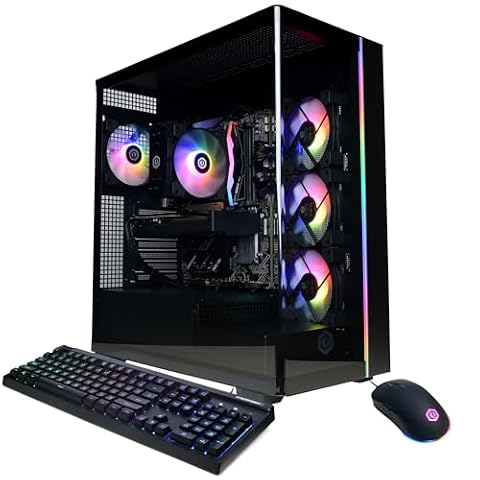
This iBUYPOWER desktop pairs an Intel Core i7 14700F processor with an NVIDIA GeForce RTX 5070 12GB graphics card and 32GB of DDR5 memory. It includes a 1TB NVMe solid-state drive for storage and connects via 802.11ac Wi-Fi or gigabit Ethernet. You get a tempered glass case with RGB lighting and bundled peripherals.
- NVIDIA GeForce RTX 5070 graphics card with 12GB dedicated memory
- 32GB DDR5 4800MHz system RAM in dual-channel configuration
- Intel Core i7 14700F processor
- Included USB gaming keyboard and RGB mouse
- Wi-Fi standard is older 802.11ac rather than Wi-Fi 6
- Heavy 36-pound chassis footprint
- Data lists no Bluetooth connectivity
- You need an Intel Core i7 14700F paired with 32GB of DDR5 memory.
- You want a dedicated 12GB GeForce RTX 5070 graphics card ready out of the box.
- You need faster native Wi-Fi 6 wireless networking.
- You want a lightweight chassis that is easy to move.
Verdict: iBUYPOWER Element RTX 5070 i7 Gaming PC suits players who want 14th-generation Intel processing and 32GB of DDR5 memory in a full-size tower. It covers dedicated graphics demands while supplying included desktop accessories.

iBUYPOWER Slate Mesh i7-14700F RTX 4060 PC
Best for: 1080p gaming with high-capacity DDR5 memory
- Processor
- Intel Core i7
- Graphics Card
- NVIDIA GeForce RTX 4060 8GB
- RAM Capacity
- 32GB
- Storage Capacity
- 1TB
- Memory Type
- DDR5
- Storage Type
- NVMe SSD
This desktop pairs an Intel Core i7 14700F processor with an 8GB NVIDIA GeForce RTX 4060 graphics card and 32GB of DDR5 RAM. A 1TB NVMe solid-state drive handles storage and system boots. It suits you if you need modern multi-core computing power and dedicated graphics for 1080p gaming inside a ventilated mesh chassis.
- Intel Core i7 14700F processor paired with 32GB DDR5 5200MHz RAM
- 1TB NVMe SSD for fast local storage
- Includes wired gaming keyboard and mouse
- Six USB 3.1 ports for accessory connectivity
- Uses older 802.11ac Wi-Fi instead of Wi-Fi 6
- Heavy chassis weighing 36 pounds
- No USB-C ports listed in the specifications
- You want 32GB of DDR5 memory ready out of the box.
- You need an Intel Core i7 14700F for demanding multi-threaded workloads.
- You prefer a desktop bundled with a keyboard and mouse.
- You require modern Wi-Fi 6 wireless connectivity.
- You need a lightweight computer case that is easy to relocate.
Verdict: iBUYPOWER Slate MESH RTX 4060 Gaming PC gives you an Intel Core i7 14700F CPU and 32GB of DDR5 memory for reliable 1080p gaming. It fits users who want a high-memory prebuilt desktop ready for multi-threaded tasks and esports.
Specifications side by side
| Spec | iBUYPOWER Element RTX 5070 Gaming Desktop | iBUYPOWER Slate Mesh i7-14700F RTX 4060 PC |
|---|---|---|
| Graphics Card | NVIDIA GeForce RTX 5070 12GB | NVIDIA GeForce RTX 4060 8GB |
| Processor | Intel Core i7 14700F | Intel Core i7 14700F |
| RAM Capacity | 32GB | 32GB |
| Storage Capacity | 1TB | 1TB |
| Memory Type | DDR5 | DDR5 |
| Storage Type | NVMe SSD | NVMe SSD |
| Operating System | Windows 11 Home | Windows 11 Home |
| Memory | 32GB RAM | 32GB RAM |
| Use | Home | Home |
| Dimensions | 20 × 9.1 × 17.4 inches | 20.1 × 8.66 × 19.4 inches |
| Weight | 36 pounds | 36 pounds |
| Color | Black | Black |
| Model | EBI7N5704 | SMI7N4601 |
How to Choose an iBUYPOWER Gaming PC
Assess Target Display Resolution
Your monitor setup dictates the graphics card tier you need. If you play at 1080p, an entry or mid-tier card handles modern frame rates reliably. When you move to higher resolutions or demand advanced ray tracing, you need higher graphics tiers and larger video memory. The iBUYPOWER Element RTX 5070 Gaming Desktop provides a GeForce RTX 5070 card with 12GB of video memory, which gives you more headroom for demanding textures.
Check the Processor Model
Look beyond the Intel Core i7 family label to check the exact generation and model suffix. A 14th-generation chip delivers modern multi-threaded execution for background apps, streaming, and editing alongside gaming. The iBUYPOWER Slate Mesh i7-14700F RTX 4060 PC lists the specific Intel Core i7-14700F processor. This tells you the desktop uses a 14th-generation CPU, while the F suffix indicates that the processor requires a dedicated graphics card for video output.
Measure Desktop Clearance Space
Case dimensions affect where you place the tower in your workspace. Full-size desktop towers need enough open room above and around them to maintain proper airflow. Check the published height, width, and length before choosing a spot under or on your desk. For example, a chassis standing 19.4 inches tall requires more vertical overhead clearance than a 17.4-inch case, while both models share a deep footprint extending over 20 inches.
Evaluate Storage Drive Capacity
Modern games install large asset packages that take up substantial drive space. A solid-state drive speeds up operating system boot times and reduces game level loading screens compared to mechanical storage. Check that the built-in SSD matches your library size so you avoid immediately running out of space. A 1TB solid-state drive holds your operating system alongside several modern game installations, leaving enough remaining capacity for regular file downloads and software updates.
Confirm RAM Capacity and Generation
System memory impacts how smoothly your computer handles background applications while running demanding software. Look closely at both the total gigabytes and the memory generation. DDR5 memory offers higher bandwidth and speed than previous DDR4 standards, aiding data flow to the processor. A capacity of 32GB gives you plenty of headroom for heavy multitasking, web browser tabs, and gaming without forcing your system to swap active memory data to the solid-state storage.
Frequently asked questions
What type of memory do these iBUYPOWER Intel Core i7 prebuilt desktops use?
Both featured builds come equipped with 32GB of DDR5 memory. This generation of system memory delivers faster transfer rates than older DDR4 standards. Having 32GB ensures you can run modern game titles and manage background tasks without memory constraints.
Which operating system comes pre-installed on these iBUYPOWER gaming towers?
Each system ships with Windows 11 Home pre-installed. You can set up the desktop right away without purchasing or installing separate system software. This operating system supports direct storage access and modern PC gaming features out of the box for home use.
How much storage space do these iBUYPOWER Intel Core i7 systems provide?
You receive a 1TB solid-state drive with each configuration. A solid-state drive provides quick boot times and fast file access compared to mechanical hard drives. This capacity allows you to store your operating system and multiple large game installations at once.
Which Intel Core i7 processors are installed in these desktop models?
The Slate Mesh uses an Intel Core i7 14700F processor, while the Element model features a 14th-generation Intel Core i7 CPU. These multi-core processors deliver the dedicated computational performance required for intensive games, background multitasking, and demanding desktop workloads.
How large are these iBUYPOWER prebuilt desktop cases?
Both towers share a similar desktop footprint and weigh 36 pounds each. The Element model measures 9.1 inches wide, 17.4 inches tall, and 20 inches long. In comparison, the Slate Mesh case measures 8.66 inches wide, 19.4 inches tall, and 20.1 inches long.
Do these iBUYPOWER prebuilt gaming PCs include accessories in the box?
The iBUYPOWER Element RTX 5070 configuration explicitly supplies included desktop accessories with the tower. You can verify your setup space knowing the system arrives ready for home use. The Slate Mesh model focuses its published specifications on the core internal hardware.