
As Amazon Associates, we earn from qualifying purchases. This means we may receive a small commission at no extra cost to you if you click through and make a purchase.
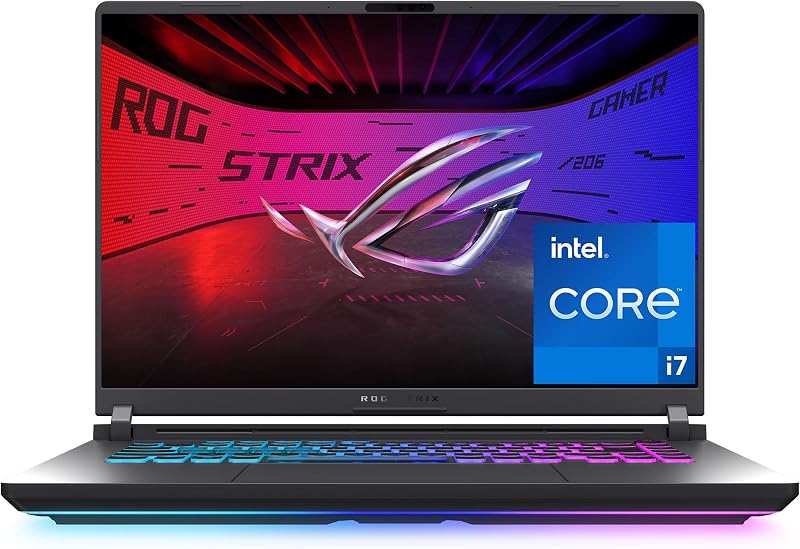
The 2025 refresh of the laptop asus rog strix series brings a dedicated focus on sustained graphics performance and aggressive thermal regulation. The ASUS ROG Strix G16 pairs Intel’s 14th-generation processing architecture with NVIDIA’s RTX 50-series mobile graphics, creating an esports-ready platform designed for demanding modern games. Based on listing specifications and architectural details, this notebook is engineered to avoid the thermal throttling that often hampers compact gaming laptops, delivering desktop-class gaming stability in a clamshell format.
This notebook suits competitive gamers who demand consistent frame pacing on a high-refresh panel without worrying about internal thermal degradation over long sessions. It also accommodates power users who value tool-free internal access to expand their memory and storage over time. However, frequent travelers and students needing an everyday portable companion should look elsewhere, as the substantial 2.65-kilogram chassis and gaming-first profile make lap use and mobile transport cumbersome.


ASUS ROG Strix G16 at a Glance
| Feature | Specification |
|---|---|
| Processor | Intel Core i7-14650HX |
| Graphics | NVIDIA GeForce RTX 5060 (8GB DDR5) |
| Display | 16-inch FHD+ 16:10, 165Hz, 3ms, ACR film |
| Memory | 16GB DDR5-5600MHz |
| Storage | 1TB PCIe Gen 4 SSD |
| Cooling | ROG Intelligent Cooling, Vapor Chamber, Tri-Fan |
| Networking | Wi-Fi 7 |
| Weight | 2.65 kg (5.84 lbs) |
| Operating System | Windows 11 Home |
Cooling Architecture and Fan Acoustics
Sustained thermal management forms the backbone of any gaming notebook, and the rog strix g16 cooling performance relies on an unusually extensive internal setup. Rather than depending strictly on standard copper heatpipes, this chassis incorporates an end-to-end vapor chamber paired with Conductonaut Extreme liquid metal applied to the chipset. The vapor chamber disperses heat laterally across a sealed, liquid-filled plane, spreading thermal energy away from localized hotspots so the Intel Core i7-14650HX processor and dedicated graphics card can operate without premature throttling.
Airflow is handled by a specialized tri-fan setup rather than the traditional dual-fan configuration. The third auxiliary fan routes cool intake air directly across the GPU and power delivery components, pushing warm air out through perimeter exhaust vents. In high-wattage gaming systems, such as the larger asus scar 18, efficient airflow design is essential for maintaining component health. On this 16-inch chassis, the three-fan array regulates internal case pressure to prevent excessive heat buildup near the keyboard deck during extended multiplayer sessions.
Acoustic performance is equally important when evaluating rog strix g16 fan noise during daily routines. Under light productivity tasks or video streaming, the thermal system maintains modest fan speeds, keeping background acoustics unobtrusive. When intensive 3D titles place heavy simultaneous demands on both processors, the three fans spin up aggressively to exhaust thermal loads. This audible airflow represents a practical trade-off: noticeable fan noise under peak stress in exchange for stable clock rates and protected internal components.
Processing Speed and Core Gaming Hardware
Examining the asus rog strix specs reveals an engine built from Intel’s Core i7-14650HX processor and an 8GB NVIDIA GeForce RTX 5060 Laptop GPU. The 14650HX processor handles multi-threaded computing, game logic, and background software without bottlenecking graphical output. Paired with 16GB of rapid DDR5-5600MHz memory, the system provides responsive multitasking and swift open-world asset streaming.
From an asus rog strix rtx 5060 review perspective, the graphics processor benefits from NVIDIA’s Blackwell architecture, incorporating DLSS 4 neural rendering and Max-Q efficiency technologies. These advancements allow players to utilize frame generation to boost visual fluidity in demanding titles. While enthusiasts seeking maximum graphics headroom might explore alternatives like the asus rog 5070 ti, the RTX 5060 configuration delivers a reliable balance of high-definition rendering and efficient power usage. The laptop also includes three months of PC Game Pass, granting immediate access to an extensive gaming library.
For competitive multiplayer games, the hardware synchronization provides rock-solid framerate delivery. Deploying the asus rog strix for competitive gaming ensures that high-tempo tactical shooters maintain smooth frame pacing during crowded firefights. Compared to older chassis platforms like the asus rog strix g17, this updated platform features modern memory architecture and refined GPU instructions that improve overall frame consistency.
Display Quality and Visual Clarity
Visual output is delivered via a 16-inch FHD+ panel sporting a modern 16:10 aspect ratio. This slightly taller screen ratio provides expanded vertical sightlines in games and extra usable space for desktop productivity compared to standard 16:9 widescreen formats. Central to the rog strix g16 display quality is its 165Hz refresh rate coupled with a 3-millisecond response time. This rapid pixel response minimizes ghosting and visual smearing during fast camera sweeps, enabling accurate target tracking in competitive matches.
The ROG Nebula Display also incorporates an Anti-Contrast Reduction (ACR) film. Ambient overhead lighting and nearby windows often wash out dark scenes on conventional anti-glare screens. The ACR film actively suppresses reflections while maintaining color contrast and deep shadow detail, making gameplay clear even in brightly lit environments.
Retaining an FHD+ resolution rather than jumping to QHD keeps graphics rendering overhead low. This allows the RTX 5060 GPU to push sustained framerates that match the 165Hz ceiling, delivering the fluid visual feedback competitive players prioritize.
Chassis Construction and Upgradeability
Finished in an Eclipse Gray coating, the laptop offers a structured gaming aesthetic. Evaluating the asus rog strix build quality shows a durable frame constructed to remain planted on a desktop. A full-surround 360-degree Aura RGB light bar runs along the chassis base, casting downward lighting across your desk surface. Players can synchronize these lighting effects with compatible ROG accessories, while those bringing the laptop to class or office environments can activate Stealth Mode to instantly turn off all exterior lighting.
Long-term maintenance is a significant advantage of this platform. The asus rog strix upgradeable ram ssd design features tool-free internal access to both memory slots and storage bays. Users can easily access the 16GB DDR5 memory and 1TB PCIe Gen 4 SSD without prying tools, making future capacity expansions simple as game install footprints grow.
However, the robust cooling hardware adds noticeable bulk. Weighing 2.65 kilograms and measuring 0.9 inches thick, this system prioritizes thermal performance over mobility. Those comparing it to ultra-slim designs like the zephyrus g16 5070ti will find that the Strix commits its weight to sustained cooling rather than lightweight travel convenience.
Audio, Connectivity, and Input Hardware
Input controls and external connectivity support a complete gaming battle station. The laptop features an esports-ready keyboard designed for rapid responsiveness during extended play sessions. On the audio side, integrated Dolby Atmos processing delivers multidimensional sound, improving directional sound awareness through headphones and connected speakers. The physical port selection includes HDMI video output for external displays, alongside compatibility with wired and wireless mice, headsets, and sound systems.
Networking is upgraded to the latest Wi-Fi 7 wireless standard. Compared to previous Wi-Fi protocols, Wi-Fi 7 offers wider channels and reduced latency when connected to compatible home networks. This minimizes latency spikes and packet loss during online multiplayer gaming, ensuring a stable connection even in crowded household Wi-Fi environments.
ASUS ROG Strix G16 Pros and Cons
Pros
- End-to-end vapor chamber with tri-fan cooling
- Fast 165Hz display with anti-glare ACR film
- Tool-free access for RAM and SSD upgrades
- Modern Wi-Fi 7 wireless connectivity
- 360-degree Aura RGB lightbar with Stealth Mode
Cons
- Heavy 2.65 kg chassis limits daily portability
- Audible fan noise under maximum gaming load
- FHD+ resolution rather than higher QHD panel
Check ASUS ROG Strix G16 on Amazon
Who Should Buy the ASUS ROG Strix G16
Selecting the right laptop requires matching hardware capabilities to your gaming habits. When considering is asus rog strix worth it, the answer centers on your preference for sustained cooling over portable convenience.
Buy It If
- You want advanced vapor chamber and tri-fan cooling that preserves high performance during marathon gaming sessions.
- You play fast-paced competitive esports titles that benefit from a 165Hz, 3ms display with glare-reducing ACR film.
- You value easy hardware maintenance and desire tool-free access to upgrade your DDR5 memory and PCIe Gen 4 storage.
- You need next-generation wireless performance through integrated Wi-Fi 7 networking.
Skip It If
- You need a lightweight laptop for daily commuting or classes, as the 2.65 kg chassis is heavy and thick.
- You require a native QHD or 4K resolution screen for high-density visual design or media production.
- You want whisper-quiet operation under heavy gaming loads without active fan acoustics.
ASUS ROG Strix G16 Alternatives Worth a Look
If this configuration does not perfectly match your requirements, other gaming laptops provide distinct trade-offs in screen refresh speed, factory memory, and chassis dimensions.
Acer Nitro V 16S AI
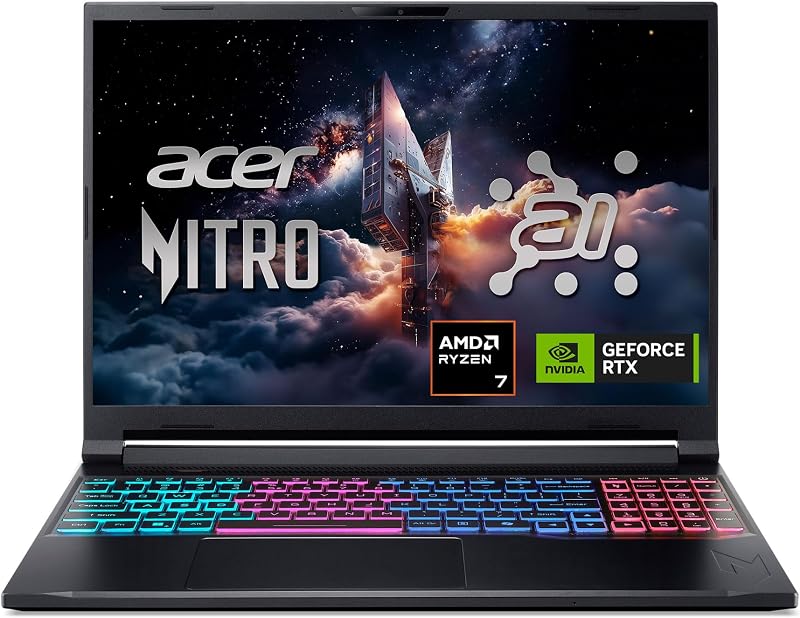
The Acer Nitro V 16S AI combines an AMD Ryzen 7 260 processor with an NVIDIA GeForce RTX 5060 Laptop GPU capable of 572 AI Tops. It comes equipped with 32GB of DDR5 memory, a 1TB Gen 4 SSD, Wi-Fi 6, and a 16-inch WUXGA IPS screen operating at a faster 180Hz refresh rate. Players who want twice the baseline system memory and a higher refresh rate right out of the box should examine this option.
msi Cyborg 17 17.3″ FHD

The msi Cyborg 17 17.3″ FHD features a larger 17.3-inch 144Hz display, an Intel Core 9-270H processor, and an RTX 5060 GPU wrapped in a translucent black chassis. It provides 2TB of total storage split between an internal 1TB SSD and a 1TB docking station set, along with WiFi 6E and a backlit keyboard. Gamers seeking an expansive display and dual-drive storage will appreciate this larger alternative.
KAIGERR Gaming Laptop

The KAIGERR Gaming Laptop features an AMD Ryzen 7430U processor running up to 4.3GHz, 16GB of DDR4 memory, a 512GB SSD, and a 1920P FHD display. It also includes everyday convenience features such as a sliding webcam privacy cover, Type-C connectivity, and USB 3.2 ports. Shoppers who need a general-purpose laptop for light computing rather than dedicated gaming hardware should consider this model.
Final Verdict
The ASUS ROG Strix G16 stands as a well-engineered gaming platform focused on thermal stability, sustained clock speeds, and practical upgradeability. Pairing an Intel Core i7-14650HX processor with an RTX 5060 GPU, an end-to-end vapor chamber, and tri-fan cooling, ASUS produced a machine capable of handling intensive game titles without thermal throttling. The 165Hz ROG Nebula Display with glare-reducing ACR film, paired with modern Wi-Fi 7 connectivity, ensures responsive competitive gameplay.
However, prospective buyers must accept the physical compromises of a performance-driven cooling design. At 2.65 kilograms, this laptop is meant to anchor a dedicated desk setup rather than travel frequently in a daypack. If you want a gaming system that prioritizes thermal control, smooth high-refresh visuals, and tool-free upgrade paths, this machine delivers dependable performance where it matters most.
FAQ
Can you upgrade the RAM and SSD on the ASUS ROG Strix G16?
Yes, the laptop features tool-free access to both internal RAM slots and the solid-state drive bay. It ships with 16GB of DDR5-5600MHz memory and a 1TB PCIe Gen 4 SSD, allowing users to upgrade components easily as storage needs expand.
How does the tri-fan cooling system manage heat and fan noise?
The cooling system combines an end-to-end vapor chamber, Conductonaut Extreme liquid metal on the chipset, and three fans. The third fan guides cool air across the GPU and power circuitry. The system operates quietly during basic computing, while the fans spin up under heavy gaming loads to exhaust heat efficiently.
What makes the ROG Strix G16 display suitable for competitive gaming?
The 16-inch FHD+ panel features a 165Hz refresh rate and a 3-millisecond response time that reduces motion blur during fast camera movements. Additionally, an Anti-Contrast Reduction (ACR) film minimizes glare from ambient lighting while preserving dark shadow detail.
Does the ROG Strix G16 support Wi-Fi 7?
Yes, the notebook includes built-in Wi-Fi 7 wireless networking, providing lower latency and wider bandwidth on compatible networks to reduce connection jitter during online gaming.
Can you turn off the RGB lighting for office or classroom settings?
Yes, the laptop includes a Stealth Mode feature that completely disables the 360-degree Aura RGB light bar and keyboard backlighting, giving the Eclipse Gray chassis a subtle, professional appearance.


