As Amazon Associates, we earn from qualifying purchases. This means we may receive a small commission at no extra cost to you if you click through and make a purchase.
As an Amazon Associate we earn from qualifying purchases. Links on this page are affiliate links.
When evaluating the skytech gaming skytech crystal ryzen 7 vs skytech azure rtx 5060 matchup, you find two desktops built on the same core platform. Both feature an AMD Ryzen 7 5700 processor, a 1TB NVMe SSD, and Windows 11 Home. The primary trade-off sits between system memory and graphics hardware. The Crystal includes 32GB DDR4 RAM paired with an RTX 5060. The Azure steps up to an RTX 5060 Ti but cuts memory to 16GB.
Graphics card
NVIDIA GeForce RTX 5060 8GB GDDR7
NVIDIA GeForce RTX 5060 Ti 8GB GDDR7
Memory
32GB DDR4 3200
16GB DDR4 3200
Bluetooth
Not listed
Supported
Case and color
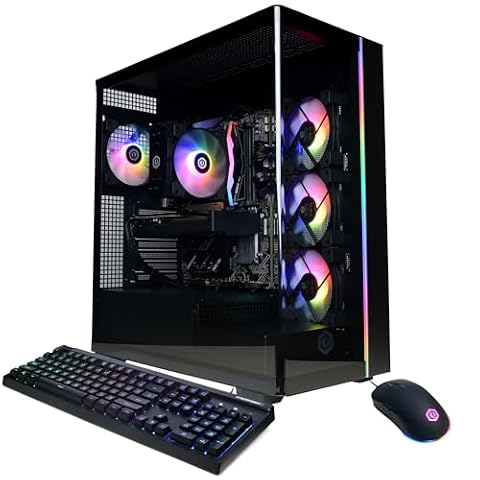
Crystal Case, triple tempered glass, Black
Azure Gaming Case, tempered glass, White
Dimensions
11.3 x 14.4 x 16.6 inches
9.1 x 17.8 x 17.2 inches
Choose the first if
- You want 32GB of system memory out of the box for heavier multitasking.
- You prefer a black chassis with triple tempered glass and a wider footprint.
Choose the second if
- You prioritize graphics performance and want the faster RTX 5060 Ti GPU.
- You need integrated Bluetooth support directly on the system.
Verdict
Choose the Skytech Crystal if your everyday workloads demand 32GB of RAM and a black triple-glass case. Select the Skytech Azure if you want the higher graphical throughput of the RTX 5060 Ti alongside factory Bluetooth support. Both configurations provide identical AMD Ryzen 7 5700 processing power and 1TB of NVMe storage.
Skytech Crystal Versus Skytech Azure Desktop
Graphics card performance
Edge: Skytech Azure RTX 5060 Ti Ryzen 7 Gaming PC
The graphics processing unit separates these two builds. The Skytech Crystal Ryzen 7 RTX 5060 Gaming PC contains an NVIDIA GeForce RTX 5060 with 8GB of GDDR7 memory. In contrast, the Skytech Azure RTX 5060 Ti Ryzen 7 Gaming PC provides an NVIDIA GeForce RTX 5060 Ti, also with 8GB of GDDR7 memory. Both cards deliver display output through one HDMI port and one DisplayPort. The Ti variant in the Skytech Azure gives you higher raw graphics processing power for 1080p gaming at Ultra settings. Because the RTX 5060 Ti sits a tier above the standard RTX 5060, it handles heavier visual loads more effectively.
System memory capacity
Edge: Skytech Crystal Ryzen 7 RTX 5060 Gaming PC
Multitasking capability depends on memory capacity and speed. Both models run DDR4 memory clocked at 3200MHz, equipped with heat spreaders to manage thermal output. The Skytech Crystal Ryzen 7 RTX 5060 Gaming PC ships with 32GB of RAM. The Skytech Azure RTX 5060 Ti Ryzen 7 Gaming PC includes 16GB of non-RGB RAM. Having 32GB gives you twice the headroom for background applications, browser tabs, and asset-heavy titles without caching data to storage. The Skytech Crystal provides superior capacity out of the box, meaning you will not need an immediate memory upgrade for intensive multitasking or future gaming demands.
Processor specifications
Edge: Tie
Central processing capabilities are identical between these two computers. The Skytech Crystal Ryzen 7 RTX 5060 Gaming PC and the Skytech Azure RTX 5060 Ti Ryzen 7 Gaming PC both feature the AMD Ryzen 7 5700 processor. This CPU has a 3.7GHz base clock speed and reaches up to 4.6GHz with Turbo Boost. To manage processor heat, each system includes a high-performance air cooler paired with ARGB fans for continuous airflow. Because the underlying silicon, clock frequencies, and cooling setups match across both machines, computational speed and instructions per cycle remain equal. Neither system holds an advantage in processor performance.
Storage capacity and speed
Edge: Tie
Local storage configurations match across both desktop computers. The Skytech Crystal Ryzen 7 RTX 5060 Gaming PC and the Skytech Azure RTX 5060 Ti Ryzen 7 Gaming PC each house a 1TB NVMe M.2 solid-state drive. According to the manufacturer specifications, this drive operates up to thirty times faster than a traditional spinning hard drive. A 1TB drive provides adequate space for your Windows 11 operating system installation, application software, and several modern game installations. Because both systems share the same drive technology, form factor, and storage volume, file read speeds and total capacity are identical on each machine.
Chassis build and dimensions
Edge: Tie
Case dimensions and exterior layouts differ between the two models. The Skytech Crystal Ryzen 7 RTX 5060 Gaming PC uses a black chassis with triple tempered glass panels. It measures 11.3 inches wide, 14.4 inches high, and 16.6 inches long. In comparison, the Skytech Azure RTX 5060 Ti Ryzen 7 Gaming PC features a white chassis with tempered glass, measuring 9.1 inches wide, 17.8 inches high, and 17.2 inches long. The Crystal case provides a wider, lower profile with extra glass panels, while the Azure case takes up less horizontal desk width but stands taller. Neither design holds a functional edge.
Choosing Your Skytech Gaming Desktop
Players who run heavy multitasking apps alongside games
Our pick: Skytech Crystal Ryzen 7 RTX 5060 Gaming PC
You get 32GB of DDR4 3200 system memory in this model, which is double the memory capacity found in the alternative. This extra allocation supports memory-heavy background applications and large game assets without bottlenecking. It also comes in a shorter, wider black case measuring 14.4 inches high with triple tempered glass.
Gamers prioritizing maximum graphics card rendering power
Our pick: Skytech Azure RTX 5060 Ti Ryzen 7 Gaming PC
This desktop equips you with an NVIDIA GeForce RTX 5060 Ti graphics card, offering a step up in GPU hardware over the base RTX 5060. Both feature 8GB of GDDR7 VRAM, but the Ti variant delivers faster processing for higher frame rates. You also gain built-in Bluetooth support alongside Wi-Fi 5 connectivity.
Users needing a narrower white chassis with Bluetooth
Our pick: Skytech Azure RTX 5060 Ti Ryzen 7 Gaming PC
You should choose this build if your desk space requires a narrower tower. Its white chassis measures 9.1 inches wide, compared to the 11.3-inch width of the alternative case. Additionally, its motherboard configuration includes documented Bluetooth support right out of the box for pairing wireless peripherals and audio gear without extra adapters.

Skytech Crystal Ryzen 7 RTX 5060 Gaming PC
Best for: 1080p gamers who need 32GB memory
- Graphics Card
- NVIDIA GeForce RTX 5060
- Processor
- AMD Ryzen 7 5700
- RAM Capacity
- 32GB
- Storage Capacity
- 1TB
- Memory Type
- DDR4
- Storage Type
- NVMe M.2 SSD
This prebuilt desktop pairs an AMD Ryzen 7 5700 processor with an NVIDIA GeForce RTX 5060 graphics card and 32GB of DDR4 memory. You also get 1TB of NVMe SSD storage and 802.11ac wireless networking inside a triple tempered glass case. It suits you if you want double the system RAM over standard 16GB builds for 1080p gaming and multitasking.
- 32GB DDR4 3200 RAM for multitasking
- NVIDIA GeForce RTX 5060 8GB GDDR7 graphics card
- 1TB NVMe M.2 SSD storage
- Includes gaming keyboard and mouse
- Base RTX 5060 GPU offers lower graphics output than RTX 5060 Ti
- Wireless networking limited to older 802.11ac standard
- Display output only guarantees one HDMI and one DisplayPort
- You want 32GB of system memory for gaming and background apps.
- You target 1080p gameplay on an 8GB GDDR7 graphics card.
- You want the higher render performance of an RTX 5060 Ti.
- You require Wi-Fi 6 wireless connectivity.
Verdict: Skytech Crystal Ryzen 7 RTX 5060 Gaming PC suits players who want 32GB of RAM and reliable 1080p graphics performance in a tempered-glass chassis.

Skytech Azure RTX 5060 Ti Ryzen 7 Gaming PC
Best for: gamers prioritizing GPU performance over system RAM
- Graphics Card
- NVIDIA GeForce RTX 5060 Ti 8GB
- Processor
- AMD Ryzen 7 5700
- RAM Capacity
- 16GB
- Storage Capacity
- 1TB
- Memory Type
- DDR4
- Storage Type
- NVMe M.2 SSD
This prebuilt desktop pairs an AMD Ryzen 7 5700 processor with an 8GB NVIDIA GeForce RTX 5060 Ti graphics card inside a white Azure case. You get 16GB of DDR4 memory, a 1TB NVMe solid-state drive, and Wi-Fi 5 connectivity. It suits you if you want stronger graphics throughput for 1080p gaming over larger memory capacity.
- NVIDIA GeForce RTX 5060 Ti 8GB GDDR7 graphics card
- AMD Ryzen 7 5700 processor with 4.6GHz max boost
- 1TB NVMe M.2 solid-state drive
- Includes gaming keyboard and mouse
- Equipped with 16GB RAM rather than 32GB
- Uses older Wi-Fi 5 (802.11ac) standard
- You prioritize the faster RTX 5060 Ti GPU over extra system memory.
- You want a turnkey setup with an included keyboard and mouse.
- You prefer a white chassis with tempered glass and ARGB fans.
- You run heavy productivity tasks that benefit from 32GB of RAM.
- You need Wi-Fi 6 wireless networking.
Verdict: Skytech Azure RTX 5060 Ti Gaming PC is built for players who want the higher-tier RTX 5060 Ti graphics card and do not require 32GB of RAM.
Specifications side by side
| Spec | Skytech Crystal Ryzen 7 RTX 5060 Gaming PC | Skytech Azure RTX 5060 Ti Ryzen 7 Gaming PC |
|---|---|---|
| Graphics Card | NVIDIA GeForce RTX 5060 | NVIDIA GeForce RTX 5060 Ti 8GB |
| Processor | AMD Ryzen 7 5700 | AMD Ryzen 7 5700 |
| RAM Capacity | 32GB | 16GB |
| Storage Capacity | 1TB | 1TB |
| Memory Type | DDR4 | DDR4 |
| Storage Type | NVMe M.2 SSD | NVMe M.2 SSD |
| Operating System | Windows 11 Home 64-bit | Windows 11 Home |
| Memory | 32GB RAM | 16GB RAM |
| Dimensions | 16.6 × 11.3 × 14.4 inches | 17.2 × 9.1 × 17.8 inches |
| Color | Black | White |
| Model | ST-CRYSTAL-2654-B-AM | ST-AZURE3-3198-W-AM |
Frequently asked questions
Which desktop takes up less desk space between the Skytech Crystal and Skytech Azure?
The Skytech Azure has a narrower footprint at 9.1 inches wide, compared to the 11.3-inch width of the Skytech Crystal. However, the Crystal stands lower at 14.4 inches tall and measures 16.6 inches long. The Azure measures 17.8 inches high and 17.2 inches long, making it taller and deeper on your desk.
What exterior color finishes do the Skytech Crystal and Azure models feature?
The Skytech Crystal model ST-CRYSTAL-2654-B-AM comes in a black finish, whereas the Skytech Azure model ST-AZURE3-3198-W-AM comes in white. If your setup requires a specific aesthetic, you can pick between the black chassis of the Crystal or the white case of the Azure. Both models use desktop tower designs with discrete components.
How do you identify the exact model numbers for these Skytech desktops?
Skytech assigns model number ST-CRYSTAL-2654-B-AM to the Skytech Crystal configuration. The Skytech Azure configuration uses model number ST-AZURE3-3198-W-AM. You can reference these manufacturer part identifiers to ensure you select the specific combination of processor, memory, and graphics hardware listed on the specification sheet.
How much internal storage comes installed in these Skytech Gaming PCs?
Both configurations supply 1TB of solid-state storage. You get a 1TB SSD inside the Skytech Crystal as well as inside the Skytech Azure. This solid-state drive capacity gives you identical internal space out of the box on either machine for operating system files, user documents, gaming installations, and local application data.
What type of system memory do these two Skytech Gaming PCs use?
Both models utilize DDR4 system memory rather than DDR5. The Skytech Crystal pairs its AMD Ryzen 7 processor with 32GB of DDR4 RAM. The Skytech Azure equips the same AMD Ryzen 7 platform with 16GB of DDR4 memory. Both configurations rely on this memory generation across their respective motherboard platforms.
Do the Skytech Crystal and Skytech Azure use different processors?
No, both machines come equipped with an AMD Ryzen 7 central processing unit. Neither desktop offers an advantage in raw CPU tier over the other. Your computing choice between them comes down to the balance of installed graphics card hardware, physical enclosure dimensions, system memory allotment, and chassis exterior color.