
As Amazon Associates, we earn from qualifying purchases. This means we may receive a small commission at no extra cost to you if you click through and make a purchase.
As an Amazon Associate we earn from qualifying purchases. Links on this page are affiliate links.
Comparing the msi codex z2 rtx 5070 vs codex r2 rtx 5060 highlights two gaming PCs with identical chassis dimensions, Windows 11 Home, and 32GB of DDR5 RAM. The primary distinction is the internal component lineup. The Codex Z2 supplies an AMD Ryzen 7 8700F, an RTX 5070 GPU, and 2TB SSD storage. The Codex R2 includes an Intel Ultra 7 265 processor and 1TB storage.
Graphics card
NVIDIA GeForce RTX 5070
NVIDIA GeForce RTX 5060Ti
Processor
AMD Ryzen 7 8700F
Intel Ultra 7 265
Storage capacity
2TB SSD
1TB m.2 NVMe SSD
Model number
CodZ2A8NVP436
CodR2AIA2NVM7455
Choose the first if
- You want higher graphical capability via the NVIDIA GeForce RTX 5070.
- You need 2TB of factory SSD storage space.
- You prefer the AMD Ryzen 7 8700F processor.
Choose the second if
- You prefer the Intel Ultra 7 265 processor architecture.
- You only need 1TB of NVMe SSD storage out of the box.
Verdict
The MSI Codex Z2 suits you if you prioritize the RTX 5070 graphics card and double the factory solid-state storage. The MSI Codex R2 fits users targeting the Intel Ultra 7 265 processing platform. Your decision centers on whether you need stronger graphical output or Intel-based CPU hardware.
MSI Codex Z2 vs R2 Comparison
Graphics card
Edge: MSI Codex Z2 RTX 5070 Gaming Desktop
The graphics processor determines visual rendering speed and frame delivery in your games. MSI Codex Z2 RTX 5070 Gaming Desktop includes an NVIDIA GeForce RTX 5070 graphics card built on NVIDIA's Blackwell GPU architecture. This architecture focuses on ray tracing and rasterization workloads. MSI Codex R2 RTX 5060 Ti Gaming Desktop features an NVIDIA GeForce RTX 5060Ti GPU instead. If you prioritize higher rasterization throughput and newer generation graphics hardware, the RTX 5070 in the Codex Z2 gives you the hardware advantage for demanding visual software. Both setups output modern gaming visuals, but the Codex Z2 carries the higher-tier GPU specification.
Processor configuration
Edge: MSI Codex R2 RTX 5060 Ti Gaming Desktop
Your central processor manages logic, multitasking, and background applications while gaming. MSI Codex R2 RTX 5060 Ti Gaming Desktop uses an Intel Ultra 7 265 processor. This platform targets advanced computing tasks and multi-threaded system responsiveness. MSI Codex Z2 RTX 5070 Gaming Desktop runs on an AMD Ryzen 7 8700F processor. The Ryzen chip features 8 cores and 16 threads with boost speeds reaching 5.0 GHz. If you seek Intel's Ultra 7 architecture for system processing and productivity workflows, the Codex R2 provides that specific platform. Both processors offer multi-core power, but the Codex R2 gives you the Intel Ultra platform.
Storage capacity
Edge: MSI Codex Z2 RTX 5070 Gaming Desktop
Storage space dictates how many game installations and large media files you can keep locally. MSI Codex Z2 RTX 5070 Gaming Desktop provides a 2TB SSD out of the box. That gives you double the baseline solid-state drive room. MSI Codex R2 RTX 5060 Ti Gaming Desktop comes equipped with a 1TB m.2 NVMe SSD. While both drives use high-speed solid-state technology for fast system booting and asset loading, the Codex Z2 avoids early storage limits. You can store significantly more software titles on the Codex Z2 before needing an external drive or secondary internal storage drive.
System memory
Edge: Tie
System memory allows your computer to handle multiple open applications and heavy gaming assets without bottlenecks. Both machines offer an identical memory specification. MSI Codex Z2 RTX 5070 Gaming Desktop features 32GB of DDR5 RAM. MSI Codex R2 RTX 5060 Ti Gaming Desktop also includes 32GB of DDR5 RAM. Using DDR5 memory provides high data bandwidth for modern computing requirements across both systems. You get enough memory capacity on either desktop to manage background processes, streaming tools, and memory-heavy titles simultaneously. Because both desktop computers share the exact same 32GB DDR5 configuration, neither PC holds an edge here.
Build and cooling
Edge: Tie
Chassis dimensions and thermal hardware determine where the computer fits and how airflow is managed. MSI Codex Z2 RTX 5070 Gaming Desktop measures 8.38 inches wide, 19 inches high, 16 inches long, and weighs 21.3 pounds in black. MSI Codex R2 RTX 5060 Ti Gaming Desktop matches these physical specs at 8.38 by 19 by 16 inches and 21.3 pounds. For cooling, both configurations use four system fans, placing three fans at the front and one at the rear alongside an air cooler. Each tower also features built-in RGB lighting controlled via an MSI LED button or MSI Center software.
Choosing Your Next MSI Gaming Desktop
Players with extensive game libraries
Our pick: MSI Codex Z2 RTX 5070 Gaming Desktop
You get a 2TB SSD out of the box, doubling the local storage of the alternative. This build also pairs the AMD Ryzen 7 8700F processor with an NVIDIA GeForce RTX 5070 GPU using Blackwell architecture, giving you greater graphics capability alongside ample space for large software installations.
Gamers who prioritize Intel processor architecture
Our pick: MSI Codex R2 RTX 5060 Ti Gaming Desktop
This configuration gives you the Intel Ultra 7 265 processor paired with an NVIDIA GeForce RTX 5060 Ti graphics card. You receive 32GB of DDR5 memory and a 1TB m.2 NVMe SSD. It suits you if you prefer Intel processing while maintaining steady thermal airflow through four system fans.
Streamers running background apps while playing
Our pick: MSI Codex Z2 RTX 5070 Gaming Desktop
You get the AMD Ryzen 7 8700F with 8 cores and 16 threads boosting to 5.0 GHz. Paired with 32GB of DDR5 memory and an NVIDIA GeForce RTX 5070 card, this setup lets you run background applications alongside gameplay while four system fans move air through the chassis.

MSI Codex Z2 RTX 5070 Gaming Desktop
Best for: RTX 5070 graphics and high-capacity storage
- Graphics Card
- NVIDIA GeForce RTX 5070
- Processor
- AMD Ryzen 7 8700F
- RAM Capacity
- 32GB
- Storage Capacity
- 2TB
- Memory Type
- DDR5
- Storage Type
- SSD
This desktop PC features an AMD Ryzen 7 8700F processor and NVIDIA GeForce RTX 5070 graphics. It packs 32GB of DDR5 memory and a 2TB SSD for your local installations. Four system cooling fans manage chassis temperatures during operation. This configuration suits you if you need strong graphics performance and ample solid-state capacity.
- NVIDIA GeForce RTX 5070 graphics card
- AMD Ryzen 7 8700F 8-core processor with up to 5.0 GHz boost
- 2TB SSD storage capacity paired with 32GB DDR5 RAM
- Four cooling fans and ARGB CPU air cooler
- Uses an air cooler rather than liquid cooling
- Includes Windows 11 Home rather than Windows 11 Pro
- You want an NVIDIA GeForce RTX 5070 graphics card.
- You need 32GB DDR5 memory and 2TB SSD storage out of the box.
- You prefer an Intel processor over AMD Ryzen.
- You require Windows 11 Pro pre-installed for business environments.
Verdict: MSI Codex Z2 RTX 5070 Gaming Desktop gives high-tier graphical power, 32GB of memory, and 2TB of solid-state storage to players focused on heavy visual workloads.
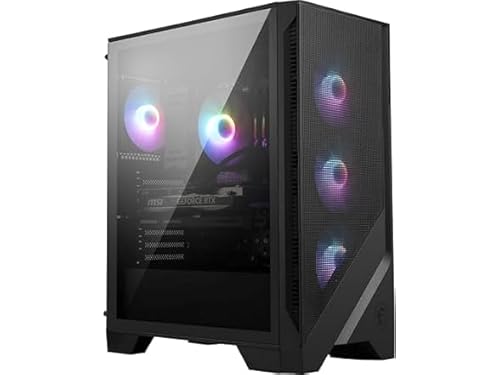
MSI Codex R2 RTX 5060 Ti Gaming Desktop
Best for: Intel-centric setups needing 32GB RAM
- Graphics Card
- NVIDIA GeForce RTX 5060Ti
- Processor
- Intel Ultra 7 265
- RAM Capacity
- 32GB
- Storage Capacity
- 1TB
- Memory Type
- DDR5
- Storage Type
- m.2 NVMe SSD
This desktop features an Intel Ultra 7 265 processor paired with an NVIDIA GeForce RTX 5060 Ti graphics card. You get 32GB of DDR5 memory alongside a 1TB NVMe solid-state drive for local storage. It suits you if you want modern Intel computing power with dedicated multi-fan airflow for home gaming.
- Intel Ultra 7 265 processor
- 32GB DDR5 system memory
- NVIDIA GeForce RTX 5060 Ti graphics card
- Four case fans with RGB CPU air cooler
- 1TB storage capacity is smaller than 2TB alternatives
- GeForce RTX 5060 Ti sits below RTX 5070 in graphics performance
- You want an Intel Ultra 7 265 processor for desktop tasks.
- You need 32GB of DDR5 RAM out of the box.
- You need more than 1TB of factory solid-state storage.
- You want higher graphics capability from an RTX 5070 GPU.
Verdict: MSI Codex R2 Intel Ultra 7 RTX 5060 Ti Gaming PC fits players who prioritize the Intel Ultra 7 platform and 32GB DDR5 memory over higher GPU tiers or larger storage drives.
Specifications side by side
| Spec | MSI Codex Z2 RTX 5070 Gaming Desktop | MSI Codex R2 RTX 5060 Ti Gaming Desktop |
|---|---|---|
| Graphics Card | NVIDIA GeForce RTX 5070 | NVIDIA GeForce RTX 5060Ti |
| Processor | AMD Ryzen 7 8700F | Intel Ultra 7 265 |
| RAM Capacity | 32GB | 32GB |
| Storage Capacity | 2TB | 1TB |
| Memory Type | DDR5 | DDR5 |
| Storage Type | SSD | m.2 NVMe SSD |
| Operating System | Windows 11 Home | Windows 11 Home |
| Memory | 32GB RAM | 32GB RAM |
| Use | Home | Home |
| Dimensions | 16 × 8.38 × 19 inches | 16 × 8.38 × 19 inches |
| Weight | 21.3 pounds | 21.3 pounds |
| Color | Black | Black |
| Model | CodZ2A8NVP436 | CodR2AIA2NVM7455 |
| Size | – | 1TB |
Frequently asked questions
Which desktop offers more solid-state drive storage?
The MSI Codex Z2 provides more integrated storage capacity. It comes with a 2TB solid-state drive, whereas the MSI Codex R2 model includes a 1TB drive. A larger internal solid-state drive gives you extra local room for modern game installations, system files, and multimedia assets without requiring immediate hardware additions.
Do the MSI Codex Z2 and Codex R2 have different physical sizes?
Both systems share the exact same external chassis measurements. Each desktop measures 8.38 inches wide, 16 inches long, and 19 inches high, and both weigh 21.3 pounds. Because their external footprints match identically, both black computer towers take up the same surface area on your desk or dedicated floor space.
Which processor brand is installed in each desktop?
The MSI Codex Z2 features an AMD processor, while the Codex R2 uses an Intel platform. Specifically, the Codex Z2 includes an AMD Ryzen 7 processor, and the Codex R2 runs an Intel Ultra 7 chip. Your preferred processor ecosystem determines which desktop configuration matches your software requirements or computing setup.
What is the system memory difference between these two PCs?
There is no difference in factory memory capacity or generation. Both the MSI Codex Z2 and Codex R2 feature 32GB of DDR5 RAM. This matching 32GB DDR5 configuration ensures you get the same baseline memory bandwidth and capacity for multitasking and background processes on either machine.
What operating system comes pre-installed on the Codex Z2 and R2?
Both desktop configurations come pre-installed with Windows 11 Home. Neither desktop requires an immediate operating system installation or license setup out of the box. You will experience identical core interface features, system menus, background services, and native driver management across both models from your initial boot.
Which graphics card is configured in each MSI desktop?
The MSI Codex Z2 features an NVIDIA GeForce RTX 5070 graphics card, whereas the MSI Codex R2 is equipped with an RTX 5060 Ti GPU. The RTX 5070 model represents a higher hardware performance tier, designed to handle heavier visual rendering tasks and graphical workloads than the 5060 Ti build.


