As Amazon Associates, we earn from qualifying purchases. This means we may receive a small commission at no extra cost to you if you click through and make a purchase.
The PlayStation 5 HD Camera is Sony’s dedicated capture accessory engineered specifically for seamless integration with the PlayStation 5 console ecosystem. If you are looking for an immediate, plug-and-play solution that lets you broadcast your face alongside your gameplay without touching a computer, capture card, or third-party streaming utility, this dual-lens unit provides the most frictionless path available. It eliminates the technical barriers of traditional streaming setups by handling video capture directly inside the console’s operating interface, offering a clean and competent 1080p video feed.
This camera suits everyday console players, budding content creators, and social gamers who want to share their live reactions on Twitch or YouTube with minimal friction. However, if your broadcasting workflow relies on an external personal computer, custom open-broadcaster software overlays, or studio-grade manual aperture controls, this hardware will feel restrictive. The camera is locked specifically to the PS5 architecture, meaning power users seeking universal PC compatibility or professional standalone optics will want to direct their attention elsewhere.



PlayStation 5 HD Camera at a Glance

| Attribute | Detail |
|---|---|
| Video Capture Resolution | 1080p Full HD |
| Lens Configuration | Dual wide-angle lenses |
| Compatible Devices | PS5 console |
| Aspect Ratio | 16:9 |
| Video Capture Format | MP4 |
| Exposure Control Type | Automatic |
| ISO / Light Sensitivity | 100–3200 |
| Shutter Speed Range | 1/30 to 1/4000 second |
| Still Image Resolution | 1920 pixels |
| Integrated Stand | Built-in adjustable mount for above or below TV |
Broadcasting Integration and DualSense Controls
The primary appeal of using the playstation hd camera for streaming lies in how deeply it connects with the native PlayStation 5 system software. Setting up a broadcast typically requires configuring external capture cards, configuring audio delays, and balancing PC resource loads. With this peripheral, Sony removed those hurdles entirely. The accessory communicates directly with the console operating system, allowing you to go live on supported platforms within seconds of powering on your system.
A key convenience comes from the playstation hd camera dualsense create button integration. Tapping the Create button on your wireless controller summons the broadcasting overlay instantly. From that menu, you can toggle your video feed on or off, reposition your picture-in-picture frame on the screen, and jump straight into a live broadcast. Whether you are using an original console or the redesigned ps5 slim disc edition, the software environment immediately recognizes the camera and makes broadcasting an intuitive, frictionless action rather than an intimidating technical chore.
This streamlined interface means you spend less time troubleshooting video signals and more time actually playing games. You can monitor your camera preview right from the command center, check your microphone levels, and confirm your video feed placement without ever leaving your active gameplay session. For everyday gamers who want to build a casual streaming presence, this level of frictionless hardware harmony is difficult to match with conventional webcam equipment.
Video Resolution and Dual Lens Capture Quality
Visual clarity is handled by the playstation hd camera dual lenses, which work together to deliver a crisp 16:9 aspect ratio feed. The ps5 hd camera 1080p video output offers a sharp step up from the sub-HD resolutions common in older console peripherals. Dual wide-angle lenses ensure that your frame captures not just your facial reactions, but also a broader view of your gaming space, which is especially useful if you stream with a co-op partner sitting beside you on the couch.
When diving into the official playstation hd camera specs, the hardware lists an automatic exposure control system paired with an ISO sensitivity range extending from 100 to 3200, alongside shutter speeds operating between 1/30 and 1/4000 of a second. Because the exposure is strictly automatic, the camera continuously evaluates ambient light to keep your face properly illuminated. The camera writes video feeds in standard MP4 format and delivers an effective still resolution of 1920 pixels, ensuring sharp output for picture-in-picture broadcasts.
Because optical performance relies heavily on automated processing rather than manual sensor tuning, lighting conditions play a massive role in your overall picture fidelity. In a room with balanced, diffused light, the feed looks sharp, natural, and remarkably clean. In dim or unevenly lit rooms, however, the automatic ISO pushes toward the 3200 ceiling, which can introduce noticeable digital grain into your stream. If you intend to use this device regularly, placing a steady light source behind your monitor or television will dramatically improve your results.
Background Removal and Green Screen Capabilities
One of the strongest technical features of this unit is its synergy with the console’s internal image processing. The ps5 hd camera background removal suite gives creators multiple ways to integrate their visual feed into live gameplay. Rather than forcing you into a standard opaque rectangular box, the console allows you to crop the background, reduce your frame size, or mask surrounding elements so that viewers see more of the game screen and less of your living room furniture.
For streamers who want a cleaner, professional broadcast aesthetic, the integrated ps5 camera green screen support is an essential feature. When you hang a solid chroma key backdrop behind your gaming chair, the PS5 software isolates your body and completely erases the background in real time. This functionality mirrors what high-end broadcast software achieves on a PC, but executes it entirely through the console’s internal processor without requiring external video mixers or third-party plug-ins.
This software-driven background removal represents a substantial technological jump over older hardware like the legacy sony playstation camera ps4, which lacked these sophisticated masking options. While the automated clipping without a green screen works reasonably well under strong lighting, using a real green backdrop yields far crisper edges around your hair and shoulders. Creators wanting a polished broadcast look will appreciate having genuine chroma key functionality built right into the console dashboard.
Mounting Design and Physical Console Setup
Physical installation is engineered to be as unobtrusive as possible. The playstation 5 camera setup takes advantage of a compact, built-in adjustable stand that folds neatly to grip various surfaces. The stand allows the dual lenses to be positioned securely either resting on top of your television frame or seated flat on an entertainment center shelf directly below your display. This versatility makes it easy to find an angle that aligns naturally with your eye level.
The integrated hinge mechanism provides enough tension to stay firmly in place without scratching delicate TV bezels or slipping out of alignment during intense gaming moments. The hardware itself features a two-tone aesthetic that mirrors the console’s industrial design language. A hardwired USB cable connects directly to the rear ports of the PS5, providing both data transmission and power in a single line. The listing notes that the camera is not water resistant, so keeping it safe from spills on your media console is necessary.
It is worth noting the distinct functional focus of this peripheral within Sony’s broader lineup. While earlier PlayStation camera iterations served dual purposes for both broadcast video and motion tracking on original virtual reality headsets, modern hardware ecosystems have separated those tasks. Players who are investing in modern virtual reality gear such as the vr2 playstation 5 should be aware that the HD Camera is built exclusively for video capture and player broadcasting, rather than tracking headset movements across your room.
PlayStation 5 HD Camera Pros and Cons
Pros
- Native PS5 streaming integration
- Sharp 1080p dual-lens capture
- DualSense Create button broadcast access
- Built-in green screen support
- Versatile television mounting stand
Cons
- Automatic exposure only without manual adjustments
- Compatible only with PS5 console
- Not water resistant
Check PlayStation 5 HD Camera on Amazon
Who Should Buy the PlayStation 5 HD Camera
Deciding whether this piece of gear fits your gaming station comes down to how you plan to create content. The question of whether the playstation hd camera is worth it hinges largely on whether you value all-in-one simplicity over granular software customization.
Buy It If
- You want an immediate, plug-and-play streaming solution that broadcasts directly to Twitch or YouTube from your PS5 without a PC.
- You want seamless physical integration, using an adjustable stand that clips neatly to the top or bottom of your television.
- You plan to use the console’s native background cropping and green screen masking tools to maintain a clean picture-in-picture layout.
- You appreciate quick hardware controls, initiating broadcasts instantly using the DualSense Create button.
Skip It If
- You stream primarily through a computer using complex broadcast software, multi-source audio mixers, and custom graphics scenes.
- You require manual exposure controls, custom aperture settings, or physical zoom adjustments on your camera hardware.
- You are seeking a general-purpose webcam to use interchangeably across multiple office laptops or operating systems.
PlayStation 5 HD Camera Alternatives Worth a Look
If your capture needs extend beyond dedicated console broadcasting, or if you require standalone video equipment for other uses, several other camera formats exist across the market.
Motion Detection

The Motion Detection Tapo C100 1080P Indoor Security Camera is engineered for home monitoring, featuring night vision, two-way audio, and siren functions. You should consider this device if your primary goal is monitoring your gaming room, watching pets, or keeping an eye on your home rather than broadcasting gameplay footage to an online audience.
1080p Full HD Video

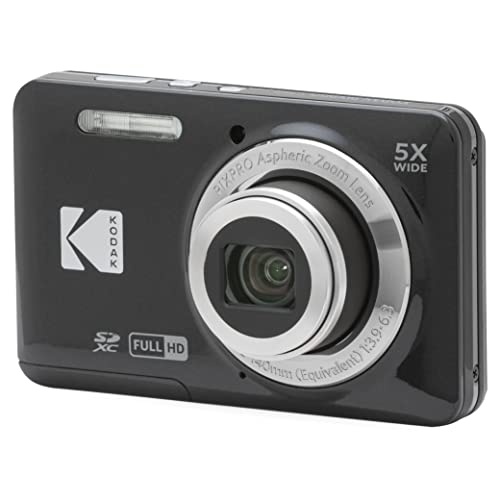
The 1080p Full HD Video KODAK PIXPRO FZ55 is a portable point-and-shoot compact digital camera equipped with a 28mm wide-angle lens, 5x optical zoom, and a 2.7-inch LCD screen. This option is suited for users who want a self-contained vlogging camera to carry around outdoors, rather than a stationary peripheral tied permanently to a living room console.
24.1 Megapixel CMOS

The 24.1 Megapixel CMOS Canon EOS Rebel T7 DSLR Camera is a dedicated photography kit featuring an EF-S 18-55mm lens and an APS-C sensor. Pick this camera if you are an aspiring photographer or serious content creator looking to produce professional standalone video and high-resolution still photography outside of the PlayStation ecosystem.
Final Verdict
The PlayStation 5 HD Camera delivers exactly what it promises: an exceptionally easy, reliable way to broadcast 1080p video directly from your console. By eliminating capture cards, HDMI splitters, and external PC software, it lowers the barrier to entry for content creation. The inclusion of dual wide-angle lenses, a flexible mounting stand, and direct DualSense Create button integration makes it an extraordinarily convenient tool for players who simply want to play their favorite games and share their live reactions with the world.
While power users will miss manual exposure adjustments and universal PC flexibility, those limitations are by design. Sony built this camera to be an effortless companion piece for the PS5, and within that scope, it performs admirably. Provided you have adequate ambient room lighting to support its automatic exposure system, this peripheral provides the smoothest, most direct path to console streaming currently available.
FAQ
Does the PlayStation 5 HD Camera work on a PC?
The listing specifies compatibility exclusively with the PS5 console. It is engineered to interface directly with the PlayStation 5 operating system and is not marketed or supported as a plug-and-play webcam for standard personal computers.
How do the background removal tools work on this camera?
The PS5 operating system uses built-in software tools to process the camera’s feed. You can crop the frame around yourself, enter a picture-in-picture layout over your active gameplay, or utilize green screen support to erase your background entirely during a live broadcast.
What video resolution does the camera output?
The camera captures video at 1080p Full HD resolution in MP4 format. It uses dual wide-angle lenses to provide a crisp 16:9 aspect ratio feed designed specifically to fit modern streaming platform standards.
Can the camera be mounted above or below a television?
Yes, the camera comes equipped with a built-in adjustable stand. Its compact hinge design allows it to clamp securely to the top edge of thin-bezel televisions or sit firmly on a flat media shelf directly beneath your screen.
How do you start broadcasting using the camera?
You can activate the camera and begin streaming by pressing the Create button on your DualSense wireless controller. This brings up the console’s broadcasting menu, where you can customize your video overlay and go live immediately.