
As Amazon Associates, we earn from qualifying purchases. This means we may receive a small commission at no extra cost to you if you click through and make a purchase.
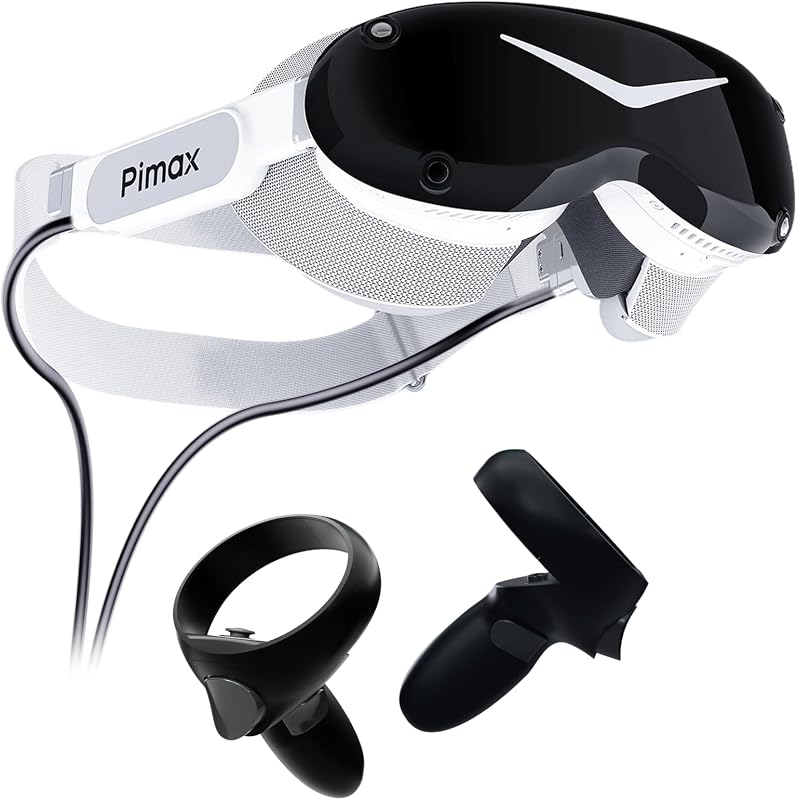
The Pimax Dream Air Slam is a tethered virtual reality headset built for computer-based simulation enthusiasts, virtual reality hobbyists, and dedicated players searching for ultra-sharp visual clarity. Featuring twin Micro-OLED micro-displays pushing 3840 x 3552 pixels per eye paired with pancake lenses, this system ditches external base stations in favor of onboard inside-out SLAM computer vision. For desktop virtual reality players who want top-tier visual definition without mounting lighthouses on their walls, this hardware delivers exceptional visual density directly to the eyes.
This headset suits simulator pilots, seated virtual cockpit drivers, and PC gaming enthusiasts who already own a capable Windows gaming rig and demand the deepest black levels and finest visual details available. Everyday shoppers seeking an untethered, standalone console that works outdoors or away from a desk should look elsewhere. In this pimax dream air slam review, we examine the listing specifications, onboard features, and operational requirements to help you decide whether this hardware belongs in your setup.


Pimax Dream Air Slam at a Glance
| Feature | Specification |
|---|---|
| Display Type | Micro-OLED (1.3 inches) |
| Resolution Per Eye | 3840 x 3552 |
| Refresh Rate | 90 Hz |
| Optics | Pancake Lens with ConcaveView Optics |
| Field of View | 110 degrees horizontal field of view |
| Tracking System | Integrated SLAM tracking and hand tracking |
| Included Controllers | 6DOF hand controllers |
| Connection Interface | Split DisplayPort cable and USB Type-A |
| Supported Platforms | SteamVR, OpenXR, PC VR (Windows 10, Windows 11) |
| Integrated Features | Eye tracking (DFR-ready), spatial audio, passthrough camera, dual cooling fans |
Micro-OLED Visual Fidelity and Optical Performance
The core attraction of the headset lies within its display engine. Delivering 3840 x 3552 pixels to each eye across a compact 1.3-inch screen size, the pimax dream air slam micro oled panels offer an exceptional pixel density that dramatically suppresses the visible screen-door effect commonly found in lower-resolution panels. Micro-OLED technology produces self-emissive pixels, allowing for true black levels, vibrant contrast ratios, and striking shadow clarity. Whether navigating nighttime flight paths or exploring shadowy dungeon corridors, contrast transitions remain crisp without the backlight bleed characteristic of standard LCD displays.
Complementing the micro-displays is Pimax’s custom ConcaveView optical stack utilizing pancake lens technology. Pancake optics allow for a shorter optical distance between the screen and the user’s eyes, reducing the physical bulk of the visor front. The listing cites a 110-degree horizontal field of view, presenting a wide panoramic viewing area that preserves situational awareness in virtual cockpits. The optical assembly also integrates an adjustable IPD mechanism, ensuring players can align the optical sweet spot precisely with their physical interpupillary distance to minimize distortion and blur across the outer perimeter of the glass.
Operating at a smooth 90 Hz display refresh rate, the panel timing keeps fast-moving scenes fluid and minimizes motion sickness during high-speed maneuvering. Dynamic Foveated Rendering readiness further enhances this optical package through onboard eye tracking sensors. By monitoring where your pupils rest, compatible software can concentrate rendering power directly on your focal point while reducing rendering loads in the periphery. For visual purists examining the pimax dream air slam specs, this combination of dense Micro-OLED hardware and specialized optics represents one of the sharpest display configurations offered in consumer computer virtual reality.
SLAM Tracking and Included Controllers
One of the largest departures from historical enthusiast-grade tethered headsets is the transition to self-contained spatial positioning. The pimax dream air slam tracking relies on integrated simultaneous localization and mapping, widely known as SLAM tracking. Instead of requiring external lighthouse base stations mounted in the corners of your room, onboard sensors map your surrounding environment in real time. This inside-out computer vision monitors orientation and position through six degrees of freedom, significantly lowering physical room barriers and letting users play immediately without calibrating external hardware emitters.
The package ships complete with 6DOF hand controllers, providing standard manual interaction across virtual spaces. These pimax dream air slam controllers deliver direct physical input with buttons, triggers, and spatial orientation tracked alongside the headset. In addition to manual controllers, the listing specifies support for built-in hand tracking and a passthrough camera. Hand tracking allows users to manipulate menus or complete casual tasks without picking up physical inputs, while the passthrough camera gives you quick visual confirmation of your real-world surroundings without taking off the visor.
Internal hardware sensors include standard high-precision accelerometers and gyroscopes to keep rotational latency minimal. For players focused on flight simulation, driving rigs, or titles requiring reliable spatial stability, inside-out tracking simplifies physical play area management. While base station lighthouses remain an industry benchmark for behind-the-back controller tracking, the SLAM architecture here avoids wall mounting, power bricks, and cable clutter across your living space.
Hardware Setup, Connectivity, and Platform Compatibility
Setting up high-bandwidth computer virtual reality requires proper hardware interfaces and software layers. The pimax dream air slam setup functions via a dedicated Split DisplayPort cable combined with standard USB Type-A connectivity. This direct uncompressed video pipeline guarantees clean digital signals straight from your graphics card to the Micro-OLED panels, avoiding the compression artifacts, visual lag, and latency penalties frequently encountered when streaming video over Wi-Fi or encoded USB connections on standalone hardware.
System requirements state compatibility with Windows 10 and Windows 11 operating systems. The software ecosystem is powered by Pimax Play, serving as the central management utility for device calibration, lens settings, and firmware updates. From an application perspective, the headset interfaces natively with SteamVR, PC VR titles, and OpenXR environments. This wide ecosystem backing guarantees support for extensive libraries of driving titles, space simulators, room-scale adventures, and productivity software without locking you into a proprietary walled garden.
Prospective buyers must recognize that this is an uncompromising PC-tethered device rather than an all-in-one portable computer. Everyday users accustomed to portable computing hardware like a macbook m2 16gb workstation or looking forward to an efficient apple macbook 2026 release must note that macOS is unsupported; running dual 3840 x 3552 panels at 90 Hz demands a dedicated Windows desktop graphics card equipped with a full-sized DisplayPort connection. Ensure your gaming rig has accessible ports and updated graphics drivers before plugging in.
Thermal Management, Spatial Audio, and Ergonomics
Driving high-resolution Micro-OLED panels inside a compact chassis generates substantial heat over long play sessions. To maintain internal component stability and user comfort, Pimax integrates a dual-fan cooling system directly within the visor. These dual fans draw airflow across internal boards and optical cavities, preventing internal heat soak while mitigating lens fogging when transitioning into intense gaming moments. Proper active cooling protects internal micro-displays from thermal degradation and keeps the player’s face cool during extended endurance sessions.
Audio delivery is handled through integrated spatial audio speakers built straight into the headstrap assembly. These open-ear speakers project directional audio cues directly toward the ears, providing spatial awareness for pinpointing footsteps, engine rumble, or cockpit radio chatter without requiring extra cabling. While some high-fidelity audiophiles might still prefer isolating over-ear headphones like an air pod max setup for absolute bass depth, integrated sound eliminates extra cords and allows you to hear external household alerts if necessary.
The combination of compact pancake optics, onboard eye tracking hardware, and adjustable IPD controls helps balance physical weight distribution. Unlike older, bulky wide-FOV headsets from previous generations, the 1.3-inch panel footprint allows a significantly slimmer front housing. This smaller form factor reduces neck torque during sudden head turns, making longer simulator stints far more comfortable on the spine and neck muscles.
Pimax Dream Air Slam Pros and Cons
Pros
- 3840 x 3552 per eye Micro-OLED displays
- Inside-out SLAM tracking eliminates base stations
- Pancake optics with 110-degree field of view
- DFR-ready eye tracking and hand tracking
- Uncompressed video via split DisplayPort cable
- Integrated dual-fan active cooling system
Cons
- Requires tethered connection to Windows PC
- Incompatible with Mac operating systems
- Needs dedicated DisplayPort and USB ports
Check Pimax Dream Air Slam on Amazon
Who Should Buy the Pimax Dream Air Slam
Deciding whether this headset fits your needs comes down to your primary use cases, existing desktop hardware, and how much you prioritize visual clarity over cord-free portability. It targets players who want the absolute finest pixel density without managing lighthouse infrastructure.
Buy It If
- You prioritize extreme visual clarity and want the deep black levels, contrast, and zero screen-door effect delivered by 3840 x 3552 Micro-OLED panels.
- You primarily engage in pimax dream air slam for pc gaming titles, such as seated flight simulators, racing rigs, and detailed SteamVR adventures.
- You want high-end PC VR performance without installing external lighthouse base stations on your room walls.
- Your desktop computer runs Windows 10 or Windows 11 with available DisplayPort and USB ports ready to drive demanding visual resolutions.
Skip It If
- You want a completely wireless, standalone virtual reality headset that operates on internal battery power without a desktop computer.
- You use a Mac or lightweight laptop that lacks dedicated DisplayPort outputs and compatible Windows operating systems.
- You prefer a simple plug-and-play console experience with zero PC driver or software configuration requirements.
Pimax Dream Air Slam Alternatives Worth a Look
If you are shopping across the virtual reality landscape, several alternative products offer different feature sets, standalone mobility, or alternative controller ecosystems that might better align with your habits.
Meta Quest 3S 128GB

The Meta Quest 3S 128GB is a standalone virtual reality headset bundled with Gorilla Tag that operates completely free of cables and external computers. Shoppers who do not own a high-end Windows gaming rig or who want casual, room-scale mobility that packs easily into a backpack will find this standalone alternative much more accessible than a dedicated DisplayPort tethered display.
Includes 512GB headset

The Includes 512GB headset package represents a higher-storage standalone alternative that features 2 controllers, a charging cable, and a power adapter designed for gaming, fitness, and entertainment alongside a Gorilla Tag bundle. Users who want substantial onboard flash storage for untethered apps and standalone media without being bound to a desktop desk should look at this configuration.
Oculus Quest 2 Advanced All-in-One

The Oculus Quest 2 Advanced All-in-One is an entry-focused 128GB white standalone virtual reality headset package. Everyday shoppers looking for a simple, self-contained way to play party titles and fitness games without connecting any DisplayPort cables or managing complex PC software drivers will appreciate its straightforward all-in-one design.
Final Verdict
The Pimax Dream Air Slam marks a significant evolutionary step for tethered PC virtual reality. By combining twin 3840 x 3552 Micro-OLED panels, a 110-degree field of view, pancake optics, and onboard eye tracking with inside-out SLAM spatial tracking, Pimax eliminates the friction of wall-mounted lighthouse hardware while maintaining ultra-enthusiast visual resolution. Direct DisplayPort connectivity ensures that your computer’s render pipeline reaches your eyes without video compression compromises.
So, is pimax dream air slam worth it? If you already possess a powerful Windows gaming rig and spend hours immersed in flight cockpits, sim racing tracks, or detailed virtual worlds where fine text and shadow detail are paramount, this headset delivers an exceptional visual experience. For those who demand maximum fidelity from their PC hardware, it represents a focused, high-performance display platform built to elevate desktop simulation to the next tier.
FAQ
What display resolution does the headset feature?
The listing specifies dual Micro-OLED displays delivering a maximum resolution of 3840 x 3552 pixels per eye across a 1.3-inch screen size, operating at a 90 Hz refresh rate.
Does the headset require external tracking base stations?
No, the headset uses integrated inside-out SLAM tracking alongside internal accelerometers and gyroscopes to track movement and orientation without external wall sensors.
What physical connections are required to connect to a PC?
The device connects directly to your desktop using a Split DisplayPort cable alongside a USB Type-A port for data and power transfer.
What operating platforms and software are supported?
The hardware is powered by Pimax Play on Windows 10 and Windows 11, with full compatibility across SteamVR, OpenXR, and PC VR environments.
Does the package include controllers?
Yes, the listing states that the package includes 6DOF hand controllers, while the headset also supports integrated hand tracking and passthrough camera features.
What warranty coverage comes with the product?
The product listing includes a 1-year limited manufacturer warranty covering hardware defects.


