
As Amazon Associates, we earn from qualifying purchases. This means we may receive a small commission at no extra cost to you if you click through and make a purchase.
As an Amazon Associate we earn from qualifying purchases. Links on this page are affiliate links.
This msi codex z2 rtx 5070 vs aegis rs2 AI rtx comparison evaluates two prebuilt gaming towers. Both run Windows 11 Home and feature 32GB of DDR5 memory. The main difference lies in their core hardware and cooling configurations. Product A pairs an AMD Ryzen 7 8700F and GeForce RTX 5070 with air cooling, while Product B provides an Intel Core Ultra 7 270K and RTX 5060 Ti with 360mm liquid cooling.
Graphics Card
NVIDIA GeForce RTX 5070
NVIDIA GeForce RTX 5060 Ti
Processor
AMD Ryzen 7 8700F
Intel Core Ultra 7 270K
Storage Capacity
2TB SSD
1TB SSD
Cooling System
Air cooler with four system fans
360mm AIO liquid cooling
Chassis Color
Black
Pink
Choose the first if
- You want higher graphics performance from the NVIDIA GeForce RTX 5070.
- You need 2TB of internal solid-state storage capacity.
- You prefer an air-cooled system in a black chassis.
Choose the second if
- You prioritize the Intel Core Ultra 7 270K processor and 360mm liquid cooling.
- You need high-speed connectivity with Thunderbolt 4 and 2.5G LAN.
- You want bundled peripherals and a pink chassis.
Verdict
Choose the MSI Codex Z2 if your workload targets higher GPU capability and double the baseline storage. Opt for the MSI Aegis RS2 AI if you need the Intel Core Ultra 7 platform, liquid cooling, and included accessories. Each desktop aligns with different processing requirements and physical design preferences.
Codex Z2 Versus Aegis RS2 AI
Graphics card hardware
Edge: MSI Codex Z2 RTX 5070 Gaming Desktop
Product A includes the NVIDIA GeForce RTX 5070, which is built on the next-generation Blackwell GPU architecture for upgraded ray tracing and rasterization. In comparison, Product B carries the NVIDIA GeForce RTX 5060 Ti, featuring support for DLSS 4 and Multi Frame Generation for 1440p gaming. While both graphics cards come from NVIDIA's lineup, the RTX 5070 in the MSI Codex Z2 sits a tier above the RTX 5060 Ti found in the MSI Aegis RS2 AI. If your primary goal is maximizing GPU compute and graphical detail in modern titles, the Codex Z2 holds the hardware advantage here.
Processor and platform
Edge: MSI Aegis RS2 AI RTX 5060 Ti Pink Desktop
Product A is powered by an AMD Ryzen 7 8700F processor, providing 8 cores and 16 threads with boost clock speeds reaching up to 5.0 GHz. Product B runs on an Intel Core Ultra 7 270K processor paired with the Intel Z890 platform. The Core Ultra chip on the Z890 chipset gives you a high-performance foundation designed for intensive multitasking, content creation, and high-headroom computing alongside gaming. While the Ryzen 7 8700F inside the MSI Codex Z2 delivers dependable 8-core performance, the MSI Aegis RS2 AI offers a more advanced platform and CPU tier with its Intel Core Ultra 7 configuration.
Storage capacity
Edge: MSI Codex Z2 RTX 5070 Gaming Desktop
Storage dictates how many games and files you can keep installed locally without adding extra drives. Product A comes standard with a 2TB SSD, offering generous room out of the box for large modern game installs and system files. Product B provides a 1TB NVMe Gen4 SSD, which delivers fast boot times and rapid loading speeds. Both systems use solid-state technology, but the MSI Codex Z2 provides twice the out-of-the-box storage volume of the MSI Aegis RS2 AI. If you install multiple modern titles without uninstalling older ones, the larger 2TB drive gives you greater convenience.
Cooling configuration
Edge: MSI Aegis RS2 AI RTX 5060 Ti Pink Desktop
Thermal management differs significantly between these two gaming rigs. Product A relies on an ARGB fan air cooler working alongside four case fans, using three intake fans in the front and one exhaust fan in the rear to move air through the chassis. Product B steps up to a dedicated 360mm AIO liquid cooler engineered to keep the Intel processor cool during sustained gaming and heavy computing tasks. While the fan array in the MSI Codex Z2 offers traditional air-cooling circulation, the 360mm liquid cooling radiator inside the MSI Aegis RS2 AI provides superior thermal capacity for demanding workloads.
Connectivity and included accessories
Edge: MSI Aegis RS2 AI RTX 5060 Ti Pink Desktop
Product B offers an extensive array of connectivity and peripheral features directly in the box. The MSI Aegis RS2 AI includes Wi-Fi 6E, 2.5G LAN networking, high-speed Thunderbolt 4 support, and VR-Ready certification, as well as a bundled MSI gaming mouse and keyboard. Product A lists a front USB Type-C port and a physical MSI LED lighting control button, but its specifications do not list Thunderbolt 4 support, network speeds, or bundled peripherals. Because the Aegis RS2 AI provides faster specified networking interfaces, modern expansion options, and included input accessories, it takes the lead for total out-of-the-box utility.
Chassis dimensions and weight
Edge: MSI Codex Z2 RTX 5070 Gaming Desktop
Physical footprint and desk clearance are practical factors when setting up a desktop. Product A measures 8.38 inches wide, 16 inches long, and 19 inches high, weighing in at 21.3 pounds in a black case. Product B uses a pink chassis measuring 9.1 inches wide, 19.4 inches long, and 19 inches high, with a heavier weight of 26.9 pounds. The MSI Codex Z2 occupies noticeably less desk depth and width while being over five pounds lighter than the MSI Aegis RS2 AI. If you want a more compact footprint that is easier to place, the Codex Z2 wins on space efficiency.
Selecting the Right MSI Gaming Tower
Buyers wanting larger onboard storage and a compact footprint
Our pick: MSI Codex Z2 RTX 5070 Gaming Desktop
Select this model if you need ample local drive space out of the box. You get a 2TB SSD, offering twice the factory capacity of the alternative. The black case measures 16 inches long and weighs 21.3 pounds, taking up less desk space while using four system fans to exhaust heat.
Users requiring advanced connectivity and liquid thermal management
Our pick: MSI Aegis RS2 AI RTX 5060 Ti Pink Desktop
Choose this desktop if you prioritize sustained thermal control and peripheral expansion. It features a 360mm AIO liquid cooler paired with an Intel Core Ultra 7 270K on a Z890 platform. You also gain Thunderbolt 4, 2.5G LAN, and Wi-Fi 6E for high-speed networking and VR-Ready hardware support.
Gamers seeking bundled peripherals and a colorful setup
Our pick: MSI Aegis RS2 AI RTX 5060 Ti Pink Desktop
Pick this configuration if you want a complete hardware package right away. It comes with an MSI gaming keyboard and mouse included in the box. The bold pink chassis features integrated RGB lighting, while DLSS 4 and Multi Frame Generation technology provide dedicated support for high-frame-rate 1440p gaming.

MSI Codex Z2 RTX 5070 Gaming Desktop
Best for: gamers needing RTX 5070 power and 2TB storage
- Graphics Card
- NVIDIA GeForce RTX 5070
- Processor
- AMD Ryzen 7 8700F
- RAM Capacity
- 32GB
- Storage Capacity
- 2TB
- Memory Type
- DDR5
- Storage Type
- SSD
The MSI Codex Z2 is a prebuilt desktop built around an AMD Ryzen 7 8700F processor and an NVIDIA GeForce RTX 5070 graphics card. You get 32GB of DDR5 memory and a 2TB solid-state drive for game storage. Four cooling fans move air through the chassis. It suits you if you want high-tier graphics and substantial internal storage.
- NVIDIA GeForce RTX 5070 graphics card with Blackwell architecture
- AMD Ryzen 7 8700F processor with 8 cores, 16 threads, and up to 5.0 GHz boost
- 32GB DDR5 RAM paired with a 2TB SSD
- Four-fan cooling configuration with three front intake fans and one rear exhaust fan
- Uses an air cooler instead of liquid cooling
- Comes with Windows 11 Home rather than Windows 11 Pro
- Specifications do not mention built-in Wi-Fi or Bluetooth support
- You want an NVIDIA GeForce RTX 5070 paired with 32GB of DDR5 memory.
- You need 2TB of solid-state storage ready out of the box for large games.
- You prefer a four-fan airflow system with dedicated LED button controls.
- You require liquid cooling for your desktop setup.
- You need Windows 11 Pro preinstalled for advanced networking or business features.
Verdict: MSI Codex Z2 RTX 5070 Gaming Desktop fits gamers who want an RTX 5070 GPU, 32GB of DDR5 RAM, and 2TB of SSD storage in a standard mid-tower chassis.
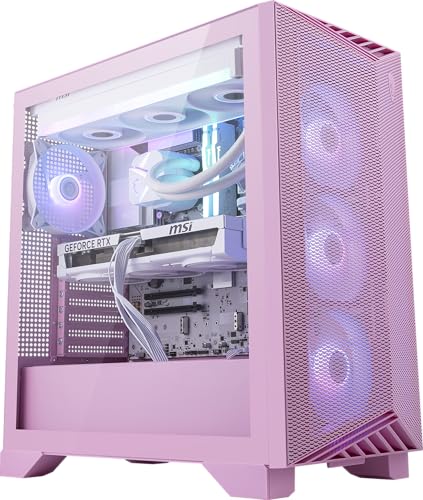
MSI Aegis RS2 AI RTX 5060 Ti Pink Desktop
Best for: 1440p gaming with Thunderbolt 4 expansion
- Graphics Card
- NVIDIA GeForce RTX 5060 Ti
- Processor
- Intel Core Ultra 7 270K
- RAM Capacity
- 32GB
- Storage Capacity
- 1TB
- Memory Type
- DDR5
- Storage Type
- NVMe Gen4 SSD
This desktop pairs an Intel Core Ultra 7 270K processor with an Nvidia GeForce RTX 5060 Ti graphics card. You get 32GB of DDR5 memory, a 1TB NVMe solid-state drive, and a 360mm liquid cooler inside a pink chassis. It suits you if you need Thunderbolt 4 connectivity and liquid cooling for 1440p gaming or multitasking.
- Intel Core Ultra 7 270K with 360mm AIO liquid cooling
- Thunderbolt 4 and 2.5G LAN ports
- Includes MSI gaming keyboard and mouse
- 1TB storage capacity is smaller than 2TB alternatives
- RTX 5060 Ti provides lower graphics performance than RTX 5070 models
- You want 360mm liquid cooling for sustained CPU tasks.
- You need Thunderbolt 4 ports for high-speed expansion.
- You prefer a pink case with included peripherals.
- You require a higher-tier RTX 5070 graphics card.
- You need 2TB of solid-state storage out of the box.
Verdict: MSI Aegis RS2 AI RTX 5060 Ti Desktop delivers liquid-cooled Intel Core Ultra processing and Thunderbolt 4 expansion for users prioritizing 1440p gaming.
Specifications side by side
| Spec | MSI Codex Z2 RTX 5070 Gaming Desktop | MSI Aegis RS2 AI RTX 5060 Ti Pink Desktop |
|---|---|---|
| Graphics Card | NVIDIA GeForce RTX 5070 | NVIDIA GeForce RTX 5060 Ti |
| Processor | AMD Ryzen 7 8700F | Intel Core Ultra 7 270K |
| RAM Capacity | 32GB | 32GB |
| Storage Capacity | 2TB | 1TB |
| Memory Type | DDR5 | DDR5 |
| Storage Type | SSD | NVMe Gen4 SSD |
| Operating System | Windows 11 Home | Windows 11 Home |
| Memory | 32GB RAM | 32GB RAM |
| Use | Home | Home |
| Dimensions | 16 × 8.38 × 19 inches | 19.4 × 9.1 × 19 inches |
| Weight | 21.3 pounds | 26.9 pounds |
| Color | Black | Pink |
| Model | CodZ2A8NVP436 | AeRS2C2NVM72254 |
Frequently asked questions
Which operating system comes installed on the MSI Codex Z2 and Aegis RS2 AI?
Both the MSI Codex Z2 and MSI Aegis RS2 AI arrive with Windows 11 Home installed. You receive Microsoft's operating system ready for gaming, multitasking, and home productivity tasks immediately. Because both desktops share the same base platform, you experience identical interface navigation, window management tools, and native software support across either tower.
Which desktop takes up less physical desk space between the Codex Z2 and Aegis RS2 AI?
The MSI Codex Z2 takes up less desk space than the Aegis RS2 AI. It measures 8.38 inches wide, 16 inches long, and 19 inches high. In contrast, the Aegis RS2 AI spans 9.1 inches wide and 19.4 inches long, requiring a deeper surface area to accommodate its larger mid-tower frame.
How much does the MSI Aegis RS2 AI weigh compared to the Codex Z2?
The MSI Aegis RS2 AI weighs 26.9 pounds, making it 5.6 pounds heavier than the MSI Codex Z2. The Codex Z2 weighs 21.3 pounds. If you plan to move your desktop tower frequently or place it on lightweight shelving, the lighter chassis of the Codex Z2 provides easier handling.
What exterior color finishes do the MSI Codex Z2 and Aegis RS2 AI feature?
The MSI Codex Z2 features a traditional black exterior finish, while the MSI Aegis RS2 AI desktop comes in pink. This gives you a choice between a stealthy, conventional look or an eye-catching pastel aesthetic that stands out inside your home workspace or gaming setup.
What processors power the MSI Codex Z2 and MSI Aegis RS2 AI?
The MSI Codex Z2 uses an AMD Ryzen 7 processor, whereas the MSI Aegis RS2 AI incorporates an Intel Core Ultra processor. Both processors handle multi-threaded workloads, though each platform uses distinct socket architectures. Your choice depends on whether you prefer AMD's processing ecosystem or Intel's Core Ultra architecture.
Does the MSI Aegis RS2 AI support Thunderbolt connectivity?
Yes, the MSI Aegis RS2 AI provides Thunderbolt 4 expansion for high-speed external devices. You can connect compatible high-throughput accessories like external storage arrays, capture devices, or specialized docks. The published specifications for the MSI Codex Z2 do not list Thunderbolt 4 support among its hardware features.


