As Amazon Associates, we earn from qualifying purchases. This means we may receive a small commission at no extra cost to you if you click through and make a purchase.
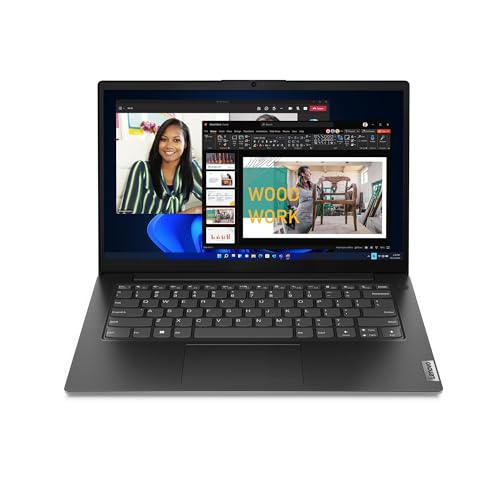
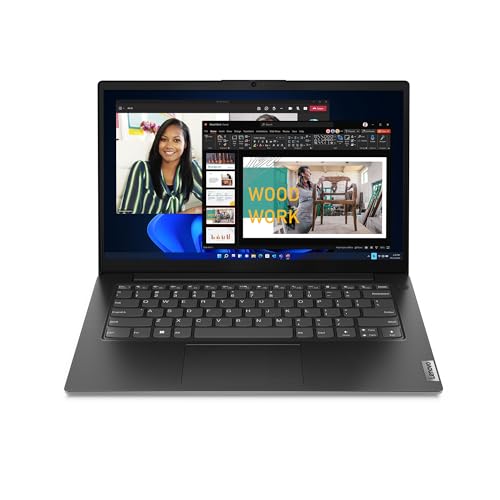
The Lenovo 14 G4 is a compact clamshell laptop engineered to handle standard office computing, web-based workflows, and administrative multitasking. Equipped with a 13th Generation Intel Core i7-13620H processor, a 14-inch Full HD display, and integrated connectivity options, this machine delivers dependable desktop-grade processing power in an easy-to-carry package for daily business use.
This notebook is well suited for office personnel, field representatives, and remote workers who require snappy application loading, a dedicated physical wired network jack, and future hardware expansion options. Shoppers who need a dedicated graphics processing unit for heavy 3D rendering or competitive high-frame-rate gaming should look elsewhere, as this machine is focused squarely on business productivity.


Lenovo 14 G4 at a Glance

| Feature | Specification |
|---|---|
| Processor | Intel Core i7-13620H |
| Graphics | Integrated Intel UHD Graphics (Shared Memory) |
| Display | 14-inch FHD, 88% screen-to-body ratio, wide viewing angles |
| Memory | 8GB RAM (upgradable to 16GB total) |
| Internal Storage | 256GB SSD (supports up to 1TB HDD in 2nd slot) |
| Operating System | Windows 11 Home |
| Weight | 3.2 pounds |
| Dimensions | 12.76 inches L x 8.47 inches W x 0.78 inches Th |
| Wired Connectivity | RJ45 Ethernet, USB Type-C, USB 3.2, HDMI |
| Wireless Connectivity | Wi-Fi 6, Bluetooth 5.2 |
Processing Power and Multitasking Performance
At the center of the system is the Intel Core i7-13620H processor. Unlike lower-tier mobile chips designed purely for power conservation, the H-series silicon provides higher compute throughput, allowing the machine to tackle dense calculations, large spreadsheets, and multi-tab browser environments without stalling. The architecture balances performance cores for active demanding programs with efficiency cores for background tasks, maintaining steady system responsiveness throughout a busy workday.
Graphics responsibilities are handled by Integrated Intel UHD graphics with shared video memory. This setup easily drives everyday visual tasks, smooth video streaming, and external presentations via the HDMI output. For users weighing corporate-tier notebooks such as the lenovo thinkpad e14 gen 7, the combination of a high-tier H-series processor and basic integrated visuals creates a reliable platform for general business applications, even if it is not tailored for demanding video production suites.
In routine office operations, the processor handles document creation, client databases, and continuous enterprise software suites with minimal friction. The H-series hardware ensures that background virus scans and cloud synchronization do not interfere with typing or online navigation, providing a fluid computing foundation for administrative duties.
Screen Quality and Video Collaboration
The Lenovo 14 G4 display centers around a 14-inch Full HD panel that produces clean, crisp text for documents, emails, and financial reporting. Thanks to an 88 percent screen-to-body ratio, the bezels remain slim, giving users an expansive viewing canvas without expanding the laptop footprint. Wide viewing angles help maintain visual clarity when you need to tilt the screen back during travel or share content with a coworker sitting nearby.
For remote work and virtual conferences, the notebook incorporates Lenovo Smart Appearance software. This utility works within video meeting platforms like Microsoft Teams to enhance camera effects, reducing visual background clutter while improving lighting and personal appearance on screen. It ensures professional presentation quality during client calls and team huddles.
Physical privacy is supported directly above the display with a built-in privacy shutter. When your conference call ends, sliding the manual barrier over the webcam lens physically blocks the sensor, preventing unauthorized surveillance. This straightforward mechanical feature gives peace of mind to professionals handling sensitive projects from home or shared co-working spaces.
Memory, Storage, and Upgradability Options
Out of the box, the system arrives with 8GB of memory and a 256GB solid-state drive running Windows 11 Home. While this starting configuration handles everyday browser tabs, email clients, and standard office applications, advanced users will appreciate the clear expansion potential. The architecture is designed so you can perform a Lenovo 14 G4 upgrade RAM procedure by installing an extra 8GB module, reaching a total memory capacity of 16GB to support intensive multitasking.
Internal storage can also grow alongside your file archives. In addition to the primary 256GB SSD, the chassis accommodates an extra 2.5-inch hard drive up to 1TB in the second storage slot. Having a secondary drive bay allows users to maintain the fast boot and application loading speeds of the solid-state drive while archiving large client files, database backups, and media libraries on a secondary disk.
Examining the overall Lenovo 14 G4 specs reveals that this modularity sets it apart from many budget notebooks where memory chips are permanently soldered to the motherboard. While higher-end commercial units like the thinkpad t14 gen 4 often cater to deep corporate deployments, having accessible memory and drive bays on this model gives budget-conscious small businesses room to adapt as digital workloads expand.
Ports, Wired Networking, and Peripherals
Physical connectivity remains a major asset for this workspace laptop. The inclusion of an RJ45 Ethernet port provides direct, high-speed wired network access without requiring external USB dongles. This is a critical advantage for hotel rooms, corporate offices, or home networks where wireless signals are unstable or restricted by network security policies.
Peripherals connect easily across the machine’s ports. A USB Type-C port manages high-speed data transfers, while standard USB 3.2 ports connect everyday input accessories like external keyboards, mice, and backup drives. The full-sized HDMI port allows rapid connection to conference room projectors and desktop monitors, while the listing also notes optical BD-ROM compatibility for specific media requirements.
Wireless peripherals are managed by Bluetooth 5.2, providing reliable links to wireless mice, headsets, and mobile accessories. For wireless internet, onboard Wi-Fi 6 technology improves throughput on crowded modern routers, minimizing latency during cloud transfers and uninterrupted video calls.
Portability, Build, and Security Features
Finished in a professional Business Black clamshell exterior, the Lenovo 14 G4 balances durable construction with mobile utility. Weighing in at 3.2 pounds and measuring 0.78 inches thick, it slides neatly into backpacks, messenger bags, or carry-on luggage. It provides enough structural rigidity for standard commutes while remaining light enough to carry between meeting rooms.
Physical and system security are well covered for business travelers. Operating system protections guard against ransomware, identity theft, and unauthorized data extraction. On the outside, an integrated Kensington NanoSaver lock slot lets you anchor the laptop to desks in public workspaces, libraries, or retail environments to deter theft.
In terms of battery endurance, the listing highlights ample battery life suited for all-day productivity on the move. While specific milliamp-hour ratings and runtime numbers are not specified in the product listing, the combination of efficient background core management and standard FHD display power consumption helps support consistent mobile work between charges.
Lenovo 14 G4 Pros and Cons
Pros
- Fast Intel Core i7-13620H processor
- Upgradable memory slot up to 16GB
- Secondary drive bay supports 1TB HDD
- Native RJ45 Ethernet and Wi-Fi 6
- Integrated webcam privacy shutter
- Lightweight 3.2-pound portable chassis
Cons
- Maximum memory ceiling capped at 16GB
- Modest 256GB base internal storage
- Integrated graphics unsuitable for heavy gaming
Who Should Buy the Lenovo 14 G4
Choosing the right workplace notebook depends on balancing processing needs against expansion potential and mobile comfort.
Buy It If
- You need the computational muscle of an Intel Core i7-13620H processor for demanding spreadsheets and business software.
- You want the flexibility to upgrade memory up to 16GB and install an additional 1TB secondary drive over time.
- You depend on a reliable physical RJ45 Ethernet jack alongside HDMI and modern USB Type-C ports for daily office connectivity.
- You value physical security features including a manual webcam privacy shutter and a Kensington NanoSaver lock slot.
Skip It If
- You need dedicated graphics hardware for professional 3D computer animation or high-end PC gaming.
- Your computational tasks require more than 16GB of maximum total system RAM right out of the gate.
- You prefer a touchscreen interface or an ultra-high-resolution 4K display for precision color grading.
Lenovo 14 G4 Alternatives Worth a Look
If you are exploring other lightweight computing options, several alternatives on the market emphasize different feature sets, screen sizes, or bundled software packages.
2026-2027 edition

The 2026-2027 edition HP 14 Laptop Computer runs an Intel N150 processor paired with 4GB of DDR5 RAM and a 128GB SSD. It also includes Microsoft 365 and 1TB of cloud storage. This machine is geared toward users who prioritize cloud integration and ultra-basic computing tasks over the heavy multi-core processing power of the Core i7 found in the Lenovo unit.
Supports 1TB TF Card Expansion
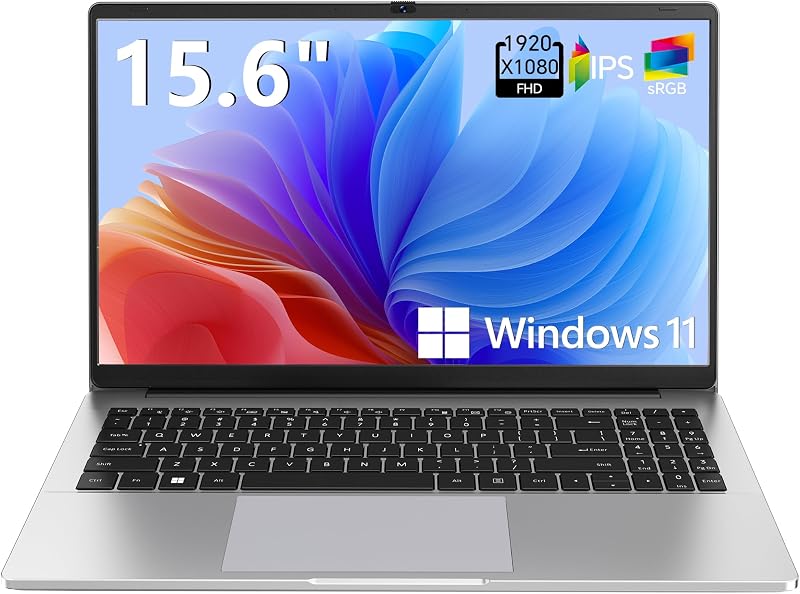
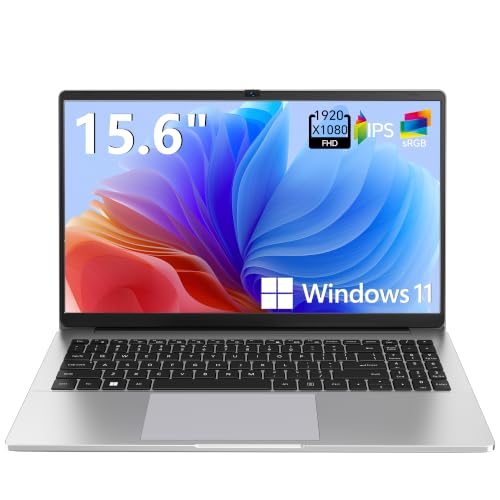
For shoppers who desire a larger screen, the Supports 1TB TF Card Expansion model offers a 15.6-inch FHD LCD display. It features an Intel N4020 processor, 4GB of DDR4 memory, 128GB of eMMC storage, and support for 1TB TF card expansion. It provides a wider display footprint for basic desk use, though it lacks the high-end application performance and dual-drive upgradability of the Lenovo 14 G4.
Copilot AI

The Copilot AI HP 2026 Essential Laptop features a Natural Silver chassis, an Intel processor, 128GB of storage, an LED display, and 1TB of cloud storage bundled with Office 365. It suits budget shoppers looking for immediate access to Microsoft productivity tools and cloud storage straight out of the box, whereas users needing a dedicated Ethernet port and stronger local compute capabilities will prefer the Lenovo platform.
Final Verdict
When asking if the Lenovo 14 G4 is worth it, the answer comes down to practical everyday utility. Backed by the potent Intel Core i7-13620H processor, this laptop handles multitasking and business applications far better than entry-level dual-core or quad-core alternatives. The chassis keeps physical connectivity front and center with native RJ45 Ethernet, standard USB, Type-C, and HDMI ports, eliminating the need for dongles during presentations and wired networking sessions.
While the base 8GB RAM and 256GB storage configuration represents an entry point for modern computing, the inclusion of an open memory slot and a secondary 2.5-inch drive bay gives this notebook true longevity. Readers evaluating the broader enterprise landscape against options like the thinkpad t14 gen 7 will find that the Lenovo 14 G4 offers an accessible, functional, and upgradable foundation for day-to-day office productivity.
FAQ
How much memory can the Lenovo 14 G4 support?
The laptop comes equipped with 8GB of memory and features an accessible expansion slot that allows you to install an extra 8GB module, reaching a maximum total of 16GB RAM.
Does the Lenovo 14 G4 come with an Ethernet port?
Yes, the notebook includes a physical RJ45 Ethernet port on the side of the chassis, enabling reliable wired internet connections without needing external USB adapters.
What processor is inside the Lenovo 14 G4?
This laptop is powered by the 13th Generation Intel Core i7-13620H processor, which uses performance and efficiency cores to deliver fast, reliable multitasking for office applications.
Can the internal storage on the Lenovo 14 G4 be expanded?
Yes, alongside the included 256GB solid-state drive, the laptop includes a secondary 2.5-inch storage slot that supports an additional hard drive up to 1TB in capacity.
Does the Lenovo 14 G4 feature a physical webcam privacy shutter?
Yes, the webcam includes a built-in mechanical privacy shutter that you can slide closed over the camera lens whenever video calls are not active.


