As Amazon Associates, we earn from qualifying purchases. This means we may receive a small commission at no extra cost to you if you click through and make a purchase.
The ASUS Chromebook CX15 is a full-sized ChromeOS laptop crafted for learners, remote workers, and casual home users who prioritize screen real estate over processing muscle. Combining a spacious 15.6-inch 1080p panel with a dual-core Intel processor and a generous solid-state storage drive, this machine delivers an uncomplicated, web-first computing environment. For shoppers seeking a dependable portable workspace for online documents, web navigation, and video streaming without dealing with the maintenance of traditional desktop operating systems, this laptop offers an accessible, big-screen option that hits the mark for everyday tasks.
Evaluating whether the ASUS Chromebook CX15 for students or home offices represents the right match comes down to your personal workload. Learners attending remote lectures, drafting term papers, and browsing research databases will appreciate the comfortable visual workspace and lightweight profile. Conversely, shoppers who require intense photo editing tools, local PC gaming, or heavy background application loads should explore traditional Windows machines or more robust multi-core devices instead.


ASUS Chromebook CX15 at a Glance

| Feature | Specification |
|---|---|
| Display Size and Resolution | 15.6-inch Full HD (1920 x 1080) LCD, 16:9 aspect ratio |
| Screen Finish | Anti-glare coating with NanoEdge slim borders |
| Processor | Intel Celeron N50, Dual-Core (up to 1.1 GHz base frequency) |
| Graphics Coprocessor | Integrated Intel UHD Graphics |
| System Memory | 4GB LPDDR4X RAM |
| Internal Storage | 128GB eMMC flash memory |
| Operating System | ChromeOS with automatic updates and built-in protection |
| Wireless Connectivity | Wi-Fi 6 and Bluetooth |
| Physical Ports | USB Type-C, USB Type-A, HDMI support, 3.5mm headphone jack |
| Dimensions and Weight | 14.2 x 9.3 x 0.79 inches; approximately 3.5 lbs (Pure Grey) |
Display Quality and Visual Comfort
The centerpiece of this laptop is its spacious screen. Evaluating the ASUS Chromebook CX15 display quality reveals that having a 1920 by 1080 Full HD resolution on a 15.6-inch panel makes a substantial difference compared to lower-resolution 768p panels often found in entry-level notebooks. Text rendering looks noticeably sharper, spreadsheet grids stay legible across multiple columns, and web pages display ample content without requiring endless vertical scrolling. ASUS incorporates a NanoEdge slim-bezel frame that maximizes screen area while keeping the chassis relatively compact, creating an expansive canvas for research papers and multimedia viewing.
Visual comfort is further supported by an anti-glare matte coating. This matte treatment helps diffuse harsh overhead fluorescent office lights and reduces distracting reflections from nearby windows, making prolonged study sessions easier on the eyes. While the listing does not specify exact nit brightness levels or color gamut coverage percentages, this standard LCD panel is built specifically for reading, web navigation, and video streaming rather than professional color grading. Shoppers who value high-resolution panels across larger laptops may also want to compare modern Windows alternatives, such as the Lenovo Ideapad Slim 3i 15.6 Full HD laptop – Intel processor N150, to weigh different operating systems against similar screen dimensions.
Watching videos on the 16:9 widescreen display feels natural and uncluttered. High-definition streaming on platforms like YouTube and standard video playback run smoothly at native 1080p. The spacious panel makes split-screen productivity viable: you can dock a research PDF on the left side while typing notes into Google Docs on the right without feeling cramped. For students and everyday family users, the ASUS 15.6 Chromebook FHD visual setup provides plenty of practical utility.
Processor Performance and Daily Multitasking
Under the hood, the laptop relies on an Intel Celeron N50 dual-core processor paired with integrated Intel UHD Graphics. When examining the Intel Celeron N50 performance, expectations must remain realistic. This energy-efficient dual-core chip operates at a base frequency of up to 1.1 GHz, engineered specifically to manage lightweight cloud computing, text editing, and web browsing. Thanks to the lean overhead of ChromeOS, standard system boots take only seconds, and navigating core Google applications feels responsive during day-to-day use.
Understanding ASUS Chromebook CX15 daily multitasking requires looking closely at the 4GB LPDDR4X memory envelope. While 4GB of RAM is sufficient for running four to six active browser tabs alongside a streaming music player and a cloud document, opening dozens of heavy web applications simultaneously will introduce noticeable tab reloading. The integrated Intel UHD Graphics handles interface animations and basic web-based media playback reliably, but it is not intended for local 3D gaming or intensive visual editing. Users wanting heavier multitasking headroom on a budget might inspect alternatives like the HP Stream 14 HD BrightView laptop, Intel processor N150, 16GB RAM, which caters to users needing vastly more system memory for background processes.
In real-world terms, the computing experience remains steady as long as you work within cloud-based boundaries. Preparing presentations in Google Slides, answering emails via Gmail, and running cloud video meetings function stably. The Celeron chip focuses on low thermal output and quiet operation, keeping the system comfortable on your lap during study marathons.
Local Storage Capacity and ChromeOS Ecosystem
A notable highlight within the ASUS Chromebook CX15 specs is the internal storage allocation. While many budget ChromeOS machines limit onboard memory to a restrictive 32GB or 64GB, this configuration steps up with an ASUS Chromebook CX15 128GB eMMC solid-state drive. Having 128GB of internal storage ensures you have ample room to download lecture slide decks, store offline media files for travel, and keep essential offline Google Drive documents readily available.
The ChromeOS ecosystem operates fundamentally around cloud connectivity, automatic security, and user simplicity. Built-in protection helps safeguard the operating system against malware without requiring cumbersome third-party antivirus suites, while background operating system updates install seamlessly. If your routine revolves around Google Docs, Sheets, Drive, Photos, and YouTube, the seamless integration saves time and eliminates software configuration headaches.
Furthermore, having local eMMC storage means you are not stranded whenever Wi-Fi drops. You can configure Google Drive to synchronize important folders locally so you can continue editing school papers or reviewing spreadsheets completely offline. When connectivity is restored, all changes sync back to the cloud automatically.
Port Selection and Everyday Connectivity
Physical peripheral connections are often neglected on entry-level machines, but the ASUS Chromebook CX15 port selection offers welcome versatility. ASUS includes both modern USB Type-C and traditional USB Type-A ports, allowing you to connect flash drives, an external mouse, or mobile devices without carrying dongles. Additionally, the device features HDMI support and a dedicated 3.5mm headphone jack, providing straightforward options for external monitors and private listening.
For remote study and virtual meetings, the laptop comes equipped with an HD webcam, a built-in microphone, and integrated stereo speakers. Video calls on Zoom or Google Meet capture clear video suitable for classroom participation and family catch-ups. Wireless networking is supported by Wi-Fi 6 technology alongside Bluetooth, ensuring stable connections to modern home routers and effortless pairing with wireless headphones or mice.
The inclusion of dedicated video output via HDMI allows students to hook the laptop straight into a dorm television or classroom projector for presentations. Having both USB-A and USB-C side by side ensures you will rarely find yourself hunting for specialized adapters during routine computer sessions.
Portability and Build Quality
Carrying a 15.6-inch laptop can sometimes feel cumbersome, yet the ASUS Chromebook CX15 manages a travel-friendly profile. Measuring 14.2 inches long, 9.3 inches wide, and just 0.79 inches thick, this notebook slips easily into standard school backpacks. Weighing approximately 3.5 pounds, it is lighter than many competing 15-inch notebooks, which often tip the scales closer to four or five pounds.
The exterior is finished in an understated Pure Grey tone that looks clean in professional settings, lecture halls, or family living rooms. The hinge design and slim chassis structure feel balanced for routine transit between home and campus. While the listing does not specify exact battery life in hours or capacity in milliamp-hours, the low-power Intel Celeron N50 and energy-conscious ChromeOS platform are engineered specifically to support daily mobile routines.
Typing on a full-width chassis provides ample palm rest area, reducing wrist fatigue when writing long reports. Even though the listing does not specify keyboard backlighting, the keys are generously spaced across the deck, making typing intuitive for students and casual typists alike.
ASUS Chromebook CX15 Pros and Cons
Pros
- Spacious 15.6-inch Full HD anti-glare display
- Generous 128GB eMMC local storage
- Lightweight 3.5-pound chassis for a 15-inch laptop
- Built-in HDMI, USB-C, and USB-A connectivity
- Modern Wi-Fi 6 wireless support
Cons
- Modest dual-core Intel Celeron N50 processor
- 4GB RAM limits heavy browser multitasking
- Listing does not specify exact battery runtime
Check ASUS Chromebook CX15 on Amazon
Who Should Buy the ASUS Chromebook CX15
Buy It If
- You want a spacious 15.6-inch Full HD 1080p display with an anti-glare finish for comfortable split-screen document work and streaming.
- You need a straightforward ChromeOS environment with 128GB of local storage for coursework, web browsing, and offline file access.
- You prefer a lightweight 15-inch laptop weighing roughly 3.5 pounds with built-in USB-C, USB-A, and HDMI ports.
- Your daily routine relies heavily on cloud applications like Google Docs, Gmail, and YouTube rather than heavy legacy desktop software.
Skip It If
- You require heavy multitasking power and frequently juggle dozens of demanding browser tabs beyond the 4GB RAM capacity.
- You need local Windows desktop software, specialized video editing suites, or dedicated PC gaming capabilities.
- You prefer a smaller 13-inch or 14-inch form factor for maximum ultraportable mobility.
ASUS Chromebook CX15 Alternatives Worth a Look
Before deciding on your purchase, it is worth comparing how the ASUS Chromebook CX15 stacks up against alternative portable machines offering different screen sizes, processor capabilities, and memory configurations.
HP 14″ HD Chromebook Laptop

The HP 14″ HD Chromebook Laptop features a smaller 14-inch HD display, an Intel Quad-Core N4120 processor, 4GB of RAM, and 64GB of eMMC storage, accompanied by an advertised 14-hour battery life and included accessories. Shoppers who prioritize a more compact footprint for tight school desks and want a quad-core processor should consider this HP alternative, provided they do not mind stepping down to a lower-resolution HD panel and half the internal storage.
HP Chromebook 15
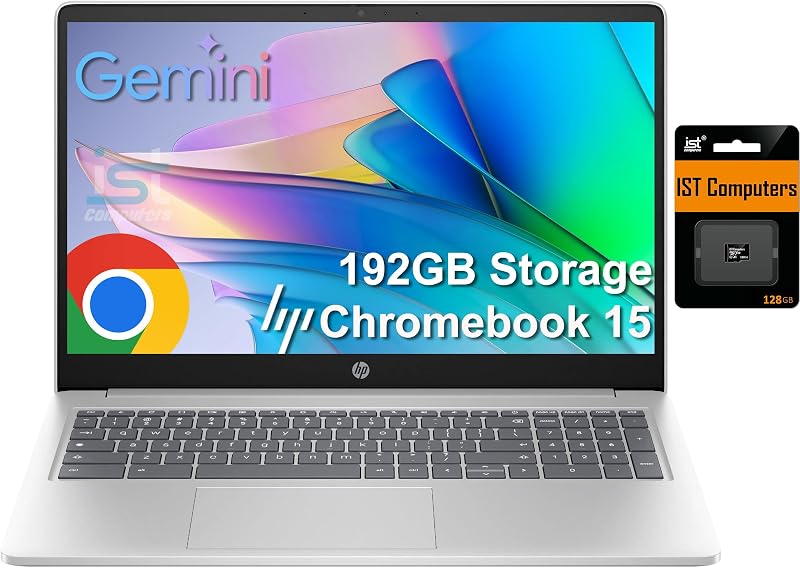
The 64GB eMMC HP Chromebook 15 configuration is equipped with an Intel N200 processor, 8GB of DDR5 RAM, 192GB of combined storage (64GB eMMC plus a 128GB SD card), and a numeric keyboard with a webcam privacy shutter. Buyers who want substantially more multitasking headroom with 8GB of DDR5 RAM and a faster processor should choose this model over the CX15, especially if their daily workflow involves heavy tab management.
Lenovo Flagship Chromebook
The Lenovo Flagship Chromebook offers a 14-inch Full HD touchscreen, an 8-core MediaTek Kompanio 520 processor, 4GB of RAM, 64GB of eMMC storage, and Wi-Fi 6 in an Abyss Blue chassis. Anyone seeking an intuitive touchscreen interface on a portable 14-inch chassis will find this Lenovo model appealing, trading off the larger 15.6-inch screen and 128GB base capacity of the CX15 for touch functionality.

Final Verdict
When asking whether the ASUS Chromebook CX15 is worth it, the answer depends on your everyday expectations. For students, parents, and casual home users seeking a comfortable big-screen experience on a sensible budget, it delivers solid value. By combining a 15.6-inch Full HD anti-glare panel with 128GB of onboard storage, ASUS addresses two of the biggest complaints surrounding entry-level Chromebooks: tiny cramped screens and restrictive 32GB drive limits.
While the dual-core Intel Celeron N50 processor and 4GB of RAM mean you must be mindful of extreme multitasking, the laptop handles standard daily tasks with reliable stability. If you want an accessible, lightweight 3.5-pound notebook for web navigation, homework assignments, and video streaming, the ASUS Chromebook CX15 serves as a practical, easy-to-use solution. For users considering whether to step into a more versatile Windows platform, looking at options like the ASUS Vivobook Go 15.6” FHD slim laptop, AMD Ryzen 3 7320U quad core processor, 8GB DDR5 RAM, 256GB SSD can help determine whether your software needs justify upgrading beyond ChromeOS.
FAQ
Can the ASUS Chromebook CX15 run Microsoft Office programs?
The ASUS Chromebook CX15 runs ChromeOS, which means it does not install traditional desktop Windows versions of Microsoft Office. However, users can access Microsoft 365 web apps through the Chrome browser or work with compatible Google Docs and Sheets to create, open, and edit Word and Excel documents seamlessly.
How much usable storage comes on the ASUS Chromebook CX15?
This laptop comes equipped with 128GB of eMMC solid-state storage. A portion of this capacity is reserved for the ChromeOS operating system and essential system files, but the remaining space provides plenty of local room for downloaded class materials, offline documents, photos, and media files.
Does the ASUS Chromebook CX15 display support touch input?
No, the 15.6-inch Full HD display on this model is a non-touch LCD panel. It features an anti-glare coating and NanoEdge borders designed to reduce reflections and provide a crisp visual experience, controlled via the built-in keyboard and touchpad.
Is the ASUS Chromebook CX15 suitable for video conferencing and online classes?
Yes, the laptop is well equipped for virtual learning and meetings. It features an HD webcam, a built-in microphone, stereo speakers, and Wi-Fi 6 connectivity, making it simple to attend lectures on platforms like Zoom or Google Meet right out of the box.
Can you connect an external monitor to the ASUS Chromebook CX15?
Yes, the ASUS Chromebook CX15 includes HDMI video output support alongside a USB Type-C port, allowing you to connect an external monitor, dorm television, or classroom projector without needing specialized display adapters.