As Amazon Associates, we earn from qualifying purchases. This means we may receive a small commission at no extra cost to you if you click through and make a purchase.
The DJI Osmo Mobile 6 is a lightweight, foldable three-axis stabilizer engineered to turn everyday smartphone footage into smooth, dynamic video. Featuring mechanical stabilization, a built-in telescoping rod, and a magnetic mounting interface, this dji osmo mobile 6 smartphone gimbal delivers immediate shake reduction without cumbersome balance adjustments. For content creators seeking a pocketable handheld tool that eliminates erratic handheld motion while speeding up filming workflows, it stands out as an exceptionally capable and straightforward choice.
This handheld stabilizer directly suits travel videographers, social media creators, and family vloggers who prioritize quick shooting turnaround, creative framing angles, and effortless phone attachment. On the other hand, individuals who utilize heavier mirrorless cameras or those who require extended shoots without relying on vague runtime estimates might want to evaluate broader market options or investigate future releases like the dji mobile 7.


DJI Osmo Mobile 6 at a Glance

| Attribute | Detail |
|---|---|
| Model Number | OE200 (Part Number CP.OS.00000213.01) |
| Stabilization System | 3-Axis Mechanical Stabilization |
| Device Weight | 305 grams |
| Folded Dimensions | 189 × 84.5 × 44 mm |
| Expanded Dimensions | 10.86″D x 4.38″W x 3.89″H |
| Color Finish | Slate Gray |
| Exposure Control | Aperture Priority |
| Supported File Formats | MP4 (Video), JPEG (Photo) |
| Maximum Shutter Speed | 1/30 seconds |
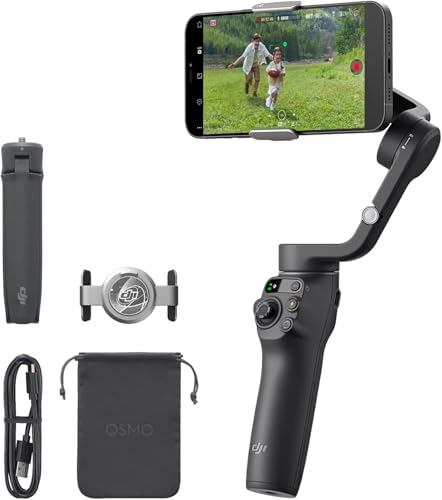
| Included In The Box | DJI OM Magnetic Phone Clamp 3, Grip Tripod, Power Cable, Storage Pouch |
Mounting Mechanism and Extension Rod Capabilities
The core appeal of the device centers around physical usability, anchored primarily by the dji om 6 magnetic phone clamp. Rather than requiring users to manually balance a phone between tension-loaded plastic brackets each time they want to shoot, the magnetic clamp grips the exterior of your mobile device and clips onto the gimbal head instantly. This design accommodates phones even when retained inside protective cases, avoiding repetitive readjustments and allowing you to answer incoming phone calls or send messages by simply popping the phone off the magnet.
Physical deployment is further streamlined through the integrated dji osmo mobile 6 extension rod. Built into the handle assembly, this telescoping section extends smoothly outwards to provide extra distance between the camera sensor and the subject. In everyday handheld vlogging, standard arm length often results in cramped framing where the operator occupies most of the screen. Extending the rod alters the perspective entirely, making it possible to include larger background vistas, wider surroundings, or multiple people in group selfies without demanding supplementary hardware.
Beyond standard eye-level framing, the extension rod fundamentally enhances dynamic shooting angles. Lowering the gimbal towards the pavement while tilting the head upwards lets operators capture moving pet shots or dramatic walking perspectives without straining their backs. When folded, the unit contracts to 189 by 84.5 by 44 mm and weighs just 305 grams, fitting cleanly inside the provided storage pouch alongside the attachable grip tripod. The physical dji osmo mobile 6 setup minimizes operational friction, encouraging casual creators to carry the tool wherever inspiration arises.
Three-Axis Stabilization and Gimbal Modes
Camera shake ruins mobile footage faster than poor lighting, especially when walking or navigating uneven terrain. The device counters unwanted physical movement via motorized 3-axis stabilization. By constantly applying corrective motor force across the pan, tilt, and roll axes, the motorized assembly absorbs running steps, hand tremors, and sudden directional jolts. The resulting footage exhibits a fluid, floating quality that native digital stabilization on mobile handsets struggles to achieve without cropping the frame.
Navigating movement styles is straightforward thanks to the integrated status display panel and the dedicated M button. Shooters can press the M button to cycle across four primary gimbal operating modes: follow mode, tilt locked, and accompanying specialized filming profiles. Follow mode maintains a level horizon while permitting smooth panning and tilting following the user’s natural arm movements, whereas tilt locked restricts motion to horizontal pans for sweeping panoramic shots. The physical panel eliminates guesswork by visibly indicating the active mode.
Quick composition changes are equally effortless during active recording. Double-clicking the dedicated switch button automatically rotates the mounting head between horizontal landscape and vertical portrait orientations. This rapid switching allows creators to capture cinematic widescreen footage for conventional displays and instantly reorient the frame for vertical TikTok or Instagram reels. For operators examining multi-generation advancements across modern stabilizers like the dji gimbal 8, having dedicated physical controls for orientation changes remains an essential standard for mobile workflow efficiency.
Software Features and Subject Tracking Performance
The gimbal hardware coordinates directly with the DJI Mimo application to unlock automated shooting tools. Deployment begins with the Quick Launch mechanism: unfolding the gimbal chassis turns on the internal circuitry immediately, and snapping a paired smartphone onto the magnetic mount prompts the DJI Mimo software to appear on screen. This automation bypasses standard Bluetooth menu browsing, letting videographers transition from pocket storage to live recording in a matter of seconds.
Solo video production benefits significantly from intelligent dji osmo mobile 6 tracking. Through the Mimo interface, the gimbal detects and tracks designated subjects, actively tilting and panning the mechanical motors to keep targets centered in the frame. Whether walking across a room during a live stream, demonstrating a tutorial, or moving around outdoor settings, the tracking system relieves the user from having to manually steer the joystick, acting as a virtual camera operator.
These smart capabilities make the dji osmo mobile 6 for vlogging a remarkably comprehensive package. Within the application, features like ShotGuides analyze environmental scenes and suggest appropriate shooting templates, shot sequences, and camera motions tailored to specific environments. Integrated creative recording functions like Timelapse compress hours of passing clouds or city traffic into stable video clips, providing social media storytellers with visual variety that rivals dedicated production tools like the insta360 flow 2 pro.
Controls, Power Management, and Technical Specifications
Operating a handheld stabilizer requires transparent monitoring of essential hardware states, and the inclusion of a built-in status display panel directly addresses this need. Located immediately above the handle controls, the panel displays the remaining battery level, system status indicators, and current operating mode icons. This visible dashboard prevents mid-shoot surprises by giving users a clear visual cue when the internal cell requires charging via the included power cable.
Regarding dji osmo mobile 6 battery life, the official Amazon listing notes the presence of the system battery meter and status indicators, though the listing does not specify exact runtime hours or milliamp-hour capacity figures. Because real-world battery longevity varies depending on the weight of the attached mobile phone and how aggressively the three motorized axes work to counter motion, monitoring the status display panel remains the most reliable method for tracking remaining operational stamina during field work.
Looking at broader dji osmo mobile 6 specs, the stabilizer accommodates cellphones across a wide operating envelope. It supports MP4 video and JPEG photo capture, features an Aperture Priority exposure control type, and lists a maximum shutter speed rating of 1/30 seconds. In the package, DJI supplies the Slate Gray OE200 stabilizer, the DJI OM Magnetic Phone Clamp 3, a screw-in Grip Tripod that facilitates hands-free recording on flat surfaces, a dedicated power charging cable, and a protective storage pouch to safeguard the equipment in transit.
DJI Osmo Mobile 6 Pros and Cons
Pros
- Quick-release magnetic clamp allows instant phone mounting
- Built-in extension rod provides high and low shooting angles
- Quick Launch powers on automatically upon unfolding
- Three-axis mechanical stabilization ensures smooth footage
- Built-in status panel displays modes and battery level
Cons
- Listing does not specify exact battery runtime hours
- Restricted to cellphone recording without larger camera support
- Maximum shutter speed limited to 1/30 seconds
Check DJI Osmo Mobile 6 on Amazon
Who Should Buy the DJI Osmo Mobile 6
Buy It If
- You film on-the-go video content and need rapid phone mounting without taking off your protective case.
- You regularly capture group photos, walking vlogs, or low-to-the-ground angles that benefit from an integrated telescoping extension rod.
- You want automated tracking capabilities and guided shooting sequences through dedicated companion software.
- You require a compact, foldable design that packs down into a travel bag while weighing only 305 grams.
Skip It If
- You need a heavy-payload stabilization rig capable of balancing mirrorless cameras or bulky add-on cinematic lenses.
- You require a stabilizer with an explicit, manufacturer-guaranteed runtime figure stated directly on the listing.
- You prefer a completely manual mechanical setup that does not rely on companion smartphone applications for advanced features.
DJI Osmo Mobile 6 Alternatives Worth a Look
If the specific combination of dimensions, magnetic latching, and app-based tracking on this stabilizer does not completely match your personal workflow, several alternative smartphone gimbals offer distinct hardware configurations.
Detachable Remote
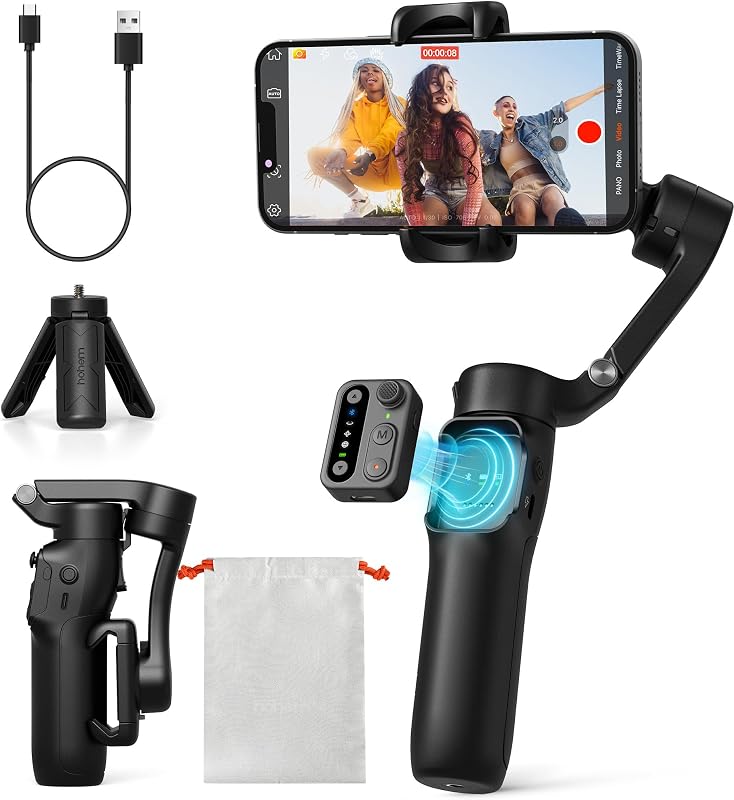
The Detachable Remote gimbal (Hohem iSteady X3 SE) features a foldable 0.79-pound design, an 11-hour battery life specification, and a 0.66-pound payload capacity. It integrates the Hohem Joy app and includes a physical detachable remote controller, making it an appealing option for creators who want documented long battery endurance and standalone wireless controls for distant tripod recording.
COMITOK L7C Pro

The COMITOK L7C Pro is a 3-axis foldable phone gimbal engineered for video recording with specialized face and object tracking. Designed to support broad mobile devices including the iPhone 15 Pro Max, this option provides an attractive alternative for creators primarily focused on stable mobile vlog recording across large-screen smartphones.
Handheld smartphone gimbal w focus

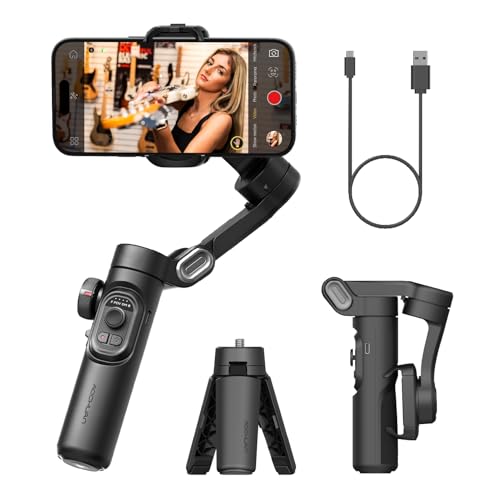
The Handheld smartphone gimbal w focus (AOCHUAN Smart XE) features an integrated focus wheel, gesture control, face tracking, and a foldable 3-axis design. Content producers creating videos for TikTok and YouTube who prefer tactile, dial-driven focus adjustments right on the gimbal handle may favor this layout over touch-screen adjustments.
Final Verdict
When asking whether is dji osmo mobile 6 worth it, the answer depends heavily on how much you value speed, packability, and framing versatility. By combining responsive 3-axis stabilization motors with the convenience of the magnetic clamp and an integrated extension rod, this stabilizer eliminates the friction points that traditionally discourage casual creators from using motorized gimbals. It deploys rapidly, tracks moving subjects accurately through the Mimo platform, and collapses into a small footprint that travels effortlessly.
While the product listing leaves out explicit battery hour metrics and limits technical camera specifications like maximum shutter speed to 1/30 seconds, its functional hardware layout remains among the most intuitive available. For vloggers, mobile journalists, and casual shooters seeking the best smartphone gimbal stabilizer for spontaneous day-to-day filming, the DJI Osmo Mobile 6 offers an exceptionally well-rounded blend of stability and physical convenience.
FAQ
Does the magnetic clamp work with phone cases attached?
Yes. The quick-release magnetic phone clamp is designed to snap securely onto your smartphone without requiring you to remove standard protective cases, allowing you to attach or detach your phone instantly.
How does the built-in extension rod work?
The extension rod is built directly into the handle shaft. You simply pull the top assembly outward to extend the physical reach, allowing you to position the camera further away for wider selfies, higher vantage points, or creative ground-level angles.
How do you switch between horizontal and vertical shooting?
You can toggle between landscape and portrait orientations by double-clicking the physical switch button on the gimbal handle. The motorized axis will automatically rotate the attached phone to match your desired filming format.
What is the battery runtime on a single charge?
The product listing does not specify exact runtime hours or milliamp-hour ratings. However, the device includes a built-in status display panel that illuminates the remaining battery level and system status during use, and it recharges using the included power cable.
What accessories come packaged in the box?
The retail package includes the DJI Osmo Mobile 6 unit, one DJI OM Magnetic Phone Clamp 3, one attachable Grip Tripod for stable stationary placement, a power charging cable, and a protective storage pouch.


