As Amazon Associates, we earn from qualifying purchases. This means we may receive a small commission at no extra cost to you if you click through and make a purchase.
As an Amazon Associate we earn from qualifying purchases. Links on this page are affiliate links.
Evaluating the best msi prebuilt gaming PCs under $1500 means looking at core hardware details such as processor models, memory generations, and system dimensions. You will find 3 models compared here based on the specifications published on their listings.
The MSI Codex Z2 RTX 5060 Gaming Desktop leads the rankings because its six-core Ryzen 5 processor and 16GB of DDR5 RAM support mainstream 1080p gaming and multitasking. This guide helps you decide which chassis size, memory capacity, and component balance fits your desk.
Base your choice on system memory
Every configuration here includes an RTX 5060 graphics card and DDR5 memory. You must choose between baseline memory and expanded capacity. The MSI Codex Z2 includes 16GB RAM for regular gaming. If you manage larger workloads alongside games, pick the MSI Codex R2 AI for its 32GB RAM.
| # | Product | Best for | Price |
|---|---|---|---|
| 1 | MSI Codex Z2 RTX 5060 Gaming Desktop Best overall | Mainstream 1080p gaming and everyday multitasking | |
| 2 | MSI Codex R2 RTX 5060 i5 Gaming PC Best budget | Everyday 1080p gaming with DDR5 hardware | |
| 3 | MSI Codex R2 AI Desktop PC Best 32gb ram | heavy multitasking and large game libraries |
The best fit for you
- You want an AMD processor for 1080p gaming – MSI Codex Z2 RTX 5060 Gaming Desktop – Its AMD Ryzen 5 processor and 16GB DDR5 memory handle everyday 1080p gaming.
- You prefer an Intel processor with dedicated SSD storage – MSI Codex R2 RTX 5060 i5 Gaming PC – Its Intel Core i5 processor pairs with a 1TB SSD and four factory cooling fans.
- You need extra system memory for heavy multitasking sessions – MSI Codex R2 AI Desktop PC – Its 32GB of DDR5 RAM delivers double the memory capacity for multitasking.

MSI Codex Z2 RTX 5060 Gaming Desktop
Best for: Mainstream 1080p gaming and everyday multitasking
- Graphics Card
- GeForce RTX 5060
- Processor
- AMD Ryzen R5-8400F
- RAM Capacity
- 16GB
- Storage Capacity
- 1TB
- Memory Type
- DDR5
- Storage Type
- M.2 NVMe SSD
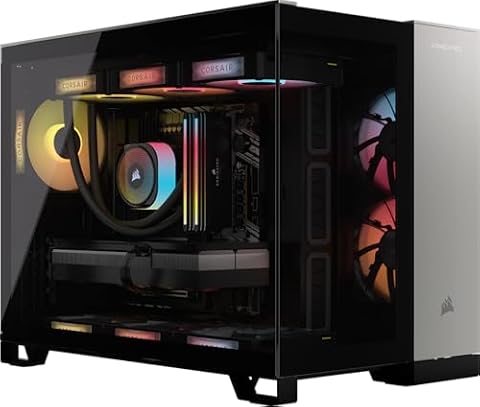
This MSI Codex Z2 desktop pairs an AMD Ryzen 5 8400F six-core processor with an Nvidia GeForce RTX 5060 graphics card and 16GB of DDR5 memory. A 1TB NVMe SSD provides local storage, while four case fans manage airflow. You get a balanced configuration built for modern 1080p gaming without paying for unused multi-core hardware.
- Nvidia GeForce RTX 5060 GPU with Blackwell architecture
- AMD Ryzen 5 8400F processor with 4.7 GHz boost clock
- Four system cooling fans with ARGB air cooler
- 16GB DDR5 memory paired with 1TB NVMe storage
- 16GB system memory is lower than 32GB configurations
- Six-core processor limits heavy compute tasks compared to higher-core options
- You want a dedicated GeForce RTX 5060 GPU for current games.
- You need 1TB of high-speed NVMe storage ready out of the box.
- You prefer a PC case with four pre-installed airflow fans.
- You require 32GB of RAM for heavy memory-intensive workflows.
- You need an eight-core or higher processor for intensive workstation loads.
Verdict: MSI Codex Z2 RTX 5060 Ryzen 5 Gaming PC gives you current-generation Blackwell graphics and solid six-core AMD performance for straightforward 1080p gaming setups.

MSI Codex R2 RTX 5060 i5 Gaming PC
Best for: Everyday 1080p gaming with DDR5 hardware
- Graphics Card
- NVIDIA GeForce RTX 5060
- Processor
- Intel i5-14400F
- RAM Capacity
- 16GB
- Storage Capacity
- 1TB
- Memory Type
- DDR5
- Storage Type
- SSD
This MSI Codex R2 desktop pairs an Intel Core i5-14400F processor with an NVIDIA GeForce RTX 5060 graphics card and 16GB of DDR5 RAM. A 1TB SSD provides storage for your games, while four fans and an air cooler manage heat. It suits you if you want a current-generation GPU and fast DDR5 memory.
- NVIDIA GeForce RTX 5060 graphics card
- Intel Core i5-14400F processor with hybrid architecture
- Four system fans plus an RGB CPU air cooler for ventilation
- 16GB DDR5 system memory and 1TB SSD storage
- Includes 16GB of RAM rather than the 32GB offered on higher trims
- Chassis is 19 inches tall and weighs 21.3 pounds
- You want an RTX 5060 graphics card combined with modern DDR5 memory.
- You prefer a prebuilt system equipped with four case fans and a 1TB SSD.
- You need 32GB of system RAM or a Core Ultra 7 processor out of the box.
- You want a compact, lightweight computer case rather than a mid-tower chassis.
Verdict: MSI Codex R2 i5 RTX 5060 Gaming PC balances an Intel Core i5 processor with an RTX 5060 graphics card and 1TB of storage. It serves players who want modern gaming components and four factory cooling fans in a mid-tower chassis.

MSI Codex R2 AI Desktop PC
Best for: heavy multitasking and large game libraries
- Graphics Card
- NVIDIA GeForce RTX 5060
- Processor
- Intel Core Ultra 7 265K
- RAM Capacity
- 32GB
- Storage Capacity
- 2TB
- Memory Type
- DDR5
- Storage Type
- M.2 NVMe Gen4 SSD
The MSI Codex R2 is a desktop gaming tower built around an Intel Core Ultra 7 265K processor and an NVIDIA GeForce RTX 5060 graphics card with 8GB of memory. It doubles the system memory of other options here to 32GB DDR5 6000 and supplies 2TB of NVMe Gen4 solid-state storage. It suits you if you run heavy background multitasking alongside your gaming.
- 32GB DDR5 6000 memory in a dual-channel 2x 16GB setup
- Spacious 2TB M.2 NVMe Gen4 solid-state drive
- Intel Core Ultra 7 265K processor
- NVIDIA GeForce RTX 5060 graphics with 8GB memory
- Graphics card VRAM is capped at 8GB
- Product specifications list no Wi-Fi or Bluetooth details
- You want 32GB of high-speed system memory right out of the box
- You need 2TB of fast solid-state storage for large games and local files
- You need a graphics card with more than 8GB of video memory
- You prefer an AMD processor platform over Intel
Verdict: MSI Codex R2 Ultra 7 RTX 5060 Gaming PC provides double the memory and storage capacity of baseline configurations for players who run intensive multitasking sessions alongside modern games.
Specifications side by side
| Spec | MSI Codex Z2 RTX 5060 Gaming Desktop | MSI Codex R2 RTX 5060 i5 Gaming PC | MSI Codex R2 AI Desktop PC |
|---|---|---|---|
| Graphics Card | GeForce RTX 5060 | NVIDIA GeForce RTX 5060 | NVIDIA GeForce RTX 5060 |
| Processor | AMD Ryzen R5-8400F | Intel i5-14400F | Intel Core Ultra 7 265K |
| RAM Capacity | 16GB | 16GB | 32GB |
| Storage Capacity | 1TB | 1TB | 2TB |
| Memory Type | DDR5 | DDR5 | DDR5 |
| Storage Type | M.2 NVMe SSD | SSD | M.2 NVMe Gen4 SSD |
| Operating System | Windows 11 Home | Windows 11 Home | Windows 11 Home |
| Memory | 16GB RAM | 16GB RAM | 32GB RAM |
| Dimensions | 16 × 8.38 × 19 inches | 16 × 8.38 × 19 inches | – |
| Weight | 21.3 pounds | 21.3 pounds | – |
| Size | 19.1" x 8.4" x 16.1" | 1TB | – |
| Color | Black | Black | – |
| Model | CodZ2B8NVL694 | CodR2A14NVL5454 | A2NVL7-464US |
How to Choose an MSI Gaming PC
Target Display Resolution
Check the graphics card tier to match your monitor. All listed machines feature an RTX 5060 graphics card. This card is built for 1080p gaming performance. If you use a standard 1080p display, this hardware produces steady frame rates in modern titles. Buyers who connect higher-resolution screens may need to lower graphical settings. Check the published graphics card specifications to confirm it suits your display.
Dedicated Storage Capacity
Review the internal solid-state drive size before you buy. Modern gaming installations require substantial storage space for base game files and downloadable updates. The MSI Codex R2 RTX 5060 i5 includes a 1TB SSD. A 1TB drive gives you enough room to store several large games at once. If you maintain an extensive library, verify whether the listing clearly states the SSD capacity.
Chassis Dimensions and Clearance
Measure your physical desk space before selecting a desktop tower. Mid-tower systems require enough room for placement and airflow. The MSI Codex Z2 measures 19 inches tall, 16 inches long, and 8.38 inches wide, weighing 21.3 pounds. You need clearance around the chassis to allow cooling fans to draw air properly. Compare these exterior dimensions against your workspace before completing your setup.
Memory Type Standard
Examine the system memory generation in the published specifications. All models listed in this guide feature DDR5 RAM. DDR5 provides faster memory bandwidth than older DDR4 configurations. This current generation component ensures the platform remains relevant for modern operating systems and upcoming software releases. Confirm on the spec sheet that the prebuilt configuration utilizes DDR5 memory to secure newer hardware architecture.
Processor Family Selection
Match the processor family to your daily computing tasks. This selection includes AMD Ryzen 5, Intel Core i5, and Intel Ultra 7 options. A standard six-core processor handles modern gaming alongside light background software. If you run intensive multitasking workloads, video rendering, or streaming tools while gaming, look toward an Intel Ultra 7 model. Check the processor specification to match your computing intensity.
Frequently asked questions
What graphics card do MSI prebuilt gaming PCs in this range use?
You get an RTX 5060 graphics card across these desktop options. This card handles standard 1080p gaming environments effectively. The MSI Codex Z2 and MSI Codex R2 configurations rely on this component to drive visual output, giving you dependable rendering capabilities for current titles without requiring dedicated hardware upgrades out of the box.
Which processor options are available in these MSI desktop systems?
You can select systems featuring an AMD Ryzen 5, an Intel Core i5, or an Intel Ultra 7 processor. The MSI Codex Z2 houses the Ryzen 5 processor. Meanwhile, the MSI Codex R2 lineup offers Intel processor options to suit whether you prefer AMD or Intel computing platforms for your daily gaming setup.
What memory type do these MSI gaming PCs use?
Every listed system uses DDR5 memory. You can select configurations with 16GB RAM on the MSI Codex Z2 and MSI Codex R2 i5 models. If your setup demands higher multitasking capability, the MSI Codex R2 AI desktop doubles that capacity to 32GB RAM, allowing you to run intensive background tasks alongside games.
How much physical space do you need for an MSI Codex desktop?
You need space for a mid-tower chassis measuring about 19 inches high, 16 inches long, and 8.38 inches wide. Both the MSI Codex Z2 and MSI Codex R2 share these exterior dimensions and weigh 21.3 pounds. Make sure your desk surface has sufficient clearance and stability to support this mid-tower form factor.
What built-in cooling is included with the MSI Codex R2?
The MSI Codex R2 i5 build includes four factory cooling fans inside its mid-tower chassis. These pre-installed case fans circulate air across your processor and graphics card during active gaming sessions. Proper airflow helps dissipate heat from components, ensuring steady thermal management while you play titles that stress internal hardware.
What storage capacity do these MSI prebuilt PCs provide?
You receive a 1TB SSD on the MSI Codex R2 i5 configuration for installing your operating system and games. The MSI Codex R2 AI desktop doubles the storage capacity compared to baseline builds. Solid-state drives deliver quick load times and smooth file transfers for all your saved titles.