As Amazon Associates, we earn from qualifying purchases. This means we may receive a small commission at no extra cost to you if you click through and make a purchase.
As an Amazon Associate we earn from qualifying purchases. Links on this page are affiliate links.
Choosing among the best dell prebuilt gaming PCs with 64GB RAM requires looking closely at core counts and graphics hardware. This guide compares 3 systems based on the specifications published on the listings. The Dell Tower Plus RTX 5070 Core Ultra 9 PC leads the lineup with its GeForce RTX 5070 graphics card and 24-core processing power.
This comparison helps you decide which desktop fits your workspace dimensions and processing needs.
Storage configurations and graphics tiers differ
All options provide 64GB of DDR5 memory, so you should focus on graphics and storage. The Dell Alienware Aurora R16 RTX 5080 Desktop provides a dual-drive 2TB SSD plus 2TB HDD setup for large libraries. In contrast, the Dell Tower RTX 5060 Gaming PC features a single 2TB SSD.
| # | Product | Best for | Price |
|---|---|---|---|
| 1 | Dell Tower Plus RTX 5070 Core Ultra 9 PC Best overall | Balanced high-resolution gaming and heavy multi-core workflows | |
| 2 | Dell Tower RTX 5060 Gaming PC Best budget | 1440p gaming and memory-heavy creative workloads | |
| 3 | Dell Alienware Aurora R16 RTX 5080 Desktop Also great | high-end AAA gaming and intensive multitasking |
The best fit for you
- You need balanced gaming and creator performance. – Dell Tower Plus RTX 5070 Core Ultra 9 PC – A 24-core processor and GeForce RTX 5070 graphics card provide dedicated multi-core and visual power.
- You want a lightweight tower for creative work. – Dell Tower RTX 5060 Gaming PC – This 10-pound chassis includes 20 processing cores alongside a 2TB SSD for fast local storage.
- You need high-end graphics for demanding gaming. – Dell Alienware Aurora R16 RTX 5080 Desktop – It pairs RTX 5080 graphics with a factory liquid-cooled chassis and a 1000W Platinum power supply.
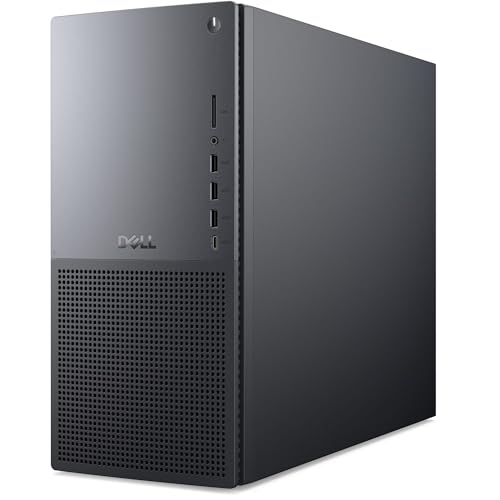
Dell Tower Plus RTX 5070 Core Ultra 9 PC
Best for: Balanced high-resolution gaming and heavy multi-core workflows
- Memory
- 64GB RAM
- Graphics Card
- NVIDIA GeForce RTX 5070
- Processor
- Intel Core Ultra 9 285K
- RAM Capacity
- 64GB
- Storage Capacity
- 2TB
- Memory Type
- DDR5
The Dell Tower Plus RTX 5070 Gaming PC pairs an Intel Core Ultra 9 285K 24-core processor with 64GB of DDR5 memory and a 2TB solid-state drive. You get an NVIDIA GeForce RTX 5070 graphics card with 12GB of GDDR7 memory alongside Wi-Fi 7 connectivity. It suits you if you handle heavy multitasking, content creation, and high-resolution gaming.
- Intel Core Ultra 9 285K CPU with 24 cores and up to 5.7 GHz
- NVIDIA GeForce RTX 5070 GPU with 12GB GDDR7 VRAM
- 64GB DDR5 RAM for demanding multitasking and gaming
- 2TB solid-state drive provides generous local storage
- Intel Wi-Fi 7 BE200 and Bluetooth for modern wireless networking
- 12GB GPU video memory is lower than the 16GB available on RTX 5080 configurations
- Includes basic wired peripherals rather than wireless accessories
- You need 64GB of DDR5 RAM paired with a 24-core CPU for multi-threaded tasks.
- You want standard Wi-Fi 7 support alongside 2TB of solid-state storage.
- You run modern 1440p gaming workloads using DLSS 4 AI frame generation.
- You want a higher-tier 16GB VRAM graphics card for maximum 4K texture headroom.
- You prefer out-of-the-box wireless input devices over wired peripherals.
Verdict: Dell Tower Plus RTX 5070 Gaming PC delivers high-end 24-core processing power and 64GB DDR5 memory to users needing a balance of creator productivity and gaming performance.

Dell Tower RTX 5060 Gaming PC
Best for: 1440p gaming and memory-heavy creative workloads
- Memory
- 64GB RAM
- Graphics Card
- NVIDIA GeForce RTX 5060
- Processor
- Intel Ultra 7 265F
- RAM Capacity
- 64 GB
- Storage Capacity
- 2 TB
- Memory Type
- DDR5
This Dell desktop pairs an Intel Ultra 7 265F 20-core processor with an NVIDIA GeForce RTX 5060 8GB graphics card and 64GB of DDR5 RAM. You get a 2TB NVMe SSD for storage and a compact 10-pound chassis with Wi-Fi 6. It suits you if you need large memory capacity for multitasking and 1440p gaming.
- 64GB DDR5 RAM handles heavy multitasking and creative workloads
- 20-core Intel Ultra 7 265F processor reaches up to 5.3 GHz turbo
- 2TB PCIe NVMe SSD provides large internal solid-state storage
- Compact footprint measuring 11.5 by 6.06 by 12.8 inches and 10 pounds
- NVIDIA RTX 5060 graphics card includes 8GB VRAM rather than 16GB
- Four of the eight USB ports operate at older USB 2.0 speeds
- You want 64GB DDR5 memory paired with a 2TB SSD out of the box.
- You target 1440p gaming, 3D work, or video editing on a 20-core processor.
- You prefer a lightweight, compact desktop chassis.
- You require top-tier 4K gaming performance with more than 8GB of VRAM.
- You need all peripheral ports to support USB 3.0 transfer rates or higher.
Verdict: Dell Tower RTX 5060 Gaming PC provides 64GB of DDR5 memory and 20 processing cores for users who prioritize system RAM and multi-threaded throughput over top-tier GPU memory bandwidth.

Dell Alienware Aurora R16 RTX 5080 Desktop
Best for: high-end AAA gaming and intensive multitasking
- Memory
- 64GB RAM
- Graphics Card
- GeForce RTX 5080
- Processor
- Intel Ultra 9 285K
- RAM Capacity
- 64 GB
- Storage Capacity
- 2 TB + 2 TB
- Memory Type
- DDR5
This prebuilt Dell gaming desktop features an Intel Ultra 9 285K 24-core processor, 64GB of DDR5 memory, and an NVIDIA GeForce RTX 5080 graphics card with 16GB of GDDR7 VRAM. It includes a 240mm liquid CPU cooler and a 1000W Platinum power supply. You get high-bandwidth memory and heavy graphics hardware suited for AAA gaming and demanding multitasking workloads.
- NVIDIA GeForce RTX 5080 GPU with 16GB GDDR7 VRAM
- 24-core Intel Ultra 9 285K processor with 5.7GHz boost
- 64GB DDR5 memory paired with a 2TB SSD
- 1000W Platinum-rated power supply
- 240mm liquid-cooled CPU thermal system
- Deep 18.1-inch chassis requires substantial desk clearance
- Wi-Fi generation and networking specifications are omitted from the data
- You want an NVIDIA RTX 5080 GPU for high-resolution gaming.
- You need 64GB of DDR5 RAM for simultaneous gaming, streaming, and background tasks.
- You have a compact desk that cannot accommodate an 18.1-inch deep case.
- You play entry-level games that do not require an RTX 5080 graphics card.
Verdict: Dell Alienware Aurora RTX 5080 Desktop delivers 24 processing cores, 64GB of DDR5 RAM, and a 1000W Platinum power supply for players running heavy modern games and streaming setups. It provides top-tier GPU performance inside a factory liquid-cooled chassis.
Specifications side by side
| Spec | Dell Tower Plus RTX 5070 Core Ultra 9 PC | Dell Tower RTX 5060 Gaming PC | Dell Alienware Aurora R16 RTX 5080 Desktop |
|---|---|---|---|
| Graphics Card | NVIDIA GeForce RTX 5070 | NVIDIA GeForce RTX 5060 | GeForce RTX 5080 |
| Processor | Intel Core Ultra 9 285K | Intel Ultra 7 265F | Intel Ultra 9 285K |
| RAM Capacity | 64GB | 64 GB | 64 GB |
| Storage Capacity | 2TB | 2 TB | 2 TB + 2 TB |
| Memory Type | DDR5 | DDR5 | DDR5 |
| Storage Type | NVMe SSD | M.2 PCIe NVMe SSD | SSD + HDD |
| Operating System | Windows 11 Pro | – | Windows 11 Pro |
| Memory | 64GB RAM | 64GB RAM | 64GB RAM |
| Dimensions | – | 11.5 × 6.06 × 12.8 inches | 18.1 × 16.5 × 7.75 inches |
| Weight | – | 10 pounds | – |
| Size | 64GB DDR5 RAM | – | 64 GB DDR5 | 2 TB SSD + 2TB HDD |
| Model | 2250 | DECT1250-7274BLK-PUS | R16 |
| Color | – | Black | Black |
Choosing a Dell 64GB Gaming Desktop
Select the Graphics Card
Check the graphics card specification to match your visual demands. Graphics tiers determine visual frame rates and rendering limits. Desktops equipped with an RTX 5060 provide entry-level capability for standard tasks. The Dell Alienware Aurora R16 RTX 5080 Desktop provides higher-tier graphical output for demanding modern titles. Review the GPU model on the spec sheet to verify it supports your software needs.
Evaluate CPU Core Counts
Review the processor core specification to support your workload. Higher core counts accelerate multi-threaded computing, code compiling, and content rendering tasks. For standard gaming and everyday multitasking, a 20-core processor provides sufficient throughput. If your workflow involves intensive production tasks or background rendering, choose a 24-core setup like the Dell Tower Plus RTX 5070 Core Ultra 9 PC. Check the processor specification before purchasing.
Measure Your Desk Space
Compare physical tower dimensions to ensure your workspace accommodates the chassis. Compact desktop cases fit smaller desks and weigh less for relocation. The Dell Tower RTX 5060 Gaming PC measures 6.06 inches wide, 12.8 inches high, and 11.5 inches long, weighing 10 pounds. Larger cases require deeper surfaces and more overhead clearance. Check the listed height, width, and length specifications against your desk space.
Assess Thermal Management Hardware
Inspect the cooling setup listed on the product specifications. High-performance internal components generate heat under continuous operation, requiring adequate thermal dissipation. Liquid cooling helps regulate temperatures during heavy loads. For example, the Dell Alienware Aurora R16 RTX 5080 Desktop specifies a factory liquid-cooled chassis alongside a 1000W Platinum power supply. Review thermal management specs to ensure the hardware maintains operating stability during long computing sessions.
Check Operating System Editions
Verify the preinstalled operating system listed in the specifications table. Business environments and specialized workflows often require specific management features found in advanced operating system editions. Windows 11 Pro includes management tools and administrative features not present in standard consumer builds. Confirm the exact edition before purchase so you do not need to upgrade the operating system license separately for your work setup.
Frequently asked questions
What type of memory do Dell 64GB prebuilt gaming PCs use?
Dell gaming desktops with 64GB of RAM utilize DDR5 memory. This standard provides higher memory bandwidth and faster operational speeds than DDR4 modules. Systems like the Dell Tower Plus model 2250 and Dell Alienware Aurora R16 feature this DDR5 configuration to handle memory-heavy multitasking and complex computational workloads smoothly.
Which operating system comes preinstalled on Dell 64GB gaming desktops?
Dell prebuilt PCs in this category ship with Windows 11 Pro installed. This 64-bit operating system provides native support for modern high-core-count processors and large memory pools over 32GB. Both the Dell Tower Plus RTX 5070 and the Dell Alienware Aurora R16 list Windows 11 Pro within their factory specifications.
What power supply capacity is included in high-end Dell 64GB desktops?
High-end configurations like the Dell Alienware Aurora R16 include a 1000W Platinum power supply. This high wattage provides stable electrical delivery to demanding hardware components such as factory liquid-cooled 24-core processors and RTX 5080 graphics cards. The Platinum efficiency rating minimizes energy waste and thermal output during extended gaming sessions.
How much physical space do compact Dell 64GB prebuilt towers require?
Compact models require minimal desk footprint. For example, the Dell Tower DECT1250-7274BLK-PUS measures 6.06 inches wide, 11.5 inches long, and 12.8 inches high, weighing just 10 pounds. These smaller dimensions allow you to place a 20-core, 64GB machine easily into setups with limited physical desk surface space.
Are liquid cooling systems available in Dell 64GB gaming PCs?
Yes, liquid cooling is available on select models such as the Dell Alienware Aurora R16. Dell pairs a factory liquid-cooled chassis with high-heat hardware to maintain lower operating temperatures across its 24-core processor. Liquid cooling helps sustain high clock frequencies and reduces fan noise under heavy multi-threaded computing tasks.
How many processor cores are available on Dell 64GB gaming computers?
You can find configurations with either 20 or 24 processor cores. The Dell Tower model DECT1250-7274BLK-PUS supplies 20 processing cores, while models like the Dell Tower Plus 2250 provide 24 cores. Higher core counts assist in handling simultaneous applications, background software, and demanding multithreaded productivity tasks alongside gaming.