As Amazon Associates, we earn from qualifying purchases. This means we may receive a small commission at no extra cost to you if you click through and make a purchase.
The ASUS ROG Zephyrus G16 is an ultra-slim performance notebook engineered to unite high-end hardware with genuine travel portability. Combining an Intel Core Ultra 9 processor and dedicated NVIDIA graphics inside an aluminum frame under 0.7 inches thick, it delivers desktop-grade computing without the cumbersome weight of traditional gaming rigs. In short, this machine successfully proves that an ultra-portable profile does not require sacrificing cutting-edge visual fidelity or graphical muscle.
This laptop is ideal for travelling professionals, visual creators, and enthusiast gamers who require a top-tier OLED panel alongside serious 3D processing power on the go. Conversely, shoppers searching for an entry-level budget laptop or those who insist on massive 17-inch desktop replacements with modular components should look elsewhere.


ASUS ROG Zephyrus G16 at a Glance

| Attribute | Detail |
|---|---|
| Processor | Intel Core Ultra 9 285H |
| Graphics | NVIDIA GeForce RTX 5070 Laptop GPU (GDDR7) |
| Display | 16-inch 2.5K (2560 x 1600) ROG Nebula OLED, 240Hz, 0.2ms |
| Color and Brightness | 100% DCI-P3, Delta E < 1, 500 nits, VESA DisplayHDR True Black 500 |
| Storage | 1 TB SSD |
| Operating System | Windows 11 Pro |
| Battery and Charging | 90Wh battery with fast-charge support |
| Thermal Design | ROG Intelligent Cooling with liquid metal, Tri-Fan, 0dB Ambient Cooling |
| Weight and Thickness | 4.08 lbs, approximately 0.59 to 0.69 inches thin |
| Wireless and Audio | Wi-Fi 7, six speakers, dual force-canceling woofers, Dolby Atmos |
Processing Power and Graphical Muscle
At the center of the hardware package sits an Intel Core Ultra 9 285H processor paired with an NVIDIA GeForce RTX 5070 Laptop GPU. This configuration delivers abundant multi-threaded computational speed for 3D modeling, streaming, and intense software development. The GPU features next-generation GDDR7 memory, giving the graphics pipeline ample bandwidth to render high-resolution textures smoothly. Exploring the asus laptop zephyrus specs reveals that this hardware combination is calibrated to sustain high performance while maintaining an exceptionally compact physical footprint.
When assessing the zephyrus g16 rtx 5070 configuration under demanding modern software, the system effortlessly maintains high framerates and steady frame pacing. While larger desktop replacements such as the zephyrus g16 5070ti utilize higher wattage envelopes for marginal gains, this standard model strikes an optimal equilibrium between graphics output, thermals, and battery consumption. Testing titles at the native 2560 x 1600 resolution yields fluid visual output across diverse modern game genres.
Storage is anchored by a high-speed 1 TB solid-state drive, ensuring rapid boot sequences and instantaneous application loading times. The machine arrives equipped with Windows 11 Pro, offering enterprise-level data protection and productivity tools. While the listing does not specify the installed system RAM capacity, the core processor and dedicated GPU work in concert to eliminate micro-stutters during heavy multitasking, rendering, and background video exports.
The ROG Nebula OLED Display Quality
The 16-inch ROG Nebula OLED screen is arguably the most visually striking component of the entire notebook. Operating at a 2.5K resolution (2560 x 1600) with a modern 16:10 aspect ratio, it presents crisp lines, sharp text, and vast screen real estate for creative work. The asus zephyrus g16 oled display is certified for VESA DisplayHDR True Black 500, delivering authentic, deep blacks and virtually infinite contrast levels that conventional IPS panels cannot match.
Motion clarity on this panel is remarkable. Combining a fluid 240Hz refresh rate with a blistering 0.2ms response time, the screen practically eliminates ghosting and motion blur during fast-paced sequences. Full compatibility with NVIDIA G-SYNC synchronizes the screen refresh with the GPU, preventing screen tearing completely. Users who have previously weighed compact alternatives like the asus rog zephyrus g14 gaming laptop will find that this 16-inch workspace makes complex editing timelines and tactical game navigation significantly more comfortable.
Digital artists and content editors will appreciate the exceptional color fidelity. The display covers 100% of the cinema-grade DCI-P3 color gamut and boasts factory calibration with a Delta E rating under 1. Reaching up to 500 nits of peak brightness, the panel resists glare in brightly lit office spaces and coffee shops. This level of visual accuracy transforms the notebook into a reliable mobile grading monitor for photo editing and video production workflows.
Cooling Architecture and Acoustic Behavior
Dissipating heat from high-tier hardware packed inside a chassis measuring under 0.7 inches thick requires advanced engineering. ASUS employs its proprietary ROG Intelligent Cooling architecture, applying liquid metal directly to the processor die. Liquid metal transfers heat substantially faster than standard silicone thermal paste, suppressing sudden temperature spikes during burst computational workloads.
Internal airflow is managed by a three-fan setup utilizing 2nd Gen Arc Flow Fans. These custom fans feature aerodynamic blade profiles engineered to maximize cubic feet per minute of airflow while minimizing high-frequency whine. The specialized third fan channels airflow specifically across the motherboard and dedicated GPU zone, ensuring the overall asus zephyrus cooling performance remains dependable throughout marathon gaming or batch video encoding sessions. Under heavy loads, the fans spin up audibly, but the acoustic profile avoids the harsh, high-pitched pitch common to thin notebooks.
For low-demand scenarios like web browsing, text processing, or watching streaming video, the system activates 0dB Ambient Cooling. In this mode, the cooling fans power down completely, providing a completely silent workspace. The Eclipse Gray chassis naturally absorbs heat under full gaming stress, but the keyboard deck and primary palm rests remain at comfortable operating temperatures.
Battery Efficiency and Real-World Portability
Portability is where the Zephyrus series truly stands out from conventional performance laptops. Measuring approximately 13.94 inches in length, 9.69 inches in width, and roughly 0.59 to 0.69 inches thick, the machine fits easily into standard computer sleeves and daypacks. Weighing just 4.08 pounds, it provides 16-inch visual capability without the exhausting weight typical of mobile workstations.
Unplugged runtime is powered by a high-capacity 90Wh battery integrated inside the base. Real-world asus zephyrus battery life benefits from the architectural power-saving efficiencies built into the Intel Core Ultra 9 processor. While running heavy 3D titles will always deplete battery capacity quickly, day-to-day office chores, spreadsheet editing, and video playback sip power conservatively, granting solid independence from wall sockets.
When topping off is necessary, the notebook includes fast-charge support through its primary power adapter. Furthermore, the Thunderbolt 4 port supports Power Delivery 3.0, enabling quick recharges via compact USB-C travel chargers when carrying the main adapter is inconvenient. Shoppers comparing lightweight machines against basic daily options like the asus vivobook go 15.6” fhd slim laptop, amd ryzen 3 7320u quad core processor, 8gb ddr5 ram, 256gb s will notice that the Zephyrus delivers vastly superior gaming muscle while preserving genuine commuter convenience.
Connectivity, Audio, and Physical Inputs
Despite its slender exterior, this laptop avoids the dongle compromises seen on many modern ultra-thin machines. The input/output layout includes a full-sized HDMI 2.1 port, allowing effortless connections to high-refresh external monitors and 4K displays. Users also get a versatile Thunderbolt 4 Type-C port supporting DisplayPort 2.1 and Power Delivery 3.0, additional USB-A and USB-C ports, an audio combo jack, and a full-sized SD card reader that streamlines file transfers for photographers.
Wireless communication is future-proofed with built-in Wi-Fi 7 networking. Wi-Fi 7 significantly boosts transmission bandwidth, reduces latency spikes, and ensures rock-solid signal reliability when connected to compatible routers. This high wireless throughput ensures that multiplayer gaming and large game downloads execute smoothly without requiring a hardwired Ethernet connection.
The audio setup is equally impressive, utilizing six speakers paired with dual force-canceling woofers and Dolby Atmos processing. The force-canceling design minimizes physical vibration through the chassis while producing surprisingly resonant bass and clean dialogue. Accompanied by a comfortable backlit keyboard that delivers precise keystroke registration, the physical typing and control experience feels thoroughly premium.
ASUS ROG Zephyrus G16 Pros and Cons
Pros
- Vibrant 2.5K 240Hz ROG Nebula OLED display
- Fast Intel Core Ultra 9 285H processor
- Dedicated RTX 5070 graphics with GDDR7 memory
- Slim 0.59-inch profile weighing 4.08 pounds
- Quiet 0dB ambient cooling for light tasks
- Versatile connectivity including Thunderbolt 4 and Wi-Fi 7
Cons
- Listing does not specify installed RAM capacity
- Chassis warms up noticeably under prolonged gaming loads
- Slim integrated design limits internal modular upgrades
Check ASUS ROG Zephyrus G16 on Amazon
Who Should Buy the ASUS ROG Zephyrus G16
Choosing a high-end laptop requires aligning your daily routine with the physical advantages and limitations of the machine. The ASUS ROG Zephyrus G16 is purpose-built for users who refuse to compromise on visual precision or chassis portability, but it does not fit every use case.
Buy It If
- You want a breathtaking 2.5K OLED 240Hz screen with 100% DCI-P3 color precision for digital content creation.
- You travel frequently and want a slim 4.08-pound machine with an Intel Core Ultra 9 and RTX 5070 graphics.
- You value high-end physical appointments like Wi-Fi 7, Thunderbolt 4, an SD card reader, and Dolby Atmos audio.
- You demand silent operation during everyday document work via 0dB ambient cooling.
Skip It If
- You only need a simple, low-cost computer for straightforward web surfing and light homework.
- You want an oversized 17-inch desktop replacement that stays permanently connected to a desk.
- You require extensive internal modular upgrade bays rather than an integrated ultra-thin layout.
ASUS ROG Zephyrus G16 Alternatives Worth a Look
If this configuration does not completely meet your computing priorities, several alternatives in the performance laptop category offer distinct feature sets.
Acer Nitro V 16S AI
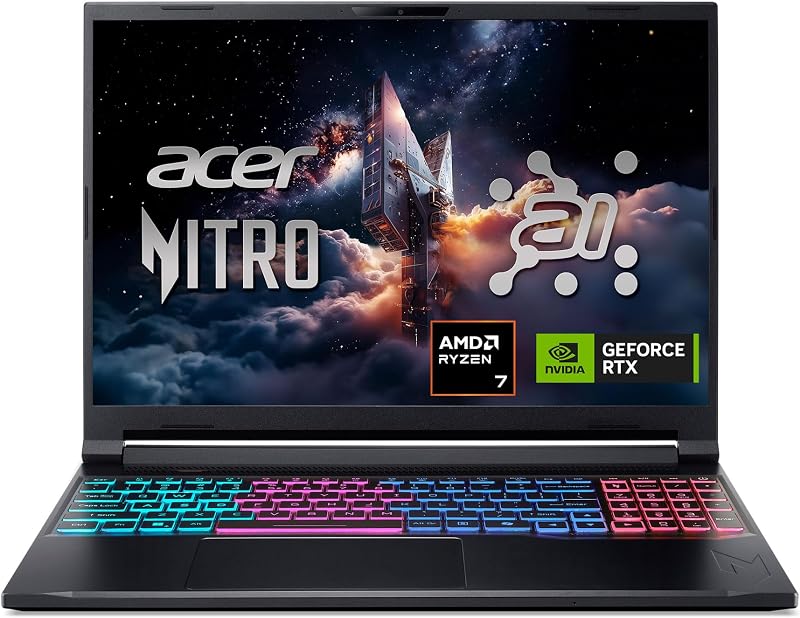
The Acer Nitro V 16S AI combines an AMD Ryzen 7 260 processor with an NVIDIA GeForce RTX 5060 GPU, 32GB of DDR5 memory, and a 1TB SSD. Outfitted with a 16-inch WUXGA 180Hz IPS display and Wi-Fi 6, this model appeals to gamers who want a balanced machine with generous system RAM out of the box.
MSI Cyborg 17

For buyers who prioritize a larger screen above extreme portability, the msi Cyborg 17 17.3″ FHD features a roomy 17.3-inch 144Hz panel. It pairs an Intel Core 9-270H processor with an RTX 5060 GPU, 16GB of DDR5 RAM, and a combined 2TB storage configuration including a docking station, making it well suited for desk-focused setups.
KAIGERR Gaming Laptop

Those seeking an economical solution for everyday web tasks and casual lightweight entertainment should examine the KAIGERR Gaming Laptop. Featuring an AMD Ryzen 7430U processor, 16GB of DDR4 memory, a 512GB SSD, and an FHD display, it serves practical daily productivity needs without the overhead of heavy 3D graphics hardware.
Final Verdict
The findings of this asus rog zephyrus g16 review confirm that high computational performance and sleek portability can successfully integrate into one balanced chassis. Featuring an Intel Core Ultra 9 285H processor, an RTX 5070 Laptop GPU, and an astonishing 240Hz Nebula OLED display, this machine fulfills the demands of visual artists and avid gamers alike. Its rigid Eclipse Gray construction, comprehensive port selection, and low-noise ambient cooling make it a joy to use throughout the workday.
When considering is asus laptop zephyrus worth it, the answer is a decisive yes for anyone who values display fidelity and true mobility over bulky desktop replacements. While its slim profile means surface temperatures elevate under maximum load, the overall execution, acoustic control, and premium audio make it an exceptional tool. If you need a versatile laptop that effortlessly transitions between creative client meetings, long flights, and high-framerate gaming, the Zephyrus G16 stands out as a premier contender.
FAQ
Is the ASUS Zephyrus G16 good for gaming?
Yes, using the asus zephyrus g16 for gaming yields smooth performance across modern titles thanks to its Intel Core Ultra 9 285H processor, NVIDIA GeForce RTX 5070 Laptop GPU with GDDR7 memory, and 240Hz G-SYNC OLED display.
How accurate is the screen on the ASUS ROG Zephyrus G16?
The 16-inch ROG Nebula OLED panel offers exceptional accuracy, featuring 100% DCI-P3 color gamut coverage, a factory-calibrated Delta E of less than 1, and VESA DisplayHDR True Black 500 certification.
How much RAM does this specific laptop configuration include?
The listing does not specify the exact capacity of the installed system RAM for this particular model, though it does confirm a 1 TB SSD and Windows 11 Pro.
Can you charge this laptop over USB-C while travelling?
Yes, the included Thunderbolt 4 Type-C port supports Power Delivery 3.0, allowing you to charge the 90Wh battery using compatible USB-C adapters when you do not want to pack the primary charger.
What ports are built into the chassis for external monitors?
The laptop provides two primary video outputs: a dedicated full-sized HDMI 2.1 port and a Thunderbolt 4 Type-C connection with native DisplayPort 2.1 support.