As Amazon Associates, we earn from qualifying purchases. This means we may receive a small commission at no extra cost to you if you click through and make a purchase.
As an Amazon Associate we earn from qualifying purchases. Links on this page are affiliate links.
This thermaltake view rtx 5070 core vs lcgs view u2670s 170 gaming comparison evaluates two desktop rigs. Both systems feature an NVIDIA GeForce RTX 5070 graphics card, 32GB DDR5 RAM, 1TB NVMe storage, and a 240mm liquid cooler. The key difference lies in the CPU and motherboard platform. One model features an Intel Core i9-14900KF on a B760 motherboard in black, while the other equips an Intel Core Ultra 7 265KF on B860 in white.
Processor
Intel Core i9-14900KF
Intel Core Ultra 7 265KF
Motherboard chipset
Intel B760
Intel B860
Case color
Black
White
Weight
25.8 pounds
26 pounds
Model number
V17B-B76B-570-LCS
V17S-B860-570-LCS
Choose the first if
- You want an Intel Core i9-14900KF processor with a B760 motherboard.
- You prefer a black chassis.
Choose the second if
- You want an Intel Core Ultra 7 265KF processor with an Intel B860 chipset.
- You prefer a white chassis.
Verdict
Choose the Thermaltake View RTX 5070 Core i9 if you want an Intel Core i9-14900KF CPU and a black case. Choose the Thermaltake LCGS View u2670S-170 if you want an Intel Core Ultra 7 265KF processor on a B860 motherboard in white. Both systems deliver the same RTX 5070 graphics, 32GB DDR5 6000MT/s memory, and 1TB NVMe storage.
Thermaltake View RTX 5070 Spec Comparison
Processor Performance
Edge: Thermaltake View RTX 5070 Core i9 Gaming PC
The Thermaltake View RTX 5070 Core i9 Gaming PC features an Intel Core i9-14900KF processor. In contrast, the Thermaltake LCGS View u2670S-170 Gaming PC is equipped with an Intel Core Ultra 7 265KF processor. When you run demanding multi-threaded tasks, heavy background applications, or processor-intensive gaming workloads, the flagship-tier Core i9-14900KF offers a higher-tier desktop classification. The Core Ultra 7 265KF brings newer architectural efficiency to your computing tasks, but the Core i9 designation provides maximum computing throughput from Intel's 14th generation tier. For users prioritizing high raw processor tiering, the Core i9 build gives you the hardware edge here.
Motherboard Chipset Compatibility
Edge: Thermaltake View RTX 5070 Gaming PC
Motherboard architecture sets these two desktop platforms apart. The Thermaltake LCGS View u2670S-170 Gaming PC integrates a newer Intel B860 chipset motherboard, pairing with its Core Ultra processor. In comparison, the Thermaltake View RTX 5070 Core i9 Gaming PC uses an Intel B760 chipset motherboard. The B860 platform represents Intel's newer desktop generation, providing a modern motherboard foundation for your connectivity and future platform support. Both configurations include built-in WiFi support on the motherboard, but the updated B860 chipset gives the Thermaltake LCGS View u2670S-170 the technical advantage if you value having the more recently released motherboard silicon.
Graphics Card
Edge: Tie
For graphics rendering and video output, both desktops deliver identical specifications. The Thermaltake View RTX 5070 Core i9 Gaming PC and the Thermaltake LCGS View u2670S-170 Gaming PC both feature an NVIDIA GeForce RTX 5070 graphics card. You get DisplayPort and HDMI outputs on both machines to connect high-refresh gaming monitors or external display setups. Because both systems rely on the exact same dedicated RTX 5070 GPU hardware, you will find no hardware variance in graphical processing capabilities, resolution support, or video connector standards between them. Consequently, this aspect is an exact tie between the two models.
Memory and Storage Capacity
Edge: Tie
System responsiveness depends heavily on internal memory and drive throughput. The Thermaltake View RTX 5070 Core i9 Gaming PC and the Thermaltake LCGS View u2670S-170 Gaming PC share identical configurations here. Each PC features 32GB of ToughRam DDR5 RGB memory clocked at 6000MT/s, providing fast bandwidth when you multitask or run memory-heavy software. For local storage, both machines come with a 1TB NVMe M.2 solid-state drive pre-loaded with Windows 11. Because capacity, memory frequency, module type, and primary storage space match across both specifications, neither rig holds a practical advantage in system memory or drive space.
Chassis Build and Weight
Edge: Tie
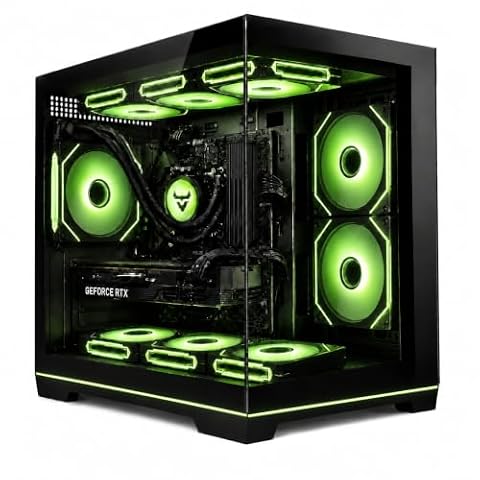
Physical build details differ in color and overall mass. The Thermaltake View RTX 5070 Core i9 Gaming PC comes in black and weighs 25.8 pounds, while the Thermaltake LCGS View u2670S-170 Gaming PC comes in white and weighs 26 pounds. Both use a large chassis layout with a power supply cover and filtered vertical side radiator mounts. For cooling and external connections, each model integrates a closed-loop liquid cooler with a 240mm radiator alongside two front USB 3.0 ports, a headphone jack, and a microphone jack. Because internal cooling and port selections are identical, choice depends on your color preference.
Which Thermaltake Gaming Desktop Fits You
Buyers looking for the Intel B860 chipset platform
Our pick: Thermaltake View RTX 5070 Gaming PC
You should choose this desktop if you prioritize the newer Intel B860 chipset motherboard platform. It pairs the Core Ultra 7 265KF with 32GB DDR5 6000MT/s RGB memory and an RTX 5070 GPU. This configuration delivers a fresh motherboard standard in a clean white chassis for your setup.
Buyers building an all-black desktop gaming setup
Our pick: Thermaltake View RTX 5070 Core i9 Gaming PC
Pick this model if you need a black case to match your workspace. It weighs 25.8 pounds, slightly less than the white alternative. Inside, the B760 motherboard hosts the Core i9-14900KF alongside 32GB DDR5 RAM, built-in WiFi, and filtered ventilated side radiator support for the included 240mm cooler.
Users prioritizing an all-white PC aesthetic
Our pick: Thermaltake View RTX 5070 Gaming PC
Select this system if you want a white chassis for your desk. It features the model V17S-B860-570-LCS build weighing 26 pounds. You get the Intel Core Ultra 7 265KF CPU, B860 motherboard, 32GB DDR5 6000MT/s memory, 1TB NVMe storage, and pre-installed Windows 11 with built-in WiFi connectivity.

Thermaltake View RTX 5070 Core i9 Gaming PC
Best for: heavy gaming and multi-threaded desktop workloads
- Graphics Card
- NVIDIA GeForce RTX 5070
- Processor
- Intel Core i9-14900KF
- RAM Capacity
- 32GB
- Storage Capacity
- 1TB
- Memory Type
- DDR5
- Storage Type
- NVMe M.2
This prebuilt desktop pairs an Intel Core i9-14900KF processor with an NVIDIA GeForce RTX 5070 graphics card and 32GB of DDR5 6000MT/s memory. It features a 240mm closed-loop liquid cooler, a B760 motherboard, and a 1TB NVMe storage drive. You get fast computing power tailored for high-framerate gaming and multi-threaded workloads.
- Intel Core i9-14900KF processor
- NVIDIA GeForce RTX 5070 graphics card
- 32GB DDR5 6000MT/s RGB memory
- Closed loop liquid cooling with 240mm radiator
- 1TB storage capacity provides limited room for multiple large games
- B760 chipset limits processor overclocking compared to Z-series boards
- You need an Intel Core i9-14900KF processor for heavy multi-core tasks.
- You want 32GB of DDR5 memory paired with an RTX 5070 GPU.
- You require more than 1TB of factory storage out of the box.
- You want a motherboard that supports manual CPU multiplier tuning.
Verdict: Thermaltake LCGS View RTX 5070 Core i9 Desktop suits players and creators who need fast multi-core speeds alongside current-generation graphics. The pre-installed 240mm liquid cooler and 32GB of DDR5 RAM handle demanding gaming workloads reliably.

Thermaltake View RTX 5070 Gaming PC
Best for: Current-gen gaming and high-demand multitasking
- Graphics Card
- GeForce RTX 5070
- Processor
- Intel Core Ultra 7 265KF
- RAM Capacity
- 32 GB
- Storage Capacity
- 1 TB
- Memory Type
- DDR5
- Storage Type
- NVMe M.2
This white gaming desktop pairs an Intel Core Ultra 7 265KF processor with an NVIDIA GeForce RTX 5070 graphics card on an Intel B860 chipset. It includes 32GB of DDR5 6000MT/s RAM, a 1TB NVMe M.2 SSD, and a 240mm liquid cooler. You get factory-installed Windows 11 and built-in Wi-Fi ready for your modern gaming space.
- Intel Core Ultra 7 265KF processor
- NVIDIA GeForce RTX 5070 graphics card
- 32GB DDR5 6000MT/s RGB ToughRam
- Closed-loop liquid cooling with a 240mm radiator
- 1TB storage capacity fills up fast with modern game installs
- No front-panel USB-C port provided
- You want an Intel Core Ultra 7 CPU paired with RTX 5070 graphics.
- You prefer a pre-built PC with built-in 240mm liquid cooling.
- You need 32GB of high-speed DDR5 memory ready out of the box.
- You need more than 1TB of base storage capacity.
- You require front-facing USB-C connectivity for your peripherals.
Verdict: Thermaltake View RTX 5070 Core Ultra 7 PC delivers modern Intel Core Ultra performance and liquid-cooled RTX 5070 graphics for players wanting a complete high-spec tower.
Specifications side by side
| Spec | Thermaltake View RTX 5070 Core i9 Gaming PC | Thermaltake View RTX 5070 Gaming PC |
|---|---|---|
| Graphics Card | NVIDIA GeForce RTX 5070 | GeForce RTX 5070 |
| Processor | Intel Core i9-14900KF | Intel Core Ultra 7 265KF |
| RAM Capacity | 32GB | 32 GB |
| Storage Capacity | 1TB | 1 TB |
| Memory Type | DDR5 | DDR5 |
| Storage Type | NVMe M.2 | NVMe M.2 |
| Operating System | Windows 11 | Windows 11 |
| Memory | 32GB RAM | 32GB RAM |
| Weight | 25.8 pounds | 26 pounds |
| Size | Large | Large |
| Color | Black | White |
| Model | V17B-B76B-570-LCS | V17S-B860-570-LCS |
Frequently asked questions
What color options do these Thermaltake gaming desktops use?
The Thermaltake View RTX 5070 Core i9 desktop comes in black, using model number V17B-B76B-570-LCS. In comparison, the Thermaltake View RTX 5070 desktop with model number V17S-B860-570-LCS features a white chassis. Both units use large desktop chassis designs for internal component clearance and airflow.
How much do these Thermaltake View gaming PC models weigh?
The black Core i9 model weighs 25.8 pounds, while the white model weighs 26 pounds. This slight difference of 0.2 pounds keeps both towers in a similar category for desk setup. You should ensure your desk supports at least 26 pounds before setting up either desktop.
What type of system memory is installed in both desktops?
Both configurations include 32GB of DDR5 RAM. This generation provides higher bandwidth and faster data transfer rates than older DDR4 memory modules. Having 32GB gives your system sufficient memory to handle current gaming titles, background applications, and demanding productivity tasks without encountering memory limits during heavy use.
What are the manufacturer model numbers for these two rigs?
The Thermaltake View RTX 5070 Core i9 model is identified as V17B-B76B-570-LCS. The alternative Thermaltake View RTX 5070 model carries the identifier V17S-B860-570-LCS. You can use these exact manufacturer part numbers to verify hardware specifications, identify motherboard configurations, and search for compatible replacement parts.
Which workloads are these Thermaltake systems intended to handle?
The black Core i9 desktop is configured for heavy gaming and multi-threaded desktop workloads. The white model targets current-gen gaming alongside high-demand multitasking. Both systems pair fast multi-core Intel processors with RTX 5070 graphics, making them capable choices for running intensive applications and modern games.
How is the processor cooled in the Thermaltake Core i9 model?
The Thermaltake Core i9 configuration includes a pre-installed 240mm liquid cooler to manage CPU temperatures. Liquid cooling setups circulate coolant through a radiator and dual 120mm fans. This design helps maintain stable performance during heavy gaming sessions by pulling heat away from the processor more effectively than standard air heatsinks.