
As Amazon Associates, we earn from qualifying purchases. This means we may receive a small commission at no extra cost to you if you click through and make a purchase.
The LG UltraGear 32GX870A-B represents an ambitious evolution in gaming display hardware, uniting visual fidelity and competitive speed on a single 32-inch canvas. Powered by a high-end OLED panel equipped with Micro Lens Array+ technology, this monitor delivers crisp 4K visual immersion at 240Hz alongside an esports-tuned Full HD mode running at 480Hz. Our comprehensive assessment shows that this dual-mode capability makes it one of the most versatile high-performance gaming screens on the market, successfully resolving the longstanding dilemma between cinematic graphical detail and lightning-fast tournament responsiveness.
This monitor squarely targets dedicated PC gamers who alternate between visually rich AAA narrative adventures and high-stakes competitive first-person shooters. Players looking for self-emissive OLED contrast, instantaneous response times, and high-bandwidth DisplayPort 2.1 connectivity will find it an extraordinary centerpiece for their setup. Conversely, shoppers who solely require a screen for static office spreadsheets or everyday business tasks should look elsewhere, as dedicated gaming OLED monitors require deliberate pixel care and focus their performance capabilities on high-framerate rendering.
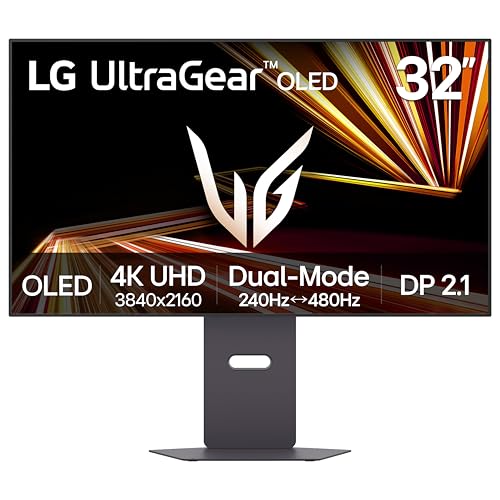


LG UltraGear 32GX870A-B at a Glance

| Attribute | Detail |
|---|---|
| Screen Size | 32 inches |
| Native Resolution | 4K UHD (3840 x 2160) |
| Panel Technology | OLED with Micro Lens Array+ (MLA+) |
| Refresh Rates | Dual-Mode: 4K at 240Hz or Full HD at 480Hz |
| Response Time | 0.03ms (GtG) |
| Contrast Ratio | 1,500,000:1 |
| Brightness | 275 nits typical, up to 1300 nits peak |
| HDR Certification | VESA DisplayHDR True Black 400, HDR10 |
| Adaptive Sync | NVIDIA G-SYNC Compatible, AMD FreeSync Premium Pro |
| Connectivity | DisplayPort 2.1, USB Type-C |
Dual-Mode Refresh Rates and Competitive Esports Performance
The hallmark capability of the lg ultragear 32gx870a-b dual mode system is how effortlessly it switches between two fundamentally different gaming use cases. In its native display mode, the screen renders 3840 x 2160 pixels at a fluid 240Hz refresh rate. For visually intensive role-playing games, driving simulators, and action adventures, 4K resolution at 240Hz produces exquisite graphic detail without sacrificing motion fluidity. When it is time to compete online, tapping the dedicated hotkey switches the display into Full HD 1080p mode at an astonishing 480Hz, providing a VESA-certified transformation that eliminates the need to maintain two separate monitors on your desk.
Operating as a specialized lg oled 480hz gaming monitor, the display delivers frames at an ultra-tight 2.08-millisecond interval. Combined with an ultra-low 0.03ms gray-to-gray response time, fast-moving opponents remain sharply defined across rapid mouse swipes, completely eliminating ghosting and visual trails. When relying on the lg 32gx870a-b for competitive gaming in titles like Counter-Strike, Apex Legends, or Valorant, the heightened refresh rate offers tangible motion clarity advantages that assist in tracking erratic targets during high-pressure firefights.
Variable refresh rate handling is fully validated across GPU brands, with official NVIDIA G-SYNC compatibility alongside AMD FreeSync Premium Pro certification. This comprehensive adaptive sync integration guarantees that whether you are running demanding single-player campaigns at variable 4K framerates or locking down 480Hz in competitive lobbies, frame tearing and disruptive stuttering are effectively neutralized. For gamers who want to examine how this panel compares against curved alternatives from the same brand family, our review of the lg ultragear 39 oled curved highlights an entirely different ultrawide form factor.
Visual Quality, MLA+ Panel Technology, and Brightness
OLED panels are renowned for contrast, but ambient room light has historically posed a challenge for earlier panel generations. Addressing this directly, lg 32gx870a-b brightness is significantly enhanced through Micro Lens Array+ technology, which uses an internal layer of microscopic lenses to direct light forward more efficiently. The panel outputs a typical brightness of 275 nits and reaches up to 1300 nits in peak HDR highlights, making this display the brightest OLED gaming monitor in the UltraGear portfolio. This output is paired with an anti-glare, low-reflection matte finish that disperses harsh reflections from windows and lamps.
The visual impact of this lg ultragear 4k 240hz oled panel is anchored by its self-illuminating pixels, yielding true pitch blacks and a massive 1,500,000:1 contrast ratio. Because each pixel controls its own light output, dark dungeon corridors and midnight skies retain deep shadow nuances without any haloing or light bleed around bright HUD elements. Certified under VESA DisplayHDR True Black 400 and supporting HDR10 processing, the monitor delivers impactful specular highlights that make explosions, torches, and neon lighting visually pop against dark backdrops.
A closer look at the lg 32gx870a-b specs highlights a precise 0.18mm pixel pitch across its 32-inch screen, providing sharp text rendering and high-density texture detail in desktop applications and games alike. The panel covers 98.5 percent of its specified color space, yielding vibrant, lifelike hues across sprawling open-world landscapes. With wide 178-degree viewing angles, image consistency remains rock solid across the display surface, ensuring color and contrast remain accurate whether you are sitting upright or relaxing back in your gaming chair.
Connectivity, Bandwidth, and DisplayPort 2.1 Capability
Driving 3840 x 2160 resolution at 240Hz demands extraordinary data bandwidth, and the lg ultragear 32gx870a-b displayport 2.1 input provides the high-throughput bandwidth necessary for modern computing setups. DisplayPort 2.1 ensures that high-end graphics cards can send ultra-high-resolution, rapid-refresh video streams with minimal signal compromise. This high-bandwidth interface makes the monitor a forward-ready centerpiece for modern rigs and upcoming GPU architectures designed around advanced digital display protocols.
In addition to DisplayPort 2.1, the monitor incorporates a modern USB Type-C port to provide broad cross-device compatibility. While the listing does not specify the exact power delivery wattage or peripheral hub layout, having USB Type-C simplifies single-cable digital video connections from supported modern laptops and compact PCs. Having diverse high-speed inputs allows you to keep both a dedicated desktop rig and a portable machine wired to the same workspace without constantly re-routing cables. Those exploring high-density 4K OLED gaming setups can also read our coverage of the asus pg27ucdm – 27 4k to see how alternative designs configure their connections.
Ergonomics, Integrated Audio, and Panel Protection
Comfort and positioning flexibility are vital for marathon gaming sessions, and the monitor comes equipped with a versatile stand that supports height, tilt, swivel, and full pivot adjustments. The pivot feature allows the display to rotate into a vertical orientation, which is particularly practical for code editing, reviewing chat feeds, or reading documentation. With dimensions of 9.83 inches deep, 28.11 inches wide, and 24.44 inches high, and an overall weight of 21.6 pounds, the chassis sits firmly on desk surfaces, while its virtually borderless, ultra-thin profile maximizes usable visual space.
Audio is integrated directly into the monitor frame, featuring built-in speakers tuned to produce deeper bass and clearer overall sound than standard monitor utility speakers. For players using gaming headsets, the integrated 4-pole headphone jack supports DTS Headphone:X processing, delivering virtual 3D spatial positioning that assists in pinpointing footsteps and enemy movements in tactical shooters. On the desktop productivity side, the LG Switch app lets users segment the 32-inch screen into up to six customized sections or assign hotkeys to multitask between browser windows, stream monitors, and game clients simultaneously.
To safeguard the self-emissive panel over years of ownership, LG incorporates OLED Care software tools that include automated pixel cleaning cycles to refresh display elements and preserve uniform output. Backing up these hardware safeguards is a 2-year limited manufacturer warranty that explicitly covers internal components including the OLED panel itself. Operating at a standard power consumption rating of 56.36 watts, the monitor manages electrical and thermal demands efficiently while sustaining peak HDR highlights and high-speed refresh cycles.
LG UltraGear 32GX870A-B Pros and Cons
Pros
- Dual-mode 4K 240Hz and 1080p 480Hz switching
- Micro Lens Array+ with 1300 nits peak brightness
- Instantaneous 0.03ms gray-to-gray response time
- High-bandwidth DisplayPort 2.1 connectivity
- NVIDIA G-SYNC Compatible and AMD FreeSync Premium Pro
- Ergonomic stand with height, tilt, swivel, and pivot
Cons
- Substantial 21.6-pound weight commands considerable desk space
- Typical SDR brightness is rated at 275 nits
- Full HD mode reduces pixel density on 32-inch screen
Check LG UltraGear 32GX870A-B on Amazon
Who Should Buy the LG UltraGear 32GX870A-B
This dual-mode OLED monitor is engineered for serious enthusiasts who demand uncompromised performance across wildly diverse gaming categories.
Buy It If
- You want both immersive 4K 240Hz visuals for AAA adventures and 1080p 480Hz speed for competitive esports in one display
- You prioritize true self-lit blacks, infinite contrast, and MLA+ brightness reaching up to 1300 nits peak
- You demand future-ready DisplayPort 2.1 bandwidth alongside G-SYNC and FreeSync Premium Pro validation
- You need full stand ergonomics including vertical pivot rotation and integrated spatial 3D audio connectivity
Skip It If
- Your gaming hardware is limited to casual 60Hz or 120Hz output and cannot take advantage of 240Hz or 480Hz modes
- Your daily computer use consists almost exclusively of static office spreadsheets where OLED care routines are inconvenient
- You are seeking a basic office display without high-refresh gaming features or advanced panel tech
LG UltraGear 32GX870A-B Alternatives Worth a Look
If your budget, desk dimensions, or display requirements differ from a premium dual-mode 4K OLED monitor, consider these alternatives from the same category.
Sceptre New 22-Inch Gaming Monitor

The Sceptre New 22-Inch Gaming Monitor delivers a compact Full HD 1080p experience with refresh rates up to 144Hz, HDMI, DisplayPort, and built-in speakers in a machine black chassis. Shoppers needing an ultra-compact secondary display or an entry-level screen for basic lightweight gaming will appreciate its modest footprint over a substantial 32-inch display.
1ms

The 1ms Acer 27-inch monitor provides a 1080p IPS display with a 120Hz refresh rate, AdaptiveSync support, 99 percent sRGB color coverage, HDMI, VGA, and a blue light filter. It serves as an accessible everyday display for mixed office work and casual gaming where high-end OLED specs are unnecessary.
Samsung 32-in S7 S70H 4K

The Samsung 32-in S7 S70H 4K computer monitor provides a large 32-inch 3840 x 2160 screen designed primarily for detailed visual productivity. Users who want expansive 4K workspace clarity for spreadsheets, documents, and general desktop tasks without paying for ultra-fast 240Hz or 480Hz gaming refresh rates will find it a dedicated office alternative.
Final Verdict
Bringing our lg 32gx870a-b oled review to a conclusion, this monitor delivers on its ambitious design promises by bridging two distinct gaming worlds. By pairing razor-sharp 4K 240Hz graphical richness with a blistering 1080p 480Hz esports mode, LG eliminates the need to choose between cinematic immersion and tournament-level speed. Elevated by Micro Lens Array+ brightness, true black OLED contrast, and instantaneous 0.03ms pixel responsiveness, it sets an exceptional benchmark for visual clarity and motion fluidity across all gaming genres.
So, is lg 32gx870a-b worth it for your desktop? If you own a capable graphics card and want a display that seamlessly transitions from story-rich single-player adventures to competitive multiplayer combat, it is an outstanding investment. Backed by forward-looking DisplayPort 2.1 connectivity, a fully ergonomic stand, and built-in panel protection with a two-year warranty, the UltraGear 32GX870A-B is an elite choice for gamers who demand the absolute best of both worlds.
FAQ
How does the Dual-Mode feature work on the LG UltraGear 32GX870A-B?
The Dual-Mode feature allows gamers to switch between 4K UHD at 240Hz and Full HD 1080p at 480Hz with a quick press of a dedicated physical hotkey. This provides native high-resolution clarity for cinematic narrative games and instantaneous high-refresh responsiveness for competitive esports without needing to alter deep operating system settings manually.
What are the benefits of Micro Lens Array+ technology on this display?
Micro Lens Array+ technology incorporates microscopic optical lenses directly into the OLED panel structure to direct trapped light outward toward the viewer. This design boosts typical brightness to 275 nits and peak HDR brightness up to 1300 nits, producing the brightest gaming image in the UltraGear OLED series while preserving deep infinite blacks.
Does the monitor include built-in protection against OLED image retention?
Yes, the display features built-in OLED Care tools, including automated pixel cleaning cycles designed to maintain panel uniformity and prevent image retention. In addition, LG backs the monitor with a 2-year limited warranty that explicitly covers both major internal components and the OLED panel itself.
Can the stand be adjusted into a vertical portrait orientation?
Yes, the ergonomic stand supports height, tilt, swivel, and 90-degree pivot adjustments. The pivot function allows you to rotate the 32-inch screen into a vertical portrait orientation, which is helpful for reading lengthy documents, programming code, or tracking stream chat feeds.
What kind of audio features are built into the monitor?
The monitor includes built-in stereo speakers engineered with deep bass reproduction for clutter-free desktop sound. It also features a 4-pole headphone jack supporting DTS Headphone:X 3D spatial audio, delivering directional virtualized surround sound and clear voice communication through connected gaming headsets.


