
As Amazon Associates, we earn from qualifying purchases. This means we may receive a small commission at no extra cost to you if you click through and make a purchase.
The Amazon Fire TV Stick 4K Plus represents the next step in Amazon’s compact streaming hardware lineup, prioritizing fluid 4K playback, modern network speeds, and cloud-based video gaming. Among the various fire sticks from amazon, this model positions itself as a versatile media player designed to modernize existing televisions through high-definition visual processing and integrated Alexa+ voice assistance. Our straightforward verdict is that it provides a snappy, feature-rich streaming hub for anyone upgrading a living room display, combining essential standards like Dolby Vision and HDR10+ with responsive voice navigation.
This in-depth amazon fire tv stick 4k plus review examines how the compact dongle performs during everyday television viewing and casual cloud entertainment sessions. It is an ideal match for households seeking reliable Ultra HD streaming, seamless integration with Prime Video and free ad-supported platforms, and console-free gaming through Xbox Game Pass. Viewers who already own recent premium smart TVs with speedy software and zero interest in cloud games or voice remotes can comfortably look elsewhere.
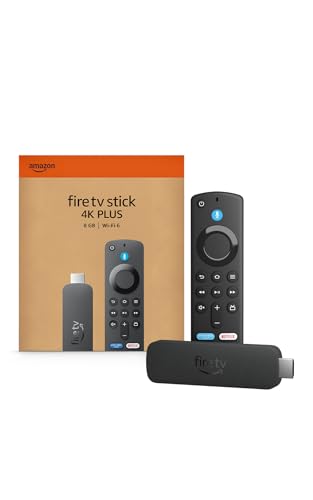

Amazon Fire TV Stick 4K Plus at a Glance

| Feature | Specification |
|---|---|
| Output Resolution | 2160p, 1080p, and 720p up to 60 fps |
| Processor | Quad-core 1.7GHz |
| Graphics Hardware | 650MHz GPU |
| Internal Storage | 8GB |
| Wi-Fi Technology | Wi-Fi 6 dual-band (802.11 a/b/g/n/ac/ax at 2.4GHz and 5GHz) |
| Bluetooth Version | Bluetooth 5.2 + BLE |
| High Dynamic Range | Dolby Vision, HDR10+ |
| Audio Support | Dolby Atmos, 7.1 surround sound, 2-channel stereo, HDMI pass-through up to 5.1 |
| Ports | HDMI 2.1 output with ARC input support, micro USB |
| Dimensions and Weight | 38.68 mm x 141.3 mm x 17.6 mm; 45g (without batteries) |
Picture Quality and Audio Performance for 4K Displays
When selecting the best fire stick for 4k tv setups, format handling and video decoding define the visual experience. The device delivers output resolutions across 2160p, 1080p, and 720p up to 60 frames per second, ensuring smooth playback for live sporting events, action cinema, and fast-paced nature documentaries. Support for dynamic high dynamic range standards, including Dolby Vision and HDR10+, allows compatible panels to calibrate color profiles and contrast frame by frame. This optimization keeps shadow details legible in dim scenes while preventing blown-out highlights in bright daylight shots.
Audio processing is equally capable, offering native Dolby Atmos decoding alongside 7.1 surround sound, 2-channel stereo, and HDMI audio pass-through up to 5.1 channels. The integrated HDMI 2.1 output features ARC input support, facilitating clean signal transmission to soundbars and multichannel AV receivers. Audiophiles who pair their streaming sticks with standalone audio hardware, such as the setup detailed in our echo studio 2023 guide, will appreciate the immersive, directional soundstage during movie playback.
Streaming from major premium providers like Netflix, Prime Video, Disney+, and HBO Max functions smoothly with consistent color balance and zero lip-sync drift. Although subscription fees apply to those third-party services, the hardware also grants immediate access to hundreds of thousands of free movies and TV episodes. Ad-supported platforms like Fire TV Channels, Tubi, and Pluto TV are integrated directly into the system, offering a steady supply of content without recurring charges.
Networking and Wi-Fi 6 Streaming Stability
A persistent challenge with compact HDMI streaming sticks is wireless reception, especially in households where numerous family members share a single router. Integrating amazon fire stick wi-fi 6 connectivity allows the device to communicate over 802.11 a/b/g/n/ac/ax protocols across both 2.4GHz and 5GHz frequency bands. This modern wireless standard manages network bandwidth efficiently, reducing buffering interruptions and unexpected resolution drops even when other family devices stream video or download files concurrently.
High-bitrate 4K content requires consistent throughput to maintain peak sharpness, and Wi-Fi 6 prevents the signal degradation that frequently affected older wireless generations. For living rooms positioned several walls away from the central router, the dual-band antenna system maintains stable data transfer speeds without requiring messy network cables. The result is instant video loading and steady frame rates from the moment you hit play.
Complementing its Wi-Fi capabilities, the stick utilizes Bluetooth 5.2 and Bluetooth Low Energy (BLE). This updated specification guarantees responsive pairing with external accessories, including wireless game controllers for cloud titles and wireless headphones for late-night viewing. Audio signals remain synchronized with on-screen dialogue, eliminating noticeable lag during conversations.
Hardware Specs and Xbox Cloud Gaming Capabilities
Under the hood, the fire stick 4k plus specs feature a 1.7GHz quad-core processor paired with a 650MHz GPU and 8GB of internal storage. While full-sized computing hubs like the mac mini m2 pro are engineered for heavy desktop productivity, this streaming stick directs its silicon toward hardware video decoding, menu fluidity, and responsive network communication. Navigating across content rows feels immediate, with applications launching promptly and switching without system freezes.
The processing package unlocks fire stick 4k plus xbox gaming through cloud streaming technology. By utilizing an Xbox Game Pass subscription, players can stream high-profile titles such as Call of Duty: Black Ops 7, Hogwarts Legacy, Outer Worlds 2, and Ninja Gaiden 4 directly on their television screen. The stick manages controller inputs and incoming video streams with low latency, turning the player into a capable cloud console without requiring bulky hardware under the television.
The 8GB internal storage capacity provides sufficient space for essential video apps, basic utilities, and gaming launchers. Amazon also provides free cloud storage for all digital content purchased through your account, saving precious on-board space. Viewers who enjoy installing dozens of niche streaming apps or large games may need to manage their storage over time, but the capacity is well-suited for typical entertainment setups.
Navigation with the Alexa Voice Remote and 2026 Fire TV Experience
Interacting with the operating system centers around the fire stick 4k plus alexa remote, which balances traditional tactile controls with voice search functionality. The remote includes dedicated buttons for television power and volume control, allowing users to retire their primary display remotes for daily viewing tasks. Preset application buttons provide direct shortcuts to popular streaming services, while the microphone key initiates conversational search queries.
Finding content is straightforward thanks to Alexa+ voice integration and AI-powered Fire TV Search. Rather than relying on rigid keyword commands, users can speak naturally to locate specific movie genres, track down favorite actors, or discover which installed app hosts a particular show. Beyond media discovery, the remote acts as an interactive hub for smart home devices, letting you inspect connected home cameras, adjust smart lighting, or request weather forecasts directly on screen.
The modern 2026 Fire TV user experience introduces organized content categories and custom app pinning. Viewers can arrange their favorite streaming apps in a dedicated front row, bypassing algorithmic recommendations when they simply want to launch an episode. When looking for new releases, personalized recommendations from Alexa+ help surface trending movies across both paid platforms and ad-supported services like Tubi.
Fire TV Stick 4K Plus Setup and Physical Design
Completing the fire tv stick 4k plus setup takes only a few minutes. The device measures 38.68 mm by 141.3 mm by 17.6 mm and weighs 45 grams without batteries. Inside the retail packaging, Amazon includes the Fire TV Stick 4K Plus, the Alexa Voice Remote, two AAA batteries, a micro USB power cable, a wall power adapter, an HDMI extender cable, and a Quick Start Guide. Setting up requires inserting the stick into an available HDMI 2.1 port, connecting the power adapter to an outlet, and following the initial on-screen prompts.
Port spacing behind modern televisions can be restrictive, making the included HDMI extender cable an invaluable accessory. The flexible dongle prevents the stick from blocking adjacent HDMI ports and relieves physical strain on wall-mounted installations. Similar to how mobile filmmakers appreciate compact tools like the dji osmo pocket 1 for travel convenience, home theater enthusiasts will value how completely this streaming stick hides behind the display panel.
Once powered on, the setup wizard guides viewers through pairing the remote, joining the local Wi-Fi network, and signing into an Amazon account. If the physical remote is misplaced, users can also control the interface using the free Fire TV mobile app, available for download on Fire OS, Android, and iOS devices.
Amazon Fire TV Stick 4K Plus Pros and Cons
Pros
- Vibrant 4K playback with Dolby Vision and HDR10+
- Fast dual-band Wi-Fi 6 wireless networking
- Xbox Game Pass cloud gaming support
- Alexa Voice Remote with TV power and volume buttons
- Dolby Atmos and surround sound audio support
Cons
- Internal storage limited to 8GB
- Requires Wi-Fi 6 router for peak network speeds
- Subscription fees required for premium streaming channels
Check Amazon Fire TV Stick 4K Plus on Amazon
Who Should Buy the Amazon Fire TV Stick 4K Plus
Buy It If
- You own a 4K television and want comprehensive format support for Dolby Vision, HDR10+, and Dolby Atmos audio.
- You want to play major console titles like Call of Duty and Hogwarts Legacy via Xbox Game Pass cloud gaming without owning a console.
- Your household router experiences heavy traffic and demands the stability and speed of dual-band Wi-Fi 6.
- You prefer conversational voice navigation using Alexa+ to discover movies across multiple streaming libraries.
Skip It If
- You use a standard 1080p television and do not plan to upgrade to a 4K panel anytime soon.
- You require extensive internal storage beyond 8GB for offline video downloads or massive utility libraries.
- Your television already possesses a fast, updated smart interface that meets all your streaming requirements.
Amazon Fire TV Stick 4K Plus Alternatives Worth a Look
While this 4K streaming stick excels in Amazon ecosystem integration and cloud gaming, other streaming players serve shoppers with different interface priorities.
Compact 4K Streaming Device

The Compact 4K Streaming Device includes a Roku Voice Remote and long-range Wi-Fi, emphasizing free and live local news and sports programming alongside standard HD and 4K streaming. Viewers who prefer a straightforward grid layout with minimal advertising and an emphasis on broadcast television will appreciate this alternative over Amazon’s recommendation-heavy dashboard.
Final Verdict
Deciding whether is fire tv stick 4k plus worth it depends on what you expect from your television experience. By pairing a responsive 1.7GHz quad-core processor with Wi-Fi 6 and advanced HDR decoding, this compact player eliminates the buffering delays and sluggish app switching found on aging smart TVs. The ability to stream Xbox titles via Xbox Game Pass adds notable utility, transforming any compatible 4K screen into a casual gaming station.
For viewers comparing fire sticks from amazon, the Fire TV Stick 4K Plus strikes an outstanding balance between performance, connectivity, and usability. While heavy app collectors must keep the 8GB storage limit in mind, the included TV controls, HDMI extender, and intuitive Alexa+ voice platform make it a solid, future-ready media streamer for any modern home theater.
FAQ
Can the Amazon Fire TV Stick 4K Plus stream Xbox games without a console?
Yes. The device supports cloud gaming via Xbox Game Pass, allowing you to play titles like Call of Duty: Black Ops 7, Hogwarts Legacy, Outer Worlds 2, and Ninja Gaiden 4 directly through an internet connection using a compatible Bluetooth controller.
What accessories are included in the box?
The package contains the Fire TV Stick 4K Plus, an Alexa Voice Remote, two AAA batteries, a micro USB power cable, a wall power adapter, an HDMI extender cable, and a Quick Start Guide.
Does this Fire TV Stick support Wi-Fi 6 networks?
Yes. It features dual-band Wi-Fi 6 (802.11 a/b/g/n/ac/ax) supporting both 2.4GHz and 5GHz frequencies to ensure stable 4K playback on congested home networks.
Can I control my TV power and volume with the Fire TV remote?
Yes. The included Alexa Voice Remote features dedicated power, volume, and mute buttons programmed to control compatible television hardware directly.
How much internal storage is available on the device?
The stick includes 8GB of onboard storage for your apps and streaming services, along with free cloud storage for digital media purchased from Amazon.


