As Amazon Associates, we earn from qualifying purchases. This means we may receive a small commission at no extra cost to you if you click through and make a purchase.
As an Amazon Associate we earn from qualifying purchases. Links on this page are affiliate links.
When evaluating the dell optiplex i7 gt 1030 vs optiplex tower gtx 1050, both desktop computers offer a 3.40 GHz Intel Core i7 processor, 16GB of system memory, a 512GB solid-state drive, and Windows 11 Pro. The main difference lies in their dedicated graphics hardware and chassis size. One configuration pairs an entry-level GeForce GT 1030 2GB card with a larger chassis, while the other features a GeForce GTX 1050 Ti 4GB card inside a lighter tower.
Graphics card
NVIDIA GeForce GT 1030 2GB GDDR5
NVIDIA GeForce GTX 1050 Ti 4GB
Processor specification
Intel Core i7 quad-core 3.40 GHz (generation not listed)
Intel Core i7 6th Gen 3.40 GHz
Memory type
not listed
16GB DDR3L
Weight
25.3 pounds
14 pounds
Dimensions
20 x 16 x 8 inches
11.5 x 8 x 13.8 inches
RGB accessories
Front panel lighting with remote controller
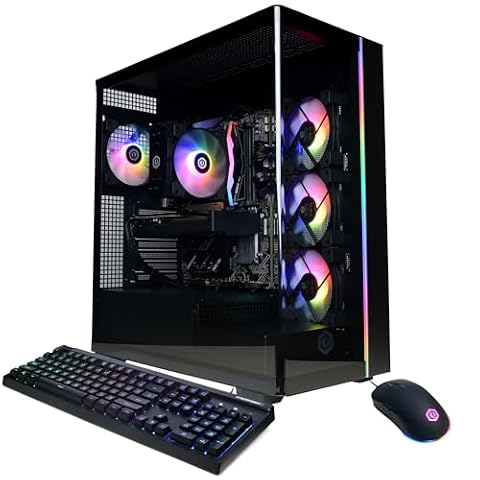
Case, keyboard, mouse, and speakers
Choose the first if
- You want front-panel RGB lighting controlled directly with a handheld remote.
- You want a bundle option configured with an included 24-inch monitor.
Choose the second if
- You need 4GB of dedicated video memory for graphical tasks.
- You prefer a lighter chassis that includes matching RGB peripherals.
Verdict
Choose the OptiPlex Tower with the GTX 1050 Ti if you need double the video memory and a lighter overall chassis. Choose the OptiPlex with the GT 1030 if you prioritize remote-controlled front lighting and monitor bundle options. Both systems provide 16GB of RAM, a 512GB SSD, and Windows 11 Pro for daily productivity.
Dell OptiPlex GT 1030 vs GTX 1050
Dedicated graphics card
Edge: Dell OptiPlex Tower GTX 1050 Ti Gaming PC
Product B equips you with an NVIDIA GeForce GTX 1050 Ti carrying 4GB of video memory. Product A provides an NVIDIA GeForce GT 1030 featuring 2GB of GDDR5 memory. The extra video memory on the GTX 1050 Ti handles higher texture resolutions and more demanding visual assets. Product B is listed for titles such as Call of Duty, Fortnite, and Diablo 4. Product A targets games like CS GO, Dota 2, and GTA V at medium settings. If you run graphically intensive games, the 4GB capacity on Product B delivers stronger visual processing headroom than the 2GB card in Product A.
Included display setup
Edge: Dell OptiPlex i7 GT 1030 Desktop with Monitor
Product A includes a 24-inch monitor in its hardware package, indicated by its configuration specifications. It also lists variations supporting 22-inch or 24-inch screens. Product B provides a tower unit without an included monitor in its specifications. Instead, Product B lists bundled peripherals including a keyboard, mouse, and speakers. For buyers who need an immediate screen out of the box, Product A supplies the visual display alongside the desktop. Product B requires you to supply or purchase a standalone computer monitor separately before you can set up the workspace and view your desktop operating system.
Case dimensions and weight
Edge: Dell OptiPlex Tower GTX 1050 Ti Gaming PC
Product B measures 8 inches wide, 11.5 inches long, and 13.8 inches high, weighing 14 pounds. Product A measures 16 inches wide, 20 inches long, and 8 inches high, with a total weight of 25.3 pounds. The lighter weight and smaller depth of Product B make it easier to place on standard office desks or move between rooms. Product A requires considerably more flat desk space due to its 20-inch length and 16-inch width. At over eleven pounds lighter, Product B provides a more compact desktop footprint that fits tighter workstations and smaller table surfaces.
RGB lighting and controls
Edge: Dell OptiPlex i7 GT 1030 Desktop with Monitor
Product A incorporates an RGB LED front panel that you adjust using an included remote controller. This remote allows you to change lighting modes, switch patterns, and adjust effect speeds directly. Product B features RGB illumination across its tower, keyboard, mouse, and speakers to illuminate your peripheral setup. However, Product B does not list a dedicated remote control for its lighting adjustments. If you prefer handheld controls to modify lighting patterns without accessing software menus, Product A gives you dedicated physical controls. Product B instead extends coordinated illumination across more individual desktop accessories on your desk.
Processor generation details
Edge: Dell OptiPlex Tower GTX 1050 Ti Gaming PC
Both systems feature an Intel Core i7 processor running at a base clock speed of 3.40 GHz with quad-core architecture. Product B specifically lists a 6th Generation Intel Core i7 processor. Product A identifies its CPU as an Intel Core i7 Quad Core processor at 3.40 GHz, but the specific generation is not detailed in its specification sheet. Knowing the exact 6th Gen classification on Product B helps you verify hardware platform revisions, motherboard chipset support, and peripheral socket capabilities. Product A confirms the clock speed and core count, yet leaves the specific generation unnamed in the published data.
Choosing the Right Dell OptiPlex System
Users needing an included monitor display setup
Our pick: Dell OptiPlex i7 GT 1030 Desktop with Monitor
If you want a complete display bundle ready out of the box, choose this setup. The package provides a 24-inch monitor alongside the quad-core Intel Core i7 system. You also get a dedicated remote controller to adjust front-panel RGB patterns and speeds directly without navigating desktop software menus.
Gamers wanting included RGB accessories and peripherals
Our pick: Dell OptiPlex Tower GTX 1050 Ti Gaming PC
Choose this build if you need a gaming bundle that includes RGB audio and input gear. This package includes an RGB-illuminated keyboard, mouse, and desktop speakers alongside the tower. The configuration is rated for releases like Call of Duty, Fortnite, and Diablo 4 using its 6th Generation Intel Core i7 platform.
Desk setups requiring a lighter, compact chassis
Our pick: Dell OptiPlex Tower GTX 1050 Ti Gaming PC
Select this model if physical desktop footprint and weight matter for your workstation. At 14 pounds, this chassis weighs roughly 11 pounds less than the 25.3-pound alternative. Its 11.5-inch length and 13.8-inch height also take up considerably less desk surface than the 20-by-16-inch alternative enclosure.

Dell OptiPlex i7 GT 1030 Desktop with Monitor
Best for: Everyday productivity and light esports gaming
- Graphics Card
- GeForce GT 1030
- Processor
- Intel Core i7
- RAM Capacity
- 16 GB
- Storage Capacity
- 512 GB
- Storage Type
- SSD
- Operating System
- Windows 11 Pro
This refurbished Dell OptiPlex desktop features a 3.40 GHz quad-core Intel Core i7 processor, 16GB of RAM, and a 512GB solid-state drive. Graphics processing relies on a 2GB GeForce GT 1030 GDDR5 card, and the system runs Windows 11 Pro. It suits you if you need a daily productivity machine that handles lighter esports games at medium settings.
- 16GB RAM for multitasking across apps and browser tabs
- Fast 512GB solid-state drive boot storage
- Front-panel RGB lighting with speed and pattern remote control
- Windows 11 Pro pre-installed
- Entry-level GeForce GT 1030 graphics card with 2GB VRAM
- Heavy 25.3-pound tower chassis
- Refurbished unit covered by a 90-day minimum warranty
- You play casual or esports games at medium display settings.
- You need 16GB of system memory for daily multitasking.
- You want remote-controlled front-panel RGB case lighting.
- You want a faster graphics card than the GeForce GT 1030.
- You prefer a lighter desktop than this 25.3-pound chassis.
Verdict: Dell OptiPlex i7 GT 1030 Desktop delivers a 3.40 GHz quad-core processor and 16GB RAM for everyday tasks alongside entry-level esports gaming.

Dell OptiPlex Tower GTX 1050 Ti Gaming PC
Best for: entry-level gaming and multi-monitor productivity
- Graphics Card
- GeForce GTX 1050 Ti
- Processor
- Intel Core i7 6th Gen
- RAM Capacity
- 16GB
- Storage Capacity
- 512GB
- Memory Type
- DDR3L
- Storage Type
- SSD
This Dell OptiPlex tower features an Intel Core i7 6th-generation processor paired with a dedicated 4GB Nvidia GeForce GTX 1050 Ti graphics card. You get 16GB of DDR3L memory, a 512GB solid-state drive, and Windows 11 Pro preinstalled. It suits you if you want a desktop ready for esports gaming and everyday office multitasking without building a system yourself.
- Nvidia GeForce GTX 1050 Ti graphics card with 4GB VRAM
- Intel Core i7 6th Gen processor clocked at 3.40GHz
- 512GB solid-state drive paired with 16GB RAM
- Includes RGB desktop lighting, keyboard, mouse, and speakers
- Uses older DDR3L memory rather than DDR4 or DDR5
- Relies on an older 6th-generation Intel processor platform
- Bulky tower chassis weighing 14 pounds
- You want a dedicated 4GB GTX 1050 Ti GPU for entry-level gaming.
- You need 16GB of RAM and a fast 512GB SSD ready to use.
- You require a newer CPU architecture beyond Intel 6th Gen.
- You want higher-bandwidth DDR4 or DDR5 system memory.
Verdict: Dell OptiPlex Tower i7 GTX 1050 Ti delivers 4GB dedicated graphics and 16GB RAM to support esports titles and daily multitasking. It fits buyers seeking a functional gaming desktop bundle complete with matching RGB peripherals.
Specifications side by side
| Spec | Dell OptiPlex i7 GT 1030 Desktop with Monitor | Dell OptiPlex Tower GTX 1050 Ti Gaming PC |
|---|---|---|
| Graphics Card | GeForce GT 1030 | GeForce GTX 1050 Ti |
| Processor | Intel Core i7 | Intel Core i7 6th Gen |
| RAM Capacity | 16 GB | 16GB |
| Storage Capacity | 512 GB | 512GB |
| Memory Type | – | DDR3L |
| Storage Type | SSD | SSD |
| Operating System | Windows 11 Pro | Windows 11 Pro |
| Memory | 16GB RAM | 16GB RAM |
| Dimensions | 20 × 16 × 8 inches | 11.5 × 8 × 13.8 inches |
| Weight | 25.3 pounds | 14 pounds |
| Size | i7-16GB-512GB+GT1030+24 inch | 8 x 11.5 x 13.8 inches |
| Color | Intel Core I7 | Black |
| Model | OptiPlex | DELL TOWER |
Frequently asked questions
Which desktop takes up less physical space on a desk?
The Dell OptiPlex Tower GTX 1050 Ti has smaller overall dimensions. It measures 8 inches wide, 11.5 inches long, and 13.8 inches high. In contrast, the Dell OptiPlex i7 GT 1030 desktop measures 16 inches wide, 20 inches long, and 8 inches high, taking up more horizontal surface.
How do the weights of these two OptiPlex desktops compare?
You will find a significant difference in weight between these configurations. The Dell OptiPlex Tower GTX 1050 Ti weighs 14 pounds. The Dell OptiPlex GT 1030 package weighs 25.3 pounds, which reflects the bundled hardware including its included 24-inch monitor display.
What operating system comes pre-installed on both Dell models?
Both systems come equipped with Windows 11 Pro. This pre-installed operating system provides standard management features, security protections, and modern application support on both configurations right out of the box, allowing you to run standard office software and compatible PC gaming titles immediately.
Do these OptiPlex computers offer different RAM or storage capacities?
No, both models share identical internal storage and system memory specifications. Each desktop provides you with 16GB of RAM alongside a 512GB solid-state drive. These matched hardware specs ensure fast file loading, rapid boot times, and responsive multitasking on either desktop choice.
Which OptiPlex setup includes matching RGB peripherals?
The Dell OptiPlex Tower GTX 1050 Ti comes bundled with matching RGB accessories. This package supports multi-monitor productivity and entry-level gaming needs directly out of the box, whereas the GT 1030 configuration focuses instead on providing a complete 24-inch monitor display setup for your workspace.
How do the intended use cases differ between these two models?
The Dell OptiPlex i7 GT 1030 configuration targets everyday productivity alongside light esports titles. In comparison, the Dell OptiPlex Tower GTX 1050 Ti targets entry-level gaming and multi-monitor productivity tasks, giving you dedicated graphics and peripherals tailored for diverse display setups.