
As Amazon Associates, we earn from qualifying purchases. This means we may receive a small commission at no extra cost to you if you click through and make a purchase.
As an Amazon Associate we earn from qualifying purchases. Links on this page are affiliate links.
Finding the best sinbun prebuilt gaming PCs with Windows 11 Pro requires checking processors, graphics cards, and chassis dimensions. This comparison evaluates 3 models based on the specifications published on the listings.
The Sinbun i7-8750H GTX 1050 Mini PC leads because its Intel Core i7 processor and 16GB of DDR4 RAM handle entry-level 1080p gaming in a compact 1.5-inch tall chassis. This guide helps you choose the ideal system specs and size for your desk.
GPU And Memory Define Performance Tiers
You must match your software needs to the GPU tier. The Sinbun X810 Mini Gaming PC Gray pairs a GeForce GTX 1650 with 16GB RAM and a 512GB SSD for light tasks. The Sinbun i9-13900HX RTX 4070 Mini PC upgrades to a GeForce RTX 4070, 32GB RAM, and a 1TB SSD.
| # | Product | Best for | Price |
|---|---|---|---|
| 1 | Sinbun i7-8750H GTX 1050 Mini PC Best overall | entry-level 1080p gaming and multi-monitor productivity | |
| 2 | Sinbun X810 Mini Gaming PC Gray Best budget | budget-conscious light 1080p gaming and multitasking | |
| 3 | Sinbun i9-13900HX RTX 4070 Mini PC Best geforce rtx 4070 | compact high-performance gaming and multi-display setups |
The best fit for you
- You want entry-level 1080p gaming and multi-monitor productivity – Sinbun i7-8750H GTX 1050 Mini PC – It combines an Intel Core i7-8750H processor with a GTX 1050 graphics card and 16GB of DDR4 RAM.
- You want a Core i9 processor with GTX 1650 graphics – Sinbun X810 Mini Gaming PC Gray – This model includes an Intel Core i9-9980HK CPU, GeForce GTX 1650 GPU, and a 512GB SSD.
- You need maximum performance for demanding workloads and modern gaming – Sinbun i9-13900HX RTX 4070 Mini PC – It features an Intel Core i9-13900HX processor, GeForce RTX 4070 graphics card, and 32GB of RAM.

Sinbun i7-8750H GTX 1050 Mini PC
Best for: entry-level 1080p gaming and multi-monitor productivity
- Operating System
- Windows 11 Pro
- Graphics Card
- GeForce GTX 1050
- Processor
- Intel Core i7-8750H
- RAM Capacity
- 16GB
- Storage Capacity
- 512GB
- Memory Type
- DDR4
This compact Sinbun desktop pairs an Intel Core i7-8750H processor with a dedicated Nvidia GeForce GTX 1050 3GB graphics card and Windows 11 Pro. It comes with 16GB of DDR4 memory and a 512GB NVMe solid-state drive. You get triple-display video output and WiFi 6E support, making it suitable for 1080p light gaming, multi-monitor productivity, and everyday tasks without crowding your desk.
- Intel Core i7-8750H 6-core processor with Nvidia GeForce GTX 1050 3GB graphics
- Triple-display support via two HDMI 2.0 ports and one Type-C port
- Fast wireless networking with WiFi 6E and Bluetooth 5.3
- Memory expandable up to 64GB DDR4 plus an open 2.5-inch SATA drive slot
- 3GB of video memory limits performance compared to systems with 4GB or 8GB GPUs
- Older 8th-generation Intel Core i7 processor running DDR4 RAM at 2666MHz
- You need a compact computer for light 1080p titles like Fortnite or The Sims 4.
- You run a triple-monitor setup for multitasking and productivity.
- You want internal expansion options for extra 2.5-inch SATA storage.
- You intend to play demanding AAA titles such as Cyberpunk 2077.
- You require more than 3GB of dedicated VRAM for modern graphical workloads.
Verdict: Sinbun Core i7 GTX 1050 Mini Gaming PC delivers balanced multi-display capability and entry-level 1080p graphics for casual gamers and office multitaskers who want a space-saving build.
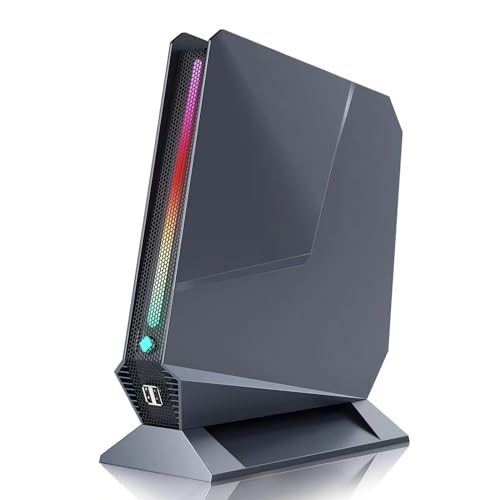
Sinbun X810 Mini Gaming PC Gray
Best for: budget-conscious light 1080p gaming and multitasking
- Operating System
- Windows 11 Pro
- Graphics Card
- GeForce GTX 1650
- Processor
- Intel Core i9-9980HK
- RAM Capacity
- 16GB
- Storage Capacity
- 512GB
- Memory Type
- DDR4
This mini desktop packs an 8-core Intel Core i9-9980HK processor, a dedicated GeForce GTX 1650 4GB graphics card, and Windows 11 Pro into a compact 1.5-inch tall chassis. You get 16GB of DDR4 RAM and a 512GB NVMe SSD for quick boots. It suits you if you need a space-saving setup for office tasks and light 1080p gaming.
- Dedicated GeForce GTX 1650 4GB GDDR5 graphics card
- Triple display support via two HDMI 2.0 ports and one Type-C port
- Expandable storage with an internal 2.5-inch SATA slot supporting up to 4TB
- Modern wireless connectivity with WiFi 6e and Bluetooth 5.2
- GeForce GTX 1650 is not designed to handle demanding AAA games
- Older 9th-generation Core i9 architecture compared to newer 13th-generation options
- Installed DDR4 system memory runs at a modest 2666MHz base speed
- You play casual or esports games at 1080p resolution like Fortnite or PUBG.
- You need three simultaneous display outputs for productivity work.
- You want an expandable mini PC with room for a secondary 2.5-inch SATA drive.
- You plan to run heavy AAA titles like Cyberpunk 2077.
- You need higher-tier graphics performance such as an RTX 4070.
Verdict: Sinbun Core i9 GTX 1650 Mini PC gives you dedicated graphics and multi-display desktop computing in a compact case for office work and entry-level 1080p gaming.

Sinbun i9-13900HX RTX 4070 Mini PC
Best for: compact high-performance gaming and multi-display setups
- Operating System
- Windows 11 Pro
- Graphics Card
- GeForce RTX 4070
- Processor
- Intel Core i9-13900HX
- RAM Capacity
- 32 GB
- Storage Capacity
- 1 TB
- Memory Type
- DDR4
This compact Sinbun desktop pairs an Intel Core i9-13900HX processor with an 8GB Nvidia GeForce RTX 4070 graphics card. It includes 32GB of DDR4 memory and a 1TB NVMe SSD inside a chassis measuring 10 by 11 inches. If you want high-frame-rate gaming and triple-display support in a small form factor, this setup delivers that performance.
- Intel Core i9-13900HX processor with 24 cores and 5.4GHz boost clock
- Dedicated Nvidia GeForce RTX 4070 8GB GDDR6 graphics with DLSS 3 support
- Triple display output via HDMI 2.0, DisplayPort 2.0, and USB-C
- Storage expansion with an extra M.2 slot and a 2.5-inch SATA bay
- Equipped with DDR4 memory instead of faster DDR5
- HDMI 2.0 output lacks the higher 4K refresh rate bandwidth of HDMI 2.1
- You want strong 1440p gaming power inside a slim 1.5-inch thick case.
- You plan to run three monitors simultaneously across DisplayPort, HDMI, and USB-C.
- You want internal bays available to add more solid-state or hard drives later.
- You need DDR5 memory speeds for memory-bandwidth-sensitive workloads.
- You require HDMI 2.1 to drive high-refresh-rate 4K displays.
Verdict: Sinbun Core i9 RTX 4070 Mini Gaming PC fits users who need 24-core computing power and DLSS 3 graphics in a small footprint. Its multiple video outs and storage drive bays accommodate both gaming and dense workstation duties.
Specifications side by side
| Spec | Sinbun i7-8750H GTX 1050 Mini PC | Sinbun X810 Mini Gaming PC Gray | Sinbun i9-13900HX RTX 4070 Mini PC |
|---|---|---|---|
| Graphics Card | GeForce GTX 1050 | GeForce GTX 1650 | GeForce RTX 4070 |
| Processor | Intel Core i7-8750H | Intel Core i9-9980HK | Intel Core i9-13900HX |
| RAM Capacity | 16GB | 16GB | 32 GB |
| Storage Capacity | 512GB | 512GB | 1 TB |
| Memory Type | DDR4 | DDR4 | DDR4 |
| Storage Type | M.2 NVMe SSD | M.2 NVMe SSD | M.2 NVMe SSD |
| Operating System | Windows 11 Pro | Windows 11 Pro | Windows 11 Pro |
| Memory | 16GB RAM | 16GB RAM | 32GB RAM |
| Use | – | – | Home, Office |
| Dimensions | 11 × 10 × 1.5 inches | 11 × 10 × 1.5 inches | 10 × 1.5 × 11 inches |
| Weight | 6.3 pounds | 6.3 pounds | 6.3 pounds |
| Size | I7-8750H | GTX 1050 | I9-9980HK | GTX 1650 | I9-13900HX | RTX 4070 |
| Color | Pink | Grey | Black |
| Model | X800 | X810 | X850 |
How to Choose a Sinbun Gaming PC
Check Solid-State Drive Capacity
Evaluate internal solid-state storage before buying. The lineup includes a 512GB SSD and a larger 1TB SSD. A 512GB drive accommodates casual gaming and essential programs. If you manage larger project files, extensive game installations, or dense workstation tasks, select a 1TB SSD. Some models also provide internal storage drive bays for extra flexibility. The Sinbun i9-13900HX RTX 4070 Mini PC comes with a 1TB SSD to meet higher capacity demands.
Compare Processor Generations
Look at processor specifications to match your compute workload. Options include the Intel Core i7-8750H, Intel Core i9-9980HK, and Intel Core i9-13900HX. Everyday office work and entry-level 1080p gaming run smoothly on an Intel Core i7. If you handle demanding workstation duties or multi-threaded background processes, step up to a 24-core computing configuration. Choose the Sinbun X810 Mini Gaming PC Gray if you want an Intel Core i9 processor tailored for office tasks.
Verify Desktop Chassis Dimensions
Measure your available workspace to select the right chassis dimensions. All listed systems weigh 6.3 pounds, but case orientation changes how they sit on your desk. Horizontal builds measure 10 inches wide, 11 inches long, and 1.5 inches high. These slide easily underneath monitors or onto compact shelves. In contrast, vertical designs measure 1.5 inches wide, 10 inches long, and 11 inches high. Choose a vertical profile if you need to conserve horizontal space beside your display.
Plan Multi-Display Video Setups
Review display output specifications if your daily workspace requires multiple screens. These mini systems provide multi-display capability and multiple video outs to drive expansive desktop arrangements. If you manage office multitasking across desktop windows, multi-monitor productivity keeps your workspace organized. Users performing dense workstation duties or high-performance gaming also benefit from dedicated multiple display outputs. Verify that your monitor arrangement aligns with the video outs listed on the machine before setting up.
Choose an Exterior Color
Consider the exterior chassis color when styling your desk setup. The options on this list include Pink, Grey, and Black cases. If you want your hardware to blend seamlessly into a traditional office or home work area, neutral Grey and Black tones provide a subtle presence. If you prefer a distinct aesthetic for your desktop gaming station, vibrant options offer visual variety. The Sinbun i7-8750H GTX 1050 Mini PC provides a Pink chassis finish for colorful setups.
Frequently asked questions
Do all Sinbun prebuilt gaming PCs include Windows 11 Pro?
Yes, all 3 Sinbun models in this guide include Windows 11 Pro pre-installed. The operating system provides native enterprise features and multi-display support out of the box. You can integrate machines like the X800, X810, or X850 into your home or office workflow without performing a separate operating system upgrade.
What case colors are available for Sinbun gaming PCs?
Sinbun offers three exterior colors depending on the specific model hardware. The X800 build comes with a Pink case finish. The intermediate X810 chassis features a Grey exterior, while the top-tier X850 system uses a Black enclosure. Each distinct variant maintains the exact same total weight of 6.3 pounds.
Which Sinbun prebuilt mini PC supports DLSS 3 graphics?
The Sinbun i9-13900HX RTX 4070 Mini PC supports DLSS 3 graphics through its GeForce RTX 4070 graphics card. This configuration pairs that graphics hardware with a 24-core Intel Core i9 processor. Other options like the X800 and X810 use GTX 1050 or GTX 1650 hardware without DLSS 3 support.
How much do Sinbun gaming desktops weigh?
All Sinbun prebuilt gaming desktop models in this guide weigh 6.3 pounds. The chassis weight remains constant whether you choose the entry-level X800, the mid-range X810, or the higher-tier X850. This compact mass ensures you can easily move your computer between different work desks or home entertainment setups.
What are the dimensions of Sinbun prebuilt gaming PCs?
The Sinbun X800 and X810 cases measure 10 inches wide, 1.5 inches high, and 11 inches long. The X850 variant lists dimensions of 1.5 inches wide, 11 inches high, and 10 inches long for a vertical profile. These slim enclosures take up minimal space on your home or office desk.
Which Sinbun gaming PC includes 32GB of RAM?
The Sinbun i9-13900HX RTX 4070 Mini PC is the only model in this comparison featuring 32GB RAM. Both the X800 and X810 configurations provide 16GB of system memory. That higher memory pool on the X850 lets you run dense workstation duties alongside gaming without encountering system bottlenecks.


