
As Amazon Associates, we earn from qualifying purchases. This means we may receive a small commission at no extra cost to you if you click through and make a purchase.
As an Amazon Associate we earn from qualifying purchases. Links on this page are affiliate links.
Finding the best MXZ RTX 4060 Ti prebuilt gaming PCs comes down to matching your performance targets with processor architecture and memory type. We compared 2 models using specifications published on their official listings.
The MXZ Ryzen 7 7700 RTX 4060Ti Gaming PC takes the top spot because it combines an eight-core AMD processor with faster DDR5 memory. This guide helps you choose the right desktop based on CPU core counts, platform generation, and system memory for your setup.
Choose Between DDR5 And DDR4 Memory
Both systems share an RTX 4060 Ti GPU, 16GB RAM, and Windows 11 Pro. You must choose between processor platform and memory generation. Pick the MXZ Ryzen 7 7700 build for DDR5 memory. Select the MXZ Core i7 13700F model if you prefer a 16-core Intel processor with DDR4 RAM.
| # | Product | Best for | Price |
|---|---|---|---|
| 1 | MXZ Ryzen 7 7700 RTX 4060Ti Gaming PC Best overall | gamers wanting eight AMD cores and DDR5 memory | |
| 2 | MXZ Core i7 13700F Gaming PC Best intel core i7 | Intel-focused multitasking and 1080p gaming |
The best fit for you
- You want an eight-core AMD setup. – MXZ Ryzen 7 7700 RTX 4060Ti Gaming PC – It features an eight-core AMD Ryzen 7 processor and Windows 11 Pro.
- You need strong multitasking processing power. – MXZ Core i7 13700F Gaming PC – Its 16-core Intel Core i7 processor provides high core capacity for multitasking.
- You want fast DDR5 system memory. – MXZ Ryzen 7 7700 RTX 4060Ti Gaming PC – This model comes with 16GB of DDR5 RAM on the AM5 platform.

MXZ Ryzen 7 7700 RTX 4060Ti Gaming PC
Best for: gamers wanting eight AMD cores and DDR5 memory
- Graphics Card
- RTX 4060 Ti
- Processor
- AMD Ryzen 7 7700
- RAM Capacity
- 16GB
- Storage Capacity
- 1 T
- Memory Type
- DDR5
- Storage Type
- NVME M2 SSD
This MXZ desktop combines an AMD Ryzen 7 7700 processor with an Nvidia GeForce RTX 4060 Ti graphics card on a B650 motherboard. You get 16GB of DDR5 memory and a 1TB NVMe solid-state drive for your games. It comes with Windows 11 Pro preinstalled and uses a 600W power supply. It suits you if you need eight-core processing with modern DDR5 bandwidth.
- AMD Ryzen 7 7700 CPU with 8 cores, 16 threads, and up to 5.3GHz boost
- 16GB DDR5 memory paired with a B650 chipset motherboard
- Fast 1TB NVMe M.2 solid-state storage
- Case equipped with six RGB cooling fans and a window side panel
- 600W power supply limits headroom for future high-power graphics upgrades
- Data does not specify built-in Wi-Fi or Bluetooth support
- You want an AMD AM5 platform with DDR5 memory and a B650 motherboard.
- You need an 8-core, 16-thread processor for multitasking alongside gaming.
- You prefer having Windows 11 Pro preinstalled on a 1TB NVMe drive.
- You require more than 16GB of system RAM out of the box.
- You plan to install higher-tier graphics cards requiring a larger power supply.
Verdict: MXZ RTX 4060 Ti Ryzen 7 Gaming PC provides balanced 1080p and 1440p gaming hardware built on modern AM5 architecture and DDR5 RAM. It fits gamers who want an eight-core AMD setup with Windows 11 Pro already installed.
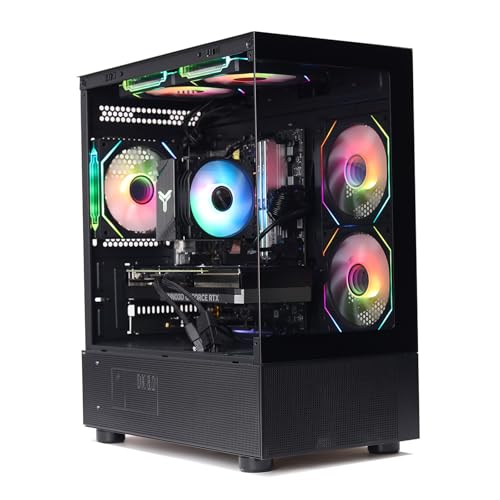
MXZ Core i7 13700F Gaming PC
Best for: Intel-focused multitasking and 1080p gaming
- Graphics Card
- RTX 4060 Ti
- Processor
- Intel Core i7 13700F
- RAM Capacity
- 16GB
- Storage Capacity
- 1T
- Memory Type
- DDR4
- Storage Type
- M.2 SSD
This MXZ tower pairs a 16-core Intel Core i7-13700F processor with an Nvidia GeForce RTX 4060 Ti graphics card. You get 16GB of DDR4 memory, a 1TB NVMe solid-state drive, and a 700W power supply inside a windowed case with preinstalled RGB fans. It suits you if you need strong multi-threaded Intel computing for productivity alongside mid-range gaming.
- Intel Core i7-13700F processor with 16 cores and up to 5.2GHz clock speed
- Nvidia GeForce RTX 4060 Ti graphics card
- 1TB NVMe solid-state drive
- 700W 80-plus power supply
- Configured with DDR4 RAM instead of newer DDR5 memory
- Includes a 1-year parts and labor warranty
- You want 16 Intel processor cores for CPU-heavy applications alongside gaming.
- You require Windows 11 Pro preinstalled on your system.
- You prefer a 700W power supply with headroom for components.
- You prefer a modern platform with DDR5 memory support out of the box.
- You need more than 16GB of preinstalled system memory.
Verdict: MXZ Intel Core i7 RTX 4060 Ti Gaming PC delivers strong 16-core Intel processing and solid mid-range graphics power for players who balance gaming with heavy multitasking. It fits users who prioritize high CPU core counts over DDR5 memory bandwidth.
Specifications side by side
| Spec | MXZ Ryzen 7 7700 RTX 4060Ti Gaming PC | MXZ Core i7 13700F Gaming PC |
|---|---|---|
| Graphics Card | GeForce RTX 4060Ti | GeForce RTX 4060Ti |
| Processor | AMD Ryzen 7 7700 | Intel Core i7 13700F |
| RAM Capacity | 16GB | 16GB |
| Storage Capacity | 1 T | 1T |
| Memory Type | DDR5 | DDR4 |
| Storage Type | NVME M2 SSD | M.2 SSD |
| Operating System | Windows 11 Pro | Windows 11 Pro |
| Memory | 16GB RAM | 16GB RAM |
| Size | Tower | Tower |
| Model | RYZEN 7 | I7 13700F| RTX 4060Ti |
| Color | – | Black or Gray |
Choosing the Best MXZ Gaming Desktop
Target Screen Resolution
Check the graphics card to match your display resolution. Both machines include the RTX 4060 Ti GPU. This graphics card handles 1080p and 1440p gaming scenarios effectively. If you play games primarily on standard high-refresh monitors, this GPU fits your setup. Look at your monitor specifications before deciding. The RTX 4060 Ti provides dedicated graphics processing suited for mid-range visual presets without requiring hardware upgrades immediately out of the box.
Evaluate Processor Core Counts
Examine the central processor specifications for your workload demands. The MXZ Core i7 13700F Gaming PC provides a 16-core Intel processor for intensive multitasking and background software. In contrast, eight-core AMD setups suit pure gaming and everyday computing. If you stream games or run rendering tasks alongside your play, higher core counts provide extra processing headroom. Match the processor model to whether you prioritize raw core quantity or balanced eight-core execution.
Verify System Memory Capacity
Check the total installed RAM to ensure smooth application performance. These prebuilt computers include 16GB RAM as the standard configuration. This capacity accommodates current gaming titles and daily multitasking without immediate memory bottlenecks. If you run multiple web browser tabs, voice chat programs, and background applications while gaming, 16GB serves as a reliable operational baseline. Review your common background software usage to confirm sixteen gigabytes supports your typical active program load.
Check Operating System Edition
Look at the preinstalled operating system to avoid separate software setup. Both configurations come with Windows 11 Pro already installed on the drive. This edition provides professional management features alongside standard gaming support. If you need Pro-tier network configuration or advanced administration settings for work, having Windows 11 Pro preloaded saves installation steps. Ensure your required gaming launchers and daily productivity tools are compatible with this operating system version before choosing your rig.
Plan Tower Chassis Space
Consider the physical dimensions and placement of the desktop computer. Each listed model utilizes a standard Tower size chassis. You need sufficient desk surface or floor space to accommodate a tower case safely. Proper placement ensures steady intake and exhaust ventilation around the computer enclosure during long gaming sessions. Check your desk clearance, surrounding airflow space, and cable routing paths before setting up the tower in your gaming environment.
Frequently asked questions
What operating system comes installed on MXZ RTX 4060 Ti prebuilts?
Both MXZ gaming desktops come with Windows 11 Pro preinstalled. This edition includes business-grade management tools, remote desktop capabilities, and BitLocker device encryption. You will not need to purchase or set up a separate operating system license before your initial setup.
How much RAM do these MXZ gaming desktops include?
Every featured MXZ model includes 16GB of system memory. This capacity handles standard gaming and background voice chat applications without bottlenecking modern titles. However, the Ryzen build supplies newer DDR5 memory, whereas the Intel Core i7 system runs on the DDR4 memory standard.
What chassis form factor do MXZ RTX 4060 Ti systems use?
These systems use standard tower cases. A tower footprint provides sufficient interior volume for airflow across the graphics card and processor. It also leaves clearance for future component swaps, extra storage drives, or standard expansion cards should your computing requirements change down the line.
Which processor options are available in MXZ RTX 4060 Ti prebuilts?
You can select an AMD Ryzen 7 7700 or an Intel Core i7 13700F. The Ryzen 7 processor supplies 8 modern cores on AMD's newer platform. The Intel Core i7 13700F provides 16 hybrid processing cores for users who juggle gaming with production workloads.
What exterior colors are available for MXZ RTX 4060 Ti desktops?
Case colors depend on the configuration you choose. The Core i7 13700F model offers black or gray exterior finishes to match your desk arrangement. The Ryzen 7 option comes configured in a standard tower enclosure designed to fit modern gaming setups.
What monitor resolution works best with an MXZ RTX 4060 Ti PC?
An RTX 4060 Ti prebuilt pairs best with 1080p and 1440p gaming monitors. The graphics card offers ample performance for high refresh rates at 1080p, while maintaining steady frame rates at 1440p in modern games. You will achieve optimal visual balance on those panel types.


