As Amazon Associates, we earn from qualifying purchases. This means we may receive a small commission at no extra cost to you if you click through and make a purchase.
As an Amazon Associate we earn from qualifying purchases. Links on this page are affiliate links.
This asus rog gm700 ryzen 7 vs rog g700 gaming desktop comparison inspects two prebuilt systems with matching core capacities. Both desktops supply 32GB DDR5 memory, 2TB of solid-state storage, and Windows 11 Home. The main difference lies in component architecture. The GM700 runs an AMD Ryzen 7 9800X3D processor alongside AMD Radeon RX 9070 XT graphics, whereas the G700 uses an Intel Core Ultra 9 285K chip and NVIDIA GeForce RTX 5060 Ti.
Processor
AMD Ryzen 7 9800X3D
Intel Core Ultra 9 285K (24 cores, up to 5.70 GHz)
Graphics card
AMD Radeon RX 9070 XT PRIME OC
NVIDIA GeForce RTX 5060 Ti 16GB GDDR7
NPU AI processing
not listed
Intel AI Boost NPU 13 TOPS
Cooling system
not listed
Liquid CPU cooler
Included accessories
not listed
USB RGB keyboard and mouse
Choose the first if
- You prefer an all-AMD platform featuring the Ryzen 7 9800X3D processor paired with Radeon RX 9070 XT graphics.
- You want a system configured with PCIe Gen 4.0 storage and Radeon AV1 encoding capabilities.
Choose the second if
- You require a 24-core Intel Core Ultra 9 285K processor with an integrated 13 TOPS NPU.
- You want NVIDIA platform features including DLSS 4 support and 16GB of GDDR7 video memory.
- You prefer an out-of-the-box package that includes a liquid CPU cooler plus a bundled keyboard and mouse.
Verdict
Choose the GM700 if you want an AMD-focused build with the Ryzen 7 9800X3D and Radeon RX 9070 XT graphics. Pick the G700 if your workload benefits from the 24-core Intel Core Ultra 9 285K processor, dedicated NPU, and GeForce RTX 5060 Ti. Both computers offer identical 32GB DDR5 memory and 2TB high-speed solid-state capacities.
ASUS ROG GM700 vs ROG G700 Comparison
Graphics card
Edge: ASUS ROG GM700 Ryzen 7 RX 9070 XT Gaming PC
The ASUS ROG GM700 features an AMD Radeon RX 9070 XT PRIME OC graphics card with support for enhanced ray tracing and AV1 hardware encoding. This dedicated desktop GPU targets high-resolution gaming and intensive video rendering workflows. In comparison, the ASUS ROG G700 includes an NVIDIA GeForce RTX 5060 Ti with 16GB of GDDR7 memory, DLSS 4 support, and ray tracing capabilities. The RTX 5060 Ti provides three DisplayPort connections and one HDMI port for external monitors. The RX 9070 XT on the GM700 provides upper-tier graphics processing power, giving it an advantage for demanding rasterization and creative GPU rendering tasks.
Processor specifications
Edge: ASUS ROG G700 Core Ultra 9 Gaming PC
The ASUS ROG G700 runs on an Intel Core Ultra 9 285K processor equipped with 24 cores, a base clock of 3.70 GHz, 36MB Smart Cache, and maximum boost speeds up to 5.70 GHz. It also integrates an Intel AI Boost neural processing unit delivering 13 TOPS for local artificial intelligence tasks. The ASUS ROG GM700 uses an AMD Ryzen 7 9800X3D processor designed for heavy workloads, streaming, and gaming. The GM700 specification sheet does not publish clock speeds, cache tiers, or NPU figures. With its detailed 24-core structure, high boost frequency, and dedicated NPU, the G700 takes the edge for compute-heavy multitasking.
Storage capacity
Edge: Tie
Both gaming desktops provide identical total storage space straight out of the box. The ASUS ROG GM700 carries a 2TB PCIe Gen 4.0 solid-state drive, ensuring fast load times for modern game installs, operating system startup, and large media libraries. The ASUS ROG G700 supplies a 2TB PCIe NVMe M.2 solid-state drive designed to handle quick transfers and rapid program launches. Neither specification sheet lists secondary internal drive bays or open M.2 slots. Because both systems deliver 2TB of high-speed PCIe solid-state storage without a capacity difference, this round is an even tie for overall data storage.
System memory
Edge: Tie
Memory capacity is uniform across both systems, as each model ships with 32GB of DDR5 RAM. This 32GB pool provides adequate headroom for background tasks, modern gaming titles, and content production workflows. The ASUS ROG G700 specifies its memory speed at DDR5 5600 MHz, giving you clear technical confirmation of operating frequency. The ASUS ROG GM700 specifies 32GB of DDR5 RAM, but its published data omits the clock frequency and slot configuration. The identical 32GB DDR5 baseline ensures both machines manage complex multitasking easily, resulting in a functional tie across system memory capabilities.
Build and hardware inclusions
Edge: ASUS ROG G700 Core Ultra 9 Gaming PC
The ASUS ROG G700 provides a detailed component build featuring a glass side cover, liquid CPU cooling, Aura Sync RGB lighting, and an included USB RGB keyboard and mouse. It measures 18.9 by 9.4 by 20.1 inches and weighs 40.4 pounds. It also lists Wi-Fi 6, Bluetooth, 2.5Gb Ethernet, and thirteen assorted USB ports. The ASUS ROG GM700 lists chassis dimensions of 20.1 by 18.9 by 9.45 inches in black. Its data does not mention liquid cooling, peripheral bundles, weight, or individual port selections. With its liquid cooler, clear casing, and included accessories, the G700 holds the build advantage.
Choosing Between ASUS ROG Gaming Desktops
Users prioritizing dedicated AI processing and high core counts
Our pick: ASUS ROG G700 Core Ultra 9 Gaming PC
You should choose the G700 if your workload relies on intensive multithreading. It features a 24-core Intel Core Ultra 9 285K processor reaching 5.70 GHz alongside a dedicated 13 TOPS Intel AI Boost NPU. The system also includes a liquid CPU cooler to manage thermal output during demanding workloads.
Gamers wanting an all-AMD processor and GPU platform
Our pick: ASUS ROG GM700 Ryzen 7 RX 9070 XT Gaming PC
You should select the GM700 if you want an AMD configuration. It combines an AMD Ryzen 7 9800X3D processor with an AMD Radeon RX 9070 XT Prime OC card. It delivers 2TB of PCIe Gen 4.0 SSD storage and 32GB DDR5 memory to run modern games and creative workloads without delay.
Users needing extensive accessory connectivity and bundled peripherals
Our pick: ASUS ROG G700 Core Ultra 9 Gaming PC
Choose the G700 if you need maximum peripheral support out of the box. It includes a USB RGB keyboard and mouse, plus a two-year warranty. You also get 2.5Gb Ethernet, eight USB-A 2.0 ports, two USB-A 3.2 Type-C ports, Wi-Fi 6, Bluetooth, and six dedicated audio jacks.

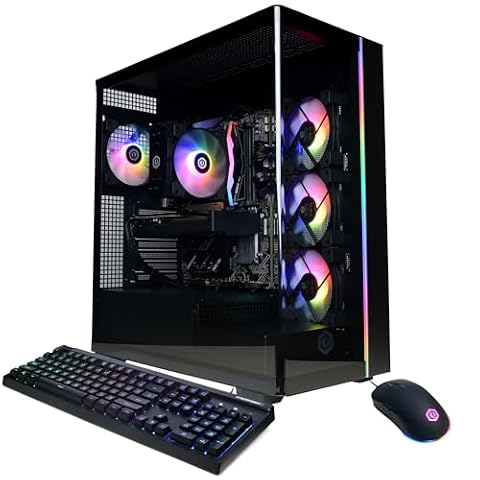
ASUS ROG GM700 Ryzen 7 RX 9070 XT Gaming PC
Best for: all-AMD high-performance PC gaming
- Graphics Card
- AMD Radeon RX 9070 XT Prime OC
- Processor
- AMD Ryzen 7 9800X3D
- RAM Capacity
- 32GB
- Storage Capacity
- 2TB
- Memory Type
- DDR5
- Storage Type
- M.2 NVMe PCIe 4 SSD
The ASUS ROG GM700 pairs an AMD Ryzen 7 9800X3D processor with an AMD Radeon RX 9070 XT Prime OC graphics card. You get 32GB of DDR5 memory alongside a 2TB PCIe 4.0 solid-state drive for games and files. This configuration suits you if you prioritize an all-AMD gaming setup running Windows 11 Home.
- AMD Ryzen 7 9800X3D processor
- AMD Radeon RX 9070 XT Prime OC graphics card
- 32GB DDR5 system memory
- 2TB PCIe 4.0 SSD storage
- Ryzen 7 tier provides fewer processing cores than Core Ultra 9 alternatives
- Large 20.1-inch chassis width requires substantial desk space
- You want an all-AMD build featuring the Ryzen 7 9800X3D and Radeon RX 9070 XT.
- You need 2TB of built-in PCIe 4.0 storage for large game libraries.
- You plan to run gaming and creative software under Windows 11 Home.
- You require the higher thread count of an Intel Core Ultra 9 processor for productivity workloads.
- You have limited workspace that cannot accommodate a 20.1-inch wide computer chassis.
Verdict: ASUS ROG GM700 Ryzen 7 Gaming Desktop delivers dedicated AMD processing and graphics hardware for players wanting 32GB of DDR5 memory and 2TB of fast solid-state storage.
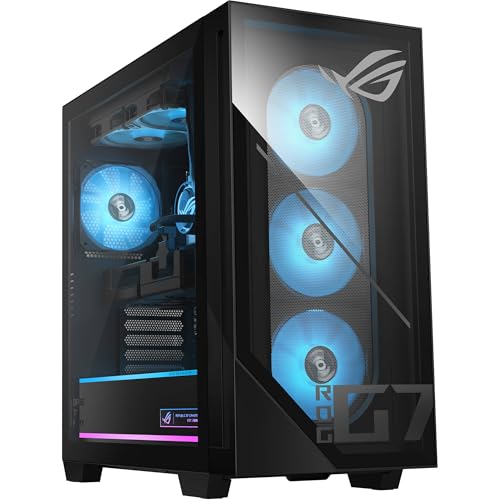
ASUS ROG G700 Core Ultra 9 Gaming PC
Best for: Multi-threaded productivity and 16GB VRAM gaming
- Graphics Card
- NVIDIA GeForce RTX 5060 Ti
- Processor
- Intel Core Ultra 9 285K
- RAM Capacity
- 32GB
- Storage Capacity
- 2TB
- Memory Type
- DDR5
- Storage Type
- PCIe NVMe M.2 SSD
This desktop pairs an Intel Core Ultra 9 285K 24-core processor with an NVIDIA GeForce RTX 5060 Ti 16GB graphics card. You get 32GB of DDR5 memory, a 2TB NVMe solid-state drive, and built-in liquid CPU cooling. It suits you if you need heavy multi-core processing power alongside dedicated gaming hardware in a single build.
- Intel Core Ultra 9 285K processor with 24 cores and 13 TOPS NPU
- NVIDIA GeForce RTX 5060 Ti graphics card with 16GB GDDR7 memory
- 2TB PCIe NVMe M.2 SSD storage and 32GB DDR5 RAM
- Liquid CPU cooling system included
- Heft of 40.4 pounds makes moving the case difficult
- Relies on Wi-Fi 6 rather than newer Wi-Fi 6E or Wi-Fi 7 standards
- Includes eight slower USB-A 2.0 ports
- You need a 24-core CPU for multi-threaded tasks and gaming.
- You want 16GB of video memory for modern graphical workloads.
- You prefer a system with pre-installed liquid CPU cooling.
- You need a lightweight desktop that is easy to move.
- You require native Wi-Fi 6E or Wi-Fi 7 connectivity.
Verdict: ASUS ROG G700 Intel Ultra 9 Desktop delivers extensive 24-core processing power and 16GB of VRAM for creators and gamers running compute-heavy workloads. It gives you expansive storage and liquid cooling without requiring custom internal upgrades.
Specifications side by side
| Spec | ASUS ROG GM700 Ryzen 7 RX 9070 XT Gaming PC | ASUS ROG G700 Core Ultra 9 Gaming PC |
|---|---|---|
| Graphics Card | AMD Radeon RX 9070 XT Prime OC | NVIDIA GeForce RTX 5060 Ti |
| Processor | AMD Ryzen 7 9800X3D | Intel Core Ultra 9 285K |
| RAM Capacity | 32GB | 32GB |
| Storage Capacity | 2TB | 2TB |
| Memory Type | DDR5 | DDR5 |
| Storage Type | M.2 NVMe PCIe 4 SSD | PCIe NVMe M.2 SSD |
| Operating System | Windows 11 Home | Windows 11 Home |
| Memory | 32GB RAM | 32GB RAM |
| Use | Home | Home |
| Dimensions | 9.45 × 20.1 × 18.9 inches | 20.1 × 18.9 × 9.4 inches |
| Weight | – | 40.4 pounds |
| Size | 32GB/2TB | 32GB RAM |
| Color | Black | Black |
| Model | GM700TZ-MS777 | G700 |
Frequently asked questions
Which operating system comes preinstalled on these ASUS desktops?
Both the ASUS ROG GM700 and ROG G700 come with Windows 11 Home installed. This platform supports modern gaming features like DirectX 12 Ultimate and native windowed game optimizations. You can boot either system right out of the box and immediately set up your gaming libraries and daily productivity applications.
What processor architectures do the ASUS ROG GM700 and G700 use?
The ASUS ROG GM700 features an AMD Ryzen 7 processor, while the ASUS ROG G700 uses a 24-core Intel Core Ultra 9 processor. AMD Ryzen chips deliver strong efficiency for dedicated gaming builds. The 24-core Intel configuration provides extensive compute power suited for background multitasking and demanding creative workflows.
How much RAM do you get with these ASUS ROG desktops?
Both desktop models supply 32GB of RAM to handle modern games and demanding software. The ASUS ROG GM700 specifically documents fast DDR5 memory. Having 32GB ensures you have ample headroom to stream games, run background utilities, and keep multiple browser tabs open simultaneously without facing memory bottlenecks.
What are the physical dimensions and weight of the ASUS ROG G700?
The ASUS ROG G700 measures 20.1 inches long, 18.9 inches wide, and 9.4 inches high, weighing 40.4 pounds in a black chassis. You should measure your desk surface before setting it up. Its substantial 40.4-pound weight provides solid stability when resting on a dedicated workstation floor or desk mat.
Which ASUS model is better suited for all-AMD gaming setups?
The ASUS ROG GM700 is specifically configured for all-AMD high-performance gaming. It pairs an AMD Ryzen 7 processor with dedicated AMD Radeon graphics hardware and DDR5 system memory. Choosing this model gives you a unified AMD ecosystem designed to maintain steady frame rates across modern high-resolution desktop gaming titles.
Does the ASUS ROG G700 include liquid cooling out of the box?
Yes, the ASUS ROG G700 includes built-in liquid cooling without requiring custom internal upgrades. Liquid cooling manages heat from the 24-core Intel processor during sustained multi-threaded workloads. This closed-loop thermal solution keeps temperatures stable and operating noise controlled when you push the system through long rendering or gaming sessions.