As Amazon Associates, we earn from qualifying purchases. This means we may receive a small commission at no extra cost to you if you click through and make a purchase.
The ASUS ROG Flow Z13 redefines high-performance portable computing by housing top-tier components inside an ultra-slim 13-inch detachable tablet chassis. Widely recognized among mobile enthusiasts looking up the z flow 13, this versatile hybrid pairs a high-speed display and next-generation processing architecture with a form factor that slips effortlessly into any daypack. The one-line verdict is that this device stands as the most capable and flexible 2-in-1 gaming tablet currently engineered, delivering serious mobile productivity and smooth gaming fidelity without forcing you to carry a bulky clamshell chassis.
This innovative slate directly serves traveling creators, students, and mobile PC gamers who want uncompromised flexibility, tactile typing via a detachable keyboard, and responsive touchscreen control while moving between hotel rooms, cafes, and client offices. Conversely, shoppers searching for a stationary gaming rig with a broad 17-inch screen, traditional desktop upgrade pathways, or a conventional clamshell design should look toward standard gaming laptops instead.


ASUS ROG Flow Z13 at a Glance

| Attribute | Detail |
|---|---|
| Chassis Color | Off Black |
| Screen Size and Type | 13.4-inch ROG Nebula Touchscreen (16:10) |
| Resolution and Speed | 2.5K WQXGA, 180Hz Refresh Rate, 3ms Response Time |
| Color Accuracy | 100% DCI-P3, PANTONE Validated |
| Processor | AMD Ryzen AI MAX+ 395 (16 Cores, up to 50 TOPS NPU) |
| Graphics Hardware | RDNA 3.5 Graphics |
| System Memory | 128GB LPDDR5X 8000MHz Quad-Channel |
| Solid-State Storage | 1TB PCIe Gen 4 SSD |
| Operating System | Windows 11 Pro |
| Wireless and Connectivity | Wi-Fi 7, 2x USB 4.0 Type-C, HDMI 2.1, Micro-SIM Reader |
Next-Gen Gaming and Processing Architecture
At the center of the rog z flow 13 hardware suite is the AMD Ryzen AI MAX+ 395 processor, an all-in-one computing powerhouse engineered to handle intense multitasking, advanced creative software, and modern game titles. Featuring 16 physical cores alongside cutting-edge AMD RDNA 3.5 graphics, this single-chip solution provides massive computational throughput inside an ultra-thin frame. Backing this silicon is an integrated neural processing unit capable of up to 50 TOPS of dedicated NPU power, making the system fully compliant with the latest Copilot+ PC experiences and ROG Intelligent Assistance tools.
The system memory configuration represents another substantial technical milestone for mobile hardware. Equipped with an astonishing 128GB of high-speed LPDDR5X memory running at 8000MHz in a quad-channel layout, the platform dynamically balances resource sharing between the system processor and the integrated graphics engine. This vast pool of ultra-low-latency bandwidth eliminates standard memory bottlenecks, allowing resource-heavy background applications, live streaming utilities, and modern game assets to run simultaneously without stutters.
When assessing overall rog flow z13 gaming performance, the balance of the Ryzen AI core and high-clocked memory architecture delivers consistent frame delivery across popular competitive and open-world PC titles. ASUS also incorporates a complimentary 90-day PC Game Pass subscription right out of the box, granting immediate access to over a hundred titles so buyers can jump directly into their favorite game libraries without having to build a software collection from scratch.
Visual Clarity and Display Responsiveness
High frame rates mean little without a screen fast enough to display them cleanly, and the asus flow z13 display excels on all fronts. Featuring a 13.4-inch ROG Nebula touchscreen with a productivity-friendly 16:10 aspect ratio, this panel provides more vertical workspace than conventional widescreen laptops. The crisp 2.5K WQXGA resolution brings razor-sharp detail to both 3D gaming worlds and high-resolution creative workflows, ensuring crisp typography, sharp textures, and detailed UI elements across Windows 11 Pro.
Fluid motion is guaranteed thanks to the panel’s 180Hz refresh rate and rapid 3ms response time. These quick transit times dramatically cut down on ghosting, blur, and visual tearing, giving fast-paced action games and esports titles the crisp clarity competitive players require. Whether you are tracking moving targets in a multiplayer shooter or quickly flicking through dense timeline assets in a video suite, the responsiveness of the glass matches the speed of your inputs.
Creative professionals will also appreciate the rigorous color fidelity of this panel. Covering 100% of the cinema-grade DCI-P3 color gamut, the screen reproduces vibrant, lifelike shades with rich saturation. Additionally, the display is PANTONE Validated, ensuring that the colors you view on screen align accurately with standardized physical swatches for design, illustration, and photography projects.
Vapor Chamber Cooling and Thermal Engineering
Cramming high-wattage computing hardware into a 13-inch slate naturally raises thermal management concerns, but the rog flow z13 cooling vapor chamber layout tackles the challenge head-on. Unlike standard laptops that rely solely on conventional copper heat pipes, the Flow Z13 utilizes an expansive, lightweight stainless steel vapor chamber. This wide-surface chamber spreads heat rapidly across the interior of the slate, utilizing internal phase changes to pull thermal energy away from the processor quickly and evenly.
Thermal transfer is elevated further by the application of liquid metal thermal compound on the CPU. Liquid metal transfers heat far more efficiently than standard silicone thermal paste, reducing hot spots and allowing the processor to maintain higher sustained clock speeds without thermal throttling. Because the core computing hardware is positioned entirely behind the kickstand screen rather than underneath a keyboard deck, your palms never sit on top of hot internal hardware during prolonged sessions.
Quiet operation is another noticeable benefit of this stainless steel vapor chamber architecture. Builders who manage thermal exhaust in compact desktop enclosures like the lian li mini v2 know how critical structural airflow paths are to maintaining stability under full load. The ROG Flow Z13 applies similar structural cooling principles to a portable slate, ensuring whisper-quiet acoustic levels during routine browsing and office workflows while keeping the high-output fans composed during demanding rendering and gaming workloads.
Versatility, Battery Life, and Travel Convenience
Where this machine truly stands apart from the broader market is its ability to seamlessly transform. The flow z13 kickstand tablet chassis features an integrated hinge capable of opening up to 170 degrees. This broad range lets you prop the slate upright for desk gaming, tilt it back into a low drafting angle for stylus sketching, or remove the magnetic keyboard completely to hold the device as a lightweight media tablet. The included detachable cover provides a backlit chiclet keyboard with a responsive typing feel and a generously sized touchpad for comfortable point-and-click navigation.
Power management is engineered to handle busy workdays away from wall outlets, with rog flow z13 battery life rated for up to 10 hours on a single charge. Combined with its slim tablet profile, the rog flow z13 for travel stands out as an exceptional carry-on companion that fits effortlessly onto cramped airplane tray tables where standard laptops struggle to open properly. Videographers balancing gear like the insta360 flow 2 pro will appreciate having such a compact, color-accurate editing tablet packed alongside their handheld camera accessories.
Physical and wireless connectivity are equally ready for modern setups. The chassis includes two high-bandwidth USB 4.0 Type-C ports, an HDMI 2.1 video output, and a dedicated Micro-SIM card reader for on-the-go data connectivity when Wi-Fi is unavailable. For local network connections, next-generation Wi-Fi 7 provides blazing-fast transfer speeds and lower latency when paired with compatible wireless routers. A dedicated ROG physical key gives you instant one-touch access to system telemetry, fan curves, and device controls.
ASUS ROG Flow Z13 Pros and Cons
Pros
- Massive 128GB LPDDR5X 8000MHz quad-channel memory
- Fast 180Hz 3ms 2.5K ROG Nebula touchscreen
- Liquid metal and stainless steel vapor chamber cooling
- Versatile 170-degree kickstand with detachable keyboard
- Modern Wi-Fi 7 and dual USB 4.0 Type-C connectivity
- Includes 3-month PC Game Pass subscription
Cons
- Compact 13.4-inch screen may feel small for desktop purists
- Integrated memory architecture cannot be manually upgraded
Check ASUS ROG Flow Z13 on Amazon
Who Should Buy the ASUS ROG Flow Z13
Buy It If
- You need an ultra-compact flow z13 2 in 1 gaming slate with a detachable keyboard for mobile travel.
- You run memory-intensive workloads that benefit from 128GB of high-speed LPDDR5X quad-channel RAM.
- You demand a fast, color-accurate 2.5K 180Hz touchscreen with 100% DCI-P3 coverage for editing and gaming.
- You want cutting-edge connectivity options like Wi-Fi 7, dual USB 4.0 Type-C, and a Micro-SIM card slot.
Skip It If
- You prefer a stationary battle station with a standard 16-inch or 17-inch clamshell display.
- You want a system with modular, user-swappable DDR5 memory slots rather than integrated memory.
- You do all your computing at a fixed desk and have no practical use for a kickstand or detachable tablet.
ASUS ROG Flow Z13 Alternatives Worth a Look
While the Flow Z13 occupies a distinct niche in the ultraportable 2-in-1 market, several alternative laptops offer different screen sizes, hardware combinations, and physical designs depending on your individual gaming and budget preferences.
Acer Nitro V 16S AI
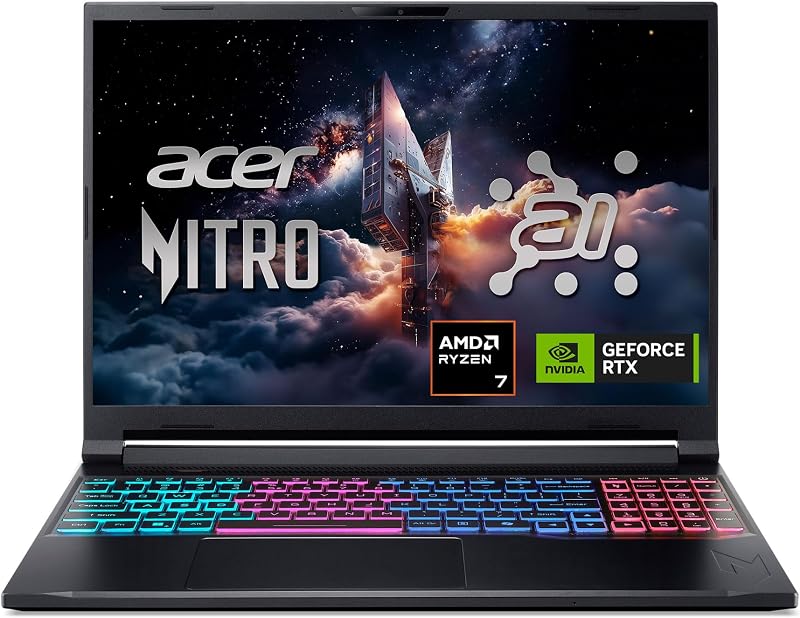
The Acer Nitro V 16S AI is built around a larger 16-inch WUXGA 180Hz IPS display, an AMD Ryzen 7 260 processor, and a dedicated NVIDIA GeForce RTX 5060 Laptop GPU backed by 32GB of DDR5 memory and a 1TB Gen 4 SSD. Shoppers who prioritize a traditional clamshell gaming layout with a dedicated NVIDIA GPU and a significantly larger screen footprint over tablet portability will prefer this machine.
MSI Cyborg 17

For gamers seeking maximum screen real estate, the msi Cyborg 17 17.3″ FHD features a broad 17.3-inch 144Hz FHD display, an Intel Core 9-270H processor, and an NVIDIA GeForce RTX 5060 graphics card. It also includes 16GB of DDR5 memory and a dual-drive setup totaling 2TB of storage via a 1TB SSD combined with a 1TB docking station set, making it a compelling alternative for gamers who want a semi-permanent desk setup.
KAIGERR Gaming Laptop

The KAIGERR Gaming Laptop offers a budget-focused, entry-level configuration equipped with an AMD Ryzen 7430U processor running up to 4.3GHz, 16GB of DDR4 RAM, and a 512GB SSD behind a 1920P FHD display. It represents a straightforward, basic laptop option for casual computing, everyday web tasks, and light gaming where cutting-edge 2-in-1 performance is not required.
Final Verdict
When asking whether the investment is rog flow z13 worth it, the answer depends entirely on how much value you place on elite mobile versatility. Traditional gaming notebooks often force you into heavy chassis with loud cooling profiles and modest battery endurance. By combining a 16-core AMD Ryzen AI MAX+ processor, 128GB of quad-channel 8000MHz RAM, and an efficient liquid-metal vapor chamber into a 13-inch tablet frame, this machine delivers genuine gaming capabilities wherever you happen to set up.
While conventional desktop builders managing thermal performance in high-airflow cases like the nzxt h5 flow 2024 might view ultra-thin gaming chassis with skepticism, the comprehensive asus rog flow z13 specs demonstrate that mobile engineering has reached an impressive level of maturity. For creators, mobile professionals, and frequent flyers seeking maximum computing density, the Flow Z13 stands as a uniquely capable hybrid workstation.
FAQ
Can the ASUS ROG Flow Z13 function as a standalone tablet?
Yes, the ROG Flow Z13 features a fully detachable backlit chiclet keyboard that unclips magnetically from the display. When the keyboard is removed, the device acts as a standalone Windows 11 Pro tablet with full 10-point multi-touch navigation and a flexible built-in kickstand that adjusts up to 170 degrees.
How does the vapor chamber cooling keep the Flow Z13 quiet?
The Flow Z13 uses a wide-surface stainless steel vapor chamber paired with liquid metal thermal compound on the CPU. Liquid metal transfers heat away from processing silicon much faster than standard paste, while the internal phase change of the vapor chamber spreads thermal energy across the slate for rapid dissipation, keeping fan noise down during routine and gaming tasks.
What makes the ROG Flow Z13 display suitable for competitive gaming?
The 13.4-inch ROG Nebula screen combines a high 180Hz refresh rate with an ultra-fast 3ms response time. This pairing minimizes motion blur and input lag during high-speed action scenes, ensuring that fast camera turns and rapidly moving targets remain sharp and easy to track.
What is the battery life expectancy of the Flow Z13 during daily use?
The listing outlines battery endurance of up to 10 hours, giving users enough stamina to manage everyday productivity tasks, web browsing, and content playback between charging sessions without staying anchored to a wall outlet.
Does the ASUS ROG Flow Z13 come with any included games?
Yes, the package includes a 3-month PC Game Pass subscription, providing immediate access to a rotating catalog of over 100 high-quality PC games that you can download and play straight out of the box.