As Amazon Associates, we earn from qualifying purchases. This means we may receive a small commission at no extra cost to you if you click through and make a purchase.
The ASUS ROG Bezel-Free Kit is a specialized optical accessory engineered to physically conceal the vertical seams between multiple adjacent displays. Designed specifically for three-screen arrays, this multi monitor bezel eliminator uses tailored optical micro-structures to refract screen light across display frames, producing the visual sensation of a single wraparound panel. For dedicated flight and racing enthusiasts seeking an unbroken field of view across flat panels under 27 inches, this hardware kit delivers a surprisingly effective passive optical solution without requiring software scaling or rendering overhead.
This optical system is built specifically for desktop PC gamers with matched triple-display cockpits who want uninterrupted peripheral vision during high-speed simulation. If you already own compatible 24- to 27-inch monitors and can position them at exact angles on sturdy monitor arms, the kit offers a substantial boost to visual continuity. However, desk users running curved displays, single ultra-wide monitors, mixed display models, or panels larger than 27 inches should look elsewhere, as the mounting clips and optical lenses cannot function on mismatched or oversized chassis.



ASUS ROG Bezel-Free Kit at a Glance

| Attribute | Detail |
|---|---|
| Model Number | ABF01 |
| Recommended Monitor Sizes | 24 to 27 inches |
| Display Surface Compatibility | Flat monitors under 27 inches |
| Bezel Style Requirement | Four-sided frameless or slim-bezel design |
| Supported Layout | Triple monitor setup (Set of 2 lenses) |
| Recommended Monitor Angle | 120 to 130 degrees |
| Optical Material | Optical micro-structures (PET / acrylic) |
| Aspect Ratio Support | 16:9 |
| Included In The Box | Four clips, two lenses, one angle measurement tool |
| Warranty | 1 Year Warranty with ARR |
Optical Micro-Structures and Visual Seamlessness
The core technology behind the ASUS ROG Bezel-Free Kit ABF01 relies on passive optical refraction rather than active digital processing. Each vertical lens contains proprietary asus optical micro-structures that capture the light emanating from the edge pixels of adjacent screens and bend it inward toward the viewer. By redirecting the screen imagery over the dead zone created by the plastic borders of both monitors, the kit visually erases the black borders that typically split a three-screen landscape. Because it is an entirely optical system, it introduces zero input lag, requires no external power cables, and operates independently of your operating system, graphics card drivers, or display refresh rates.
In terms of visual performance, the lenses blend the edges by stretching the boundary pixels across the seam. While the listing notes compatibility with fast displays operating up to a 240 refresh rate and pairing alongside systems running FreeSync adaptive sync, the lenses themselves impose no electronic constraints on picture transmission. When seated directly in the center viewing position, the optical strips make cockpit instruments, horizon lines, and tarmac textures appear continuous from the left peripheral monitor all the way to the right. The physical image does experience slight distortion and a minor drop in brightness directly over the optical seam, which is an inherent physical property of optical light bending, but the visual trade-off is often preferable to a thick black bezel slicing through an apex turn.
Building a seamless multi-display workstation often starts from the foundation up. When planning an enthusiast desk arrangement driven by desktop motherboards like the asus tuf gaming b650e-plus wifi, verifying the alignment and physical footprint of three full-sized monitors is vital before factoring in optical accessories. The ABF01 kit performs best under controlled ambient lighting conditions, as direct overhead glare or strong window reflections striking the optical lenses can cause internal light dispersion, momentarily highlighting the seam rather than hiding it.
Monitor Compatibility and Physical Constraints
Strict physical compatibility is the single most critical factor when considering this accessory. According to official asus bezel free kit specs, the ABF01 is engineered exclusively for flat monitors under 27 inches featuring a four-sided frameless or slim-bezel design. The optical lenses have fixed physical dimensions designed around standard 16:9 aspect ratio panels. Curved displays are explicitly incompatible because the straight acrylic lenses cannot flex to match panel curvature, and attempting to mount them on curved bezels creates gaps that ruin the optical refraction angle.
ASUS provides a clear list of recommended 24- to 27-inch monitors verified to work seamlessly with the included clips. Officially listed models include the VG245H, VG245HE, VG248QG, VG258Q, VG258QR, VG259Q, VG259QM, VG278Q, VG278QR, VG279Q, VG279QM, VG27AQ, and VG27BQ, as well as the MG248QR, PG248Q, PG258Q, PG278QR, PG279Q, PG279QZ, and PG27AQ. Using identical monitor models across all three positions is paramount. If monitor heights, bezel profiles, or screen thicknesses vary by even a few millimeters, the mounting clips cannot hold the optical lens flush against both display surfaces, causing visible refraction breaks along the seam.
Shoppers often ask about asus bezel free kit compatibility with third-party displays from other manufacturers. While the kit features a universal design intended for slim-bezel flat panels under 27 inches, success on non-ASUS screens depends entirely on whether the monitor frame has flat, uniform borders without protruding bottom chin bezels, control joysticks, or uneven casing steps. If your desk setup relies on mobile machines such as the asus tuf 16 running out to mismatched external displays, achieving the required flush alignment across monitors will be exceedingly difficult.
Mounting Mechanics and the Assembly Process
Executing a successful asus bezel free kit setup requires mechanical patience and precise physical alignment. In the box, the product contains four clips, two optical lenses, and one dedicated angle measurement tool. The set of two lenses is tailored specifically to cover the two seams found in a classic triple-monitor configuration. Each lens is suspended by two quick-release clips—one snapping onto the top seam and the other securing the bottom—which clasp the adjacent monitor edges and hold the lens at a precise focal distance from the panel surface.
The critical element of the installation is achieving an angle between 120 and 130 degrees between the center monitor and each side wing. ASUS internally tested this specific angular range to maximize the immersive wraparound effect while ensuring the optical micro-structures refract light directly toward the driver seat. The included angle measurement tool clips directly between the panels, allowing you to manually verify that both side displays are turned inward to the exact required geometry before locking your monitor arms into place. If your monitor stand does not allow independent tilt, swivel, and height adjustments, matching the panels to this tight tolerance can be challenging.
The quick release clip mechanism is engineered to accommodate slight variations in bezel profile, but fine-tuning requires hands-on micro-adjustments. You must eliminate vertical steps where the two panels touch; even a two-millimeter height mismatch will prevent the lens from seating flat, leading to light leakage and blurry optical stretching. Unlike setting up an all-in-one performance powerhouse like the asus scar 18 where display geometry is fixed, this triple monitor bezel free kit turns your desk into a physical alignment puzzle that demands rock-solid mounting arms.
Gaming Immersion in Sim Racing and Flight Simulations
The primary arena where this optical setup shines is in high-end simulation rigs. Enthusiasts frequently seek out the asus bezel free kit for sim racing because the physical borders between three monitors typically disrupt the natural tracking of apexes, competitors alongside the vehicle doors, and rear-view mirrors. When negotiating tight chicanes in iRacing, Assetto Corsa, or rFactor, having the center windshield visually extend directly into the driver-side and passenger-side glass without black vertical bars dramatically enhances situational awareness and speed perception.
Flight simulation pilots enjoy a similar benefit. In titles like Microsoft Flight Simulator or X-Plane, standard multi-monitor bezels break up horizon lines and cockpit instrumentation clusters. With the ABF01 lenses bridging the gaps, panoramic scenery shifts naturally across the visual field as you bank and yaw. The peripheral motion cues become much more intuitive because your brain no longer processes three disjointed pictures separated by physical borders, but rather a single, contiguous, wraparound digital window.
Beyond simulation, first-person shooters and flight-action games also benefit from the broadened peripheral vision. In competitive fast-paced titles, keeping an eye on motion in the far edges of your periphery without bezel distraction helps with target acquisition. However, players must remember that because the lenses compress and bend pixels right at the seam, interface elements such as mini-maps, chat windows, or health meters placed directly across the monitor borders will experience optical distortion and can be difficult to read.
ASUS ROG Bezel-Free Kit Pros and Cons
Pros
- Eliminates vertical seams between triple displays
- Zero input lag with passive optical refraction
- Works across FreeSync and 240Hz monitors
- Quick-release clips allow straightforward attachment
- Includes dedicated angle measurement tool
- One-year warranty with ARR coverage
Cons
- Incompatible with curved monitors
- Limited strictly to flat screens under 27 inches
- Minor image distortion along the optical seam
Check ASUS ROG Bezel-Free Kit on Amazon
Who Should Buy the ASUS ROG Bezel-Free Kit
Buy It If
- You already own or plan to purchase three identical flat 24- to 27-inch slim-bezel monitors.
- You primarily play sim racing, flight simulators, or cockpit-based games where peripheral vision matters.
- You have high-grade monitor arms capable of locking displays firmly between 120 and 130 degrees.
- You want a hardware-level multi monitor bezel eliminator that adds zero software lag or rendering overhead.
Skip It If
- You use curved monitors, ultra-wide screens, or panels larger than 27 inches.
- Your monitors have thick frames, bottom chin bezels, or uneven casing steps that block the mounting clips.
- You frequently use your triple-screen array for spreadsheet work or reading fine text across screen seams.
ASUS ROG Bezel-Free Kit Alternatives Worth a Look
When searching for monitor accessories to organize or optimize a multi-screen workspace, several alternative products populate peripheral categories. While these options do not offer optical seam elimination for triple-display gaming, they serve specific utility needs around the display bezel.
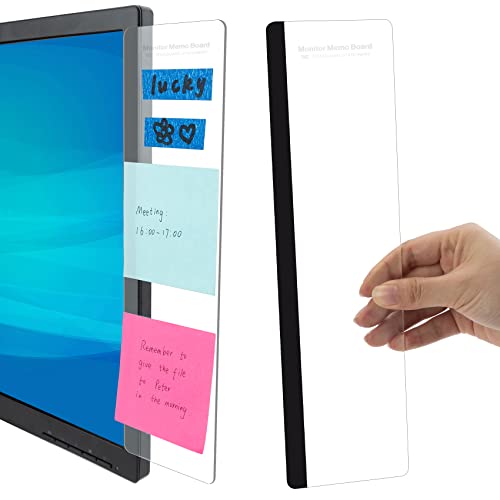
Computer Monitor Memo Board Computer

The Computer Monitor Memo Board Computer is a two-piece office organization accessory designed to hold sticky notes and reminder tabs directly along the side edges of a computer screen. Rather than concealing monitor bezels for gaming, this product utilizes the bezel space as a functional memo board for office supplies and daily productivity reminders.
Shoppers looking to repurpose their outer monitor borders for organizational tasks rather than gaming immersion will prefer this utilitarian accessory over an optical gaming kit.
Joyberg 3PCS Monitor Memo Board

The Joyberg 3PCS Monitor Memo Board is a three-piece memo board set intended to attach sticky note holders to monitor frames. With three separate panels included, it provides side-mounted note space across multiple office displays.
This item suits administrative desk workers who need physical organizational surfaces on multi-screen workstations rather than visual continuity across racing simulation displays.
Monitor Side Panel

The Monitor Side Panel features a two-piece set of transparent acrylic note holders measuring 11 inches by 3.1 inches that fit PC monitors and laptops. Manufactured by DOLLAR BOSS, these clear boards attach to screen borders to keep messages and sticky pads neatly aligned.
Choose this transparent side panel set if your goal is maintaining a tidy desktop message board on individual monitors rather than optically merging screens for simulation gaming.
Final Verdict
Addressing the core question of is asus bezel free kit worth it comes down entirely to your display hardware and simulation ambitions. The ASUS ROG Bezel-Free Kit ABF01 is a niche, purpose-built product that accomplishes a difficult task: physically eliminating the harsh black seams separating triple monitors without introducing software latency or requiring external power. When deployed across three matching flat panels under 27 inches angled properly between 120 and 130 degrees, it creates a genuinely cohesive visual panorama that transforms cockpit immersion in sim racing and flight simulation.
However, the kit demands rigorous adherence to its compatibility parameters. If you run displays larger than 27 inches, use curved monitors, or lack the mounting hardware to hold displays completely flush, the kit simply will not work as intended. For sim racers and flight sim pilots with the right triple-monitor configuration who are willing to spend the setup time dialing in the physical alignment, this asus bezel free kit review concludes that the ABF01 remains one of the most effective hardware modifications available for wraparound display setups.
FAQ
How does the ASUS ROG Bezel-Free Kit eliminate display borders?
The kit contains optical micro-structures that refract light emanating from the edges of adjacent screens, bending the light inward across the plastic bezels. This optical bending stretches the image slightly over the gap, giving the illusion of a continuous wraparound panel without any electronic signal processing.
Which monitor sizes are compatible with the ABF01 kit?
The kit is officially recommended for 24- to 27-inch flat monitors featuring a four-sided frameless or slim-bezel design. Specific supported ASUS models include displays such as the VG245H, VG248QG, VG258QR, VG278Q, VG279QM, VG27AQ, PG258Q, and PG279Q. It is not compatible with curved panels or screens larger than 27 inches.
Can the ASUS ROG Bezel-Free Kit be used on curved monitors?
No, the listing specifies that the kit is designed for flat monitors under 27 inches. Because the optical lenses are rigid straight panels, they cannot conform to the curvature of curved displays, which prevents the clips from seating properly and disrupts optical refraction.
What angle must monitors be placed at when using this kit?
The ROG Bezel-Free Kit is designed for a triple monitor setup placed at an angle between 120 and 130 degrees. ASUS includes a dedicated angle measurement tool in the box to help users adjust and lock in this exact angular positioning during setup.
What components are included in the retail box?
The retail package includes four quick-release mounting clips, two optical lenses to cover both vertical seams in a three-monitor layout, and one angle measurement tool for checking display alignment.
Does the Bezel-Free Kit cause any distortion or dimming?
Because the optical micro-structures physically bend and magnify light across the dead zone of the bezels, there is minor pixel stretching and a slight reduction in brightness directly along the seam area. This optical effect is normal and is far less distracting during high-speed motion than a solid black plastic bezel.